Visualstudio: Auto-including repositories cloned outside the GitHub extension UI
I clone repos from GitHub on a weekly or daily basis by typing git clone <paste> (or even typing the full URL when that's faster) from the PowerShell console. They end up under the Local Git Repositories section in Team Explorer's Connect pane.
Much later when I want to use GitHub extension features, I find that not only was my Git repo with GitHub remotes _not_ automatically included in the GitHub section of the Connect pane, there's also no easy way to get it there. This means I have to:
- rename the folder the existing clone is in
- do a new clone using GitHub extension UI (I still prefer the CLI for this)
- drop to the CLI and add the local path to the original repo as a remote
- check out the unpushed branches I'm working on
- remove the remote to the original repo
- delete the original repo and hope I didn't miss saving anything, like the git stash contents
Perhaps I'm just overlooking an existing feature. Wouldn't the ideal outcome be that any Git repository that shows up under Local Git Repositories should automatically be included in the GitHub section so long as it has at least one remote with a correct GitHub URL?
The extension looks good, and I want to start using it more fully. Thanks for considering! 😃
Extension version 2.5.2.2566, VS version 15.7.3
 jnm2
jnm2
All 8 comments
Hey Joseph,
Thanks for getting in touch. That's strange - if the repository is appearing under Local Git Repositories in Team Explorer and it has an origin of github.com then we should be picking it up - the list of repositories in the GitHub section is literally the Local Git Repositories filtered to include only GitHub repositories.
Are you using a default remote other than origin?
 grokys
on 11 Jun 2018
grokys
on 11 Jun 2018
@jnm2,
I clone repos from GitHub on a weekly or daily basis by typing git clone
(or even typing the full URL when that's faster) from the PowerShell console. They end up under the Local Git Repositories section in Team Explorer's Connect pane.
Are you sure they automatically end up under the Local Git Repositories section when you do a git clone from the command line?
For me they only appear there when I use the Clone command (under Local Git Repositories) or when I load a solution with a GitHub remote.
Below you can see there are repositories in folders GhostAssemblies and GhostAssemblies2. I cloned GhostAssemblies using the command line and GhostAssemblies2 using the clone command. Only the repository with the folder name GhostAssemblies2 has appeared in the two lists.
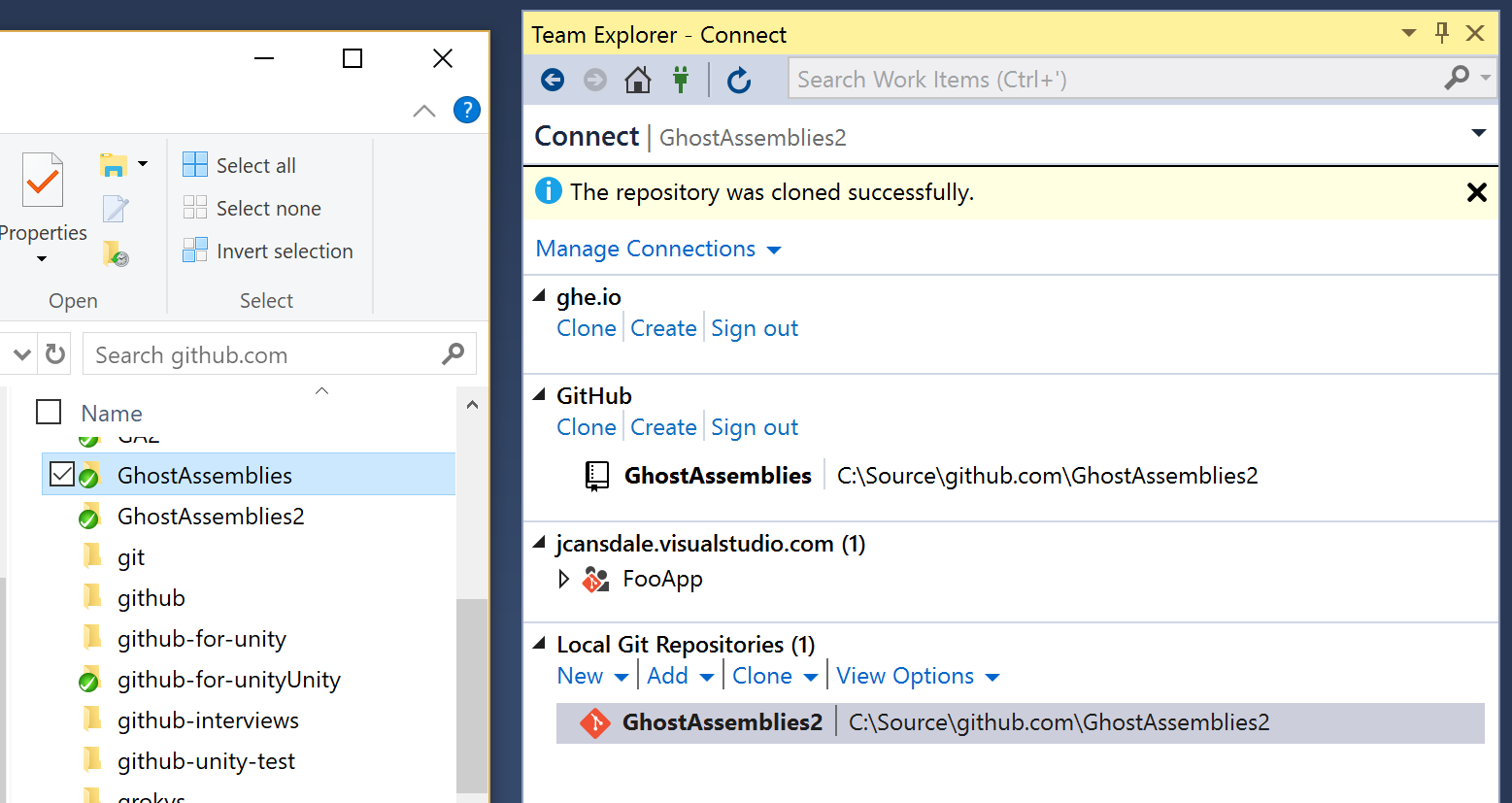
Could you double check that this is behaving differently for you?
You should be able to add it to the list simply by opening the solution. If this isn't working, it's a bug.
You can add all repositories in a folder using the Add command (or you can add a single repository).
I've never completely understood this interface and have only just discovered what I've written above. 😉 Only the GitHub section is controlled by us.
 jcansdale
on 12 Jun 2018
jcansdale
on 12 Jun 2018
@grokys @jcansdale I greatly appreciate you looking into this! I've just tried cloning a new repo and opening the solution and the repo does appear. This doesn't match my specific memories of opening the NUnit and Roslyn solutions. I could not get the GitHub menu to show up when right-clicking source code over the course of months. When I tried to figure out why, I remember the repo missing from the GitHub section. I'm thinking it was either some kind of user error or maybe even an enhancement or fix.
Now here's something that still does affect me: with all the NUnit repositories, I often use the remote names nunit and jnm2 rather than the traditional upstream and origin. This is mostly because I'd forget whether or not I had cloned a fork and added upstream for the nunit org.
I also delete all local branches right after cloning except for the topic branch I want to work on. This means that my .git\config only has:
[remote "nunit"]
url = https://github.com/nunit/nunit
fetch = +refs/heads/*:refs/remotes/nunit/*
[remote "jnm2"]
url = https://github.com/jnm2/nunit
fetch = +refs/heads/*:refs/remotes/jnm2/*
Do you think the GitHub extension could detect that there is at least one remote to github.com? Maybe as a fallback if there is no origin remote?
jnm2
on 12 Jun 2018
I've just tried cloning a new repo and opening the solution and the repo does appear.
Oh, so this is different to what I'm seeing? 😕 I wonder what's different on your setup?
Now here's something that still does affect me: with all the NUnit repositories, I often use the remote names nunit and jnm2 rather than the traditional upstream and origin. This is mostly because I'd forget whether or not I had cloned a fork and added upstream for the nunit org.
Ah, this would probably prevent the GitHub menu from showing up as well. Coincidentally this same issue was reported a few days ago https://github.com/github/VisualStudio/issues/1709#issuecomment-395815771. I'm hoping to tackle it very soon!
Do you think the GitHub extension could detect that there is at least one remote to github.com? Maybe as a fallback if there is no origin remote?
Yes, I was thinking of falling back to use the remote that's tracking the checked out branch. Do you think that would work for your scenario?
I guess the question would be which remote to use if the current branch isn't tracking anything. Tricky!
jcansdale
on 12 Jun 2018
@jcansdale
Oh, so this is different to what I'm seeing?
Didn't say it well. I think it's the same as what you're seeing: opening a solution with a GitHub origin causes the repo to appear in both Connect lists.
Awesome! I'll follow https://github.com/github/VisualStudio/issues/1709 and close this one.
That would work most of the time. To be honest, I often don't have any tracking branches when first opening a new clone, so I would appreciate a further fallback. What's the worst thing that would happen if the extension lit up for any repository that had any remote starting with https://github.com/?
jnm2
on 12 Jun 2018
To be honest, I often don't have any tracking branches when first opening a new clone, so I would appreciate a further fallback.
Yup, I was coming to that realization as well.
What's the worst thing that would happen if the extension lit up for any repository that had any remote starting with https://github.com/?
It would become the default repository for listing and creating PRs. The user experience would be better if it's able to choose the appropriate default.
I've just done some experimenting and it appears that the order of the remotes doesn't change when a remote is renamed or added.
Here is my config file after cloning, adding a remote foo, renaming origin to bar and lastly renaming bar to zzz. The order never changed and the original origin (now called zzz) is still at the top of the list!
[remote "zzz"]
    url = https://github.com/jcansdale/DogfoodVsix
    fetch = +refs/heads/*:refs/remotes/zzz/*
[branch "master"]
    remote = zzz
    merge = refs/heads/master
[remote "foo"]
    url = https://github.com/foo/DogfoodVsix
    fetch = +refs/heads/*:refs/remotes/foo/*
It looks like we could use origin if available and if not default to the first remote in the list. Unless the user has edited the config file by hand, the first remote will will be from the original clone. 🎉
jcansdale
on 12 Jun 2018
I like it!
Should I actually rename this one, or is the non-origin remote enhancement already tracked by https://github.com/github/VisualStudio/issues/1709?
jnm2
on 12 Jun 2018
@jnm2, I'm going to add an issue to track specifically this. With any luck I'll have a fix for you to try within the next 24 hours. 🤞
jcansdale
on 13 Jun 2018
Related issues
 Lupusa87
·
7Comments
jcansdale
·
4Comments
grokys
·
6Comments
Lupusa87
·
7Comments
jcansdale
·
4Comments
grokys
·
6Comments
 jharris1993
·
5Comments
jharris1993
·
5Comments
 diryboy
·
9Comments
diryboy
·
9Comments
Most helpful comment
Yup, I was coming to that realization as well.
It would become the default repository for listing and creating PRs. The user experience would be better if it's able to choose the appropriate default.
I've just done some experimenting and it appears that the order of the remotes doesn't change when a remote is renamed or added.
Here is my
configfile after cloning, adding a remotefoo, renamingorigintobarand lastly renamingbartozzz. The order never changed and the originalorigin(now calledzzz) is still at the top of the list!It looks like we could use
originif available and if not default to the first remote in the list. Unless the user has edited theconfigfile by hand, the first remote will will be from the original clone. 🎉