Viro: How to dynamically know which image target found ?
Environment
Please provide the following information about your environment:
- Development OS: Mac
Android Note 9 -- OS 8.1 - Version: ViroReact 2.12.0 and React Native 0.56.0
Description
When I register multiple ViroARImageMarker using loop, it recognize all the images but only trigger the last one on onAnchorFound.
here is how I'm doing.
this._onAnchorFoundForVideoTarget = this._onAnchorFoundForVideoTarget.bind(this);
  ViroARTrackingTargets.createTargets({
    videoTarget_0 : {
      source :  { uri: videosData[0].ImageUrl } ,
      orientation : "Up",
      physicalWidth : 5 // real world width in meters
    },
    videoTarget_1 : {
      source :  { uri: videosData[1].ImageUrl } ,
      orientation : "Up",
      physicalWidth : 5 // real world width in meters
    },
    videoTarget_2 : {
      source :  { uri: videosData[2].ImageUrl } ,
      orientation : "Up",
      physicalWidth : 5 // real world width in meters
    },
  });
let views = [];
  let i = 0;
   console.log('_loadAllVideoMarkers',apiVideosData)
  if(apiVideosData){
    for (i = 0; i < apiVideosData.length; i++){

      views.push((
        <ViroARImageMarker
          key={`videoTarget_${i}`}
          target={`videoTarget_${i}`}
          onAnchorFound={(e) =>  this._onAnchorFoundForVideoTarget(e, i)}
          pauseUpdates={this.state.pauseUpdates}>
        </ViroARImageMarker>
      ));
    }
  }
 faisal3413
All 6 comments
I found the system returns the different anchorId upon match for different markers, but I cannot use that information to map with my registered targets.

faisal3413
on 14 Mar 2019
I reviewed code and found that onAnchorFound is a callback function, so it will trigger only when it find any match, and above case is justified as value of i becomes 3 so it triggers last index +1 element always.
My Question, is there any way to dynamically know which anchor found ?
faisal3413
on 17 Mar 2019
From https://docs.viromedia.com/docs/viroarimagemarker it looks like onAnchorFound already provides you the anchor that was found and from it the id of the anchor. Thus you should already be able to dynamically know which anchor is found?
 dthian
on 18 Mar 2019
dthian
on 18 Mar 2019
Hi @dthian ,
Thanks for your answer. Yes, onAnchorFound returns an object containing anchorId, but I cannot use it to found which image triggered? So, for now I added extra 'target' parameter in _onAnchorFound in ViroARImageMarker.js class like below.
If you add the found target name in response of the onAnchorFound callback it will be really helpful.
Thanks
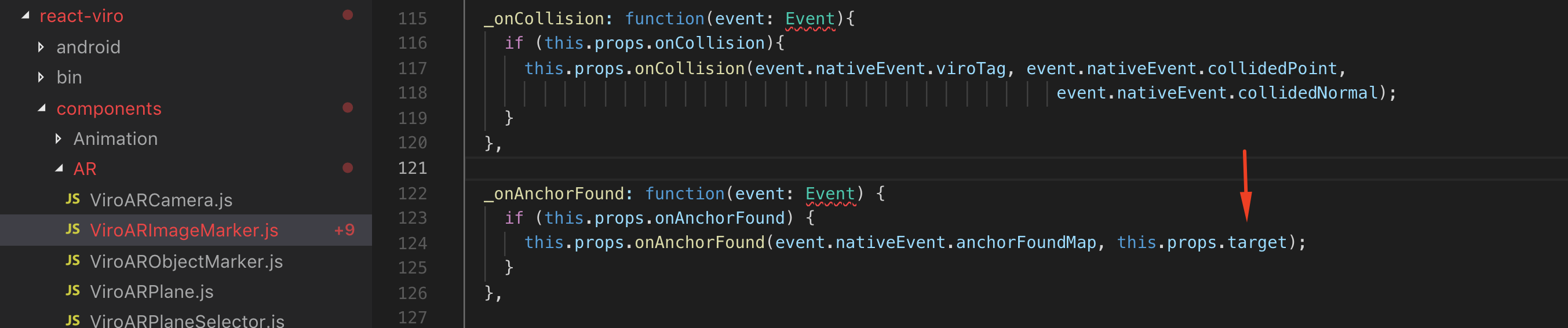
Now I can use it like
  <ViroARImageMarker
          key={`videoTarget_${i}`}
          target={this.videoTargetImages[i]}
          onAnchorFound={ (e, targetName) => this._onAnchorFoundForVideoTarget(e,targetName)}
          pauseUpdates={this.state.pauseUpdates}>

          // rest of code

  </ViroARImageMarker>
@faisal3413 Excellent solution for this problem. Are you planning to make PR for this feature ? This is definitely a great feature to have.
 ranjanpoudel1234
on 20 May 2019
ranjanpoudel1234
on 20 May 2019
@faisal3413 thanks sir
 farid12445
on 10 May 2020
farid12445
on 10 May 2020
Related issues
 yabeow
·
4Comments
yabeow
·
4Comments
 ascorbic
·
4Comments
ascorbic
·
4Comments
 u-can-miracle
·
3Comments
u-can-miracle
·
3Comments
 starantino
·
6Comments
starantino
·
6Comments
 eliaskh
·
5Comments
eliaskh
·
5Comments
Most helpful comment
Hi @dthian ,
Thanks for your answer. Yes, onAnchorFound returns an object containing anchorId, but I cannot use it to found which image triggered? So, for now I added extra 'target' parameter in _onAnchorFound in ViroARImageMarker.js class like below.
If you add the found target name in response of the onAnchorFound callback it will be really helpful.
Thanks
Now I can use it like