I have done all the conversions and put all files in the correct path, i just get nothing with the vrx format--the obj seems to work, but I cant get a vrx to work except for the one included with the demo. Is there a specific fbx version I should save as or something I am missing? Is it a scale issue? OBJ is exported from the same file--scale seems fine. OS 10.13.2, Most current version of Viro
      <ViroARScene onTrackingInitialized={this._onInitialized} >
        <ViroText text={this.state.text} scale={[.5, .5, .5]} position={[0, 0, -1]} style={styles.helloWorldTextStyle} />
        <ViroAmbientLight color={"#aaaaaa"} />
        <ViroSpotLight
        innerAngle={5}
        outerAngle={90}
        direction={[0,-1,-.2]}
        position={[0,3,1]}
        color="#ffffff"
        castsShadow={true} />
        <Viro3DObject
          source={require('./res/inventLogo/inventLogo3.vrx')}
          resources={[require('./res/inventLogo/baked_beauty_polySurfaceShape1.png'),
                      require('./res/inventLogo/baked_tpAmbient_polySurfaceShape1.png'),
                      require('./res/inventLogo/baked_tpIndirectIllumination_polySurfaceShape1.png')]}
          position={[0, 0, -2]}
          scale={[1, 1, 1]}
          type="VRX"
        />
      </ViroARScene>
 starantino
All 6 comments
Brought fbx into blender then scaled it up and it then worked, seems to be something with scaling from maya. Looks like I will have to play around with settings more.
starantino
on 29 Jan 2018
@starantino glad you were able to get it to work. Here is a guide/tutorial our 3D artist made detailing his process 3D modeling -> https://blog.viromedia.com/https-blog-viromedia-com-asset-pipeline-optimizing-3d-models-ar-vr-arkit-arcore-d0fb61627aaf
 dam00n
on 29 Jan 2018
dam00n
on 29 Jan 2018
Perfect thank you!
On Jan 29, 2018 4:25 PM, "Danny Moon" notifications@github.com wrote:
@starantino https://github.com/starantino glad you were able to get it
to work. Here is a guide/tutorial our 3D artist made detailing his process
3D modeling -> https://blog.viromedia.com/https-blog-viromedia-com-
asset-pipeline-optimizing-3d-models-ar-vr-arkit-arcore-d0fb61627aaf—
You are receiving this because you were mentioned.
Reply to this email directly, view it on GitHub
https://github.com/viromedia/viro/issues/157#issuecomment-361391534, or mute
the thread
https://github.com/notifications/unsubscribe-auth/AM3UWKm3XFjXBY3cfgWnpNFUJL1v9izNks5tPjc1gaJpZM4RxU0D
.
starantino
on 29 Jan 2018
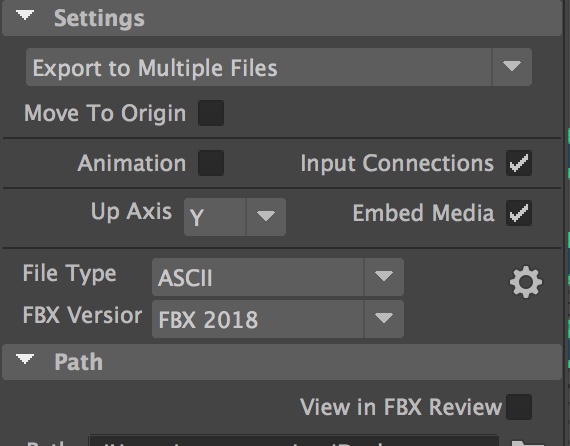
One note as well as to why I couldn't get a FBX to export properly in MayaLT for use in conversion to VRX--File Type needs to be set to ASCII to work properly otherwise it wont convert properly. You will be able to tell it doesn't convent properly from FBX to VRX if the file size of the VRX is something like 24 bytes, it should read something like 350kb.
starantino
on 30 Jan 2018
May be something worth noting in Docs, it took me a while to figure this out.
starantino
on 30 Jan 2018
Thanks for the heads up @starantino. Will look it this and update documentation as needed.
dam00n
on 30 Jan 2018
Related issues
 yabeow
·
4Comments
yabeow
·
4Comments
 peacemind
·
5Comments
peacemind
·
5Comments
 ascorbic
·
4Comments
ascorbic
·
4Comments
 funkyfourier
·
3Comments
funkyfourier
·
3Comments
 Thomas101
·
3Comments
Thomas101
·
3Comments
Most helpful comment
Thanks for the heads up @starantino. Will look it this and update documentation as needed.