Environment
Please provide the following information about your environment:
- Development OS: Mac
- Device OS & Version: iOS 12
- Version: ViroReact version 2.11.0 and React Native version 0.55.1
- Device(s): iPhone X
Description
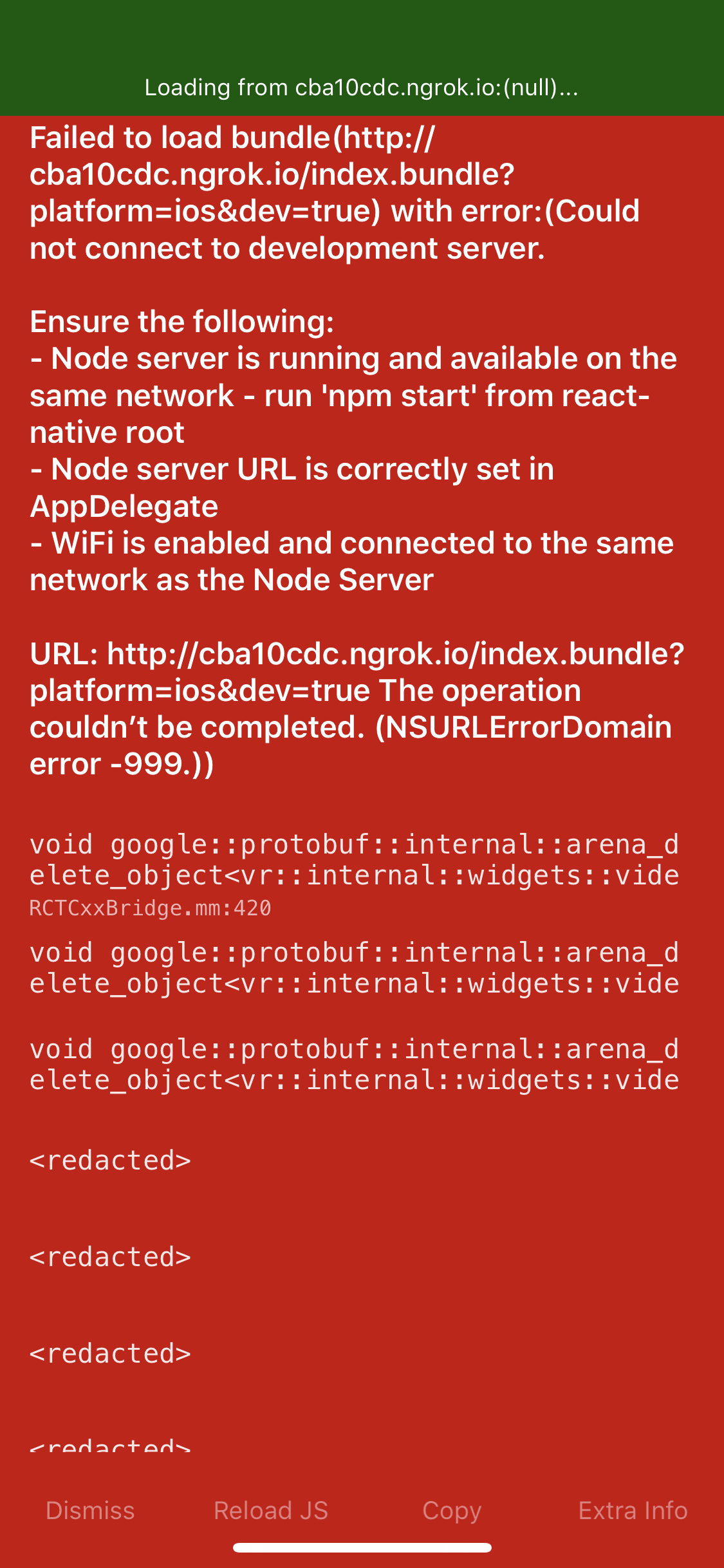
I have a simple demo for rendering a 3d object in an AR scene that i've made an issue about here earlier. When I was working at the office on this, I was able to use the testbed app just fine. I'm at home now, with my phone and macbook pro on the same wifi network. I've ensured the ngrok URL i'm entering has no typos. I know this demo works because the code has been unchanged since it was last running it at the office. Now that I'm home I try to run npm run start and enter my ngrok URL into the testbed app on my iphone X and constantly get this Failed to load bundle error and I cannot navigate around this. I tried sideloading it on my iphone with xcode but get a compilation error about a missing config.h file.
Stack trace:
Loading dependency graph, done.
 BUNDLE  [ios, dev] ./index.js ░░░░░░░░░░░░░░░░ 0.0% (0/263)
<--- Last few GCs --->

[76392:0x102801600]    25771 ms: Mark-sweep 888.6 (1012.9) -> 888.5 (962.4) MB, 111.0 / 0.0 ms  (average mu = 0.892, current mu = 0.000) last resort GC in old space requested
[76392:0x102801600]    25877 ms: Mark-sweep 888.5 (962.4) -> 888.5 (948.4) MB, 106.4 / 0.0 ms  (average mu = 0.803, current mu = 0.000) last resort GC in old space requested


<--- JS stacktrace --->

==== JS stack trace =========================================

    0: ExitFrame [pc: 0x2a542dd041bd]
Security context: 0x384d56e1e589 <JSObject>
    1: _send [0x384dab25cab9] [internal/child_process.js:715] [bytecode=0x384dab26b879 offset=606](this=0x384d33e8a1f1 <ChildProcess map = 0x384da906be49>,message=0x384dedfcb9c9 <JSArray[4]>,handle=0x384d9f2822e1 <undefined>,options=0x384dedfcba51 <Object map = 0x384d22391c99>,callback=0x384d9f2822e1 <undefined>)
    2: send [0x384dab25ca79] [internal/child_...

FATAL ERROR: CALL_AND_RETRY_LAST Allocation failed - JavaScript heap out of memory
 1: node::Abort() [/Users/stephentetreault/.nvm/versions/node/v10.4.0/bin/node]
 2: node::OnFatalError(char const*, char const*) [/Users/stephentetreault/.nvm/versions/node/v10.4.0/bin/node]
 3: v8::internal::V8::FatalProcessOutOfMemory(v8::internal::Isolate*, char const*, bool) [/Users/stephentetreault/.nvm/versions/node/v10.4.0/bin/node]
 4: v8::internal::Heap::FatalProcessOutOfMemory(char const*) [/Users/stephentetreault/.nvm/versions/node/v10.4.0/bin/node]
 5: v8::internal::Heap::AllocateRawWithRetry(int, v8::internal::AllocationSpace, v8::internal::AllocationAlignment) [/Users/stephentetreault/.nvm/versions/node/v10.4.0/bin/node]
 6: v8::internal::Factory::NewRawTwoByteString(int, v8::internal::PretenureFlag) [/Users/stephentetreault/.nvm/versions/node/v10.4.0/bin/node]
 7: v8::internal::String::SlowFlatten(v8::internal::Handle<v8::internal::ConsString>, v8::internal::PretenureFlag) [/Users/stephentetreault/.nvm/versions/node/v10.4.0/bin/node]
 8: v8::String::Utf8Length() const [/Users/stephentetreault/.nvm/versions/node/v10.4.0/bin/node]
 9: node::StringBytes::Size(v8::Isolate*, v8::Local<v8::Value>, node::encoding) [/Users/stephentetreault/.nvm/versions/node/v10.4.0/bin/node]
10: int node::StreamBase::WriteString<(node::encoding)1>(v8::FunctionCallbackInfo<v8::Value> const&) [/Users/stephentetreault/.nvm/versions/node/v10.4.0/bin/node]
11: void node::StreamBase::JSMethod<node::LibuvStreamWrap, &(int node::StreamBase::WriteString<(node::encoding)1>(v8::FunctionCallbackInfo<v8::Value> const&))>(v8::FunctionCallbackInfo<v8::Value> const&) [/Users/stephentetreault/.nvm/versions/node/v10.4.0/bin/node]
12: v8::internal::FunctionCallbackArguments::Call(v8::internal::CallHandlerInfo*) [/Users/stephentetreault/.nvm/versions/node/v10.4.0/bin/node]
13: v8::internal::MaybeHandle<v8::internal::Object> v8::internal::(anonymous namespace)::HandleApiCallHelper<false>(v8::internal::Isolate*, v8::internal::Handle<v8::internal::HeapObject>, v8::internal::Handle<v8::internal::HeapObject>, v8::internal::Handle<v8::internal::FunctionTemplateInfo>, v8::internal::Handle<v8::internal::Object>, v8::internal::BuiltinArguments) [/Users/stephentetreault/.nvm/versions/node/v10.4.0/bin/node]
14: v8::internal::Builtin_Impl_HandleApiCall(v8::internal::BuiltinArguments, v8::internal::Isolate*) [/Users/stephentetreault/.nvm/versions/node/v10.4.0/bin/node]
15: 0x2a542dd041bd
16: 0x2a542dd13429
17: 0x2a542dd13429
18: 0x2a542dd0c223
Abort trap: 6
Screenshot of error:
Reproducible Demo
This doesn't appear to happen consistently, since all of today it was fine but now with unchanged code I cannot get the testbed app up and running. This would be my personal repo to refer to.
 tetreault
All 15 comments
I can confirm that I've tried this out with multiple AR scenes in the reproducible demo I've posted above. Those scenes were the simple basic hello world text scene, and one of a particle emitter demo I had working great. Now, for whatever reason, I cannot get anything to load in the testbed app. The only thing that has changed is my location (home now, not at the office), but previously I've had no issues messing with the particle emitter or hello world demos at home. And again, I'm on the same wifi network for PC & mobile.
tetreault
on 6 Nov 2018
I also make sure to check ps in the terminal and run kill #### where #### represents the PID of ngrok after the crash.
tetreault
on 6 Nov 2018
Hey @tetreault,
This looks like an issue with the React Native packager server running outta heap space. (see this issue: https://github.com/facebook/react-native/issues/12686).
Can you try running the packager server like this:
node --max_old_space_size=8000 $(which npm) start
Thanks,
 achuvm
on 7 Nov 2018
achuvm
on 7 Nov 2018
unfortunately that didnt' change anything @achuvm it just crashed again when i tried :(
tetreault
on 7 Nov 2018
Hi @tetreault,
Is your machine out of RAM space? Have you tried restarting your computer?
Does this happen when you create a brand new react-viro project too? Are you loading very large assets?
The error:
FATAL ERROR: CALL_AND_RETRY_LAST Allocation failed - JavaScript heap out of memory points to your computer or the node process being out of memory.
Thanks,
achuvm
on 7 Nov 2018
Thanks again for the response @achuvm . I've tried restarting my computer, reinstalling the viro media app, randomly trying out npm --max-workers start and node --max_old_space_size=8000 $(which npm) start. I have barely nothing else open except for VSCode, the terminal, an email client, and chrome with a few tabs. My laptop's not overwhelmingly powerful but its a 2016 MBP running MacOS Mojave with 8gb RAM.
Really at a loss at why i can't get this running again. I was messing around with Viro a little bit from Friday to today and this specific issue has only been occurring since maybe around 2pm today.
tetreault
on 7 Nov 2018
That's way curious, well something else you can check are your node and npm version, here are the versions I have that work:
~$ node -v
v11.1.0
~$ npm -v
6.4.1
I'm on npm 6.4.1 but running node 10.4.0. I'll update node to 11.1 later and give it a shot and will follow up back here tomorrow with other troubleshooting I try. thanks for your time @achuvm !
tetreault
on 7 Nov 2018
Hey, this might help:
Your package.json file should look similar to this:
{
  "name": "ViroSample",
  "version": "0.0.1",
  "private": true,
  "scripts": {
    "prestart": "./node_modules/react-viro/bin/run_ngrok.sh",
    "start": "node node_modules/react-native/local-cli/cli.js start",
    "test": "jest"
  },
  ...
}
You should update the start script to use that command we used earlier, so:
"start": "node --max_old_space_size=8000 node_modules/react-native/local-cli/cli.js start",
When we did the node --max_old_space_size=8000 $(which npm) start command, it was a good idea, but I forgot that the npm start script simply executes this other command using a normal node process without the increased heap size.
Once you replace that line, simply run npm start from your command line again.
Thanks,
achuvm
on 7 Nov 2018
thx @achuvm i actually tried making a new viro project from the CLI for the hell of it and oddly enough it starts ngrok and runs the 3d text hello world demo just fine...
This means it has to be something going on with the prior project I previously linked to in the above thread. The odd thing is when I was trying out some advice on the 3d model it did indeed load via npm start, just not when I got back home an hour or so later (despite all the troubleshooting we tried above).
I can continue on just updating this fresh project I created from the CLI. Of course I'm concerned I'm going to face the same issue as described above once I start messing with the VRX or OBJ file, even though I've reduced the texture file sizes so they shouldn't be huge anymore.
For tonight though, this is at least a starting point so I can follow up if I run into this issue again tomorrow.
tetreault
on 7 Nov 2018
yup as i thought, adding back in the Viro3DObject with the assets for it caused the exact same crash as documented above, so its definitely something with what I'm doing. @dam00n helped in this thread and was able to load this exact model though.
adding the line in for the start script you suggested prevents the heap error, but lets the viro app load the demo up to 100%. At 100% the app freezes on the white screen with the green progress bar at the top and becomes unresponsive on the iphone.
tetreault
on 7 Nov 2018
After a lot of trial and error I finally got the app to build onto my phone with xcode but then metro bundler crashes like I documented last night:
<--- JS stacktrace --->

==== JS stack trace =========================================

    0: ExitFrame [pc: 0x226d57a841bd]
Security context: 0x2f3fa351e589 <JSObject>
    1: _send [0x2f3f6d20cb79] [internal/child_process.js:715] [bytecode=0x2f3fb099b7a1 offset=606](this=0x2f3f35626259 <ChildProcess map = 0x2f3fd5608299>,message=0x2f3fe40d4039 <JSArray[4]>,handle=0x2f3fa08822e1 <undefined>,options=0x2f3fcff48da9 <Object map = 0x2f3fd5608871>,callback=0x2f3fa08822e1 <undefined>)
    2: send [0x2f3f6d20dcf1] [internal/child_...

FATAL ERROR: CALL_AND_RETRY_LAST Allocation failed - JavaScript heap out of memory
 1: node::Abort() [/Users/stephentetreault/.nvm/versions/node/v10.4.0/bin/node]
 2: node::OnFatalError(char const*, char const*) [/Users/stephentetreault/.nvm/versions/node/v10.4.0/bin/node]
 3: v8::internal::V8::FatalProcessOutOfMemory(v8::internal::Isolate*, char const*, bool) [/Users/stephentetreault/.nvm/versions/node/v10.4.0/bin/node]
 4: v8::internal::Heap::FatalProcessOutOfMemory(char const*) [/Users/stephentetreault/.nvm/versions/node/v10.4.0/bin/node]
 5: v8::internal::Heap::AllocateRawWithRetry(int, v8::internal::AllocationSpace, v8::internal::AllocationAlignment) [/Users/stephentetreault/.nvm/versions/node/v10.4.0/bin/node]
 6: v8::internal::Factory::NewRawTwoByteString(int, v8::internal::PretenureFlag) [/Users/stephentetreault/.nvm/versions/node/v10.4.0/bin/node]
 7: v8::internal::String::SlowFlatten(v8::internal::Handle<v8::internal::ConsString>, v8::internal::PretenureFlag) [/Users/stephentetreault/.nvm/versions/node/v10.4.0/bin/node]
 8: v8::String::Utf8Length() const [/Users/stephentetreault/.nvm/versions/node/v10.4.0/bin/node]
 9: node::StringBytes::Size(v8::Isolate*, v8::Local<v8::Value>, node::encoding) [/Users/stephentetreault/.nvm/versions/node/v10.4.0/bin/node]
10: int node::StreamBase::WriteString<(node::encoding)1>(v8::FunctionCallbackInfo<v8::Value> const&) [/Users/stephentetreault/.nvm/versions/node/v10.4.0/bin/node]
11: void node::StreamBase::JSMethod<node::LibuvStreamWrap, &(int node::StreamBase::WriteString<(node::encoding)1>(v8::FunctionCallbackInfo<v8::Value> const&))>(v8::FunctionCallbackInfo<v8::Value> const&) [/Users/stephentetreault/.nvm/versions/node/v10.4.0/bin/node]
12: v8::internal::FunctionCallbackArguments::Call(v8::internal::CallHandlerInfo*) [/Users/stephentetreault/.nvm/versions/node/v10.4.0/bin/node]
13: v8::internal::MaybeHandle<v8::internal::Object> v8::internal::(anonymous namespace)::HandleApiCallHelper<false>(v8::internal::Isolate*, v8::internal::Handle<v8::internal::HeapObject>, v8::internal::Handle<v8::internal::HeapObject>, v8::internal::Handle<v8::internal::FunctionTemplateInfo>, v8::internal::Handle<v8::internal::Object>, v8::internal::BuiltinArguments) [/Users/stephentetreault/.nvm/versions/node/v10.4.0/bin/node]
14: v8::internal::Builtin_Impl_HandleApiCall(v8::internal::BuiltinArguments, v8::internal::Isolate*) [/Users/stephentetreault/.nvm/versions/node/v10.4.0/bin/node]
15: 0x226d57a841bd
16: 0x226d57a93429
17: 0x226d57a93429
18: 0x226d57a8c223
/Users/stephentetreault/git/tetreault/react-native-arkit-demo/Viro3dModelDemo/node_modules/react-native/scripts/packager.sh: line 11: 59297 Abort trap: 6           node "./local-cli/cli.js" start "$@"
Process terminated. Press <enter> to close the window
losing this @achuvm thanks so much for your help, but I definitely found out the issue. On the 3d object I was working with, the original texture PNGs were MASSIVE (like 60+mb). I cloned those files and resized the PNGs to be < 1mb however I screwed up somewhere and left one reference in to the 60mb PNG file. So Viro/RN was trying to load this massive PNG and of course the asset was going to choke things, which kept causing the crash...
Thanks again for your efforts at helping resolve this and sorry for such a stupid mistake!
tetreault
on 7 Nov 2018
Glad you figured out the issue!
Let us know if you run into anything else
achuvm
on 7 Nov 2018
When we start a localtunnel client after Reboot by mistake - Launching the client again and requesting the same subdomain sometimes results in the user being assigned a random URL. I am using port ---
lt --port 9000 --subdomain mysubdomain. Is there any solution for it and how to set user name and password for it...? please reply Thanks in advance..!
 pcl392578
on 10 Dec 2019
pcl392578
on 10 Dec 2019
Related issues
 u-can-miracle
·
3Comments
u-can-miracle
·
3Comments
 slycoder
·
4Comments
slycoder
·
4Comments
 Thomas101
·
3Comments
Thomas101
·
3Comments
 starantino
·
6Comments
starantino
·
6Comments
 jonlaing
·
6Comments
jonlaing
·
6Comments
Most helpful comment
losing this @achuvm thanks so much for your help, but I definitely found out the issue. On the 3d object I was working with, the original texture PNGs were MASSIVE (like 60+mb). I cloned those files and resized the PNGs to be < 1mb however I screwed up somewhere and left one reference in to the 60mb PNG file. So Viro/RN was trying to load this massive PNG and of course the asset was going to choke things, which kept causing the crash...
Thanks again for your efforts at helping resolve this and sorry for such a stupid mistake!