Vim-airline: Missing spaces in tabline
environment
- vim: 8.0 patches 1-1401
- vim-airline: current master (9a2ed35ff9f7d38dc7e37b6ddefa2ca4eb02139e)
- OS: Debian testing
- Have you reproduced with a minimal vimrc: yes (see issue text)
- What is your airline configuration: ???
if you are using terminal: - terminal: xfce4-terminal with tmux
- $TERM variable: tmux-256color
- color configuration (:set t_Co?): no
if you are using Neovim: - does it happen in Vim: ???
Since commits ab49a1c7aea5e775e27e087f8beb71fdf68e5764 and 02816a3cb691e13ebbf46a38613979ac4df499d2 I have noticed missing white space in the tabline. With this minimal vimrc
set nocompatible
set runtimepath+=~/.vim/dein/repos/github.com/Shougo/dein.vim
if dein#load_state(expand('~/.vim/dein'))
  call dein#begin(expand('~/.vim/dein'))
  call dein#add('Shougo/dein.vim')
  call dein#add('vim-airline/vim-airline')
  call dein#end()
  call dein#save_state()
endif

let g:airline#extensions#tabline#enabled = 1

filetype plugin indent on
syntax enable
set background=dark
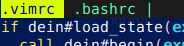
I get the following tabline with a missing space at the beginning of the first buffer name:
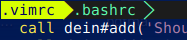
If powerline symbols are activated addtionally with
let g:airline_powerline_fonts = 1
each buffer name has a missing white space:
 IngoMeyer441
All 31 comments
I have been trying to get rid of the double whitespaces in front of the buffer names in the tabline.
I get the following tabline with a missing space at the beginning of the first buffer name:
That is okay. There is a single whitespace before .bashrc
The second one doesn't have a space in front of the name. But I would see this as acceptable.
You can check the tabline using :echo eval(&tabline[2:]) for what is being printed (to either the statusline or the tabline).
 chrisbra
on 9 Jan 2018
chrisbra
on 9 Jan 2018

Ah ok, I never realized that there is a double space without powerline fonts since I always use a patched powerline font. Is it perhaps a better solution to only remove the space if powerline fonts are deactivated?
IngoMeyer441
on 10 Jan 2018
Is it perhaps a better solution to only remove the space if powerline fonts are deactivated?
I can add that check as well.
chrisbra
on 15 Jan 2018
I think these changes also now cause an issue with the filenames jumping about when you traverse buffers

a temporary workaround appears to be;
let g:airline#extensions#tabline#left_sep = "\ue0b0 "
let g:airline#extensions#tabline#left_alt_sep = "\ue0b1"
 kirjavascript
on 17 Jan 2018
kirjavascript
on 17 Jan 2018
and with let g:airline#extensions#tabline#alt_sep = 1 i get
a>b c instead of <a>b c
and with let g:airline#extensions#tabline#left_alt_sep = '' i get
a>b c instead of a>bc
 plexigras
on 18 Jan 2018
plexigras
on 18 Jan 2018
Before update:


After update:
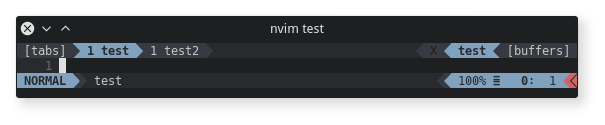
This looks ok, but not with single file:

NORMAL, [tabs] and [buffers] are look normally
 andreyorst
on 18 Jan 2018
andreyorst
on 18 Jan 2018
Hello @IngoHeimbach and others who have reported this issue — thanks for doing so as I have noticed the same problem. Also, many thanks to @chrisbra for developing this pluging as I use it very regularly in Neovim and Vim. I wanted to chime in and note that I am seeing exactly the same issue that @andreyorst shared in the screenshots. The spacing in NVIM v0.2.3-dev looks correct for multiple files but does not look correct (i.e., tight spacing on the left) for a single file.
The only data point that I can add to the discussion is that the file that I open first _never_ has enough spacing on the left regardless of how many buffers I open. Finally, it may be usesful to point out that I am using this plugin with the Devicons plugin and a patched font. Also, I took the advice of @kirjavascript and adding the following lines to my Neovim configuration file:
let g:airline#extensions#tabline#left_sep = " "
let g:airline#extensions#tabline#left_alt_sep = " "
Please note that I do not use the triangles in my Airline and thus only needed the spaces. Okay, I hope that this helps! Of course, please let me know if you need more details to resolve this matter. Again, thanks to everyone involved in the development and improvement of this plugin.
 gkapfham
on 31 Jan 2018
gkapfham
on 31 Jan 2018
The spacing correct for multiple files but does not look correct for a single file.
@gkapfham I must admit, that thiss issue is only about buffers. Tabs works fine. Though when you open a new tab, top line switches to display tabs instead of buffers on tle left side. If you working with single tab, top line shows buffers. And no matter how many buffers are in top line, the spacing is whong.
Buffers:

Tabs:

P.S.: can someone explain me what this 1 at the begining of the tab name mean ( 1 blah2>)? I can't get it since I started to use this plugin. Because in original tabs there is no such thing as I remember.
andreyorst
on 31 Jan 2018
@andreyorst the number means how many windows (i.e. panes) that tab contains
 tcbbd
on 31 Jan 2018
tcbbd
on 31 Jan 2018
change this line
let space= (pgroup == group ? s:spc : '')
to
if get(g:, 'airline_powerline_fonts', 0)
  let space = s:spc
else
  let space= (pgroup == group ? s:spc : '')
endif
will make it look better.
tcbbd
on 31 Jan 2018
@tcbbd This seems to work quite well with powerline font, with no difference without powerline font. Seems fit for a PR to me.
 algmyr
on 31 Jan 2018
algmyr
on 31 Jan 2018
Not really. That change would yes add an initial space in front of the first buffer name, but somehow, also in front of the second one.
Before the change:

After the change:

 slabua
on 31 Jan 2018
slabua
on 31 Jan 2018
@slabua not sure how you got this extra space.

Maybe it is related to Devicons plugin?
andreyorst
on 31 Jan 2018
@andreyorst in this previous picture of yours, before the change,

an initial space is missing before the first buffer and also before the second buffer,
whilst in my red picture, the only missing space is at the very beginning.
Was yours a picture from latest master or some previous commit?
EDIT:
I realised I had set
let g:airline#extensions#tabline#left_sep = "\ue0b0"
let g:airline#extensions#tabline#left_alt_sep = "\ue0b1"
Will test again and report below.
slabua
on 31 Jan 2018
Was yours a picture from latest master or some previous commit
Screenshot represents solution from https://github.com/vim-airline/vim-airline/issues/1631#issuecomment-361888819 and I also removed workaround from https://github.com/vim-airline/vim-airline/issues/1631#issuecomment-358250219
andreyorst
on 31 Jan 2018
@andreyorst yup I had forgotten to remove that workaround.
I can confirm that the change works fine for powerline fonts enabled.
slabua
on 31 Jan 2018
Just setup a new machine, this drove me crazy because I thought there was problem with my powerline fonts.
Thanks for the fix
Since no one has submitted a pull request, I went ahead and made one.
 erfanio
on 9 Feb 2018
erfanio
on 9 Feb 2018
Hello @IngoHeimbach and @erfanio! First, thanks for raising this issue as I was also experiencing this problem on a regular basis. Second, thanks to @erfanio for developing the fix and @chrisbra for merging it. Finally, I am writing to confirm that I am no longer seeing the problem that was initially reported — the fix is working correctly for me. Thanks everyone!
gkapfham
on 19 Feb 2018
I'm still seeing this issue, with the default settings with tabline=1 and the minimalist theme. I'm running the latest master as well:

Also furthermore what's the meaning of left_sep/right_sep/left_alt_sep/right_alt_sep? I want to highlight the current buffer with something like buf1 <currentbuffer> buf2, but I can't figure out how they work.
 shuhaowu
on 14 Mar 2018
shuhaowu
on 14 Mar 2018
@shuhaowu Can also confirm the issue still exists. Checked buffers.vim in autoload/airline/extensions/tabline and saw that @erfanio's PR is there, which indicates that vim-airline is already up-to-date. However, first buffer's name is still missing a leading whitespace. All tabline-related configs are pretty much default:
let g:airline_powerline_fonts = 0
let g:airline#extensions#tabline#enabled = 1
let g:airline#extensions#tabline#tab_min_count = 2
let g:airline#extensions#tabline#buffer_min_count = 2
@chrisbra Should the issue be re-opened?
 ghost
on 13 Apr 2018
ghost
on 13 Apr 2018
What I have seen is that with powerline fonts enabled, there is a single space before each buffer, whilst with powerline fonts disabled, there is no space before the first buffer and a single space before each subsequent buffer.
Not sure this is the expected behaviour, but this is what I am reproducing.
slabua
on 13 Apr 2018
IIRC this is expected behaviour.
chrisbra
on 13 Apr 2018
What a pity... Now I can't unsee it & my OCD is tingling like crazy...
If someone else has a fix for this then it would be awesome.
ghost
on 13 Apr 2018
What a pity... Now I can't unsee it & my OCD is tingling like crazy...
I don't understand what you are talking about. What exactly is the problem?
chrisbra
on 13 Apr 2018
Lack of leading space I presume.
algmyr
on 14 Apr 2018
@chrisbra It's what @slabua described before.
ghost
on 14 Apr 2018
@khoacao96 in other words you'd like to also have a leading space in front of the first buffer when not using powerline fonts?
slabua
on 14 Apr 2018
@slabua Yes, exactly. I mean, when not using powerline fonts, there's a space in front of all the buffer names, except for the first buffer. Why not make it consistent?
ghost
on 14 Apr 2018
I'll have a look.
chrisbra
on 14 Apr 2018
I think this should be fixed now with the last commit
chrisbra
on 15 Apr 2018
@chrisbra Can confirm the issue is fixed. Thank you!
ghost
on 15 Apr 2018
Related issues
 rjshrjndrn
·
28Comments
rjshrjndrn
·
28Comments
 ypxu
·
29Comments
ypxu
·
29Comments
 jaredcobb
·
36Comments
jaredcobb
·
36Comments
 sekoenig-de
·
19Comments
sekoenig-de
·
19Comments
 svanharmelen
·
22Comments
svanharmelen
·
22Comments
Most helpful comment
change this line
to
will make it look better.