Vim-airline: Issues with FocusGained logic changes from PR #2053
environment
- vim: nvim 0.4.3
- vim-airline: latest (master)
- OS: macOS 10.15.3
- Have you reproduced with a minimal vimrc: No, this doesn't seem related to the config
- What is your airline configuration:
" ===================== vim-airline ====================
let g:airline_focuslost_inactive=1
let g:airline_powerline_fonts = 1
let g:airline_theme = 'murmur'
let g:airline#extensions#coc#enabled = 1
let g:airline#extensions#whitespace#enabled = 0
let g:airline#extensions#default#layout = [
  \ [ 'a', 'b', 'c' ],
  \ [ 'x', 'y', 'z', 'error', 'warning' ]
  \ ]
if you are using terminal:
- terminal: Alacritty
- $TERM variable: screen-256color
actual behavior
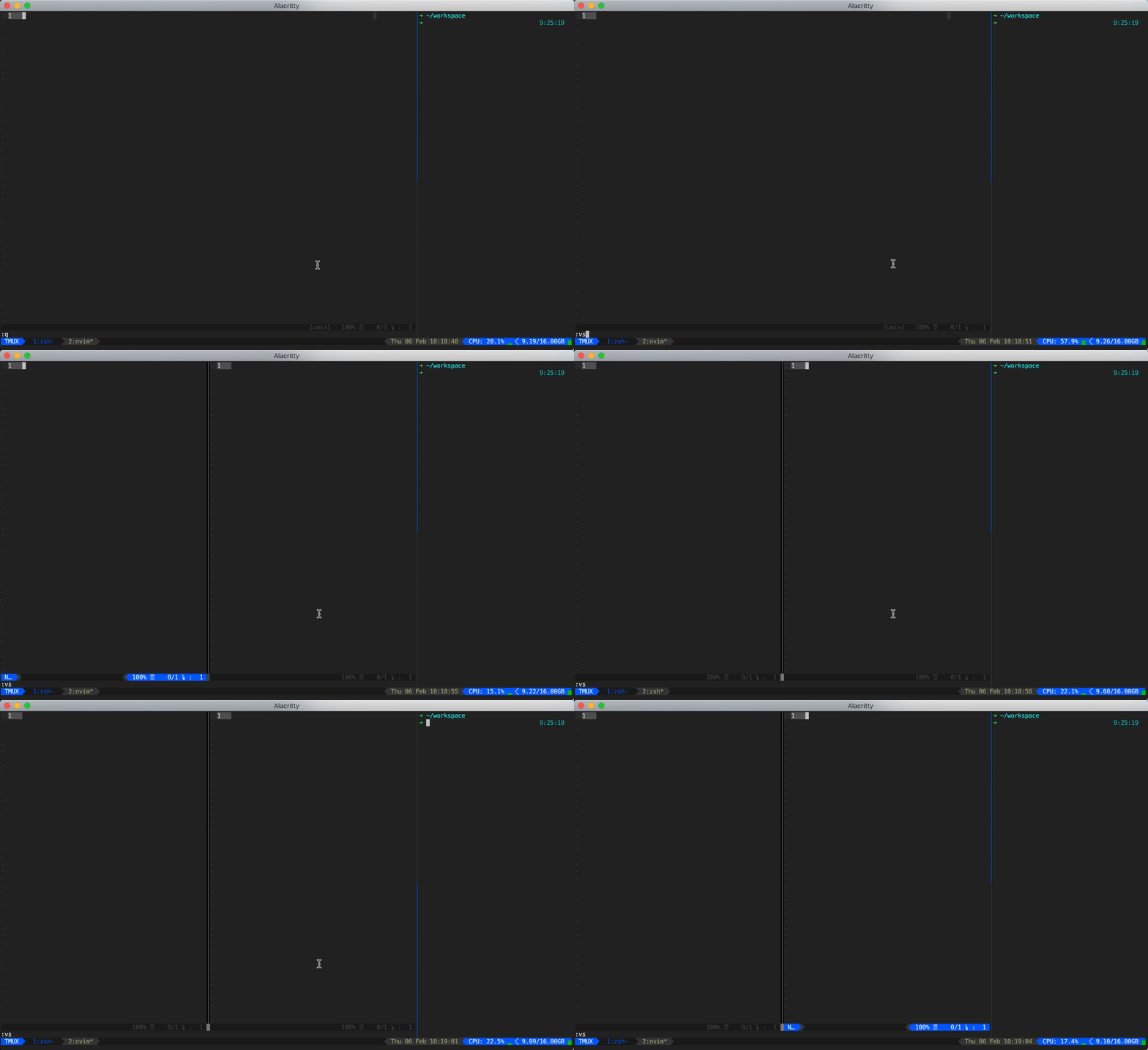
If you look closely to the screen capture below you can see that when creating a new buffer, switching to the tmux pane next to it and then switch back again to the buffer, the status line is not activated properly. I can keep switching between the buffer and the pane, but it doesn't get activated.
When I then move to the buffer on the left, and switch back again it does get activated again. And funny enough when then switching back and forth between the buffer and the pane again, it now keeps working as expected. So it seems like there is some initial state that messes this up initially?
expected behavior
It should properly activate the status line when switching back and forth between the buffer and the pane.
I have some issues with this PR, as it breaks (part of) the functionality this logic was initially added for: https://github.com/vim-airline/vim-airline/issues/1807
Let me know it you need any specific data/info in order to properly solve this! Thanks!
screen shot (if possible)
 svanharmelen
All 22 comments
well, we need to be careful not to cause any regressions like the one that #2053 tried to solve. Do you have any specific suggestions on how to solve this?
 chrisbra
on 6 Feb 2020
chrisbra
on 6 Feb 2020
No I don't... And I agree that regressions are bad, but actually #2053 already causes a regression right?
I will have to think a little about how to solve this and probably need to debug it more to better understand it. Unfortunately I'm super limited on time right now (deadlines) so I was hoping that @idbrii might have some ideas (assuming he currently has a better mental model of the related bits).
If nobody has any ideas or insights I'll try to make some time next week...
svanharmelen
on 6 Feb 2020
FYI I just had a use case where failing to activate the status line was consistent. It did activate when switching between buffers, but it didn't when switching between a buffer and tmux pane. Even when it was activated before when switching between buffers. So it the same as in the screenshot above, but then consistently.
svanharmelen
on 6 Feb 2020
See here a good example of the consistent behavior:
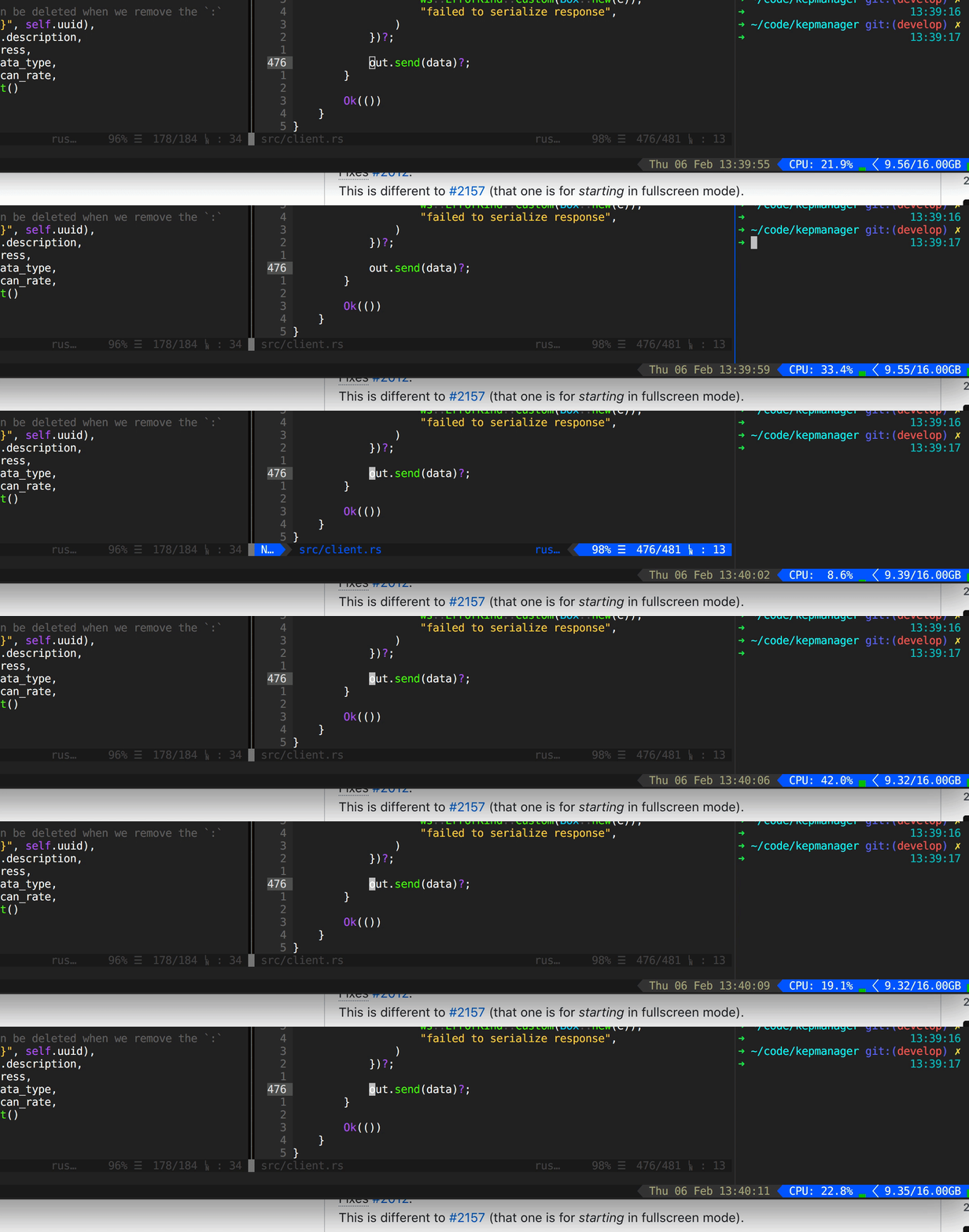
The two left windows are nvim buffers, the right one is a tmux pane...
svanharmelen
on 6 Feb 2020
I can reproduce this with g:airline_focuslost_inactive=1.
I don't really understand how vim works with tmux. @svanharmelen can you try this:
augroup test | au FocusGained * echo 'hello' | augroup END
echo system('grep --version')
Do you see 'hello'? If so, I'd expect you have the same problems with airline refreshing as my PR, but maybe under a fast linux system they're not noticeable.
If you have tpope/vim-fugitive, also try :Gedit HEAD inside a git repo and see if you see 'hello'.
 idbrii
on 7 Feb 2020
idbrii
on 7 Feb 2020
I noodled around with this for a bit.
Some thoughts:
- Maybe some platforms don't trigger FocusLost for calls to system()?
- If this is true, airline#util#try_focusgained() can always return true for those platforms.
- This doesn't resolve g:airline_focuslost_inactive on other platforms.
- We don't know if we lost focus until the after the current function stack completes.
- This is the major problem. We worked around this by assuming we'll lose focus and skipping the next focus gain.
- We don't know if we'll lose focus by invoking fugitive.
- FugitiveHead may not call system because it uses caching.
fugitive#repo().git_chompwill always invoke system.
branch.vim also has update_git_branch and display_git_branch but display_git_branch invokes git which seems bad. The display_hg_branch is comparatively much simpler which makes sense. Maybe a better solution is to reduce display_git_branch down to a simple get and be more careful in update_git_branch?
idbrii
on 7 Feb 2020
My above FocusGained test does not show hello for MacVim (has('mac') == 1, with or without gui):
VIM - Vi IMproved 8.1 (2018 May 18, compiled Oct 30 2019 23:05:43)
macOS version
Included patches: 1-2234
Maybe it's a windows only problem.
idbrii
on 7 Feb 2020
Maybe it's a windows only problem
I was wondering the same thing... I'm still going to do the same test you suggested later today, but I too wonder if this is Windows (so OS) related.
svanharmelen
on 7 Feb 2020
Just tried your test @idbrii and I do see hello when switching back from the tmux pane to the buffer. But that is the expected behavior right? As I was in a different tmux pane so nvim didn't have focus.
I also get hello when switching between other applications (like Firefox and my terminal), but only if nvim was in the active tmux pane. Again that is exactly what I should expect right?
When starting nvim I see my grep version and when I press enter I also see hello. Yet when I manually do :echo system('grep --version') I do see my grep version but not hello after that.
And when I do :Gedit HEAD I sometimes see hello and sometimes not. In some cases I don't see hello and I get a response immediately and in other cases (in other, bigger repos) I do see hello after my CPU goes mad for a bit first.
Does this in any way help and tells you something? If so please share as I'm a bit lost about what to do next. Yet I do know that I miss that the status line becomes active again as I'm super used to use that when orienting where I am... Thanks!
svanharmelen
on 8 Feb 2020
Any ideas or suggestion on how to proceed in order to get this fixed? Thanks!
svanharmelen
on 12 Feb 2020
Seeing hello means you got a FocusGained event.
For you in tmux, you get FocusGained:
- switching from another application to your terminal
- switching from another tmux pane to the vim tmux pane
- for some
:Geditcommands. this one puzzles me.
You do not get FocusGained:
- single
system()calls.
Since you get it for Gedit, I don't think we can just isolate my fix to win32.
Update: I've come up with a solution.
@svanharmelen Please test #2070.
idbrii
on 13 Feb 2020
@idbrii I tried your solution, but it still caused Airline to not show it had focus sometimes. If I did some test and then switched really slowly (waiting a good second) then it seemed to work. But when just doing actual work, it still felt a little flaky.
So having this arbitrary timeout of a second doesn't feel quite right to me. And since you mentioned in the PR that with the code that is currently in master s:focusgained_ignored is
often greater than 5, it seems that there is indeed also an issue with the already merged solution.
So I tested a more simple solution (inline with what @chrisbra had pushed earlier) and if I profile that, it looks to be working fine. I created PR #2071 so you could check the same code on your machine and maybe share a profile of your setup when using that solution?
svanharmelen
on 14 Feb 2020
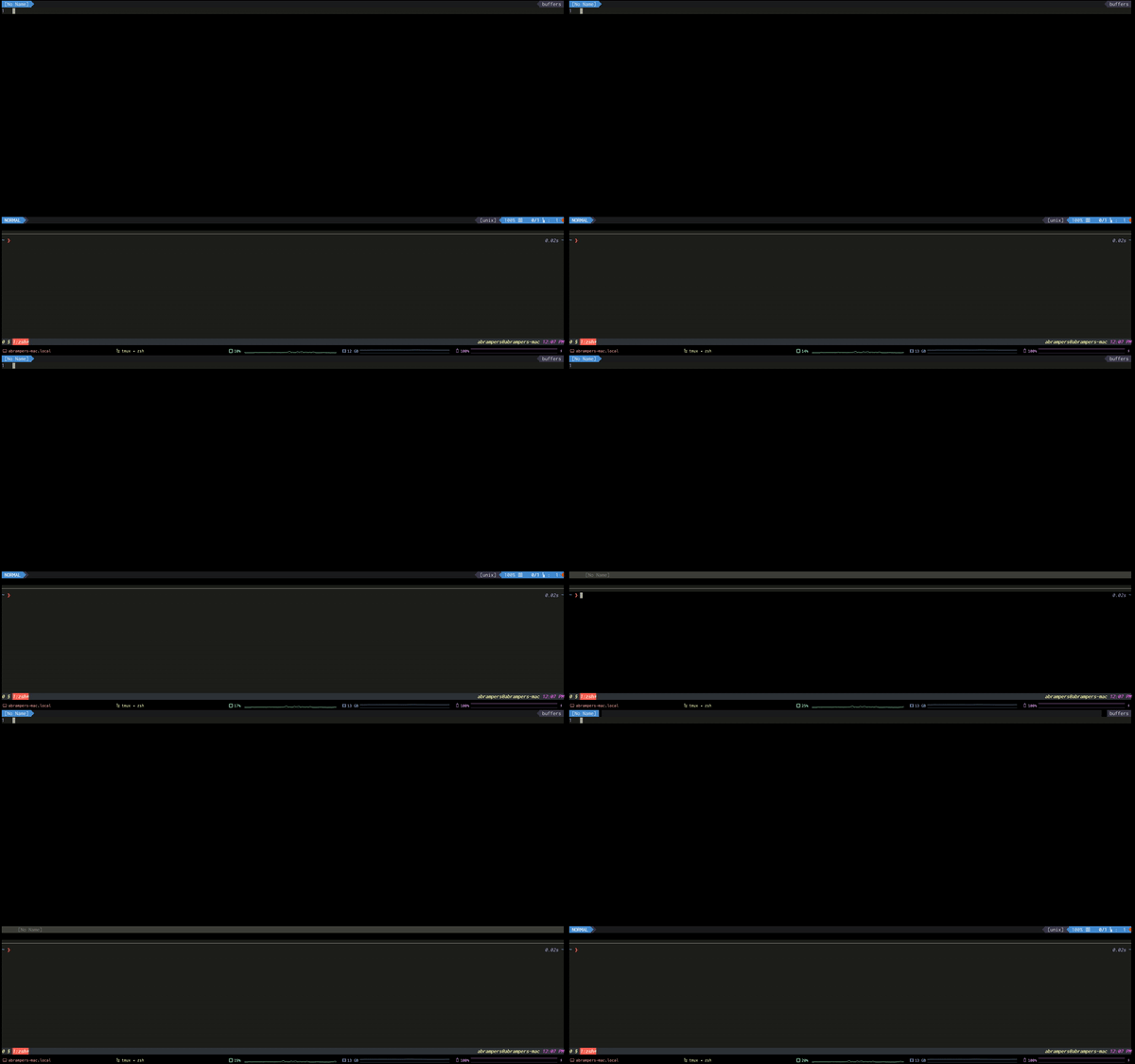
Hi guys, I am sorry to interrupt. Is this issue is related to FocusGained on tabline?
Here's my issue:
 abrampers
on 18 Feb 2020
abrampers
on 18 Feb 2020
I doubt if it's related, but it doesn't seem to be the same problem that is being discussed in this issue...
svanharmelen
on 18 Feb 2020
@idbrii did you by any change had a moment to look at (and maybe even test) the PR I made?
svanharmelen
on 20 Feb 2020
I am confused. We have now two proposed PRs. I am not sure which works and fixes all issues.
chrisbra
on 21 Feb 2020
I understand...
For my setup and as far as I can test the PR I created (PR #2071) solves the problem. But of course we need confirmation if this also solves the issue for @idbrii on his machine.
The additional solution @idbrii suggested (PR #2070) didn't work consistently for me (see my earlier comment), so I guess that PR could maybe be closed again.
svanharmelen
on 21 Feb 2020
I noticed that fugitive doesn't reload status on win32:
  if !has('win32')
    autocmd FocusGained        * call fugitive#ReloadStatus(-2, 0)
  endif
So maybe the right way to fix @svanharmelen's issue is to limit ignoring focusgained to platforms where it's definitely problematic: win32. I pushed an update to #2070.
This results still puzzles me:
And when I do :Gedit HEAD I sometimes see hello and sometimes not. In some cases I don't see hello and I get a response immediately and in other cases (in other, bigger repos) I do see hello after my CPU goes mad for a bit first.
However, I assume you still see that delay after an :AirlineToggle? If the problem is fugitive fetching the git info and not airline spinning on an update, then your platform doesn't need the focusgain ignore fix.
idbrii
on 21 Feb 2020
I tested the updated solution (with the has('win32') guard) and while I still think (like also commented on the PR) that using an ignore timeout of a second seems super arbitrary, it now doesn't seem to break anything when using macOS.
svanharmelen
on 21 Feb 2020
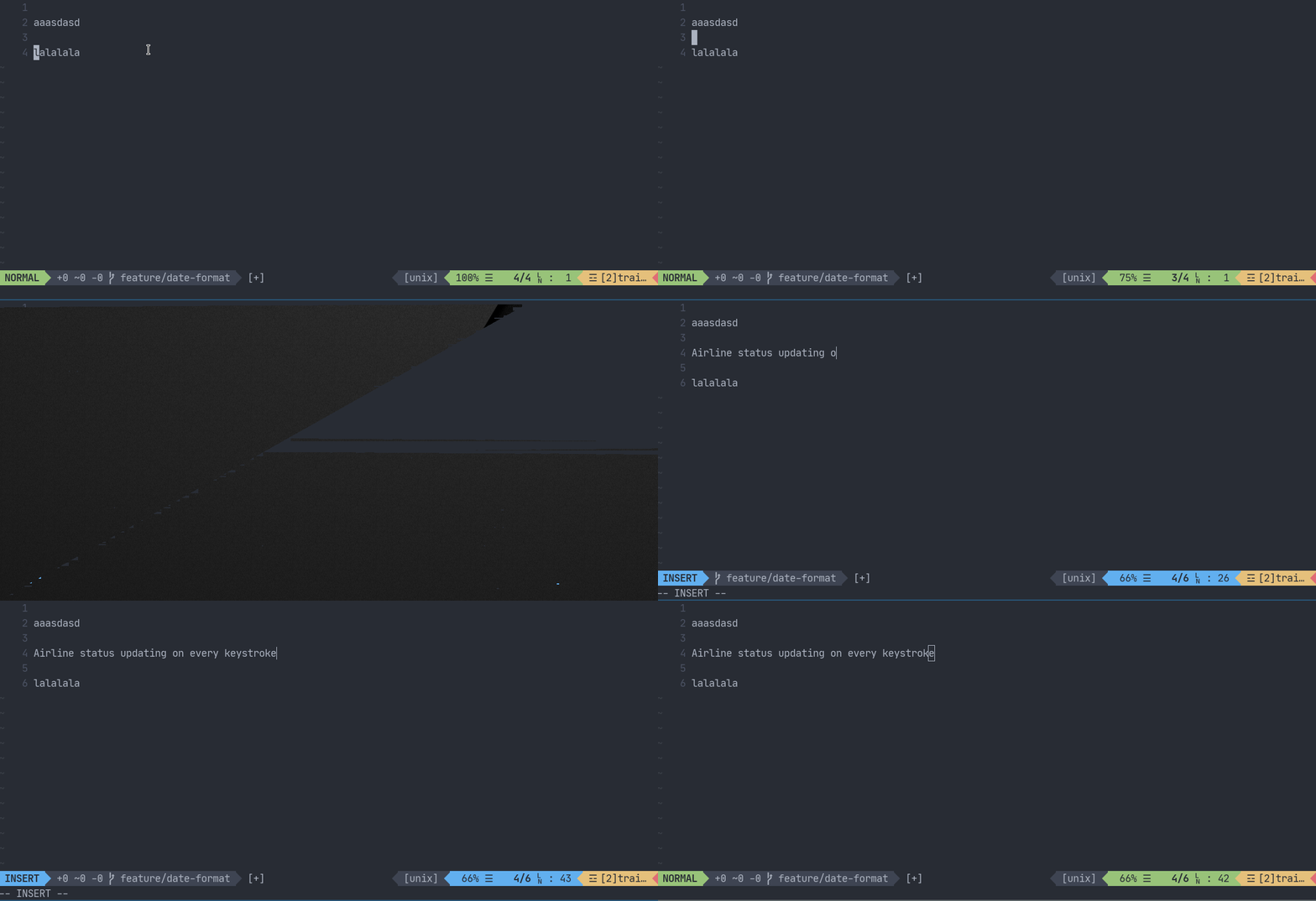
I think I'm having an issue related to this.
I have fugitive and gitgutter installed and when I'm in a git repo and press either h,j,k,l to move in the buffer, the airline part refreshes multiple times. I thought it was a problem of having git-gutter and vim-fugitive installed but after searching it may be related to the focus gained thing and those 2 packages
 romariolopezc
on 29 Mar 2020
romariolopezc
on 29 Mar 2020
Should be fixed by 74ca43a
chrisbra
on 29 Mar 2020
@chrisbra I confirm that is fixed :+1: :tada:
romariolopezc
on 29 Mar 2020
Related issues
 tnguyen14
·
24Comments
tnguyen14
·
24Comments
 Dea1993
·
22Comments
Dea1993
·
22Comments
 Tomalak
·
17Comments
Tomalak
·
17Comments
 notpratheek
·
18Comments
notpratheek
·
18Comments
 a14m
·
44Comments
a14m
·
44Comments