Viewers: Interface for navigating SEG segments
Request
What feature or change would you like to see made?
An interface to navigate the segments available in the DICOM SEG (or multiple SEGs?) being shown.
Why should we prioritize this feature?
Currently, there is no user interface to:
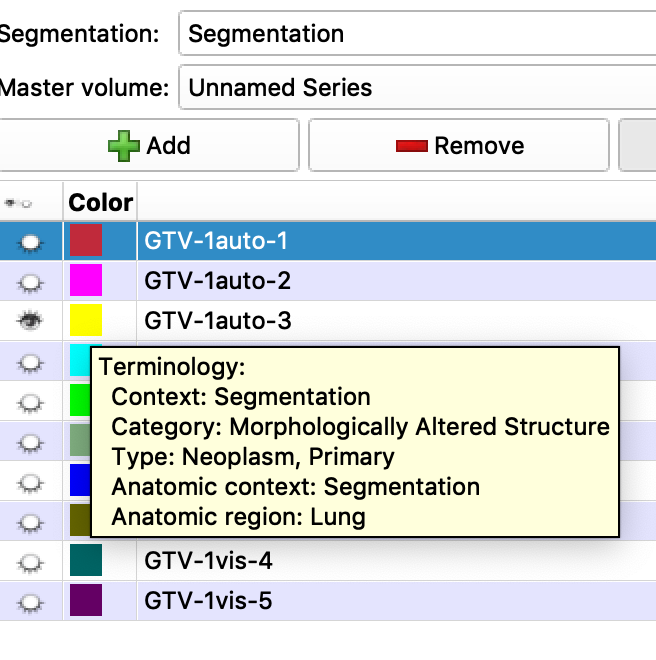
- provide metadata about the visible segment(s)
- control visibility of a given segment - it's all or nothing right now
Those tasks are basic functionality needed by the user. I also think this should be a priority to have this functionality for the IDC MVP, although I don't think there is anything specific to our needs - this is generic capability.
Example below is how segment navigation is supported in Slicer Segment Editor (same interface supporting contours loaded from RTSTRUCT). Tooltip is for the colored square, and shows metadata for the given segment, segment name is initialized from DICOM SEG "SegmentLabel", I believe. Another example of such interface is implemented in http://econtour.org/.
 fedorov
All 10 comments
@JamesAPetts and I have been discussing how to clean up the UI from this branch: https://github.com/OHIF/Viewers/pull/1187 to finally get this functionality in
 swederik
on 14 Jan 2020
swederik
on 14 Jan 2020
Definitions:
- Segmentation: A 3D labelmap the size of the imaging volume, containing one or more non-overlapping segments.
- Segment: An individual label value/color in a segmentation. Usually this represents a continuous volume (e.g. an organ, bone or lesion), but doesn’t have to be continuous, (e.g. All bones could be labelled as segment 1, depending on use case.)
Build off of this RSNA demo which already has most of this functionality: https://github.com/OHIF/Viewers/pull/1187
Initial design, this ticket shall work on the left panel of the design, we can leave out the cog icon for now.
https://www.figma.com/file/0CP9cmhHhDC8gQX5R9zvgo/OHIF-segmentation-side-panel?node-id=0%3A1
- The side panel must display the segmentation metadata for the active viewport window if this is an imaging window (i.e. a cornerstonejs of vtkjs viewport).
- If the active viewport is a non-imaging viewport (e.g. pdf) the side panel should be empty.
The segmentation side panel contains two main components:
- The segmentation list:
- This is a list of the available segmentations and their name, imported SEGs have their series description as their name.
- As in the demo branch, on load of the viewer, if a series has DICOM SEGs associated with it, their metadata should populate the list of segmentations.
- The most recently produced one (i.e. with the largest ${studyDate}${studyTime} value) should be loaded into the cornerstone labelmap the first time the scan is displayed in a viewport.
- If there are no segmentations associated with a series, you should get a greyed out segmentation list.
The segment list:
- This lists the different segments in the active segmentation.
- Each row should have 2 elements, similar to the measurement table:
- The number/color of the segment, clicking this makes this the active segment for that labelmap.
- The segment info, this should be a label and a description editor, the same as the measurement table.
Switching the segmentation in the drop down menu should swap the active labelmap.
- Clicking on the left part of a segment entry in the list should set it as the active segment for editing.
Ignore the + and cogs in the figma file for now.
 JamesAPetts
on 21 Jan 2020
JamesAPetts
on 21 Jan 2020
My initial comments/preferences based on the review of the current demo here: https://deploy-preview-1187--ohif.netlify.com/pwa/viewer/1.3.12.2.1107.5.2.32.35162.30000015050317233592200000046
- I would like to see series list on the left showing all series. I think it will be confusing if individual types of objects will be disappearing from the series list once they are exposed via some other interface. I also think that it is intuitive if the user has the same interface to trigger display of the individual series by dragging them into the viewport. I would prefer if for SEG (as well as for SR, and other series that do not have thumbnails) there is a line with the series number, description and modality.
- It would be helpful if Segmentations interface had the functionality to toggle visibility of the individual segments.
- It would be helpful to expose the coded metadata for the individual segments. Segment label/description may not be descriptive. Maybe it could be shown in a tooltip?
- "Next/Previous" and "Brush radius" controls are a bit confusing/redundant, since I would expect by default to have a "read only" view of the segmentations, and switch to editing mode using some additional functionality.
- It would be nice to have buttons that control segment visibility (overlay, contour, both, opacity), similar to what we have in Slicer (see you already have plans for this in the figma sketch).
- "Brush radius" suggests you wanted to have editing capability, but if that is the case, what are your plans for authoring new content? How will you identify the user to associate those details with the new content? How will you manage access control for new content? Maybe the initial scope of this functionality should be limited to "read only" to collect feedback and refine that aspect of the interface (display and navigation of segmentations)?
fedorov
on 21 Jan 2020
Hey Andrey, we are going to split this into multiple phases to make it easier. The UI you are looking at is from RSNA, the current scoped UI is in the figma file linked about above (here: https://www.figma.com/file/0CP9cmhHhDC8gQX5R9zvgo/OHIF-segmentation-side-panel?node-id=0%3A1).
The current goal is to clean up the UI we already have before we add more.
The brush radius stuff is going to go in the tool UI itself. Toggle visibility will come in the UI at a later point.
I would like to see series list on the left showing all series. I think it will be confusing if individual types of objects will be disappearing from the series list once they are exposed via some other interface. I also think that it is intuitive if the user has the same interface to trigger display of the individual series by dragging them into the viewport. I would prefer if for SEG (as well as for SR, and other series that do not have thumbnails) there is a line with the series number, description and modality.
Yeah we should display a list somewhere, that'll also be another ticket.
JamesAPetts
on 21 Jan 2020
This issue has been automatically marked as stale because it has not had recent activity. It will be closed if no further activity occurs. Thank you for your contributions.
![stale[bot] picture](https://avatars.githubusercontent.com/in/1724?v=4&s=40) stale[bot]
on 11 Feb 2020
stale[bot]
on 11 Feb 2020
Certain labels keep the Stale bot away:
https://github.com/OHIF/Viewers/blob/master/.github/stale.yml#L9-L20
Feel free to use one one of our workflow labels to keep your issues fresh. For example, Story indicates this is a feature we would accept should someone draft a PR.
Also, the view portion of this ticket is nearing completion in #1391
 dannyrb
on 11 Feb 2020
dannyrb
on 11 Feb 2020
@dannyrb should "Accepted" be added to that list?
What is a good way to keep "IDC: priority" and "IDC: candidate" issues open?
Another idea - maybe instead of adding exceptions, the Stale bot should be configured to close only explicitly allowed labels or issues with no labels at all?
fedorov
on 11 Feb 2020
@fedorov, I would prefer that configuration, but the bot only appears to work with an exemption list: https://probot.github.io/apps/stale/
I often use stale notifications to remind me that I should provide an update or check-in on progress, which resets the day counter. The goal being to move from a triage state (Community question, report, or suggestion) to an actionable state (backlog, closed, etc.).
You're more than welcome to add any IDC labels you find appropriate to the exempt list. Or I can add them on your behalf.
dannyrb
on 11 Feb 2020
@dannyrb no worries, I can do it. Was just thinking about a more scalable approach, since likely (hopefully!) there will be more projects that will interact with OHIF like IDC in a similar way.
fedorov
on 11 Feb 2020
I'm going to close this one for easier bookkeeping, could you bring up any new issues in new tickets.
JamesAPetts
on 24 Apr 2020
Related issues
 ranasrule
·
4Comments
ranasrule
·
4Comments
 panzhengo1
·
3Comments
panzhengo1
·
3Comments
 rlaxodnjs199
·
3Comments
rlaxodnjs199
·
3Comments
 ohif-bot
·
3Comments
ranasrule
·
4Comments
ohif-bot
·
3Comments
ranasrule
·
4Comments
Most helpful comment
Hey Andrey, we are going to split this into multiple phases to make it easier. The UI you are looking at is from RSNA, the current scoped UI is in the figma file linked about above (here: https://www.figma.com/file/0CP9cmhHhDC8gQX5R9zvgo/OHIF-segmentation-side-panel?node-id=0%3A1).
The current goal is to clean up the UI we already have before we add more.
The brush radius stuff is going to go in the tool UI itself. Toggle visibility will come in the UI at a later point.
Yeah we should display a list somewhere, that'll also be another ticket.