Victory-native: Y axis ticks are truncated
When my y axis tick texts are longer than around 5 characters, characters are being cut off. Expected behaviour is that the chart would shrink and fit the entire y axis tick texts.
Reproduction
export class LineChart extends React.Component {
  getYAxisTranslation(value) {
    let translation = { 1: "None", 3: "Average", 5: "A lot" }
    if (!translation) {
      return value
    }
    return translation[value] || ""
  }

  render() {
    return (
      <VictoryChart minDomain={{ y: 1 }} domainPadding={{ y: 5 }}>
        <VictoryAxis
          dependentAxis
          tickValues={[1, 3, 5]}
          tickFormat={t => this.getYAxisTranslation(t)}
        />
        <VictoryAxis tickValues={[]} tickFormat={t => ""} />
        <VictoryLine
          interpolation="natural"
          data={[
            { x: 0, y: 2 },
            { x: 1, y: 2 },
            { x: 2, y: 3 },
            { x: 3, y: 2 },
            { x: 4, y: 4 },
            { x: 5, y: 5 }
          ]}
        />
      </VictoryChart>
    )
  }
}
Using:
´"victory-native": "^30.1.0"´
´"react-native": "https://github.com/expo/react-native/archive/sdk-29.0.0.tar.gz"´
See how the word "average" is truncated below
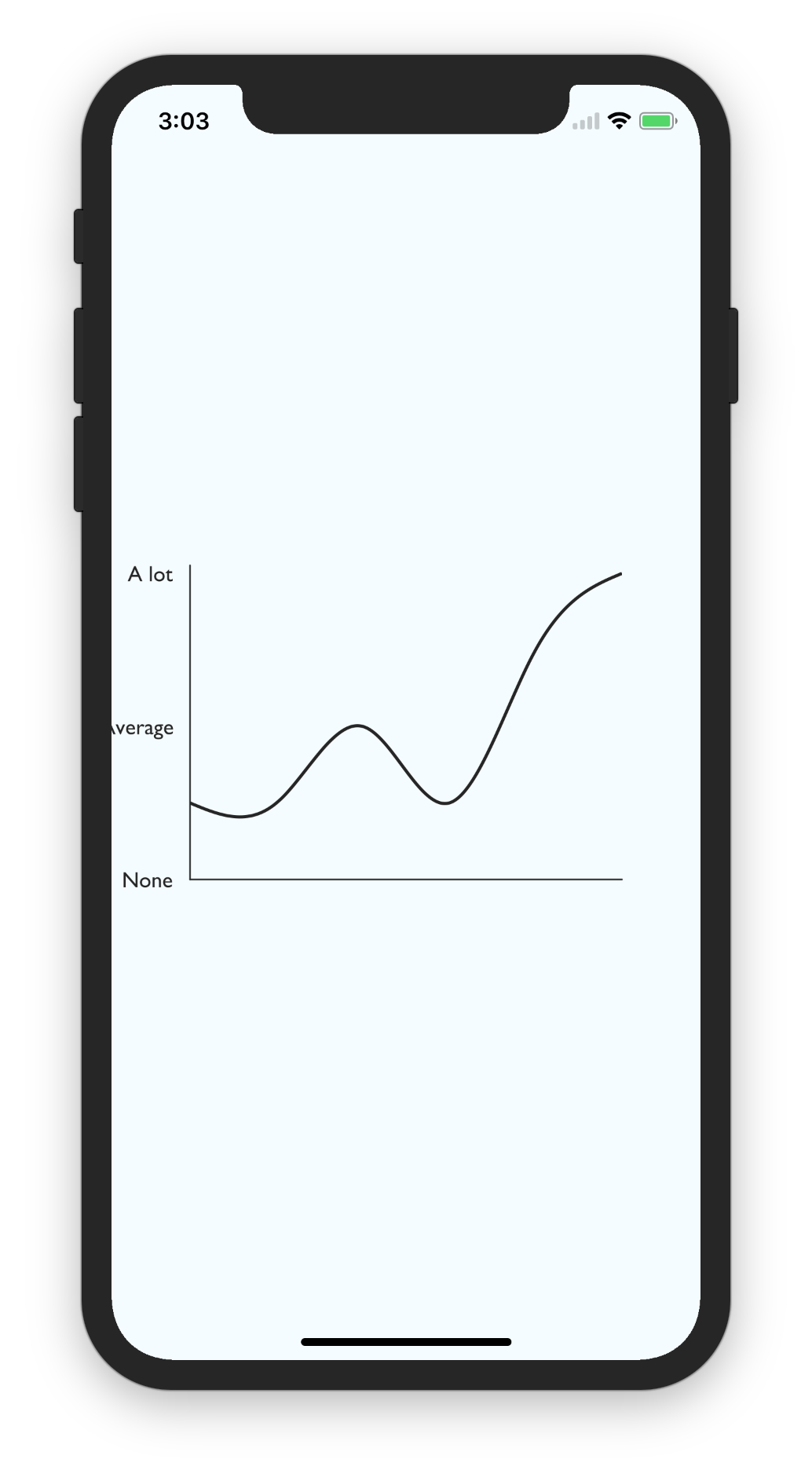
 fsto
fsto
>All comments
@fsto neither victory or victory-native using a constraint based layout system, so you will need to manually create space for your labels. You can do so by altering the padding prop on VictoryChart. The default value is padding={50} but you can set this to any positive number you like or to an object with values for "top", "bottom", "left" and "right".
 boygirl
on 24 Aug 2018
boygirl
on 24 Aug 2018
👍4
Was this page helpful?
0 / 5 - 0 ratings
Related issues
 hwaterke
·
6Comments
hwaterke
·
6Comments
 UtkarshPramodGupta
·
5Comments
UtkarshPramodGupta
·
5Comments
 WhyX
·
6Comments
WhyX
·
6Comments
 kkemple
·
6Comments
kkemple
·
6Comments
 jzhw0130
·
3Comments
jzhw0130
·
3Comments
Most helpful comment
@fsto neither
victoryorvictory-nativeusing a constraint based layout system, so you will need to manually create space for your labels. You can do so by altering thepaddingprop onVictoryChart. The default value ispadding={50}but you can set this to any positive number you like or to an object with values for "top", "bottom", "left" and "right".