Victory-native: Victory components ignore their container width
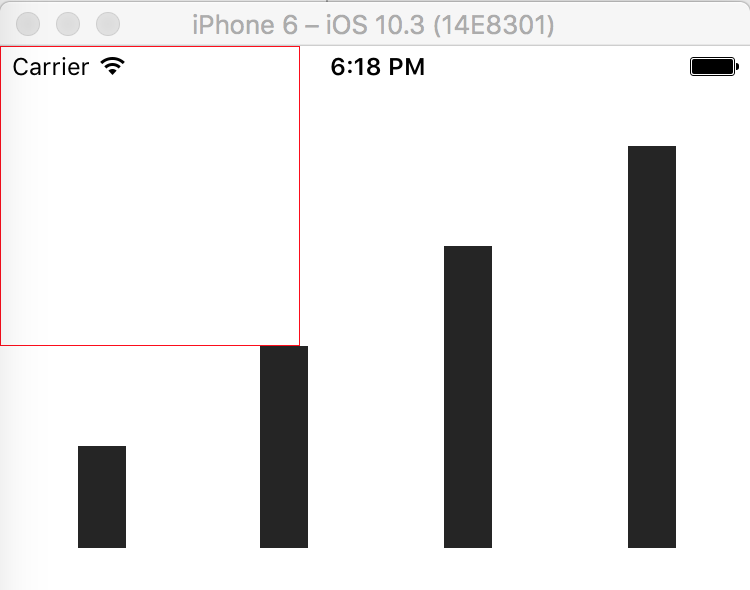
The documentation mentions that by default the containers are responsive.
What I expected is that while the viewbox would be fixed, the actual svg size would adapt to its container size. But it does not seem to be the case.
class Bar extends React.Component {
  render() {
    return (
      <View style={styles.container}>
        <View style={styles.graphContainer}>
          <VictoryBar />
        </View>
      </View>
    );
  }
}

const styles = StyleSheet.create({
  container: {
    flex: 1
  },
  graphContainer: {
    width: 150,
    borderColor: 'red',
    borderWidth: StyleSheet.hairlineWidth,
  }
});

 hwaterke
All 6 comments
Height as well:
    return (
      <View style={{ flex: 1 }}>
        <View style={{ width: 150, height: 150, borderColor: 'red', borderWidth: StyleSheet.hairlineWidth }}>
          <VictoryBar />
        </View>
      </View>
    );
 brianlow
on 9 Jul 2017
brianlow
on 9 Jul 2017
Workaround: set the width and height attributes (not styles):
<VictoryBar width={150} height={150} />
I'm running into this issue, too. It seems like our only option is to use absolute values for Victory charts at this point
 jdpigeon
on 14 Jul 2017
jdpigeon
on 14 Jul 2017
This is because victory-native defaults the width to Dimensions.get('window').width ie. the screen width not a conatiners width. This also is a problem if you want it to resize when the screen rotates.
We solved this by having the width set as an internal state and updating it in onLayout. So in @hwaterke example it would look something like this:
class Bar extends React.Component {
  constructor(props, context) {
    super(props, context);

    this.state = {
      width: 0
    };
    this.measureView = this.measureView.bind(this);
  }

  setDimensions(event) {
    this.setState({
      width: event.nativeEvent.layout.width
    });
  }

  render() {
    const { width } = this.props;

    return (
      <View style={styles.container} onLayout={setDimensions}>
        <View style={styles.graphContainer}>
          <VictoryBar width={width} />
        </View>
      </View>
    );
  }
}
 levsero
on 25 Sep 2017
levsero
on 25 Sep 2017
It would be great if Victory native were responsive by default, this is especially problematic when we use it with react-native-web.
 miguelocarvajal
on 3 Sep 2018
miguelocarvajal
on 3 Sep 2018
Is there a workaround for this today on React Native? Today I need to set the width manually on every chart, it would be very helpful to have the width of the chart be the same as the container.
 hugomarisco
on 12 Jun 2020
hugomarisco
on 12 Jun 2020
Related issues
 yvonne6344
·
4Comments
yvonne6344
·
4Comments
 matejkriz
·
3Comments
matejkriz
·
3Comments
 jzhw0130
·
3Comments
jzhw0130
·
3Comments
 aszheng
·
5Comments
aszheng
·
5Comments
 isabel-thx
·
5Comments
isabel-thx
·
5Comments
Most helpful comment
It would be great if Victory native were responsive by default, this is especially problematic when we use it with react-native-web.