Vercel: Timeout while verifying instance count
Constantly getting this error when running now scale xyz:
> Error! An unexpected error occurred in scale: Error: Timeout while verifying instance count (10m)
    at waitForScale (/snapshot/repo/dist/now.js:8878:13)
    at <anonymous>
 mxstbr
All 34 comments
+1
Getting when deploying to bru1
 hakonkrogh
on 5 Apr 2018
hakonkrogh
on 5 Apr 2018
+1 to sf1
 mgranados
on 5 Apr 2018
mgranados
on 5 Apr 2018
> Your deployment's code and logs will be publicly accessible because you are subscribed to the OSS plan.
> NOTE: You can use `now --public` or upgrade your plan (https://zeit.co/account/plan) to skip this prompt
> Using Node.js 8.11.1 (default)
> https://experiment-qcjvbbvnfs.now.sh [in clipboard] (bru1) [912ms]
> Building…
> ▲ npm install
> ▲ Snapshotting deployment
> ▲ Saving deployment image (463)
> Build completed
⠧ Verifying instances in bru1> Error! An unexpected error occurred!
  Error: Timeout while verifying instance count (10m)
    at waitForScale (/snapshot/repo/dist/now.js:6281:13)
    at <anonymous> Error: Timeout while verifying instance count (10m)
    at waitForScale (/snapshot/repo/dist/now.js:6281:13)
    at <anonymous>
 vtvz
on 7 Apr 2018
vtvz
on 7 Apr 2018
same here, deploying to bru1
 omarkhaled11
on 7 Apr 2018
omarkhaled11
on 7 Apr 2018
We are looking into this. To confirm, do you see anything in the app logs that would point to startup issues / not opening a HTTP port?
 rauchg
on 8 Apr 2018
rauchg
on 8 Apr 2018
The app I uploaded doesn't record logs, the deployment was successful after a couple of tries, but the url provided gives 503 error, here's the given link https://brantu-task-ctmovfwubg.now.sh
what was happening is that the upload process goes fine but it gets stuck at verifying and then times out
omarkhaled11
on 8 Apr 2018
Same here. Just sent you guys an email before heading here to check the conversation.
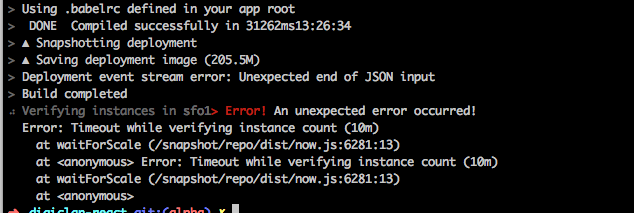
 nnennajohn
on 8 Apr 2018
nnennajohn
on 8 Apr 2018
I get the same on sfo1 trying to deploy anything with now
 rwboyer
on 8 Apr 2018
rwboyer
on 8 Apr 2018
Same!
Verifying instances in sfo1> Error! An unexpected error occurred!
  Error: Timeout while verifying instance count (10m)
    at waitForScale (/snapshot/repo/dist/now.js:6281:13)
    at <anonymous> Error: Timeout while verifying instance count (10m)
    at waitForScale (/snapshot/repo/dist/now.js:6281:13)
    at <anonymous>
 heymartinadams
on 9 Apr 2018
heymartinadams
on 9 Apr 2018
Ah! There was an error in my code, which I only discovered by deploying via localhost instead of now. Once fixed, I no longer received a timeout. So it might only occur if there’s an unrelated bug.
/Users/__USER__/Apps/__MY_APP__/node_modules/graphql-yoga/node_modules/graphql-tools/dist/schemaGenerator.js:341
                throw new SchemaError(typeName + "." + fieldName + " defined in resolvers, but not in schema");
                ^
@heymartinadams So were you able to successfully deploy after this?
nnennajohn
on 9 Apr 2018
Yes indeed, @nnennajohn! 😎
heymartinadams
on 9 Apr 2018
Bummer for me. Successfully got it on heroku though, so I know its not some rouge function. :) Will wait to hear from the support team after the weekend. Hopeful. :)
nnennajohn
on 9 Apr 2018
+1, both bru and sfo, timeout
 akabab
on 10 Apr 2018
akabab
on 10 Apr 2018
Sorry, getting the same with bru1 and sfo1 since last night.
update: I also had broken code (third party dep) and it works fine after fixing that, same as @heymartinadams. This is a non issue for me!
Or rather... this is a messaging issue.
 antony
on 10 Apr 2018
antony
on 10 Apr 2018
Any updates on this? this is holding me back.
 bookofdom
on 11 Apr 2018
bookofdom
on 11 Apr 2018
@bookofdom see if you can deploy to localhost using the node or nodemon command in your CLI — this should give you an indication to any errors in your code (that are unrelated to now).
heymartinadams
on 11 Apr 2018
Just wanted to add, I'm seeing this too. It's only affecting one of my projects. I'm able to build and run it locally:
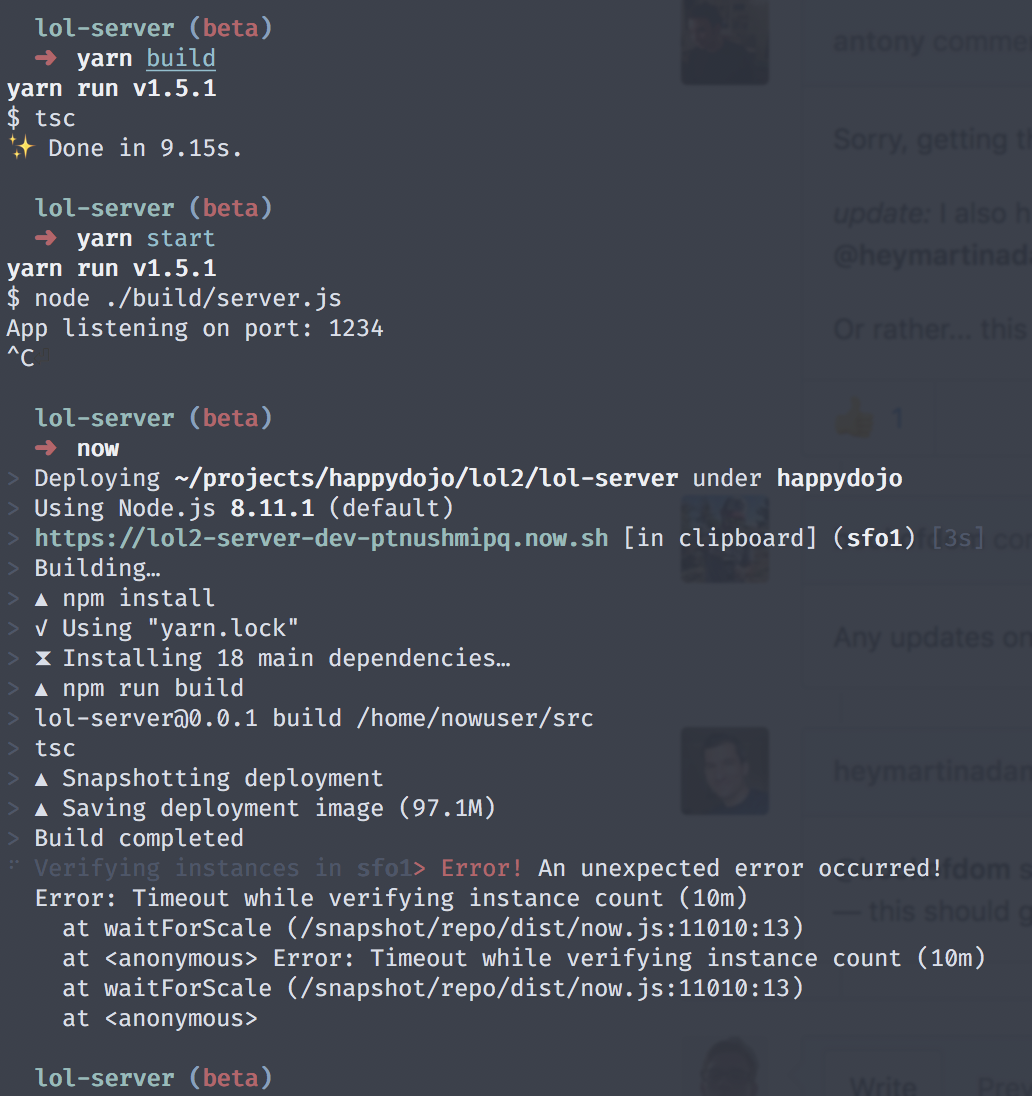
 ianjsikes
on 11 Apr 2018
ianjsikes
on 11 Apr 2018
i, too, am getting this error:
⠼ Verifying instances in sfo1> Error! An unexpected error occurred!
  Error: Timeout while verifying instance count (10m)
    at waitForScale (/snapshot/repo/dist/now.js:8446:13)
    at <anonymous> Error: Timeout while verifying instance count (10m)
    at waitForScale (/snapshot/repo/dist/now.js:8446:13)
    at <anonymous>
there are no errors in my code, i ran a standard JS task to clean and report any JS error, which came back with none.
 benjtinsley
on 14 Apr 2018
benjtinsley
on 14 Apr 2018
Same here! Waiting for a way to deploy my app. :O
 springrid
on 14 Apr 2018
springrid
on 14 Apr 2018
@rauchg It seems that the deploy process doesn't start the Node.js application. Earlier you saw the application bootstrapping before verifying the Now instances.
 robinvdvleuten
on 14 Apr 2018
robinvdvleuten
on 14 Apr 2018
Yeah, same here, I deployed my app built on Probot on Now a month back. At that time, it was working fine.
After making a few changes, I redeployed it after updating CLI but faced similar error.
Subscribing this thread to receive new updates on the same. 🙂
 abhijeetps
on 15 Apr 2018
abhijeetps
on 15 Apr 2018
This should never happen again in the latest both stable and canary releases!
Please reopen if anybody else experiences this issue.
 javivelasco
on 19 Apr 2018
javivelasco
on 19 Apr 2018
Yup keep seeing this again more and more last few days in our deployments (always bru1). This is completely breaking down our continuous deployments for 2 projects:
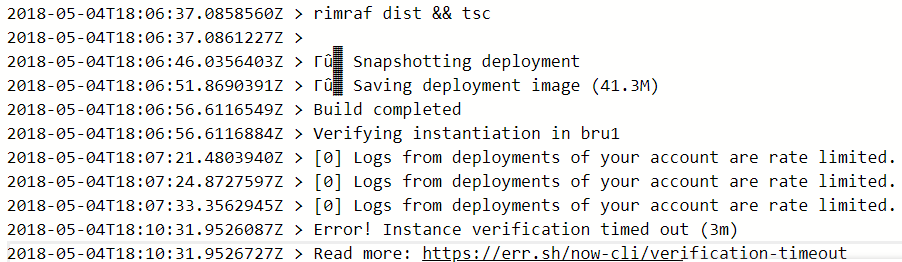
Note sure what causes the log rate limiting, but we are on a paid account and far away from any limits nor do we deploy excessively.
Update:
This might be only happening on our CI agents where its pulling the latest version of the now CLI during every build. I'll check if this goes away to setting this to same as local version, but if that makes it go away then an error was introduced in a later version.
 ntziolis
on 4 May 2018
ntziolis
on 4 May 2018
I'm pretty sure this is happening to you because you ran into a logs rate limit so we are unable to get the logging events to ensure that the instance is running. Temporarily you can just run the deploy with --no-verify but maybe we should consider this case on our side @rauchg
javivelasco
on 7 May 2018
It's happened again to me. my app, and I also tested with now-example/hello-go. When I used --no-verify, deploying was completed but the apps didn't work well.
now
> Deploying ~/Workspace/now-examples/go-hello under
> https://go-hello-zfxrcdeozk.now.sh [in clipboard] (sfo1) [4s]
> Building…
> Sending build context to Docker daemon  4.096kB
> Step 1/7 : FROM golang:1.9-alpine as base
>  ---> b0260be938c6
> Step 2/7 : WORKDIR /usr/src
>  ---> Using cache
>  ---> 3c896b471e39
> Step 3/7 : COPY . .
>  ---> 606d53d6f6f1
> Step 4/7 : RUN CGO_ENABLED=0 go build -ldflags "-s -w" -o main
>  ---> Running in 1d409d44bdc9
> Removing intermediate container 1d409d44bdc9
>  ---> 323e9d832b79
> Step 5/7 : FROM scratch
>  --->
> Step 6/7 : COPY --from=base /usr/src/main /go-http-microservice
>  ---> cfe6c5685dea
> Step 7/7 : CMD ["/go-http-microservice"]
>  ---> Running in da80dd77058f
> Removing intermediate container da80dd77058f
>  ---> 15f3d2c0f800
> Successfully built 15f3d2c0f800
> Successfully tagged registry.now.systems/now/685e5f16b3f11c86f95fb93bcbe4b83178a48758:latest
> ▲ Storing image
> Build completed
⠹ Verifying instances in sfo1> Error! An unexpected error occurred!
  Error: Timeout while verifying instance count (10m)
    at waitForScale (/snapshot/repo/dist/now.js:6281:13)
    at <anonymous> Error: Timeout while verifying instance count (10m)
    at waitForScale (/snapshot/repo/dist/now.js:6281:13)
    at <anonymous>
 ragingwind
on 1 Nov 2018
ragingwind
on 1 Nov 2018
I'm having same here :raised_hand_with_fingers_splayed: (I'm using now-cli version 12.1.2)
UPDATE: I changed the region from bru1 to sfo1 and it seems working back.. issues with bru1 region? I have another deployment on bru1 though.
All the process went fine, here the logs from the deployment:
11/14 12:11 PM (6m) yarn
11/14 12:11 PM (6m) yarn install v1.9.4
11/14 12:11 PM (6m) [1/4] Resolving packages...
11/14 12:11 PM (6m) [2/4] Fetching packages...
11/14 12:12 PM (6m) info [email protected]: The platform "linux" is incompatible with this module.
11/14 12:12 PM (6m) info "[email protected]" is an optional dependency and failed compatibility check.Excluding it from installation.
11/14 12:12 PM (6m) info [email protected]: The platform "linux" is incompatible with this module.
11/14 12:12 PM (6m) info "[email protected]" is an optional dependency and failed compatibility check. Excluding it from installation.
11/14 12:12 PM (6m) [3/4] Linking dependencies...
11/14 12:12 PM (6m) [4/4] Building fresh packages...
11/14 12:12 PM (6m) Done in 23.48s.
11/14 12:12 PM (6m) npm run build
11/14 12:12 PM (6m)
11/14 12:12 PM (6m) > [email protected] build /home/nowuser/src
11/14 12:12 PM (6m) > react-scripts build
11/14 12:12 PM (6m)
11/14 12:12 PM (6m) Creating an optimized production build...
11/14 12:12 PM (6m) Compiled successfully.
11/14 12:12 PM (6m)
11/14 12:12 PM (6m) File sizes after gzip:
11/14 12:12 PM (6m)
11/14 12:12 PM (6m)   144.03 KB  build/static/js/main.88c0f8b5.js
11/14 12:12 PM (6m)   18.72 KB   build/static/css/main.b014df2d.css
11/14 12:12 PM (6m)
11/14 12:12 PM (6m) The project was built assuming it is hosted at the server root.
11/14 12:12 PM (6m) To override this, specify the homepage in your package.json.
11/14 12:12 PM (6m) For example, add this to build it for GitHub Pages:
11/14 12:12 PM (6m)
11/14 12:12 PM (6m)   "homepage": "http://myname.github.io/myapp",
11/14 12:12 PM (6m)
11/14 12:12 PM (6m) The build folder is ready to be deployed.
11/14 12:12 PM (6m) You may serve it with a static server:
11/14 12:12 PM (6m)
11/14 12:12 PM (6m)   yarn global add serve
11/14 12:12 PM (6m)   serve -s build
11/14 12:12 PM (6m)
11/14 12:12 PM (5m) Snapshotting deployment
11/14 12:12 PM (5m) Saving deployment image (25.8M)
$ now
....
> ▲ Snapshotting deployment
> ▲ Saving deployment image (25.8M)
> Build completed
> Verifying instantiation in bru1
> Error! Instance verification timed out (3m)
> Read more: https://err.sh/now-cli/verification-timeout
 IsmiKin
on 14 Nov 2018
IsmiKin
on 14 Nov 2018
I am having the same problem with bru over the last few days.
Every now and then my deployment refuses to scale in bru with verification timeout (yes, it really is not running). There is no error in logs.
 hleumas
on 30 Jan 2019
hleumas
on 30 Jan 2019
@hleumas We have fixed a problem with scaling affecting BRU1 a few hours ago. Can you retry?
 paulogdm
on 30 Jan 2019
paulogdm
on 30 Jan 2019
It's working seamlessly. Thanks @paulogdm .
hleumas
on 31 Jan 2019
+1
I have the same issue in BRU1 region today. Is there a way to increase timeout?
 drobnikj
on 8 Feb 2019
drobnikj
on 8 Feb 2019
We have not been able to scale up BRU1 on the first try for about a month.
 s-r-jones
on 22 May 2019
s-r-jones
on 22 May 2019
Between 40% and 80% of my deploys fail (it varies from day to day( on BRU1 due to this problem. I'm running out of options.
Today I've had 2 successful deploys out of 12 and still going.
antony
on 28 May 2019
This should never happen again in the latest both stable and canary releases!
Please reopen if anybody else experiences this issue.
@javivelasco This should be reopened. I have instance verification timeouts for latest stable release versions in bru1. Tested versions 14.2.0 on up all the way to lts 15.3.0.
It feels like there just aren't enough resources allocated for bru1 anymore:
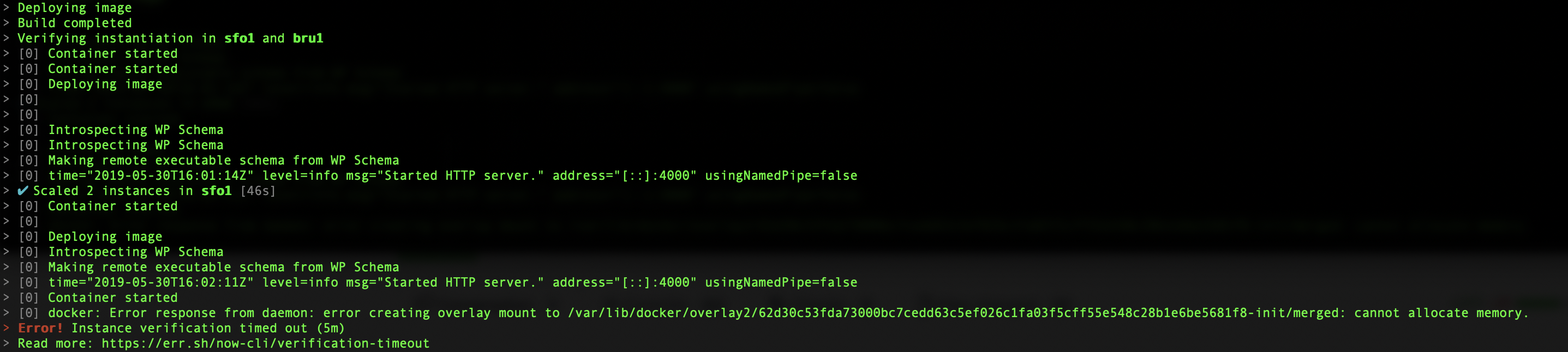
Is this true?
 moolbits
on 29 May 2019
moolbits
on 29 May 2019
Related issues
 morgs32
·
29Comments
morgs32
·
29Comments
 gyandeeps
·
32Comments
gyandeeps
·
32Comments
 brandonmp
·
29Comments
brandonmp
·
29Comments
 SteveALee
·
51Comments
SteveALee
·
51Comments
 mathiasbynens
·
28Comments
mathiasbynens
·
28Comments
Most helpful comment
This should never happen again in the latest both stable and canary releases!
Please reopen if anybody else experiences this issue.