Vercel: Creating Lets Encrypt certificates fails when using CloudFlare
$ node --version
v6.9.1

$ now --version
𝚫 now 0.37.1

$ now alias # note: this is run inside the root dir of https://github.com/jsperf/jsperf.com
> jsperf.com is a custom domain.
> Verifying the DNS settings for jsperf.com (see https://zeit.world for help)
> Verification OK!
> Provisioning certificate for jsperf.com
> Error! Unknown error: Error: Unhandled error
    at Alias._callee17$ (/Users/mathias/.nvm/versions/node/v6.9.1/lib/node_modules/now/build/lib/index.js:1236:25)
    at tryCatch (/Users/mathias/.nvm/versions/node/v6.9.1/lib/node_modules/now/node_modules/regenerator-runtime/runtime.js:64:40)
    at GeneratorFunctionPrototype.invoke [as _invoke] (/Users/mathias/.nvm/versions/node/v6.9.1/lib/node_modules/now/node_modules/regenerator-runtime/runtime.js:355:22)
    at GeneratorFunctionPrototype.prototype.(anonymous function) [as next] (/Users/mathias/.nvm/versions/node/v6.9.1/lib/node_modules/now/node_modules/regenerator-runtime/runtime.js:116:21)
    at step (/Users/mathias/.nvm/versions/node/v6.9.1/lib/node_modules/now/node_modules/babel-runtime/helpers/asyncToGenerator.js:17:30)
    at /Users/mathias/.nvm/versions/node/v6.9.1/lib/node_modules/now/node_modules/babel-runtime/helpers/asyncToGenerator.js:28:13
    at process._tickCallback (internal/process/next_tick.js:103:7)
 mathiasbynens
All 28 comments
What happens if you try to create the cert manually with now cert create?
Edit:
I checked the logs. Your seem to use a proxy on front of your deployment. Are you possibly limiting the valid URLs for HTTP GET requests?
 OlliV
on 29 Dec 2016
OlliV
on 29 Dec 2016
Thanks, @OlliV. I disabled the CloudFlare proxy for the A records on jsperf.com temporarily, and then now cert create + now alias worked flawlessly.
$ now cert create jsperf.com
> Success! Certificate entry jsperf.com (OGSizuNKETrmjOFBgb7E) created [11s]

$ now alias
> jsperf.com is a custom domain.
> Verifying the DNS settings for jsperf.com (see https://zeit.world for help)
> Verification OK!
> Success! Alias created (YtHcrUwXG2u5vsnd8WZMwVcA): https://jsperf.com now points to https://jsperfcom-fykbzklscb.now.sh (L9r54TzkgaQdzhxcohVfeHpS)
That's pretty odd. This is the second case I have seen now. The problem seems to be that the domain ownership validation made by Let's Encrypt, before issuing a TLS certificate, fails in some cases when Cloudflare proxy is used.
Do you have anything special in the configuration for this particular domain? I'm wondering because my own test domain works just fine.
OlliV
on 29 Dec 2016
This is my Cloudflare DNS config:

Grey-locking these records temporarily allowed now cert create to work.
mathiasbynens
on 29 Dec 2016
What kinds of requests are made exactly during verification? Perhaps some Cloudflare Page Rules kicked in…
mathiasbynens
on 29 Dec 2016
Yeah, I was wondering the same. I'm sure it has worked before.
https://letsencrypt.org/how-it-works/
So there is a special URL under your domain that Let's Encrypt tries to access for validation.
Now I'm pretty concerned because this issue will also break automatic renewals.
Edit:
The odd thing is, it still works for my test domain 😨
OlliV
on 30 Dec 2016
Do you have this config knob set:

OlliV
on 30 Dec 2016
It’s set to “Strict (SSL-Only Origin Pull)” right now. But when I was trying to get my domain verified it was set to “Flexible SSL” IIRC.
mathiasbynens
on 30 Dec 2016
Can you try to create a new alias to a subdomain now and check if the issue still occurs?
OlliV
on 30 Dec 2016
Done — feel free to test using now188.jsperf.com.

$ now cert create now188.jsperf.com
> Error! Unexpected error. Please try later. (Unhandled error)
That's unfortunate 😞
Hmm it seems LE is receiving an error page saying:
525: SSL handshake failed
CloudFlare is unable to establish an SSL connection to the origin server.
As far as I understand the signed nonce is shared over HTTP, so trying to use TLS is actually wrong in this case 🤔
OlliV
on 1 Jan 2017
I have been trying to reproduce this by registering new domains to Cloudflare but everything seems to work perfectly for me. I also have been trying to contact you so we could test some tricks.
OlliV
on 3 Jan 2017
@OlliV suggested adding the following Page Rule to the Cloudflare config:

I’ve confirmed that this avoids the issue. 👍
mathiasbynens
on 3 Jan 2017
Thanks, this will be documented properly soon. And we are also going to improve the error message.
OlliV
on 3 Jan 2017
Did anything change here? I still have the same Cloudflare settings, but now alias now fails:
$ now alias
> jsperf.com is a custom domain.
> Verifying the DNS settings for jsperf.com (see https://zeit.world for help)
> Verification OK!
> Renewing certificate for jsperf.com
> Error! Unknown error: Error: Invalid challenge response for jsperf.com. Make sure the DNS records are correct.
Error: Invalid challenge response for jsperf.com. Make sure the DNS records are correct.
    at Alias.<anonymous> (~/.nvm/versions/node/v6.9.1/lib/node_modules/now/build/lib/index.js:635:17)
    at next (native)
    at c (~/.nvm/versions/node/v6.9.1/lib/node_modules/now/build/lib/index.js:775:99)
    at process._tickCallback (internal/process/next_tick.js:103:7)
I took a look at https://zeit.co/docs/features/dns#adding-a-domain-using-external-nameservers, and this step seems important:
Enable _Full (strict)_ encryption. Without this step your deployments can't communicate with Cloudflare.
Mine was set to _Strict (SSL-Only Origin Pull)_ instead which indeed seems to cause the above error. With the setting changed, I am now getting another error, though:
$ now alias
> Assigning alias jsperf.com to deployment...
> jsperf.com is a custom domain.
> Verifying the DNS settings for jsperf.com (see https://zeit.world for help)
> Verification OK!
> Renewing certificate for jsperf.com
> Error! Unknown error: Error: The certificate for this domain is expired or expiring soon
Error: The certificate for this domain is expired or expiring soon
    at Alias.<anonymous> (~/.nvm/versions/node/v6.9.1/lib/node_modules/now/build/lib/alias.js:378:21)
    at next (native)
    at c (~/.nvm/versions/node/v6.9.1/lib/node_modules/now/build/lib/alias.js:650:99)
    at process._tickCallback (internal/process/next_tick.js:103:7)
Not sure if it’s related, but I ran now certs renew jsperf.com (which said something about renewing an 8-minute-old certificate), then tried now alias again, and it worked. Problem solved!
mathiasbynens
on 29 Mar 2017
I've got the same error, a certificate wasn't auto renewed and I needed to do the manual renew and re-aliasing.
I'm using Cloudflare with Full (strict) encryption.
 tdurand
on 18 Apr 2017
tdurand
on 18 Apr 2017
Hi guys, I'm having this issue too. Tried all the steps above...
The DNS settings:
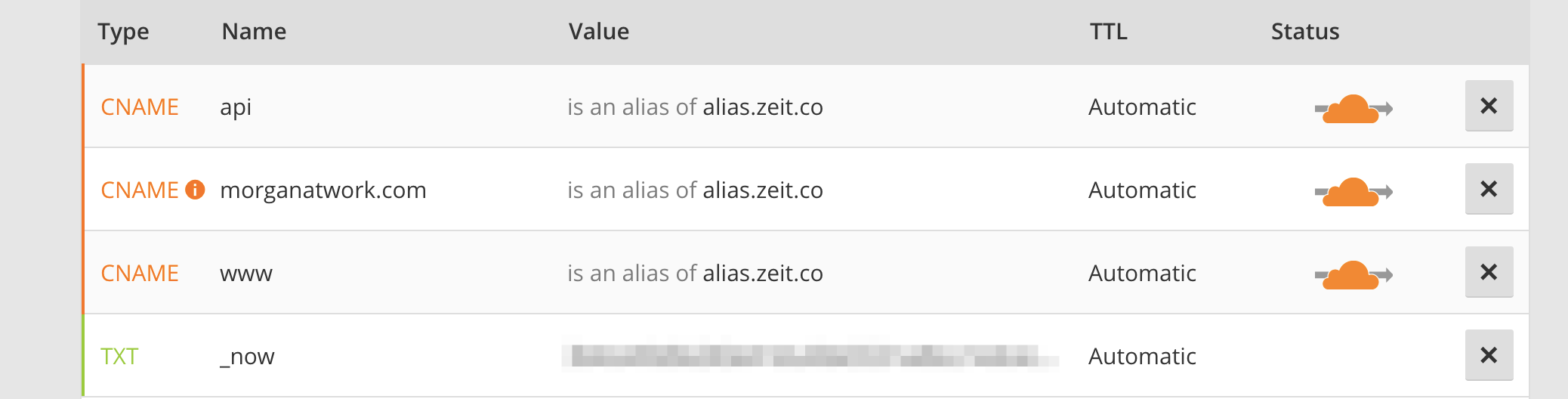
The page rule:

Any suggestions?? Thanks!
It's not working for the api subdomain. www I set up a month ago or so and was provisioned a cert then.
 morgs32
on 4 Sep 2017
morgs32
on 4 Sep 2017
I am not really sure what I'm doing... but going to this url gets a 500 and it's not hitting my app. I suppose your systems are supposed to handle it?
http://morganatwork.com/.well-known/acme-challenge/sp_test
http://api.morganatwork.com/.well-known/acme-challenge/sp_test
morgs32
on 4 Sep 2017
We catch that URL for Let's Encrypt verifications. Why should it hit your app?
OlliV
on 4 Sep 2017
I'm not expecting it to hit my app. But should it be giving off a 500?
morgs32
on 4 Sep 2017
This is my issue, to be clear:
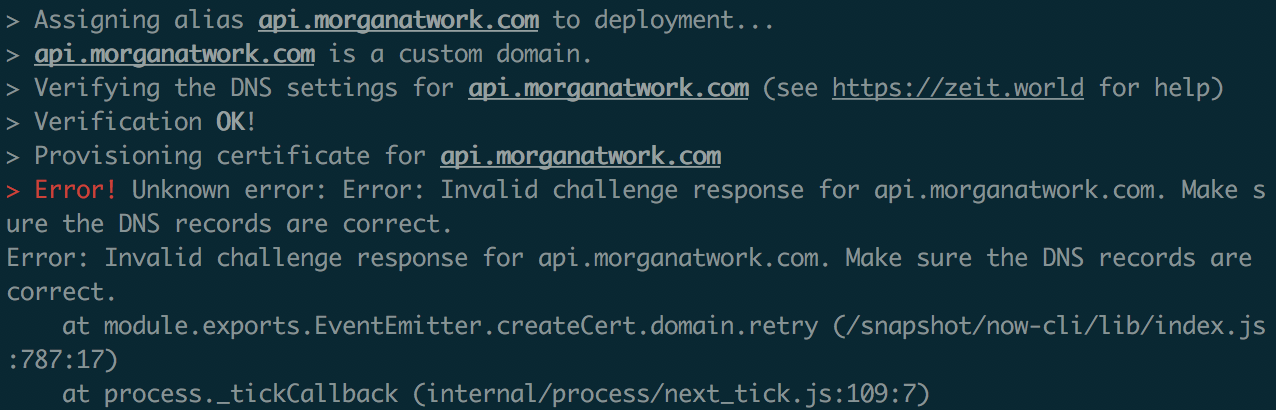
morgs32
on 4 Sep 2017
I seem to have the same error whilst I bought the domain via now.
Error! Unknown error: Error: Invalid challenge response for XXXXXX. Make sure the DNS records are correct.
I did: "now domains buy XXXX". it's added to my list of domains.
I then did "now alias XXXX XXXX" which configured the DNS records and threw an error.
After that it's giving the upper error when I try to alias.
 darenmalfait
on 4 Sep 2017
darenmalfait
on 4 Sep 2017
Can you try again now?
OlliV
on 4 Sep 2017
@OlliV it's working now. All systems go. Thanks a lot for your help.
morgs32
on 4 Sep 2017
Great.
OlliV
on 4 Sep 2017
Sorry, should have been more patient, getting a different error after 24 hours so will follow up on that.
 Stumblor
on 10 Nov 2017
Stumblor
on 10 Nov 2017
Related issues
 gadicc
·
48Comments
gadicc
·
48Comments
 Betree
·
27Comments
Betree
·
27Comments
 vladejs
·
36Comments
vladejs
·
36Comments
 viczam
·
30Comments
viczam
·
30Comments
 mxstbr
·
34Comments
mxstbr
·
34Comments
Most helpful comment
@OlliV suggested adding the following Page Rule to the Cloudflare config:
I’ve confirmed that this avoids the issue. 👍