Vercel: Alias immediately after a deploy now fails
my npm deploy script is
now --public deploy build/ && now alias alwaysinmind
but sometime the alias errors wit ha message that the deployment is not ready.
Would it be possible to make the deploy wait?
If not do you have any other suggestions - eg a portable delay cmd :)
 SteveALee
All 51 comments
In fact sometime the deploy is failing.
$ now --public deploy build/
> Deploying C:\projects\aim-web-app\client\build under stevelee
> Using Node.js 8.9.4 (default)
> Ready! https://alwaysinmind-qntfvyiiaa.now.sh [2s]
> Initializing…
and no more status outputs to console
SteveALee
on 10 Feb 2018
The same here. From yesterday I am not able to deploy.
 steida
on 10 Feb 2018
steida
on 10 Feb 2018
steida
on 10 Feb 2018
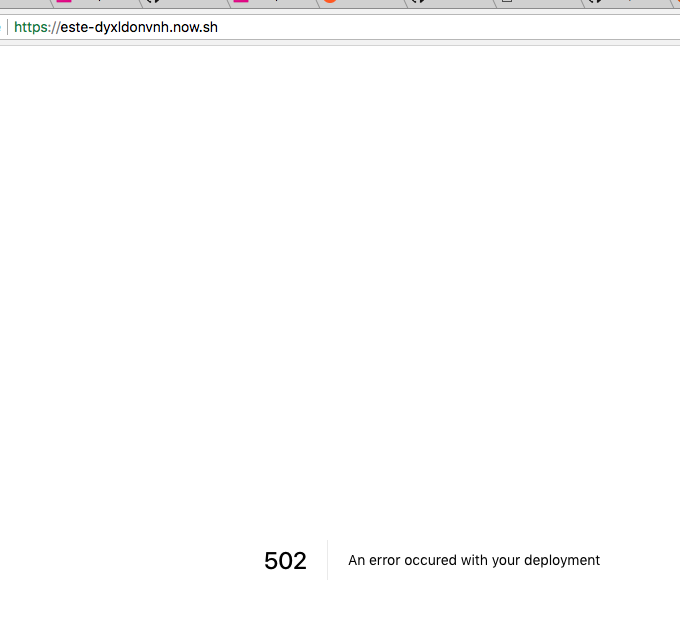
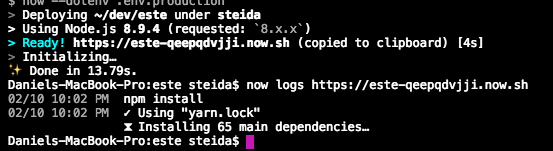
I thought it was now error, but it was mine error. https://zeit.co/steida/este/juubjtgoxn/logs
The problem of cli is that is will not tell you that deployment has failed.
steida
on 10 Feb 2018
@steida - ah thanks - will check that. The Alais command does give a nice red error.
In fact sometime the deploy is failing.
actually it's not failing it just that static deployments like my SPA frontend don't give all the details that node ones do. I mistakenly took this as a failure.
However the original issue remains. While using alias without specifying the actuall instance to link to is not document as afar as I can tell. It always used to work. Perhaps something now has gone asynchronous so the CLI returns from the previous deploy before it is complete. Or perhasps it just a timing thing and something is slow?
SteveALee
on 11 Feb 2018
The CLI exits successfully after initializing - This started happening to me after updating to 0.9.3
 davidyaha
on 12 Feb 2018
davidyaha
on 12 Feb 2018
Yes, it only recently started happening. I have the WIndows desktop client set to auto update but it's not clear if that also updates the global CLI.
I also installed project locally via yarn as got a red 'new version' warning form the cli. That has a few problems - report in another bug
SteveALee
on 12 Feb 2018
A hacky package.json script to give a portable delay till this command becomes synchronous again
"pause": "node -e \"((time) => new Promise((resolve) => setTimeout(resolve, time)))(process.argv[1]).then(() => process.exit(0))\" 3000"
We are investigating the issue. We recently started to enforce that an alias can't be pointed to a deployment that can't handle traffic. Unfortunately it seems these changes had some side effects.
 OlliV
on 13 Feb 2018
OlliV
on 13 Feb 2018
I get this issue too when running the 2 commands one after the other. Previously I was using the deprecated --alias option but it seems removed now
 slorber
on 14 Feb 2018
slorber
on 14 Feb 2018
Also just started getting this problem running now && now alias which worked fine up until a few days ago. It seems like before this problem, I could see the deployment building, installing dependencies etc. Now in the CLI I see Initializing… and then the alias attempt right away.
Upgrading to the latest CLI version same issue. Good you see you guys are on it.
In the meantime, I find if I run the same command 30 seconds later, it sees there are no changes to the code, finds the previous deployment that was not ready before and assigns the alias to it.
 codemzy
on 14 Feb 2018
codemzy
on 14 Feb 2018
@codemzy I was using 3 Secs but that still fails a small amount of times.
Once I use proper continuous deployment with CI I won't mind much but while it's manual, an extra 30 secs wait is a pain
SteveALee
on 15 Feb 2018
as a workaround this works for me, it sure is not pretty though
now && sleep 60 && now alias && now rm project --safe --yes
 chrillo
on 17 Feb 2018
chrillo
on 17 Feb 2018
Does it work in a Travis pipeline @chrillo ? I tried @SteveALee's pause script for 30 seconds and it still skipped the alias
 spences10
on 17 Feb 2018
spences10
on 17 Feb 2018
@spences10 I can't say for sure but the sleep command is available on most unix systems so I'd imagine it is
chrillo
on 17 Feb 2018
Sleep got removed from windows and replaced with timeout ages ago.
I find in git for windows bash that timeout always runs the bash version of timeout which is no use. Hence the one line portable node script I posted above.
SteveALee
on 17 Feb 2018
@spences10 try increasing the time constant to say 30000 (30 secs) if you can bear the delay :) I find it occasionally fails with 3 Secs so have increased it in my script
SteveALee
on 17 Feb 2018
I found 30 seconds being not enough some times, with 60 I have not experienced any failures.
chrillo
on 17 Feb 2018
I'll try with a minute or two, thanks 👍
spences10
on 17 Feb 2018
Any advance on 2 mins? :)
SteveALee
on 17 Feb 2018
I was investigating this and failed to reproduce it – tried around 15 times with no luck.
Could you guys run now ls | head -6 immediately after the failure to alias, and share the full logs (the output of now && now alias and the output of now ls | head -6)?
 matheuss
on 19 Feb 2018
matheuss
on 19 Feb 2018
I also added some extra logging on the relevant APIs that will help shed light into what's causing this, specially into @OlliV's suspiciousness.
matheuss
on 19 Feb 2018
@matheuss sure, will try ASAP :)
SteveALee
on 19 Feb 2018
@matheuss
C:\projects\aim-web-app>yarn deploy:api
yarn run v1.3.2
$ now rm -y alwaysinmindapi
> Success! [2s]
> Deployment alwaysinmindapi-tummapzdqw.now.sh removed
$ now --public deploy api/src && yarn pause && now alias alwaysinmindapi
UPDATE AVAILABLE The latest version of Now CLI is 9.3.3
> Deploying C:\projects\aim-web-app\api\src under stevelee
> Using Node.js 8.9.4 (default)
> Ready! https://alwaysinmindapi-clcopkyejw.now.sh [2s]
> Initializing…
$ rem node -e "((time) => new Promise((resolve) => setTimeout(resolve, time)))(process.argv[1]).then(() => process.exit(0))" 30000
> Assigning alias alwaysinmindapi to deployment...
> Error! Unknown error: Error: The deployment is not ready yet
Error: The deployment is not ready yet
    at module.exports.Now.createAlias.alias.retry (C:\snapshot\now-cli\dist\now.js:3978:21)
    at <anonymous>
    at process._tickCallback (internal/process/next_tick.js:188:7)
Done in 17.98s.

C:\projects\aim-web-app>bash

steve@OD-Surface MINGW64 /c/projects/aim-web-app (master)
$ now ls | head -6
> 2 deployments found under stevelee [980ms]

alwaysinmindapi (1 of 1 total)
 url                                       inst #    state                 age
 alwaysinmindapi-clcopkyejw.now.sh              1    READY                 49s
oh is the new API logging on the client side? I'll update and re run just in case
SteveALee
on 19 Feb 2018
The output with now 9.3.3 is identical even with yarn run deploy:client && now ls | head -6 as a single command
SteveALee
on 19 Feb 2018
@matheuss I think it's the time before an app listens to a public port when aliasing is not possible
 fridays
on 19 Feb 2018
fridays
on 19 Feb 2018
If you can;t get it to happen then my guess is latency somehow is causing it - it's unfortunately significant here in UK >700ms. Though you's think that would make things better :)
SteveALee
on 19 Feb 2018
@SteveALee you can make a now.json file and put the aliases in that. When you run now it should automatically add the aliases to your deployment.
{
    "alias" : [
        "alias.now.sh",
        "second.alias.now.sh"
    ]
}
Not sure if it will fix the reason for your error but it might help you troubleshoot, and it's a lot nicer than writing scripts. :wink:
edit: fixed typo
 kochie
on 19 Feb 2018
kochie
on 19 Feb 2018
@kochie Oh, OK, will try. I already have a now.json to set the name different to the npm package name. Though 'files' seems misnamed to me! :)
SteveALee
on 19 Feb 2018
@kochie files is used to determine which files now should upload – not to determine which aliases to set. alias is for that 🙂
@SteveALee thanks for re-running it. The logs in the server-side were helpful – I'll share more later today.
@fridays aliasing is only possible after the deployment is completed, which only happens after an exposed port is detected.
matheuss
on 19 Feb 2018
@kochie that does NOT work the, alias is not created
SteveALee
on 19 Feb 2018
@matheuss yes it seemed a strange use of 'files' :)
Glad you got some useful intell!
SteveALee
on 19 Feb 2018
@SteveALee crap that's my bad! alias is the correct name, my apologies. Thanks for the pickup @matheuss .
kochie
on 19 Feb 2018
@kochie heh, NP! But alias setting is only a way of providing the alias name for the alias command when not on the command line so I doubt it will have any impact.
SteveALee
on 19 Feb 2018
Should be fixed by now! It was a tricky (but simple) issue that was only affecting requests being served by bru.now.sh. I'm in Brazil, so I'm being served by sfo.now.sh – that's why I had a hard time reproducing it.
@SteveALee could you confirm it doesn't happen anymore? 🙂
matheuss
on 19 Feb 2018
Ok, I had now ls | head -6 set on my .travis.yml for this, do I not need to do that now @matheuss? I'm UK based too
spences10
on 19 Feb 2018
@spences10 shouldn't be needed anymore since I've already identified the issue and fixed it 🙏 Could you also confirm it's not happening anymore? 🙌
matheuss
on 19 Feb 2018
@matheuss I'll try now 👍
And thanks! 🙏
spences10
on 19 Feb 2018
🤔
Still the same behaviour for me @matheuss, you want me to add the now ls | head -6 and try again?
spences10
on 19 Feb 2018
Wahoo!!!!! It works. I now see those nice little status lines again. I had convinced myself I had imagined them and they only happened for node deployments, not static :)
$ yarn deploy:api && now ls && now alias ls
yarn run v1.3.2
$ now rm -y alwaysinmindapi
> Success! [1s]
> Deployment alwaysinmindapi-pzhrsdteex.now.sh removed
$ now --public deploy api/src && yarn pause && now alias alwaysinmindapi
> Deploying C:\projects\aim-web-app\api\src under stevelee
> Using Node.js 8.9.4 (default)
> Ready! https://alwaysinmindapi-kxmoebtgsz.now.sh [2s]
> Initializing…
> Building
> ▲ npm install
> ⧗ Installing 4 main dependencies…
> ✓ Installed 88 modules [1s]
> ▲ npm start
> > [email protected] start /home/nowuser/src
> > micro
> micro: Accepting connections on port 3000
> Deployment complete!
$ rem node -e "((time) => new Promise((resolve) => setTimeout(resolve, time)))(process.argv[1]).then(() => process.exit(0))" 30000
> Assigning alias alwaysinmindapi to deployment...
> Success! alwaysinmindapi.now.sh now points to alwaysinmindapi-kxmoebtgsz.now.sh! [4s]
Done in 58.42s.
> 2 deployments found under stevelee [922ms]

alwaysinmindapi (1 of 1 total)
 url                                       inst #    state                 age
 alwaysinmindapi-kxmoebtgsz.now.sh              1    READY                 56s

alwaysinmind (1 of 1 total)
 url                                       inst #    state                 age
 alwaysinmind-ovrebfxffj.now.sh                 0    FROZEN                15h

> 2 aliases found [203ms] under stevelee

  source                                      url                                age
  alwaysinmindapi-kxmoebtgsz.now.sh           alwaysinmindapi.now.sh             36s
  alwaysinmind-ovrebfxffj.now.sh              alwaysinmind.now.sh                15h
The alias did seem to take longer than usual though.
SteveALee
on 19 Feb 2018
@matheuss ^^^
SteveALee
on 19 Feb 2018
@SteveALee great to know 🎉
@spences10 yes, please share the full output of now && now alias (or the equivalent that you're using) and now ls | head -6 🕵️
matheuss
on 19 Feb 2018
Ok cool!
Here are the scripts I'm using in Travis:
package.json
"build": "react-scripts build && mv build c-counter",
"deploy:now": "now c-counter/ --token $NOW_TOKEN",
"alias:dev": "now alias c-counter.now.sh --token $NOW_TOKEN",
"alias:prod":
  "now alias c-counter.scottspence.me --token $NOW_TOKEN",
"cleanup": "now rm c-counter --safe --yes --token $NOW_TOKEN",
.travis.yml
sudo: false

language: node_js

cache:
  directories:
    - node_modules

notifications:
  email: false

node_js:
  - '9'

before_script:
  - npm prune

script:
  - npm i -g now@canary
  - npm run build
  - npm run deploy:now
  - now ls | head -6

after_script:
  - if [ "$TRAVIS_BRANCH" = "development" ]; then npm run alias:dev; fi
  - if [ "$TRAVIS_BRANCH" = "master" ]; then npm run alias:prod; fi
  - if [ "$TRAVIS_BRANCH" = "master" ]; then npm run release; fi
  - npm run cleanup
Guessing I need to add --token $NOW_TOKEN to my Travis script?
0.45s$ now ls | head -6
> Error! No existing credentials found. Please run "now login" or pass "--token"
0.31s$ now ls | head -6 --token $NOW_TOKEN
head: unrecognized option '--token'
Try 'head --help' for more information.
> Error! No existing credentials found. Please run "now login" or pass "--token"
> More details: https://err.sh/now-cli/no-credentials-found
It's ok I added the token to now, now instead of head 🙃
- now ls --token $NOW_TOKEN| head -6
spences10
on 19 Feb 2018
@matheuss [Gist] of the Travis output 👍
spences10
on 19 Feb 2018
@matheuss I can confirm it's working again for me. Thanks for the fix. 👍
codemzy
on 19 Feb 2018
is there any reason I should not close this now? Thanks for the awesome support!
SteveALee
on 19 Feb 2018
I'm still facing the same issue:
Green:dist ez$ now && now alias
> Deploying ~/Github/scp-ui/dist under ezeki
> Using Node.js 8.9.4 (default)
> Ready! https://scp-ui-xgixbeuqlv.now.sh (copied to clipboard) [5s]
> Success! Deployment ready!
> Initializing…
> Assigning alias scp-dev to deployment...
> Error! Unknown error: Error: The deployment is not ready yet
Error: The deployment is not ready yet
    at module.exports.Now.createAlias.alias.retry (/snapshot/now-cli/dist/now.js:3986:21)
    at <anonymous>
    at process._tickCallback (internal/process/next_tick.js:188:7)
Green:dist ez$
Green:dist ez$ now -v
10.0.0


md5-9ddb3d3d59feba636800d91ebd9d62d3


{
  "name": "scp-ui",
  "alias": "scp-dev"
}
 playerx
on 27 Feb 2018
playerx
on 27 Feb 2018
I just started getting this issue. It used to exit after deploying, now after running now it sits for about 60s then says:
> Deployment complete!
> Running in sfo1
 gkiely
on 1 Apr 2018
gkiely
on 1 Apr 2018
Related issues
 gadicc
·
48Comments
gadicc
·
48Comments
 Warchant
·
27Comments
Warchant
·
27Comments
 rgwozdz
·
40Comments
rgwozdz
·
40Comments
 doque
·
27Comments
doque
·
27Comments
 leo
·
46Comments
leo
·
46Comments
Most helpful comment
We are investigating the issue. We recently started to enforce that an alias can't be pointed to a deployment that can't handle traffic. Unfortunately it seems these changes had some side effects.