Vedo: Color map with alpha values disables interaction events
In the recent example called slice-plane, the code works as expected.

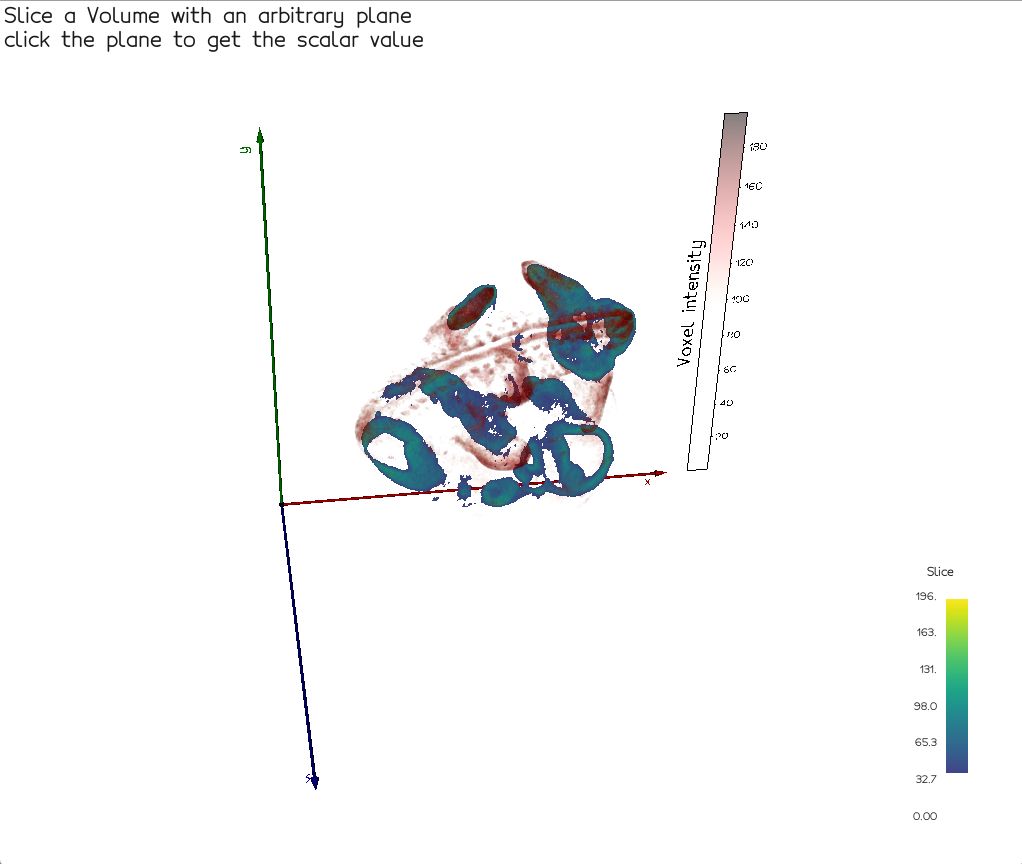
However, if you set a color map with alpha values, it doesn't work anymore.
In my case, I created a color map with hundreds of opaque (alpha 1.0) rgb colors and only one transparent (alpha 0.0) color. Then I built a LUT with that color map. Setting this color map disables interaction events, even if pickable(True) is set.
I tried first setting a LUT with slice._mapper.SetLookupTable(lut) and then with vedo's cmap slice.cmap(color_map, alpha=alpha_map).
 nantille
All 7 comments
Here's the modified code of the above example to reproduce the issue:
"""Slice a Volume with an arbitrary plane
click the plane to get the scalar value"""
from vedo import *

vol = Volume(datadir+'embryo.slc').alpha([0,0,0.5]).c('hot_r')
vol.pickable(False).addScalarBar3D(title='Voxel intensity', c='k')

# Fails to be pickable because of alpha map
sl = vol.slicePlane(origin=vol.center(), normal=(0,1,1))
# Hide black
alpha_map = [0.0, 1.0, 1.0, 1.0, 1.0]
sl.cmap('viridis', alpha=alpha_map).lighting('ambient').addScalarBar(title='Slice')
sl.pickable(True)

plt = show(vol, sl, __doc__, axes=3, interactive=False)

def func(mesh):
    print('Hey', mesh.name)
    ptid = mesh.closestPoint(mesh.picked3d, returnPointId=True)
    val = arr[ptid]
    txt = precision(mesh.picked3d, 3) + f"\nvalue = {val}"
    vpt = Sphere(mesh.points(ptid), r=1, c='pink').pickable(0)
    vig = vpt.vignette(txt, s=5, offset=(20,10)).followCamera()
    msg = Text2D(txt, pos='bottom-left', font="VictorMono")
    plt.remove(plt.actors[-3:], render=False) # remove the last 3
    plt.add([vpt, vig, msg])                  # add the new ones

arr = sl.getPointArray()
plt.actors += [None,None,None] # holds sphere, vignette, text2d
plt.mouseLeftClickFunction = func
plt.resetcam = False
interactive()
nantille
on 11 Jan 2021
Hi Nicolas - unfortunately this seems to be a bug in vtk9 versions.
In fact your above example (nice idea btw to hide low values in the slice!) works fine in vtk 8.1.2 | python 3.7
I'll investigate it with vtk people but I need to make sure it's not related to vedo.
I'll keep you informed.
PS: your output image seems to lack antialising...

do you know why so?
 marcomusy
on 12 Jan 2021
marcomusy
on 12 Jan 2021
Hi Marco, thanks for investigating this nasty bug! Ugh...then I suppose I'll install vtk 8 and py37 temporarily. Good to know that it's a regression.
I need to be able to clip and hide parts of a volume (even on a slice like this) with a color map. And then I can do more advanced stuff with that.
I don't know why AA is off by default, but I can turn it on with settings.useFXAA = True
nantille
on 12 Jan 2021
I confirm it works with vtk8, py37 and latest vedo (pip install -U git+https://github.com/marcomusy/vedo.git).

nantille
on 12 Jan 2021
I found the problem and submitted an issue to vtk developers... if they cannot fix it , it shouldnt be difficult to have a work around in vedo..
marcomusy
on 13 Jan 2021
As a temporary fix you can set
# Hide black
alpha_map = [0.0, 1.0, 1.0, 1.0, 1.0]
sl.cmap('viridis', alpha=alpha_map).lighting('ambient').addScalarBar(title='Slice')
sl.ForceOpaqueOn()
Great fix for VTK 9, thank you! I feared that ForceOpaqueOn would also force black to opaque but it keeps transparency as desired. I suppose we can close this because there's a way to fix the regression.
nantille
on 13 Jan 2021
Related issues
 jby1993
·
6Comments
jby1993
·
6Comments
 hmralavi
·
7Comments
hmralavi
·
7Comments
 FedeClaudi
·
6Comments
FedeClaudi
·
6Comments
 Jesse0818
·
4Comments
Jesse0818
·
4Comments
 m-albert
·
7Comments
m-albert
·
7Comments