It seems that addons.addSlider2D does not consider set related renderer. I added sliderWidget.SetCurrentRenderer(plt.renderer) before EnabledOn() to make the slider2D rendered on current renderer, it worked.
However, I found the coordinateSystem of sliderRep become confused.
For example, If SetCoordinateSystemToNormalizedDisplay(), the slider2D's origine is associated renderer's origine instead of window's origine. If SetCoordinateSystemToNormalizedViewport(), the final position is totally incomprehensible.
Any ideas?
 jby1993
All 6 comments
It looks like it's a VTK bug.
Apparently GetPoint2Coordinate refers to the window while GetPoint1Coordinate refers to the current renderer...
As you suggested, adding the line in addons.py (line438) before EnabledOn():
sliderWidget.SetCurrentRenderer(settings.plotter_instance.renderer)
then:
from vedo import *

def slider0(widget, event):
    value = widget.GetRepresentation().GetValue()
    sphere.color(value)

def slider1(widget, event):
    value = widget.GetRepresentation().GetValue()
    cube.color(value)


vp = Plotter(N=2, axes=1)

sphere = Sphere(r=0.6)
vp.show(sphere, at=0)
vp.addSlider2D(slider0,
               -9, 9,
               value=0,
               pos=([0.1,0.1],
                    [0.4,0.1]),
               title="slider0 color number")

cube = Cube()
vp.show(cube, at=1)
vp.addSlider2D(slider1,
               -9, 9,
               value=0,
               pos=([0.1,0.1],
                    [0.4,0.1]),
               title="slider1 color number")

vp.show(interactive=1)
produces:
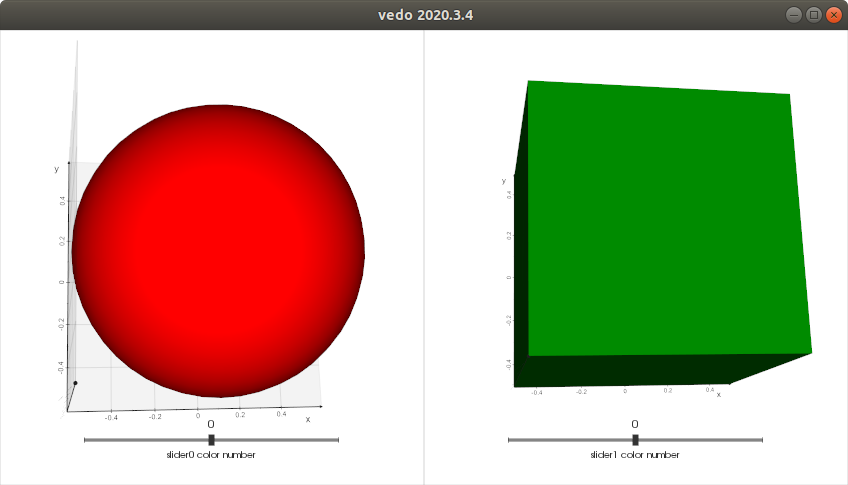
 marcomusy
on 23 Jun 2020
marcomusy
on 23 Jun 2020
@marcomusy Thanks for your reply. I tested with vtk python API only, it does have strange results when using slider2D in multi renderers. In your example, both Point1 and Point2 refer to their associated renderers. You can change the viewport of the renderer to see this.
Here is my test script with vtk. I found when I construnct the second vtkSliderWidget(), The first slider will disappear..
import vtk

def sliderfunc1(widget, event):
    value = widget.GetRepresentation().GetValue()
    print('slider 1: %f'%value)

def sliderfunc2(widget, event):
    value = widget.GetRepresentation().GetValue()
    print('slider 2: %f'%value)

def sphere(r,reso):
    shape=vtk.vtkSphereSource()
    shape.SetRadius(r)
    shape.SetThetaResolution(reso)
    shape.SetPhiResolution(reso)
    shape.Update()
    mapper=vtk.vtkPolyDataMapper()
    mapper.SetInputConnection(shape.GetOutputPort())
    actor=vtk.vtkActor()
    actor.SetMapper(mapper)
    return actor

def initialRep():
    sliderRep = vtk.vtkSliderRepresentation2D()
    sliderRep.SetMinimumValue(0.)
    sliderRep.SetMaximumValue(1.)
    sliderRep.SetValue(0.5)
    sliderRep.SetSliderLength(0.015)
    sliderRep.SetSliderWidth(0.025)
    sliderRep.SetEndCapLength(0.0015)
    sliderRep.SetEndCapWidth(0.0125)
    sliderRep.SetTubeWidth(0.0075)
    sliderRep.GetPoint1Coordinate().SetCoordinateSystemToNormalizedDisplay()
    sliderRep.GetPoint2Coordinate().SetCoordinateSystemToNormalizedDisplay()
    sliderRep.GetPoint1Coordinate().SetValue(0.1, 0.1)
    sliderRep.GetPoint2Coordinate().SetValue(0.4, 0.1)
    return sliderRep

window=vtk.vtkRenderWindow()
Interactor=vtk.vtkRenderWindowInteractor()
Interactor.SetRenderWindow(window)

Render1=vtk.vtkRenderer()
Render1.SetViewport(0,0,0.5,1)
window.AddRenderer(Render1)

actor=sphere(0.6,10)
Render1.AddActor(actor)
window.Render()

sliderRep=initialRep()
sliderWidget = vtk.vtkSliderWidget()
sliderWidget.SetCurrentRenderer(Render1)
sliderWidget.SetInteractor(Interactor)
sliderWidget.SetRepresentation(sliderRep)
sliderWidget.SetAnimationModeToJump()
sliderWidget.AddObserver("InteractionEvent", sliderfunc1)
sliderWidget.EnabledOn()

Render2=vtk.vtkRenderer()
Render2.SetViewport(0.5,0,1,1)
window.AddRenderer(Render2)

actor=sphere(0.6,4)
Render2.AddActor(actor)
window.Render()

sliderRep=initialRep()
sliderWidget = vtk.vtkSliderWidget()
sliderWidget.SetCurrentRenderer(Render2)
sliderWidget.SetInteractor(Interactor)
sliderWidget.SetAnimationModeToJump()
sliderWidget.SetRepresentation(sliderRep)
sliderWidget.AddObserver("InteractionEvent", sliderfunc2)
sliderWidget.EnabledOn()

Interactor.Initialize()
window.Render()

Interactor.Start()
The error above is that you reuse sliderWidget. Rename it to sliderWidget2 and it works.
The effect of the bug is that the 0.4 value somehow refers to the coordinate system of the window _in size_ but shifted in the viewport (use 0.5 to see the result).
marcomusy
on 23 Jun 2020
Yes, I understood. Maybe I have to report the bug for VTK.
jby1993
on 23 Jun 2020
Yes - that would be a good idea!
(btw also sliderRep should be renamed)
marcomusy
on 23 Jun 2020
BTW: For python, we do not have to rename the varible. New assignment should have no influence on the old one. I do not know why here is not.
jby1993
on 23 Jun 2020
Related issues
 kemo993
·
6Comments
kemo993
·
6Comments
 FedeClaudi
·
6Comments
FedeClaudi
·
6Comments
 CMengich
·
5Comments
CMengich
·
5Comments
 bhaveshshrimali
·
6Comments
bhaveshshrimali
·
6Comments
 mahendra-ramajayam
·
3Comments
mahendra-ramajayam
·
3Comments