Hello,
I plan to use vedo to visualize and manipulate the in-house dental model datasets (all are VTP file). Each cell/triangle has its own label (between 0 to 24). For example, the "gingiva" cells is labeled as 0, and "molar" cells are labeled as 1. The total number of labels are 25, from 0 to 24, across different models, but most of them only have 15 labels. All cell labels are stored in a cell array (named "Label"). Could you guide me how to fixed the color of cells based on their label? For example, cell with label of 0 always show [255, 162, 143], cells with label of 1 always show [170, 255, 255], cells with label of 2 always show [255, 0, 127], and so on, even though the model might not have some labels.
I started from some examples. Now, I have made an lookup table with total 25 classes (see below).
lut = makeLUT(colorlist=[(0, [255, 162, 143]), (1, [170, 255, 255]), (2, [255, 0, 127]),
                         (3, [170, 255, 127]), (4, [0, 0, 127]), (5, [255, 255, 127]),
                         (6, [255, 170, 255]), (7, [255, 255, 255]), (8, [0, 0, 0]),
                         (9, [255, 0, 255]), (10, [255, 255, 0]), (11, [0, 0, 255]),
                         (12, [0, 255, 0]), (13, [255, 0, 0]), (14, [0, 255, 255]),
                         (15, [68, 114, 196]), (16, [255, 80, 80]), (17, [0, 51, 0]),
                         (18, [102, 102, 255]), (19, [204, 204, 0]), (20, [102, 0, 51]),
                         (21, [231, 232, 228]), (22, [95, 95, 95]), (23, [102, 0, 204]),
                         (24, [255, 153, 0]),],
                         vmin=0,
                         vmax=24,
                         aboveColor='black',
                         belowColor='white',
                         interpolate=False)
I fed this LUT in the cmap function on a mesh object, as below.
mesh.cmap(cname=lut, arrayName='Label', on='cells', n=25).addScalarBar()
I found that the color of cells still changes in different models due to the different numbers of teeth (or classes).
I am looking forward to hearing your response! Many thanks!
Best,
Bruce Wu
 Tai-Hsien
All 12 comments
Hi, what you have already done sounds perfectly fine, I can't see why you get different coloring as this doesn't depend on the nr of triangles (or teeth).
Maybe you can share a small dataset or post a snapshot to see what the problem is?
 marcomusy
on 24 Sep 2020
marcomusy
on 24 Sep 2020
Hello marcomusy,
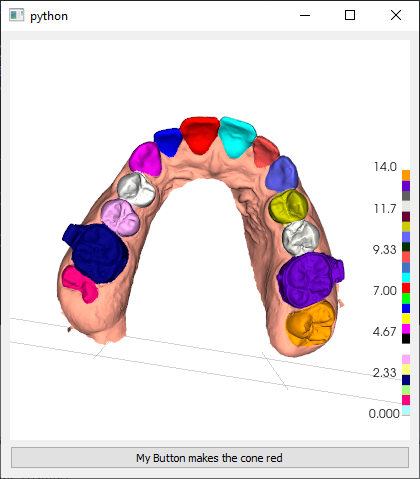
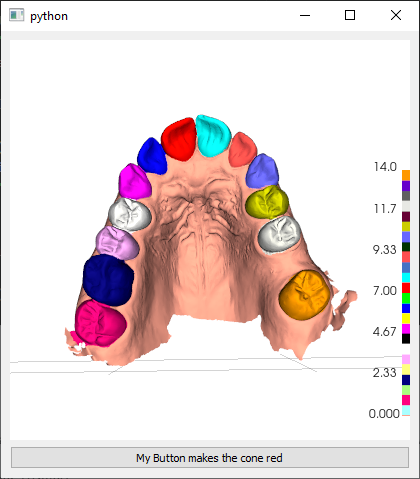
Thank you for your quick response! I attached the screenshots as below. I found that they actually use the same colormap!
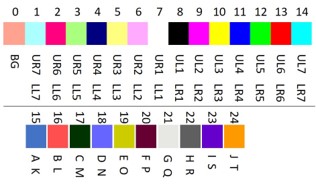
However, the color is not right. I also attached a colormap for these 25 labels. I don't know why the cells with label of 1 (the teeth in the left edge, or the 2nd molar) are not the light blue. Could you help me figure it out?
Tai-Hsien
on 24 Sep 2020
Hi Bruce, uhmm are you sure of your labels?
can you visualize
mesh.threshold('Labels', above=0.5, below=1.5, useCells=True)
to see which is actually tooth nr.1
ps: btw you can also play with mesh.lighting() to improve a bit the appearance
ps2; useCells=True will become on='cells' in next release
marcomusy
on 24 Sep 2020
Hello Musy,
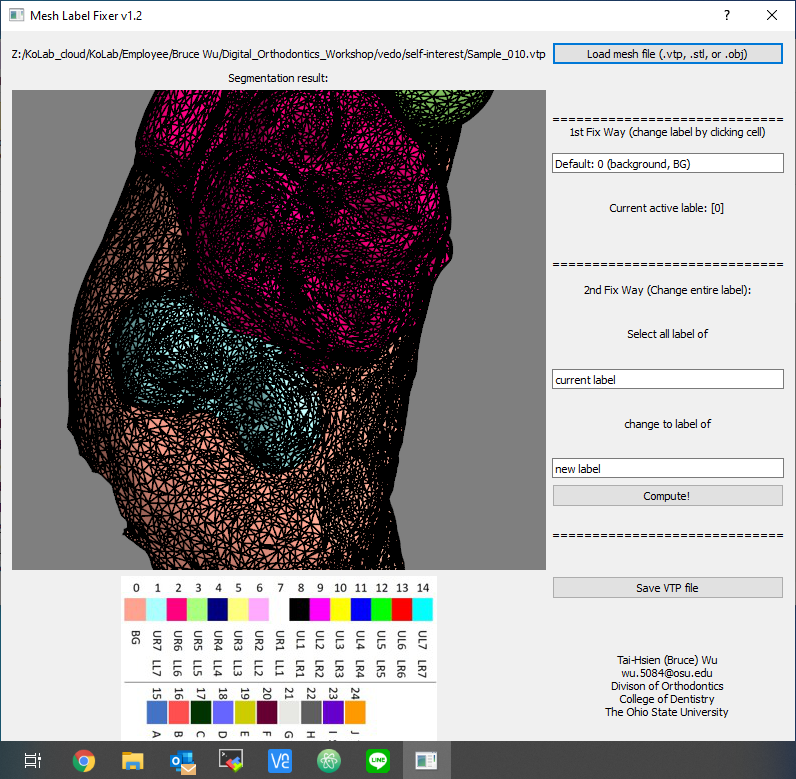
Yeah, I am pretty sure the labels are right. I attached the cells with label 1 in the first example below.
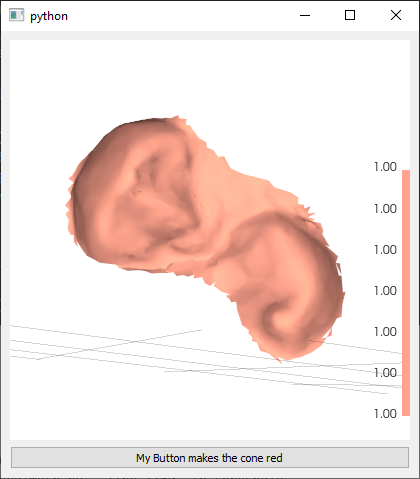
I also attached visualization of the same example using my previous work, in which you can see the UR7 should be light blue.
Tai-Hsien
on 24 Sep 2020
could it be that it's all shifted by 1?
what if you try lut = makeLUT(colorlist=[(0.5, [255, 162, 143]), (1.5, [170, ...
marcomusy
on 24 Sep 2020
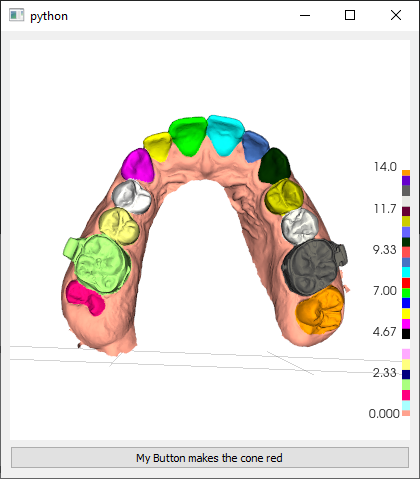
It looks still not right... :(
Tai-Hsien
on 24 Sep 2020
From the color bar, it looks like it squeezes all 25 colors from LUT into the range from 0 to14, because this example only has 15 classes (label 0 to label 14).
Tai-Hsien
on 24 Sep 2020
You're right. This seems to be a bug.. Try removing the scalarbar (the bug might be there).
Also try mesh.mapper().SetScalarRange(0,25).
I will need a couple of days to investigate&fix i'm afraid.
marcomusy
on 24 Sep 2020
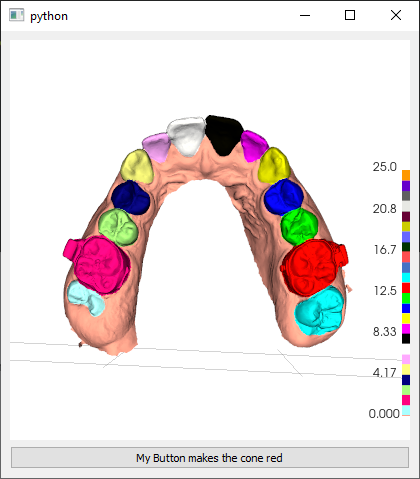
mesh.mapper().SetScalarRange(0,25) works!!!
Tai-Hsien
on 24 Sep 2020
fantastic! at least you have a temporary hack :)
i'll fix it in the coming release, thanks for drawing my attention to it.
marcomusy
on 24 Sep 2020
You save my day, my friend! Vedo is a fantastic package!
Tai-Hsien
on 24 Sep 2020
Happy to help!, thanks for your interest and for the feedback.
marcomusy
on 24 Sep 2020
Related issues
 m-albert
·
7Comments
m-albert
·
7Comments
 jrdkr
·
7Comments
jrdkr
·
7Comments
 hmralavi
·
7Comments
hmralavi
·
7Comments
 Yoorthiziri
·
5Comments
Yoorthiziri
·
5Comments
 Jesse0818
·
4Comments
Jesse0818
·
4Comments
Most helpful comment
You save my day, my friend! Vedo is a fantastic package!