Vedo: load mesh from .ply file with custom format
Hi @marcomusy,
I want to load a custom .ply file with different properties and elements structured in the following format:
File: map_mesh.ply
Description:
ply
format binary_little_endian 1.0
comment generated by omnimap
element vertex 3786298
property float x
property float y
property float z
property float nx
property float ny
property float nz
property float radiance_blue
property float radiance_green
property float radiance_red
property float irradiance_blue
property float irradiance_green
property float irradiance_red
property float irradiance_lamp_0_blue
property float irradiance_lamp_0_green
property float irradiance_lamp_0_red
property float irradiance_lamp_1_blue
property float irradiance_lamp_1_green
property float irradiance_lamp_1_red
property float irradiance_lamp_2_blue
property float irradiance_lamp_2_green
property float irradiance_lamp_2_red
property float irradiance_lamp_3_blue
property float irradiance_lamp_3_green
property float irradiance_lamp_3_red
property float irradiance_lamp_4_blue
property float irradiance_lamp_4_green
property float irradiance_lamp_4_red
property float irradiance_lamp_5_blue
property float irradiance_lamp_5_green
property float irradiance_lamp_5_red
property float reflectance_blue
property float reflectance_green
property float reflectance_red
element face 7570727
property list uchar uint vertex_indices
element lamp 6
property list uint uint vertex_indices
end_header
Do you think it would be possible to do that with vedo. I've tried to use the following command mesh = vedo.Mesh('./map_mesh.ply') but it seems that my created mesh variable to be empty.
You can access the .ply file from this tarball (apologies for the big size)
 ttsesm
All 18 comments
Hi @ttsesm the only thing wich seems to work is plyfile
pip install plyfile
from plyfile import PlyData
plydata = PlyData.read('map_mesh.ply')
print(plydata)
print(plydata.elements)
print(plydata.elements[0].data['radiance_blue'])
print(len(plydata.elements[0].data['radiance_blue']))
print(plydata['vertex'])
print(plydata['face'].data['vertex_indices'])
Output:
(PlyElement('vertex', (PlyProperty('x', 'float'), PlyProperty('y', 'float'), PlyProperty('z', 'float'), PlyProperty('nx', 'float'), PlyProperty('ny', 'float'), PlyProperty('nz', 'float'), PlyProperty('radiance_blue', 'float'), PlyProperty('radiance_green', 'float'), PlyProperty('radiance_red', 'float'), PlyProperty('irradiance_blue', 'float'), PlyProperty('irradiance_green', 'float'), PlyProperty('irradiance_red', 'float'), PlyProperty('irradiance_lamp_0_blue', 'float'), PlyProperty('irradiance_lamp_0_green', 'float'), PlyProperty('irradiance_lamp_0_red', 'float'), PlyProperty('irradiance_lamp_1_blue', 'float'), PlyProperty('irradiance_lamp_1_green', 'float'), PlyProperty('irradiance_lamp_1_red', 'float'), PlyProperty('irradiance_lamp_2_blue', 'float'), PlyProperty('irradiance_lamp_2_green', 'float'), PlyProperty('irradiance_lamp_2_red', 'float'), PlyProperty('irradiance_lamp_3_blue', 'float'), PlyProperty('irradiance_lamp_3_green', 'float'), PlyProperty('irradiance_lamp_3_red', 'float'), PlyProperty('irradiance_lamp_4_blue', 'float'), PlyProperty('irradiance_lamp_4_green', 'float'), PlyProperty('irradiance_lamp_4_red', 'float'), PlyProperty('irradiance_lamp_5_blue', 'float'), PlyProperty('irradiance_lamp_5_green', 'float'), PlyProperty('irradiance_lamp_5_red', 'float'), PlyProperty('reflectance_blue', 'float'), PlyProperty('reflectance_green', 'float'), PlyProperty('reflectance_red', 'float')), count=3786298, comments=[]), PlyElement('face', (PlyListProperty('vertex_indices', 'uchar', 'uint'),), count=7570727, comments=[]), PlyElement('lamp', (PlyListProperty('vertex_indices', 'uint', 'uint'),), count=6, comments=[]))
[12.588509 12.497231 12.510437 ... 10.479129 10.484828       nan]
3786298
element vertex 3786298
property float x
property float y
property float z
property float nx
property float ny
property float nz
property float radiance_blue
property float radiance_green
property float radiance_red
property float irradiance_blue
property float irradiance_green
property float irradiance_red
property float irradiance_lamp_0_blue
property float irradiance_lamp_0_green
property float irradiance_lamp_0_red
property float irradiance_lamp_1_blue
property float irradiance_lamp_1_green
property float irradiance_lamp_1_red
property float irradiance_lamp_2_blue
property float irradiance_lamp_2_green
property float irradiance_lamp_2_red
property float irradiance_lamp_3_blue
property float irradiance_lamp_3_green
property float irradiance_lamp_3_red
property float irradiance_lamp_4_blue
property float irradiance_lamp_4_green
property float irradiance_lamp_4_red
property float irradiance_lamp_5_blue
property float irradiance_lamp_5_green
property float irradiance_lamp_5_red
property float reflectance_blue
property float reflectance_green
property float reflectance_red
[array([788, 772, 771], dtype=uint32) array([788, 771, 787], dtype=uint32)
 array([773, 772, 789], dtype=uint32) ...
 array([1422788, 1422789, 1422961], dtype=uint32)
 array([1422961, 1422789, 1422770], dtype=uint32)
 array([1422789, 1422769, 1422770], dtype=uint32)]
You can extract vertices and faces from it, along with any property array, and feed vedo with them:
from vedo import Mesh, show
m = Mesh([verts, faces])
m.addPointArray(radiance_blue_array, 'radiance_blue')
show(m)
Note that there are Nones in the numpy arrays so you must take care of that I guess.
 marcomusy
on 24 Aug 2020
marcomusy
on 24 Aug 2020
thanks @marcomusy, yup plyfile seems to work but it is quite slow. pyntcloud is a bit faster and seems also to be able to load the data but it is structuring them a bit strange, e.g. I couldn't find the lamp property array once I've loaded the file.
Thus, I was hoping that vedo might be able to handle it better. Anyways, I will play a bit with plyfile --> vedo and see how it goes.
ttsesm
on 24 Aug 2020
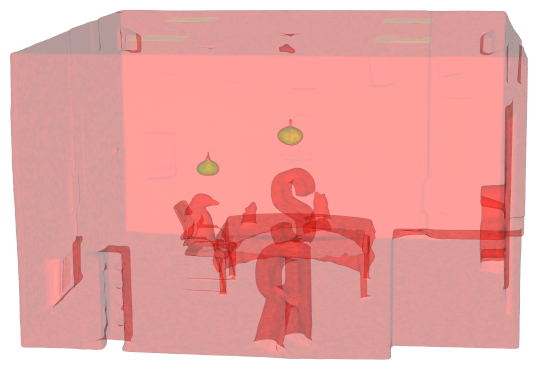
yes! pyntcloud seems to work faster:
from pyntcloud import PyntCloud
cloud = PyntCloud.from_file("map_mesh.ply")
pts = cloud.points.to_numpy()

from vedo import Mesh, show
m = Mesh([pts[:,(0,1,2)], cloud.mesh.to_numpy()]).alpha(0.2)
arr_names = [
    'radiance_blue'
    'radiance_green'
    'radiance_red'
    'irradiance_blue'
    'irradiance_green'
    'irradiance_red',
    'irradiance_lamp_0_blue',
    'irradiance_lamp_0_green',
    'irradiance_lamp_0_red',
    'irradiance_lamp_1_blue',
    'irradiance_lamp_1_green',
    'irradiance_lamp_1_red',
    'irradiance_lamp_2_blue',
    'irradiance_lamp_2_green',
    'irradiance_lamp_2_red',
    'irradiance_lamp_3_blue',
    'irradiance_lamp_3_green',
    'irradiance_lamp_3_red',
    'irradiance_lamp_4_blue',
    'irradiance_lamp_4_green',
    'irradiance_lamp_4_red',
    'irradiance_lamp_5_blue',
    'irradiance_lamp_5_green',
    'irradiance_lamp_5_red',
    'reflectance_blue',
    'reflectance_green',
    'reflectance_red',
]
for i in range(6, len(arr_names)):
    m.addPointArray(pts[:,i], arr_names[i])
m.write('map_mesh.vtk')
show(m)
marcomusy
on 24 Aug 2020
PS: once map_mesh.vtk is created, vedo takes 0.8 sec to load it:
from vedo import load, show
m = load('map_mesh.vtk').alpha(0.2)
m.selectPointArray('irradiance_lamp_1_red')
print('loaded')
show(m)
yes! pyntcloud seems to work faster:
from pyntcloud import PyntCloud
cloud = PyntCloud.from_file("map_mesh.ply")
pts = cloud.points.to_numpy()

from vedo import Mesh, show
m = Mesh([pts[:,(0,1,2)], cloud.mesh.to_numpy()]).alpha(0.2)
arr_names = [
    'radiance_blue'
    'radiance_green'
    'radiance_red'
    'irradiance_blue'
    'irradiance_green'
    'irradiance_red',
    'irradiance_lamp_0_blue',
    'irradiance_lamp_0_green',
    'irradiance_lamp_0_red',
    'irradiance_lamp_1_blue',
    'irradiance_lamp_1_green',
    'irradiance_lamp_1_red',
    'irradiance_lamp_2_blue',
    'irradiance_lamp_2_green',
    'irradiance_lamp_2_red',
    'irradiance_lamp_3_blue',
    'irradiance_lamp_3_green',
    'irradiance_lamp_3_red',
    'irradiance_lamp_4_blue',
    'irradiance_lamp_4_green',
    'irradiance_lamp_4_red',
    'irradiance_lamp_5_blue',
    'irradiance_lamp_5_green',
    'irradiance_lamp_5_red',
    'reflectance_blue',
    'reflectance_green',
    'reflectance_red',
]
for i in range(6, len(arr_names)):
    m.addPointArray(pts[:,i], arr_names[i])
m.write('map_mesh.vtk')
show(m)
What about the elements face and lamp. The former I can see it in the variables of pyntcloud but not the latter one.
ttsesm
on 24 Aug 2020
oh.. i see.. i guess pyntcloud ignores them because they contains some Nones (?)
marcomusy
on 24 Aug 2020
oh.. i see.. i guess
pyntcloudignores them because they contains some Nones (?)
Yup, I do not know either. Maybe it is due to NaN's as you say. I've tried meshio as well but this one raises a reading error, so I am kind of stack with the plyfile in order to be able to read all the embedded data.
ttsesm
on 24 Aug 2020
@marcomusy how to pass the lamp data from plydata to my vedo.Mesh() though addPointArary()?
I am trying the following:
m.addPointArray(plydata['lamp'].data['vertex_indices'].flatten(), 'light_sources')
m.addPointArray(plydata['lamp'].data['vertex_indices'][0], 'light_source1')
m.addPointArray(plydata['lamp'].data['vertex_indices'][1], 'light_source2')
m.addPointArray(plydata['lamp'].data['vertex_indices'][2], 'light_source3')
m.addPointArray(plydata['lamp'].data['vertex_indices'][3], 'light_source4')
m.addPointArray(plydata['lamp'].data['vertex_indices'][4], 'light_source5')
m.addPointArray(plydata['lamp'].data['vertex_indices'][5], 'light_source6')
but it gives me a runtime error.
Also how do you access afterwards these added point arrays?
m.getPointArray('radiance_blue') does not seem to return something.
Also another question what is the difference between addPointArray() and addCellArray()?
ttsesm
on 25 Aug 2020
but it gives me a runtime error.
what error
m.getPointArray('radiance_blue') does not seem to return something.
it should.
from vedo import Mesh, show
m = Mesh('map_mesh.vtk').alpha(0.2)
m.selectPointArray('irradiance_lamp_0_red')
print(m.getArrayNames())
print(m.getPointArray('irradiance_lamp_1_red'))
m.cmap('viridis').addScalarBar3D(title='')
show(m)
{'PointData': ['reflectance_red', 'irradiance_lamp_1_red', 'irradiance_lamp_2_blue', 'irradiance_lamp_2_green', 'irradiance_lamp_2_red', 'irradiance_lamp_3_blue', 'irradiance_lamp_3_green', 'irradiance_lamp_3_red', 'irradiance_lamp_4_blue', 'irradiance_lamp_4_green', 'irradiance_lamp_4_red', 'irradiance_lamp_5_blue', 'irradiance_lamp_5_green', 'irradiance_lamp_5_red', 'reflectance_blue', 'reflectance_green'], 'CellData': []}
[12.588509 12.497231 12.510437 ... 10.479129 10.484828 nan]
Also another question what is the difference between addPointArray() and addCellArray()?
data can be associated to the vertices (points) or to the faces (cells) of the mesh, so the array you're passing must have the right dimensions, in your case all data seems to be associated to points (i guess).
marcomusy
on 25 Aug 2020
but it gives me a runtime error.
what error
ok, it seems to be due to the fact that the data in lamp are not the same size as my vertices
Error in addPointArray(): Number of inputs != nr. of points 6 3786298
Traceback (most recent call last):
  File "/usr/share/pycharm/plugins/python-ce/helpers/pydev/pydevd.py", line 1438, in _exec
    pydev_imports.execfile(file, globals, locals)  # execute the script
  File "/usr/share/pycharm/plugins/python-ce/helpers/pydev/_pydev_imps/_pydev_execfile.py", line 18, in execfile
    exec(compile(contents+"\n", file, 'exec'), glob, loc)
  File "/home/ttsesm/Development/open3d_reconstruction_system/3d_reconstruction.py", line 87, in <module>
    m.addPointArray(plydata['lamp'].data['vertex_indices'], 'light_sources')
  File "/home/ttsesm/Development/open3d_reconstruction_system/venv/lib/python3.8/site-packages/vedo/base.py", line 853, in addPointArray
    raise RuntimeError()
RuntimeError
Is it possible to add it as another type of property or something?
m.getPointArray('radiance_blue') does not seem to return something.
it should.
from vedo import Mesh, show
m = Mesh('map_mesh.vtk').alpha(0.2)
m.selectPointArray('irradiance_lamp_0_red')
print(m.getArrayNames())
print(m.getPointArray('irradiance_lamp_1_red'))
m.cmap('viridis').addScalarBar3D(title='')
show(m)
Yup, it works. It seems I had a typo or something.
{'PointData': ['reflectance_red', 'irradiance_lamp_1_red', 'irradiance_lamp_2_blue', 'irradiance_lamp_2_green', 'irradiance_lamp_2_red', 'irradiance_lamp_3_blue', 'irradiance_lamp_3_green', 'irradiance_lamp_3_red', 'irradiance_lamp_4_blue', 'irradiance_lamp_4_green', 'irradiance_lamp_4_red', 'irradiance_lamp_5_blue', 'irradiance_lamp_5_green', 'irradiance_lamp_5_red', 'reflectance_blue', 'reflectance_green'], 'CellData': []}
[12.588509 12.497231 12.510437 ... 10.479129 10.484828 nan]Also another question what is the difference between addPointArray() and addCellArray()?
data can be associated to the vertices (points) or to the faces (cells) of the mesh, so the array you're passing must have the right dimensions, in your case all data seems to be associated to points (i guess).
I see thanks. Apparently, this is not the case for the lamp varialbe sicne it does not associated neither to the number of points nor to faces. Thus, this comes down to my question above and whether I can embed somehow this data to Mesh() as something else.
ttsesm
on 25 Aug 2020
Is it possible to add it as another type of property or something?
No! vertex data must be one-to-one to vertices (same for faces).
whether I can embed somehow this data to Mesh() as something else.
well it all depends on what _exactly_ is this data representing.. if it's neither associated to points nor faces what is it?
Error in addPointArray(): Number of inputs != nr. of points 6 3786298
btw. this means your' passing an array of length 6 and trying to match it to 3.7M points, are you sure it's not a matrix? check the shape of your input.
marcomusy
on 25 Aug 2020
There are the vertices associated to the points that correspond to the light sources. Thus, one solution could be to create an array of zeros size of overall vertices and in the corresponding indices change them to 1 and then add with addPointArray() like the other properties.
It is size of 6 because it is a list of arrays.
ttsesm
on 26 Aug 2020
if it's some complementary information I would keep it separate from the mesh, but that really depends on the way you plan to use it.
Hope it helps :)
marcomusy
on 26 Aug 2020
@marcomusy one more question is it possible to re-save the vedo.Mesh() with the added addPointArrays() as a .ply file again or it is not supported?
ttsesm
on 28 Aug 2020
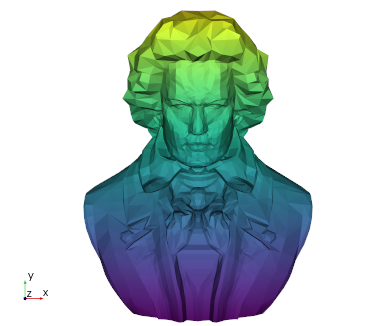
Yes, it's already supported. E.g.
from vedo import *
s = Mesh(datadir+'beethoven.ply')
s.cmap('viridis', s.points()[:,1])
s.write('mymesh.ply')
s.show()
then type
vedo mymesh.ply
marcomusy
on 28 Aug 2020
but it does not save the addPointArray() variables that I have included, right? At least it didn't here that I've tried it.
ttsesm
on 29 Aug 2020
Oh I see, PLY writer generates an RGB array but it doesn't save multiple arrays.
marcomusy
on 29 Aug 2020
I see, thanks a lot for the support. I think I will close the issue for now.
ttsesm
on 29 Aug 2020
Related issues
 kemo993
·
6Comments
kemo993
·
6Comments
 CMengich
·
5Comments
CMengich
·
5Comments
 RubendeBruin
·
3Comments
RubendeBruin
·
3Comments
 Yoorthiziri
·
5Comments
Yoorthiziri
·
5Comments
 mahendra-ramajayam
·
3Comments
mahendra-ramajayam
·
3Comments