Hi Marco,
I tried exporting a brainrender scene to embed it within a web page, but it renders weird: depending on how I move the camera around different objects are rendered.
I am no familiar at all with x3d, so I don't even know if this is something with vtkplotter or x3d or something else still, but I was hoping you'd have some advice on this?
This is just a first test but I'd love to start hosting brainrender scenes online to let people play around with it before committing to actually installing it, so having this feature working perfectly would be very important.
 FedeClaudi
All 14 comments
Hi Federico, the X3D exporting is almost completely delegated to the class
https://vtk.org/doc/nightly/html/classvtkX3DExporter.html
used in this part of the vtkplotter.vtkio code.
You can play with some parameter but i'm not quite sure that it might fix the issue..
Another option is to import the meshes in a notebook with k3d and then export the rendering window from within the menu (inside the k3d rendering).
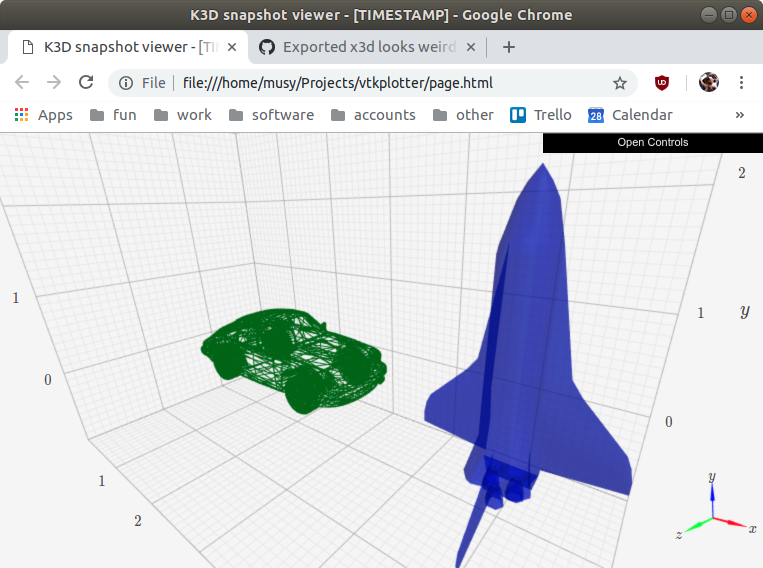
The result is something like this.
You can save the full scene with pressing E or - programmatically with
exportWindow('scene.npy')
Then load it back in jupyter and finally export the html page.
 marcomusy
on 1 May 2020
marcomusy
on 1 May 2020
Wow I had no idea you could export it with controls like that!
This is so great, I was just planning some expansions for brainrender and this is exactly the feature that I needed, awesome!
I will try the solution you've proposed then, thanks :)
FedeClaudi
on 1 May 2020
 FedeClaudi
on 1 May 2020
FedeClaudi
on 1 May 2020
...actually this seems to work as a script even outside jupyter:
from vtkplotter import load, datadir, settings, show

settings.notebookBackend= 'k3d'

s1 = load(datadir+'shuttle.obj').normalize().alpha(0.5).c('b').rotateZ(-90).x(5)
s2 = load(datadir+'porsche.ply').normalize().alpha(1).c('dg').wireframe().x(2)

plt = show(s1,s2, axes=1)

with open('page.html','w') as fp:
    fp.write(plt.get_snapshot())
marcomusy
on 2 May 2020
That's great.
By the way in both notebooks and outside of jupyter creating the plotter window in full screen ( by passing size='full' to Plotter) gives an error:
  File "/Users/federicoclaudi/Documents/Github/BrainRender/workspace.py", line 27, in <module>
    vp = show(*scene.get_actors(), axes=1)
  File "/Users/federicoclaudi/miniconda3/envs/brainrender/lib/python3.7/site-packages/vtkplotter/plotter.py", line 306, in show
    q=q,
  File "/Users/federicoclaudi/miniconda3/envs/brainrender/lib/python3.7/site-packages/vtkplotter/plotter.py", line 1477, in show
    return backends.getNotebookBackend(actors2show, zoom, viewup)
  File "/Users/federicoclaudi/miniconda3/envs/brainrender/lib/python3.7/site-packages/vtkplotter/backends.py", line 57, in getNotebookBackend
    height=int(vp.size[1]/2) )
TypeError: unsupported operand type(s) for /: 'str' and 'int'
Not a big problem but I thought I'd flag it.
FedeClaudi
on 2 May 2020
I'm also getting this error when using your code:
  File "/Users/federicoclaudi/Documents/Github/BrainRender/workspace.py", line 45, in <module>
    fp.write(plt.get_snapshot())
AttributeError: 'Plot' object has no attribute 'get_snapshot'
[I've updated to the latest release of vtkplotter]
FedeClaudi
on 2 May 2020
the first one is a bug! for the second try:
pip install -U k3d
python3 -c "import k3d; print(k3d.__version__)"
2.7.4
marcomusy
on 2 May 2020
Yep that was the problem, I had version 2.7.0, thank you!
FedeClaudi
on 2 May 2020
Hi Marco,
I'm having problems with exporting to .html again.
It all runs smoothly, but when I open the .html I see this:

And the error in the console is:
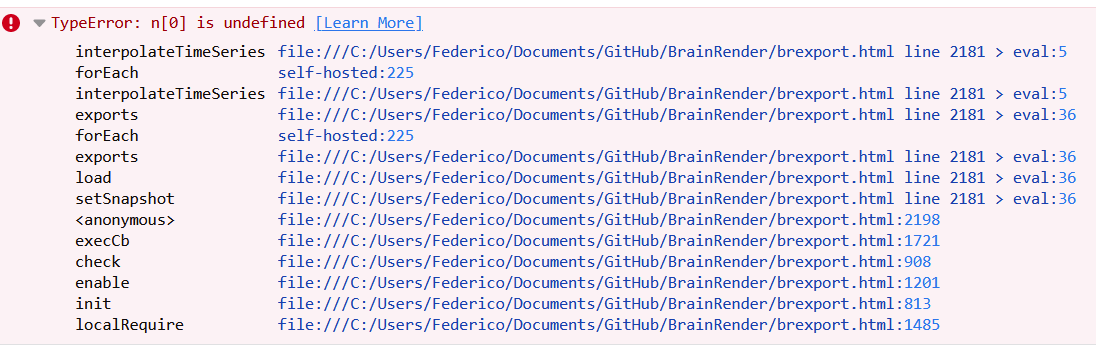
I haven't changed anything with brainrender that could've broken this so I am at a loss?
I'm using k3d version 2.7.0 and the latest vtkplotter from the master branch.
FedeClaudi
on 7 Jun 2020
uhmm, maybe i did something bad in the master version... what if you use
pip install vtkplotter==2020.3.0
marcomusy
on 7 Jun 2020
I get the same. Does it work for you?
I've tried this code https://github.com/marcomusy/vtkplotter/issues/136#issuecomment-622644655 and I get the same error. The axes get loaded correctly but not the objects.
FedeClaudi
on 7 Jun 2020
I get the same. Does it work for you?
I've tried this code #136 (comment) and I get the same error. The axes get loaded correctly but not the objects.
Yes it works for me with the master version.
are you using chrome? it seems related to the browser (?)
marcomusy
on 7 Jun 2020
mmm no it does the same in chrome and firefox.
I've found the error, I must have at some point updated k3d to version 2.8.1, when I downgraded back to 2.7.4 it worked fine.
FedeClaudi
on 7 Jun 2020
good to know, it might be that the get_snapshot() method is broken in k3d ==2.8.1
marcomusy
on 7 Jun 2020
Related issues
 bhaveshshrimali
·
6Comments
bhaveshshrimali
·
6Comments
 jby1993
·
6Comments
jby1993
·
6Comments
 CMengich
·
5Comments
CMengich
·
5Comments
 Jesse0818
·
4Comments
Jesse0818
·
4Comments
 hmralavi
·
7Comments
hmralavi
·
7Comments
Most helpful comment
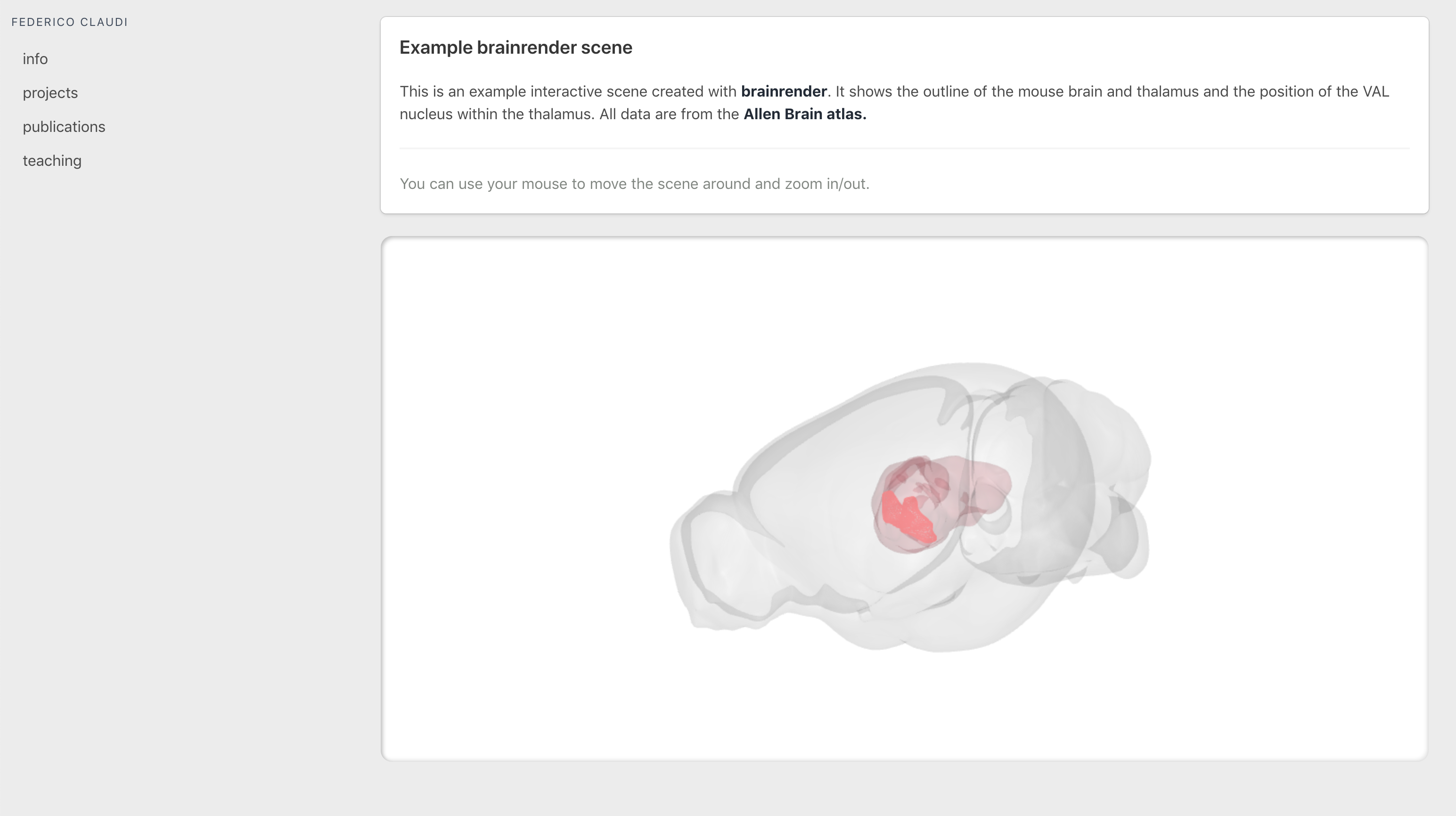
That did it:
https://fedeclaudi.github.io/brainrender.html

Thank you once again :)