I have a triangular mesh in 3D and I am trying to determine which vertices are visible from a given position.
I would like to do so without displaying/plotting the mesh or any manual clicking.
Is this doable? If not, any pointer/suggestions would be greatly appreciated.
 anderspe73
All 15 comments
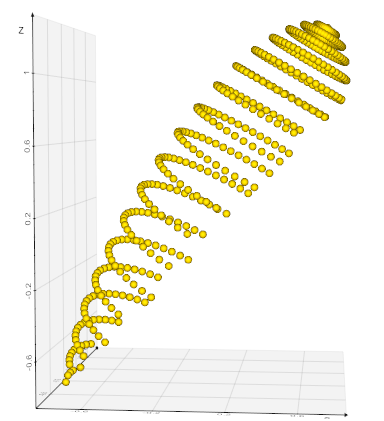
Consider this:
from vtkplotter import *

s = Ellipsoid().rotateY(30)

#Camera options: pos, focalPoint, viewup, distance,
# clippingRange, parallelScale, thickness, viewAngle
camopts = dict(pos=(0,0,25), focalPoint=(0,0,0))
show(s, offscreen=True, camera=camopts)

m = visiblePoints(s)

print('visible pts:', m.points()) # numpy array
show(m, newPlotter=True, axes=1) # optionally draw result
 marcomusy
on 1 Apr 2020
marcomusy
on 1 Apr 2020
Great thanks marco!
Would it also be possible to get the indices (in s) that these extracted points corresponds to?
anderspe73
on 3 Apr 2020
Yes.. with a small trick..
from vtkplotter import *
import numpy as np

s = Ellipsoid().rotateY(30)

#Camera options: pos, focalPoint, viewup, distance,
# clippingRange, parallelScale, thickness, viewAngle
camopts = dict(pos=(0,0,25), focalPoint=(0,0,0))
show(s, offscreen=True, camera=camopts)

s.addPointScalars(range(s.NPoints()), "v_ids") # store the ids
s.printInfo()

m = visiblePoints(s)

ids = m.getPointArray("v_ids").astype(np.int) # get back the ids
vpts = s.points()[ids]                        # numpy
m_fromids = Points(vpts)                      # create a new cloud just to check

show(m, m_fromids, N=2, newPlotter=True, axes=1)
That is a very clever trick...
Thanks again!
anderspe73
on 6 Apr 2020
Hi, I have a related question: is it possible to get just the outline of a mesh?
 FedeClaudi
on 5 May 2020
FedeClaudi
on 5 May 2020
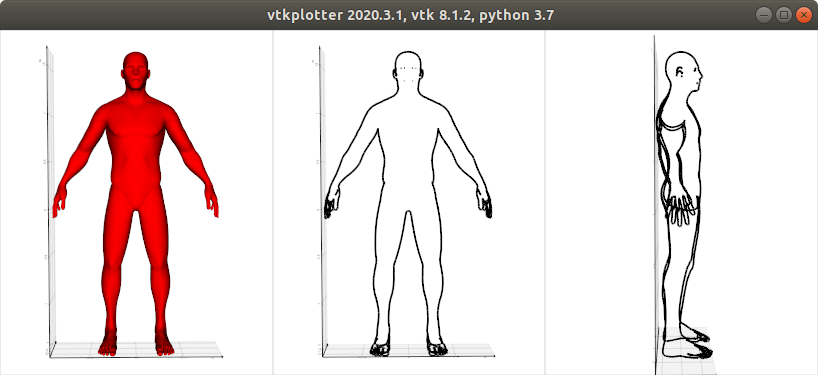
.. it depends on what kind of outline one would like to have... I only see this possibility though:
from vtkplotter import *

m = load(datadir+'man.vtk')

outline0 = m.silhouette()
outline1 = m.silhouette(direction=(-1,0,0)).rotateZ(90)

show(m,outline0, outline1, N=3, axes=1, elevation=-30)
marcomusy
on 6 May 2020
Hi,
That's almost it, ideally I would've likes something that 'follows' the mesh, always just showing the outline from the camera's perspective as the meshes rotates around.
If there's nothing like this it doesn't matter too much, I was just thought it would've been neat for some visualisations.
FedeClaudi
on 6 May 2020
I think I've found a reasonably elegant way of doing it! try:
vtkplotter -ir silhouette2
marcomusy
on 6 May 2020
I think that this is closer to what I had in mind:
from vtkplotter import *

s = load(datadir+'shark.ply')
s.alpha(0).c('gray').lw(0.1).lc('k')

# this call creates the camera object needed by silhouette()
vp = show(s, bg='db', bg2='lb', interactive=False)
sil = s.silhouette(direction=vp.camera).c('violet').alpha(0.7)

# Function to update the silhuete actor
def update_sil(*args):
    sil = s.silhouette(direction=vp.camera).c('violet').alpha(0.7)
    vp.add(sil)
    vp.remove(vp.actors[-2])

# ideally you'd call the update function when the camera stops moving
vp.interactor.AddObserver("MouseMoveEvent", update_sil)

vp = show(s, sil, __doc__, interactive=True)
The idea being that as you move the camera around the silhouette actor get's updated to keep facing the camera. It's my first time using interactor events like this so I'm sure there's much cleverer ways to do this (e.g. only update when the camera moves), but this is good enough for me.
FedeClaudi
on 6 May 2020
oh I think you didnt' update to the master version !
pip install -U git+https://github.com/marcomusy/vtkplotter.git
then
vtkplotter -ir silhouette2
but your solution is pretty good :)
marcomusy
on 6 May 2020
Yep, you're right I hadn't! It now works perfectly, awesome!
Thank you so much Marco
FedeClaudi
on 6 May 2020
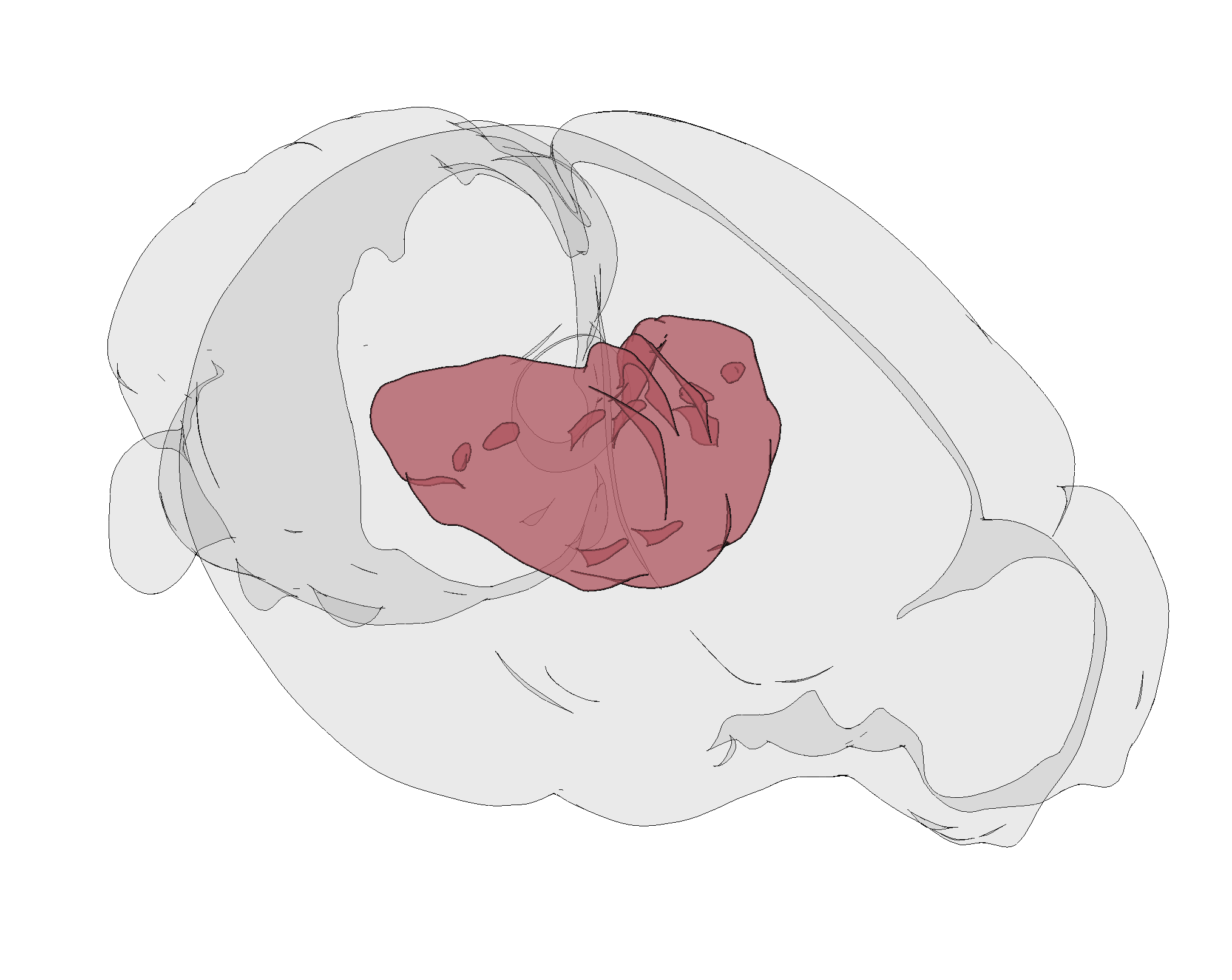
Love the cartoony look that you get with this new feature (and a bit of flat shading)!
FedeClaudi
on 6 May 2020
that's really cool! :)
marcomusy
on 6 May 2020
I've added a new example :)
vtkplotter -ir cartoony
PS: this might be of interest to you:
vtkplotter -ir multiren
marcomusy
on 8 May 2020
yay cartoon style, I really like the way it looks!
And the multi render is very cool, need to figure out how to use it in brainrender.
Love all the new features coming out of vtkplotter recently!
FedeClaudi
on 8 May 2020
Related issues
 Jesse0818
·
4Comments
Jesse0818
·
4Comments
 bhaveshshrimali
·
6Comments
bhaveshshrimali
·
6Comments
 drew-parsons
·
7Comments
drew-parsons
·
7Comments
 kemo993
·
6Comments
kemo993
·
6Comments
 RubendeBruin
·
3Comments
RubendeBruin
·
3Comments