Using Volume to render data from a numpy array seems to mess up the axes order (see screenshot below). At the same time building a vtkImageData manually works fine.
I'm getting this behaviour only after reinstalling my python environment and updating vtkplotter. Unfortunately I can't find the configuration in which things would work as they did before, so here's code illustrating the problem:
import vtk
import numpy as np
from vtkplotter import show, embedWindow, Volume

embedWindow('itkwidgets') # backends are: itkwidgets, k3d or False

import skimage.io as io
f = 'embryo.tif' # from the vtkplotter examples
raw = io.imread(f, plugin='simpleitk')

arr = vtk.util.numpy_support.numpy_to_vtk(raw.transpose(2,1,0).ravel(), array_type=vtk.VTK_FLOAT)
img = vtk.vtkImageData()
img.SetDimensions(raw.shape)
img.GetPointData().SetScalars(arr)

# doesn't work
# show(Volume(raw.transpose(2,1,0)))
show(Volume(raw))
# show(Volume(raw)._image)
# show(Volume(raw.transpose(2,1,0))._image)

# works
# show(img)
This is the output:

Thanks! Cheers, Marvin
 m-albert
All 9 comments
Hi Marvin,
thanks a lot! Indeed I have a vague memory of the fact that skimage.io was doing different things in different python versions... but I might be wrong.
Your transpose() solution works fine so I will add it to the next release!
Marco
PS actually i need to permute axes and flip y as well (in vtkplotter/actors.py):
        elif utils.isSequence(inputobj):
            if "ndarray" not in inputtype:
                inputobj = np.array(inputobj)
            varr = numpy_to_vtk(inputobj.transpose(2,1,0).ravel(),
                                deep=True, array_type=vtk.VTK_FLOAT)
            varr.SetName('input_scalars')
            ima = vtk.vtkImageData()
            ima.SetDimensions(inputobj.shape)
            ima.GetPointData().SetScalars(varr)

            imp = vtk.vtkImagePermute()
            imp.SetFilteredAxes(2,1,0)
            imp. SetInputData(ima)
            imp.Update()

            ff = vtk.vtkImageFlip()
            ff.SetInputData(imp.GetOutput())
            ff.SetFilteredAxis(1)
            ff.Update()
            img = ff.GetOutput()
 marcomusy
on 29 Nov 2019
marcomusy
on 29 Nov 2019
Hi Marco,
thanks a lot!
the fact that skimage.io was doing different things in different python versions... but I might be wrong.
Interesting, I wasn't aware of this.
PS actually i need to permute axes and flip y as well (in vtkplotter/actors.py):
Somehow for me this still doesn't work. Probably I should try different orders of applying permutations and flipping until it works?
Cheers,
Marvin
m-albert
on 2 Dec 2019
Ok, actually your solution works for me, tested it wrongly at first!
It seems that vtk interprets arrays in "fortran ordering" (see here), which is why .ravel(order='F') might be a cleaner solution compared to the transposing?
import vtk
import numpy as np
from vtkplotter import show, embedWindow, Volume

embedWindow('itkwidgets') # backends are: itkwidgets, k3d or False

import skimage.io as io
# f = 'embryo.tif' # from the vtkplotter examples
f = '/Users/marvin/Downloads/embryo.tif'
raw = io.imread(f, plugin='simpleitk')

arr = vtk.util.numpy_support.numpy_to_vtk(raw.ravel(order='F'), array_type=vtk.VTK_FLOAT)
ima = vtk.vtkImageData()
ima.SetDimensions(raw.shape)
ima.GetPointData().SetScalars(arr)

show(ima)
This already leads to a coherent image, then potentially there'd need to be a processing step done for sticking to the right axis convention.
m-albert
on 2 Dec 2019
Hi @m-albert
please update from the latest commit and check out this example:
this compares loading directly the file and creating manually the volume from numpy array.
the two images should be the same:
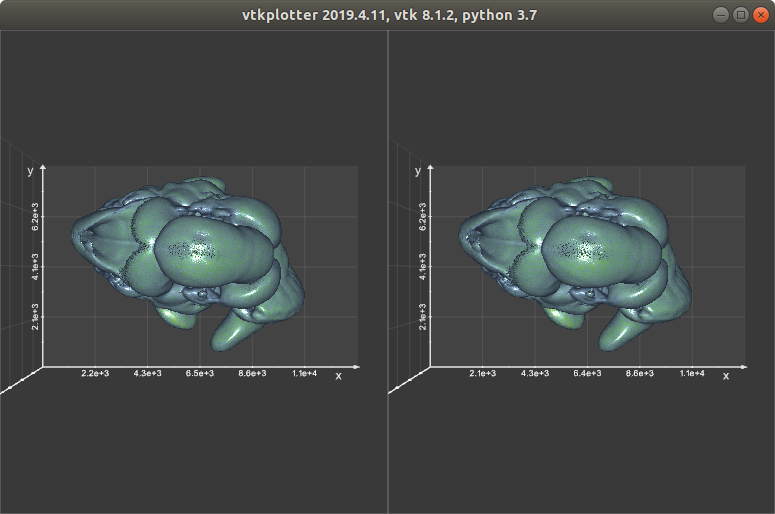
Cheers
M.
marcomusy
on 2 Dec 2019
Nice, passing the shape as an argument works nicely.
Thanks a lot Marco!
m-albert
on 2 Dec 2019
We overlapped in finding 2 possible solutions :)
I like a lot your second one, i'll give it a try!
marcomusy
on 2 Dec 2019
Yeah there doesn't seem to be a way around some confusion... Probably using transpose is the most transparent solution where it's clear what's happening.
Do you think it makes sense to let the Volume constructor do the transposing in case of passing a numpy array or would this loose generality somehow?
m-albert
on 2 Dec 2019
Actually I said something completely wrong... the trasnpose thing doesn't fix the spacing order... so in the end I believe the order='F' would simplify the operation, so the above becomes:
from vtkplotter import *
from skimage.io import imread

f = datadir+'embryo.tif'

voriginal = load(f)
printc('voxel size is', voriginal.spacing(), c='cyan')

raw = imread(f)

vraw = Volume(raw, spacing=(104,104,104))
# Need to change axes and mirror
# NOTE: spacing specified above is now inverted: (z,y,x)
vraw.permuteAxes(2,1,0).mirror("y")

# Compare loading the volume directly with the numpy volume:
# they should be the same
show(voriginal, vraw, N=2, axes=1)
I committed the new version... sorry for the confusion and thanks a lot for the help! Let me know if this does the job..
M.
marcomusy
on 2 Dec 2019
This works for me as well. Thanks so much for looking into this so quickly and fixing!
Cheers, Marvin
m-albert
on 2 Dec 2019
Related issues
 MarkusRosen
·
3Comments
MarkusRosen
·
3Comments
 FedeClaudi
·
6Comments
FedeClaudi
·
6Comments
 Yoorthiziri
·
7Comments
Yoorthiziri
·
7Comments
 jby1993
·
6Comments
jby1993
·
6Comments
 kemo993
·
6Comments
kemo993
·
6Comments