Version Info
- Directus API version (Or commit hash): latest release
- PHP version: 7.1
- MySQL version: working fine ;)
- Web server: Apache
- OS name and version: CentOS 7 (w/DirectAdmin)
Expected Behavior
Trying to login to api from remote directus app (located on same server, but other subdomain for testing purposes).
Actual Behavior
In Chrome dev console on Directus App login screen I'm getting;
- The /server/ping request does work
XHR response: CORS error OPTIONS 405 method not allowed when App tries to connect to http://domain.com/_/auth/sso
The response from the API doesn't show any Acces-Control headers in the dev consoleI've tried to set the headers manually in a .htaccess file in, but then also the /server/ping
request breaks, stating Access-Control-Allowed-Origin is already set.I've also configured the api.php in /config to include the headers, but _/auth/sso don't seem to care for a bit :)
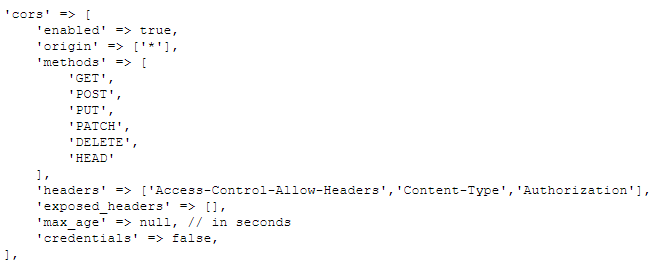
Could you guys point me in the right direction?
Thanx
 DeHekOnline
All 9 comments
Hmm, odd. I haven't seen this issue before in an Apache setup. Could you try adding 'OPTIONS' to that 'methods key in the cors settings?
 rijkvanzanten
on 28 Nov 2018
rijkvanzanten
on 28 Nov 2018
Hoi Rijk,
Already tried this, but it didn't seem to matter. The _/auth/sso/ doesn't seem to care about the cors settings in api.php
DeHekOnline
on 28 Nov 2018
I am having a related issue. CORS settings in api.php don't seem to be working in 7.0.9. I am able to load images stored in /directus/public/uploads/_/originals/ from a different domain, but I cannot get data from collections. If I revert to 7.0.8, this issue goes away.
Directus API version (Or commit hash): latest release
PHP version: 7.2.8
MySQL version: working fine ;)
Web server: Apache
OS name and version: Linux
 colehellman
on 29 Nov 2018
colehellman
on 29 Nov 2018
I am having a related issue. CORS settings in api.php don't seem to be working in 7.0.9. I am able to load images stored in /directus/public/uploads/_/originals/ from a different domain, but I cannot get data from collections. If I revert to 7.0.8, this issue goes away.
Directus API version (Or commit hash): latest release
PHP version: 7.2.8
MySQL version: working fine ;)
Web server: Apache
OS name and version: Linux
Working with 7.0.9 too. Will check 7.0.8. in a couple of hours.
DeHekOnline
on 29 Nov 2018
I have it fixed, turned out to be incorrect settings in apache (although the cors options in api.php got ignored).
DeHekOnline
on 3 Dec 2018
@DeHekOnline What was the actual problem and the solution you implemented?
 wellingguzman
on 3 Dec 2018
wellingguzman
on 3 Dec 2018
Well, it's a bit of mistery, but this is what works;
Although CORS settings from the api in php got ignored, Chrome (in my case) sees the headers when I set the same headers in .htaccess. But now headers are set double and you will get errors telling you so.
You can choose to 'overwrite' the header set by php in .htaccess by using "Header always set Acces-...", now the correct headers are shown when you inspect the response in Chrome, BUT...... this was the tricky part ... it turns out that although the headers are shown, they still got ignored, resulting still in "OPTIONS 403 method not allowed" ...
My solutions was to define al headers in the <Directory> of corresponding domain in the Virtual Host on apache directly. Note: My server runs CentOS and DirectAdmin, changing some file locations and settings. Make sure to pay attention to this.
Now headers are seen, but this results in one last error, saying that the OPTIONS request didn't respond with a 200 OK status. Now in your .htaccess add the following lines to adjust this.
RewriteEngine On
RewriteCond %{REQUEST_METHOD} OPTIONS
RewriteRule ^(.*)$ $1 [R=200,L]
I don't know if this is an 'accepted' workaround, but it worked in our case.
Hope someone with the same server setup can use this information.
DeHekOnline
on 4 Dec 2018
Thanks @DeHekOnline for the clarification this is a bit odd to me, but glad it worked out for you.
If this is something to do with Directus API itself, please I would love some new leads to reproduce and fix this.
As it doesn't seem to be a problem with Directus I will close this.
wellingguzman
on 5 Dec 2018
I just came across the same issue. I thought I needed to add this configuration to fix it, but it turns out it was my own mistake.
The api I was calling was https://api.mysite.com/_items/ instead of https://api.mysite.com/_/items/. This mistake showed up in the console as a CORS issue and blocked the request.
 waterlooblue
on 4 Jan 2019
waterlooblue
on 4 Jan 2019
Related issues
 vuhrmeister
·
3Comments
vuhrmeister
·
3Comments
 HashemKhalifa
·
3Comments
HashemKhalifa
·
3Comments
 ondronix
·
3Comments
ondronix
·
3Comments
 cdwmhcc
·
3Comments
cdwmhcc
·
3Comments
cdwmhcc
·
3Comments
cdwmhcc
·
3Comments