V8-archive: Support any base-url or document root
Feature Request
We have a need in our organization to host directus under a non-root url. For example ALL requests related to directus to be hosted under /catalog. The webapp seems like it will handle this use case but the api is using absolute paths that won't work under our hosting conditions. Specifically:
/uploads
/extensions
/layouts
/interfaces
/server/ping
...
and so on need to have the /catalog prefix:
/catalog/uploads
/catalog/extensions
/catalog/layouts
/catalog/interfaces
/catalog/server/ping
...
Project names also seem to be available only under root. Again, it would be nice to host projects/apis/app/everything under a common root url prefix like /catalog.
What problem does this feature solve?
Hosting under a non-root path prefix.
How do you think this should be implemented?
Perhaps adding settings to the api.php project configuration and templating the returned absolute urls. Since this config is required by all api installations it could be a global setting trickling to other api.*.php project configurations.
Would you be willing to work on this?
With some guidance I could contribute some code and test but it has been a while since I've written a line of PHP ;)
PS Re: edit I changed a couple url paths to reflect actual api endpoints as documented in the protected endpoints section here: https://docs.directus.io/api/reference.html#get-auth-token
 kmaris
All 30 comments
Hey @kmaris, can you explain what is the expected result and what's the actual result? I don't see to understand the issue or the request.
Where is the api removing the subdirectory (prefix)? from the generated URLs?
 wellingguzman
on 12 Dec 2018
wellingguzman
on 12 Dec 2018
I think I'm running into this issue currently - the wrong URL is being generated for SSO-auth callback URLs. Still investigating, but this is what I've found:
You can set routeBaseUrl in config.js for directus/app to allow for a basePath; you can also set the path to the API for the front-end using the same file.
However, for URLs generated in the API - these values don't get used. I should get sent to the Google OAuth screen with a redirect URI of http://local-dev/directus/_/auth/sso/google/callback - instead, it's using http://local-dev/_/auth/sso/google/callback
(I'm using a simple nginx reverse-proxy to make directus available at /directus, excerpt from my nginx.conf:
    location /directus {
        include     /etc/nginx/proxy-common.conf;
        proxy_pass  http://directus/;
    }
)
From what I can tell, there's nothing we can specify in config/api.php to alter the generated URLs.
 ar-cf
on 19 Dec 2018
ar-cf
on 19 Dec 2018
@ar-cf did you add an API endpoint for the app? Something like DIRECTUS; http://local-dev/directus?
@WellingGuzman The app (expecting it from the api, I suspect) is trying to make requests such as:
/
/interfaces
/layouts
/pages
I'm not sure if those are bound for the api or the app itself, but should they be...? :
/pmpedia/interfaces
/pmpedia/layouts
/pmpedia/pages
I imagine there are "global" urls for the api at /interfaces (which is easy enough to route), but we can't have those in our hosting situation.
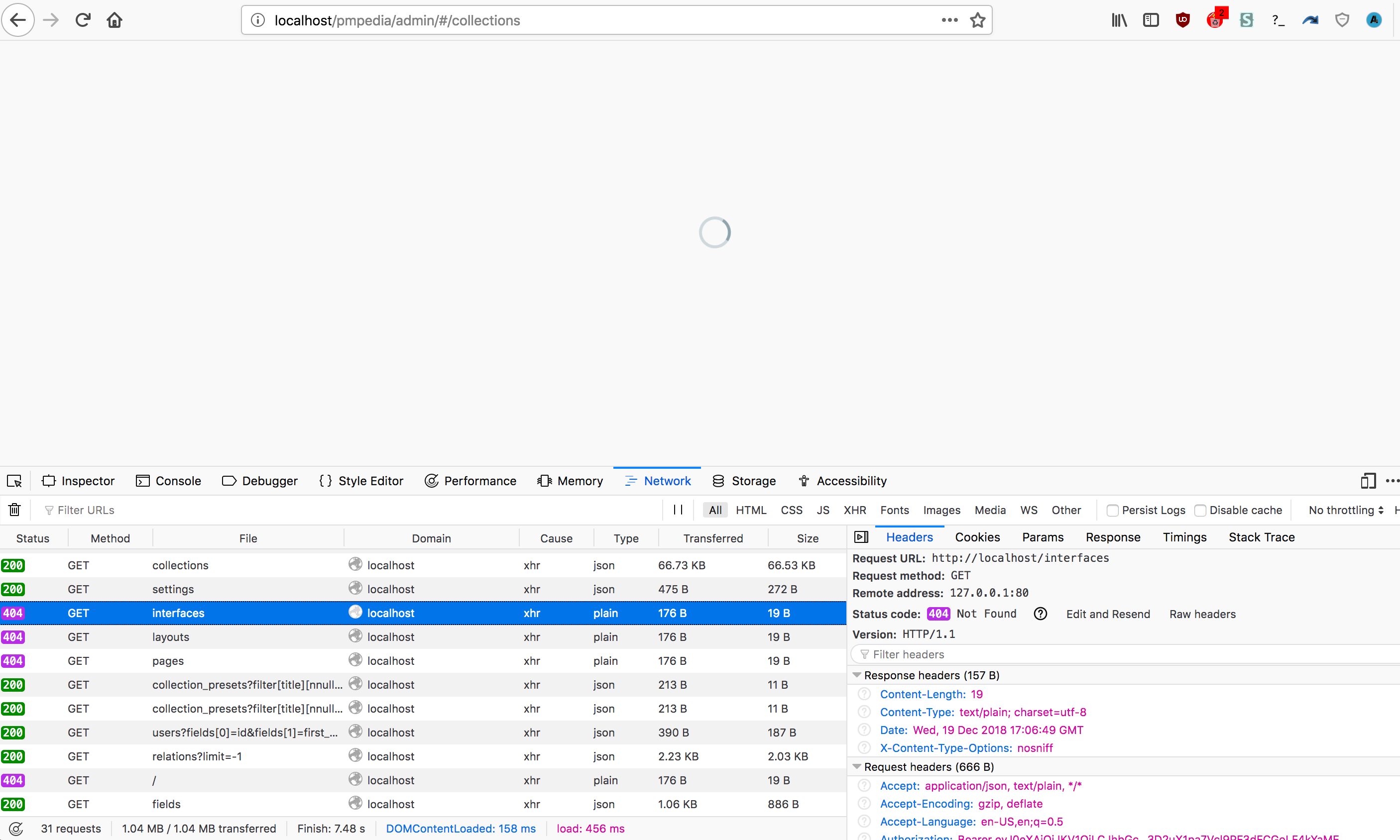
Here is a demo I've made using docker-compose and traefik to show what I'm trying to do: https://github.com/kmaris/directus-demo
Edit: In that screenshot above the api has a project named pmpedia configured with api.pmpedia.php. There is a default _ project api.php too but I have no interest in using that url in production.
kmaris
on 19 Dec 2018
@rijkvanzanten @WellingGuzman — any thoughts on this? Is this actually an App issue?
 benhaynes
on 20 Dec 2018
benhaynes
on 20 Dec 2018
@benhaynes I'm thinking it's both. The api uses those absolute urls and the app would need to change to accommodate a new url scheme too.
I'd be happy to help out a bit with this (both dev and testing) if it's a feature that you'd be interested in including.
kmaris
on 20 Dec 2018
@kmaris the app should use whatever url you put in the config.js
 rijkvanzanten
on 20 Dec 2018
rijkvanzanten
on 20 Dec 2018
@WellingGuzman What would it take to make this happen?
I noticed that index.php in the public folder only calls web.php in the src folder. I copied over the index.php file to the root of the project, changed the path from /../src/web.php to /src/web.php and that seems to make the API run. Although, the admin app is still in /public/admin, as are the thumbnails, uploads and extensions.
Alternatively, can we set the apache document root of the whole directus API in the .htaccess in the root of the project?
(I'm on a shared host with no access to the global virtual hosts of apache. I have 1 public_html root folder to work with, and like to access directus on /api. This means that my file structure will look something like this:
/public_html/ (root)
  /api/ (directus)
  index.html (my project)
  style.css
  script.js
Right now, to get the data, I have to get /api/public/_/items, where I'd like to get /api/_/items
rijkvanzanten
on 23 Dec 2018
I came across this little snippet online, might this help?
https://www.webhostface.com/kb/knowledgebase/change-document-root-folder-htaccess/
RewriteEngine on
RewriteCond %{HTTP_HOST} ^yourdomain.com$ [NC,OR]
RewriteCond %{HTTP_HOST} ^www.yourdomain.com$
RewriteCond %{REQUEST_URI} !public/
RewriteRule (.*) /public/$1 [L]
I realize that this requires you to enter your domain, which is not a one-stop solution for everyone. Is there a way we can change this to not require the domain?
(I'm not too familiar with Apache or it's setup, so I'd love to hear your thoughts)
rijkvanzanten
on 23 Dec 2018
This seems to work for me:
// /api/.htaccess

RewriteEngine on
RewriteBase /
RewriteCond %{REQUEST_URI} !api/public
RewriteRule (.*) /api/public/$1 [L]
We can use this ticket for: **Allow API to use any base path (root, or otherwise). Therefore I'll merge this one in too:
https://github.com/directus/api/issues/596
From @rijkvanzanten
Someone on slack pointed out that certain (cheap) shared hosting providers only have 1 root directory of the server (often called public_html). This means that directus is only available under /public/ instead of /. Is there anything we can do to work on / in those cases?
From @treechime
Correct me if I'm wrong, but another use case for this is when I don't want to install Directus to the root of the server? Seems to be a huge assumption that the project would always be installed into the root of a server.
My current v6 installs are multiple subdirectories deep and I'm now trying to work out how to maintain the same url structure to access the app in v7.
e.g. /directory/subdirectory/directus instead of /directory/subdirectory/directus/public/admin
benhaynes
on 30 Jan 2019
From @dur41d
Currently the api expects the folder structure to be: $basePath . '/public' for the public folder. It would be nice not to make this assumption and allow different paths for the public folder. This is useful in shared hosting where the user doesn't have have the choice of setting the root folder.
What problem does this feature solve?
I'm using share hosting which gives me the following structure:
/home
/public -- this is the path of the root website /
/protected -- these are files available to the website but not accessible directly
if I put the api folder in public then my api url will be:
/api/public
Also all the files in the api (ex. schema.sql ) will be exposed to the public which is not desirable. Also I would like to reserve the root of the website to my frontend (the actual website).
I would like put the api in the following locations:
/home
/public/api -- the 'api' here is the public folder so that the URL for the api is http:/mydomain.com/api
/protected/api -- the 'api' is the base folder that contains all the files except for the public folder
This way all the non public api files are protected.
To do that is I set the the path in public/index.php to
$app = require '/home/protected/api/src/web.php';
however the public folder is hard coded in several locations like src/core/Directus/Services/InterfacesService.php (line 16):
$basePath . '/public/extensions/core/interfaces',
benhaynes
on 30 Jan 2019
An update on this issue for everyone interested in a quick solution, while working on this there are things that are fixed in public, and there's no quick way to change that.
But if you want to store Directus API in any path, but only make public the Directus API public directory, the quickest solution will be to add a symlink for everything in public except uploads and index.php.
On unix system you can do the following to create the symlinks:
ln -s /path/to/directus/api/public/extensions /path/to/new/public/extensions
ln -s /path/to/directus/api/public/thumbnail /path/to/new/public/thumbnail
ln -s /path/to/directus/api/public/.htaccess /path/to/new/public/.htaccess

# If using the build version
ln -s /path/to/directus/api/public/admin /path/to/new/public/admin
_On Windows, I don't have experience creating symlink (or the equivalent), you can search somewhere how to do this._
Make sure your web server follows symlinks, otherwise this will fail. At the moment .htaccess (using +SymLinksIfOwnerMatch) follows symlink only if the owner of the symlink is the same owner as the original file/directory.
Now create a new index.php on your new public path with the following content:
<?php

$basePath = '/path/to/directus/api';

$app = require $basePath . '/src/web.php';

$app->setBasePath($basePath);

$app->run();
Everything now should works normally when you access the API through this new index.php file.
On the other hand I've been analyzing that we should add this into the docs and move to #168 (Create the API as package), which will include a more customizable option like pick where all the "business" code is located such as extensions etc.
Using a new option means that we only solving a minor part of the whole picture, while we will have access to where all the files are, the other public files, the ones that we created the symlink, wouldn't be accessible.
While not a the expected solution this is a great solution for the current structure.
What I can implement to solve/close this is create a new cli command that you can execute to point Directus API to a new path.
Example:
$ bin/directus <command-name> /path/to/new/public
What this command will do is everything that I explained above automatically, plus adding warning such as "these files are not the same owner as the symlink", so you are able to take actions on following the symlinks when the owner does not match.
Ping @kmaris, @ar-cf, @dur41d.
wellingguzman
on 1 Feb 2019
@WellingGuzman
I couldn't get the symbolic links to work.. always getting 403. I tried putting Options +FollowSymLinks -SymLinksIfOwnerMatch in htaccess but it didn't help. My file owner is different than the web owner and I can't change that with my shared host.
All the requests going thought public/index.php are working fine. Only the direct requests to files under extensions and thumbnail are not working. I'm thinking, how about making all the requests go through index.php? this way we have all the flexibility where to store the files. i.e. make all the requests be server the php. does that make sense?
 dur41d
on 4 Feb 2019
dur41d
on 4 Feb 2019
Hey @dur41d,
Does your shared hosting provider disable symlinks altogether? I thought replacing FollowSymLinks with SymLinksIfOwnerMatch, would've solved this issue.
What if you copy the .htaccess instead of create the symlink will the server follows an actual .htaccess instead of a symlink of it? Although I think the .htaccess is working if you said everything works except serving static files.
Also for making all request getting serve from php, we should create using .htaccess catching all requests from uploads and extensions.
Does /admin works for you?
wellingguzman
on 4 Feb 2019
Hi @WellingGuzman
Yes I tried all those. I copied the .htaccess to my public directory to make sure that apache is reading the rules. I tried all these settings:
+FollowSymLinks
+SymLinksIfOwnerMatch
+FollowSymLinks -SymLinksIfOwnerMatch
What do you mean if the /admin works for me? the app is in my public folder so there is no problem in executing it. The problem is with the api because it's in my protected folder.
There is no problem with the uploads folder because the path is configured in app.config and I can control that (local, S3, etc).
I modified the /public/index.php to server the extensions from the protected folder which achieves the same result of symbolic links. There is a performance hit of course but since it's the admin page I don't think there is an issue because there isn't much load.
It's kind of a hack. I think It's better to make the public folder path configurable. However, pointing to the base folder rather then separating the public folder has the advantage of easy update via git pull as it keeps all the code is under the same folder.
This code can be written to be more efficient. I just googled some samples.
<?php

function get_type($extension) {
    if ($extension == 'js') return 'text/javascript';
    if ($extension == 'json') return 'application/json';
    if ($extension == 'css') return 'text/css';
    return 'text/plain';
}

if (preg_match_all('/extensions(.*?)\.(\w+)/',$_SERVER['REQUEST_URI'], $matches_out)) {
    $path = $matches_out[1][0];
    $extension = $matches_out[2][0];
    $file_path = '/home/protected/api/public/extensions' . $path . '.' . $extension;
    if (file_exists($file_path)){
        $file = file_get_contents($file_path);
        $type = get_type($extension);
        header('Content-Type: ' . $type);
        echo $file;
        exit;
    } else {
        http_response_code(404);
        exit;
    }

}

$basePath = '/home/protected/api';

$app = require $basePath . '/src/web.php';

$app->setBasePath($basePath);

$app->run();
What do you mean if the /admin works for me? the app is in my public folder so there is no problem in executing it. The problem is with the api because it's in my protected folder.
If you are able to access static files from uploads and admin directory, I don't understand why you are getting 403 errors on extensions if they are all in the same public directory.
If they all exists, you wouldn't be able to execute your example because the web server will catch and serve those request (based on .htaccess ignoring rewriting on existing files).
wellingguzman
on 4 Feb 2019
@WellingGuzman
This is how i'm hosting the api and app:
/home/protected/api   -- this is the api folder by git clone  <api github repo>
/home/public/api -- this the public folder of the api. has 2 files: index.php and .htaccess
/home/public/app -- this is the app folder by git clone <app github repo>
I deleted the .htaccess from /home/protected/api/public so that my code above works and it does because i tested it.
dur41d
on 4 Feb 2019
@dur41d I understand, I thought they were together at the same path (using the directus/directus repo). Thanks for the clarification.
Your solution seems ideal to me for this case in particular. Although is not a "clean" way, it's a way to solve by how the project is structured and the server permissions.
wellingguzman
on 4 Feb 2019
Hi @WellingGuzman
I think all the issues above can be solved easily by making the public directory at the root of the project. This solves:
The security issues as all traffic will go to index.php and (except static files: extensions, upload, thumbnail) and no other files will be exposed publicly.
The user can choose the location of the api in the url (ex. domain.com/myapi) just be renaming the directory.
The user can update the api easily by using git.
This way the api does not have to be split into a public folder and the other files.
dur41d
on 9 Feb 2019
@dur41d the problem there is that by default most "private" files will be exposed to the public including the vendor, config, and logs directories. Again this can be solved using .htaccess and forbid some path.
I don't prefer these approach to avoid direct access to files, but what everyone else think about this?
wellingguzman
on 11 Feb 2019
@WellingGuzman yes the .htaccess will direct all the traffic to index.php except for few exceptions (extensions, thumbnail, etc). I'm thinking even to put all content that need direct access under the public folder this way the .htaccess rules are even simpler: all traffic -> index.php except for public. This way you don't need to change the .htaccess if you add other public content.
so the folder structure of the project will look like this:
/
index.php
.htaccess
public/
   extensions
   thumbnail
    <other content for direct access>
vendor/
config/
<other private content>
Which is very similar to the current structure except for moving index.php and .htaccess one level up.
dur41d
on 12 Feb 2019
So what's the verdict? what's the chosen implementation?
dur41d
on 19 Mar 2019
@WellingGuzman left the team on short notice, so issues are getting closed a bit slower than before while we're onboarding a new API lead..
Verdict: /public is annoying, the API should work in any folder.
rijkvanzanten
on 19 Mar 2019
Too bad. I think he did a good job. I hope you find someone soon. I'd be up
for the job but i don't know php..do i need to?
On Tue, Mar 19, 2019, 11:26 AM Rijk van Zanten notifications@github.com
wrote:
@WellingGuzman https://github.com/WellingGuzman left the team on short
notice, so issues are getting closed a bit slower than before while we're
onboarding a new API lead..Verdict: /public is annoying, the API should work in any folder.
—
You are receiving this because you were mentioned.
Reply to this email directly, view it on GitHub
https://github.com/directus/api/issues/636#issuecomment-474423343, or mute
the thread
https://github.com/notifications/unsubscribe-auth/ABQewOQghF3ljQPn3PblRnLzv5n1h4Slks5vYQG-gaJpZM4ZIaMr
.
dur41d
on 19 Mar 2019
Yeah, someone needs to take full responsibility over the primarily PHP codebase of the API, so knowing PHP (well) is a requirement
rijkvanzanten
on 20 Mar 2019
We have a team of developers who will be taking on this responsibility. Once they have familiarized themselves with the API codebase we'll pick up speed with these fixes and improvements.
Some of the new API Team are: @hemratna @bjgajjar — they're already making good progress in other areas.
benhaynes
on 20 Mar 2019
To achieve better clarity/visibility, we are now tracking feature requests within the Feature Request project board.
This issue being closed does not mean it's not being considered.
benhaynes
on 20 May 2019
This seems to be broken in v8 @rijkvanzanten , I've moved a client's installation to a subfolder this weekend and files are broken (full url works), but thumbnail urls are broken since it seems to ignore the subdirectory
EDIT: Check #1593
 WoLfulus
on 23 Dec 2019
WoLfulus
on 23 Dec 2019
@WoLfulus @rijkvanzanten — should we re-open this? I know it's a feature request, but it seems like a big issue... I'd almost consider it a bug.
benhaynes
on 23 Dec 2019
We're tracking the thumbnail specific issue in #1593; lets leave this OP as a feature request for now
rijkvanzanten
on 3 Jan 2020
Related issues
 Nitwel
·
3Comments
Nitwel
·
3Comments
 gitlabisbetterthangithub
·
3Comments
gitlabisbetterthangithub
·
3Comments
 HashemKhalifa
·
3Comments
HashemKhalifa
·
3Comments
 cdwmhcc
·
3Comments
cdwmhcc
·
3Comments
cdwmhcc
·
3Comments
cdwmhcc
·
3Comments
Most helpful comment
Hi @WellingGuzman
I think all the issues above can be solved easily by making the public directory at the root of the project. This solves:
The security issues as all traffic will go to index.php and (except static files: extensions, upload, thumbnail) and no other files will be exposed publicly.
The user can choose the location of the api in the url (ex. domain.com/myapi) just be renaming the directory.
The user can update the api easily by using git.
This way the api does not have to be split into a public folder and the other files.