V8-archive: Server Error After Upgrade
Bug Report
Steps to Reproduce
- After login in admin:
2:Error
Server Error
Something is wrong with this instance’s server or database.
Expected Behavior
Actual Behavior
Other Context & 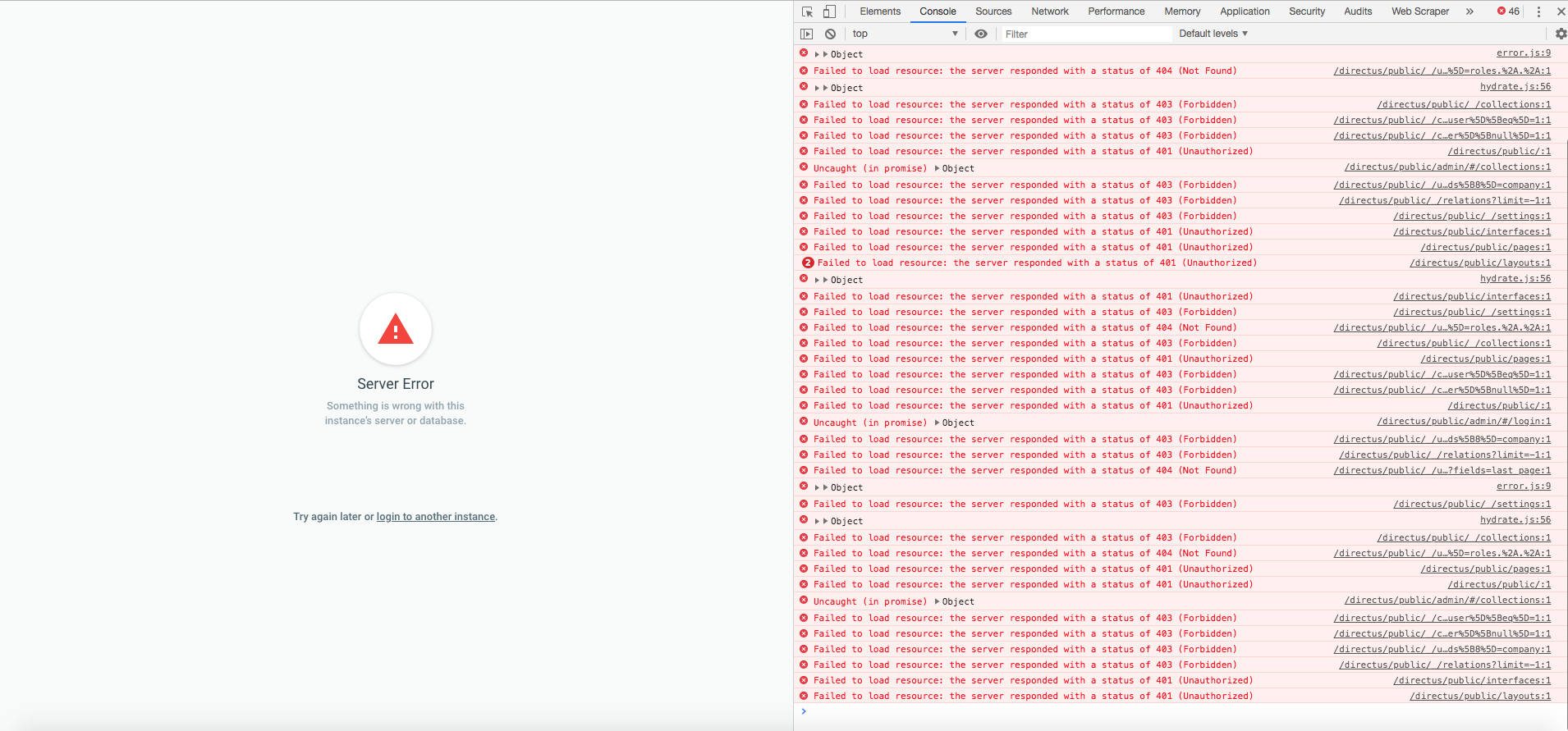
Technical Details
- Device: Desktop
- OS: linux CentOS release 6.10
- PHP Version: PHP 7.2.14
- Database: MySQL Ver 14.14 Distrib 5.5.42
- Install Method: cloned
masterbranch
 cristianopolicarpo
All 27 comments
Did you run the database upgrade script? You can run it from with the App:
Settings > Update Database
 benhaynes
on 26 Mar 2019
benhaynes
on 26 Mar 2019
Did you run the database upgrade script? You can run it from with the App:
Settings > Update Database
Yes, I run:
bin/directus db:upgrade
Through the app I do not have access to after the login, I can not access Settings in the app.
I've attached a screenshot with the errors log.
Thank you!
cristianopolicarpo
on 26 Mar 2019
Interesting. I know there were some changes to uppercase support for schema info... do you have any uppercase/capitalized table names?
benhaynes
on 26 Mar 2019
No, all tables are lowercase. Even I just did a new test installation in a clean database and the error is the same.
cristianopolicarpo
on 26 Mar 2019
@cristianopolicarpo From the console logs, I can see that the request to user endpoint is failing with 404 and that's why the user is not being authenticated and subsequent requests are failing. I think the API endpoint is not reachable. If the setup is failing on the clean database also, can you share the steps of reproducing?
 theharshin
on 26 Mar 2019
theharshin
on 26 Mar 2019
@cristianopolicarpo From the console logs, I can see that the request to
userendpoint is failing with404and that's why the user is not being authenticated and subsequent requests are failing. I think the API endpoint is not reachable. If the setup is failing on the clean database also, can you share the steps of reproducing?
Sure:
Step 1: git clone https://github.com/directus/directus.git
Step 2: I created a new mysql database
Step 3: I made the install via app that generated a config/api.php file with my access credentials to the new database.
Step 4: I tried to login first and the error appears:
Server Error
Something is wrong with this instance's server or database.
cristianopolicarpo
on 26 Mar 2019
When I run:
git checkout tags/v7.0.19
Go back to work normally.
cristianopolicarpo
on 26 Mar 2019
Have you checked the logs to see what ind of errors are in there? Our online demo is working as expected, so I don't think there are any big upgrade issues.
Also, not sure if your schema is private or not, but a database dump would be helpful in troubleshooting this too. You can send it to us privately over our Slack if that helps: https://directus.chat
benhaynes
on 26 Mar 2019
Could you also verify you have all the php extensions installed, and have given the right permissions to the apache / php user group on the files?
 rijkvanzanten
on 26 Mar 2019
rijkvanzanten
on 26 Mar 2019
Have you checked the logs to see what ind of errors are in there? Our online demo is working as expected, so I don't think there are any big upgrade issues.
Also, not sure if your schema is private or not, but a database dump would be helpful in troubleshooting this too. You can send it to us privately over our Slack if that helps: https://directus.chat
Okay, I already shared it with you in the slack.
cristianopolicarpo
on 26 Mar 2019
Have you checked the logs to see what ind of errors are in there? Our online demo is working as expected, so I don't think there are any big upgrade issues.
Also, not sure if your schema is private or not, but a database dump would be helpful in troubleshooting this too. You can send it to us privately over our Slack if that helps: https://directus.chat
Errors in log:
api[_].ERROR: Directus\Permissions\Exception\ForbiddenCollectionReadException: Reading items from "directus_users" collection was denied in /home/user/directus/src/core/Directus/Permissions/Acl.php:988

api[_].ERROR: Directus\Database\Exception\ItemNotFoundException: Item not found in /home/user/directus/src/core/Directus/Services/ItemsService.php:108

api[].ERROR: Directus\Exception\UnauthorizedException: Unauthorized request in /home/user/directus/src/helpers/app.php:252
the above errors occur even after a fresh installation in an empty database using master branch. Using the tag v7.0.19 returns to normal operation.
cristianopolicarpo
on 2 Apr 2019
Sorry for the delay, @cristianopolicarpo — we'll be taking a look at the issue this week.
benhaynes
on 2 Apr 2019
@rijkvanzanten @bjgajjar — we have a private database dump for this (let me know when you need it). Do we know if this is App or API?
benhaynes
on 2 Apr 2019
I think API
rijkvanzanten
on 3 Apr 2019
Hey @cristianopolicarpo
Just clone the repo of v7.0.19; But not able to replicate this issue. Can you upgrade it with the latest one and try again?
 bjgajjar
on 23 May 2019
bjgajjar
on 23 May 2019
Hey @cristianopolicarpo
Just clone the repo of v7.0.19; But not able to replicate this issue. Can you upgrade it with the latest one and try again?
Yes of course. I'll do this and I'll let you know.
cristianopolicarpo
on 23 May 2019
Hey @cristianopolicarpo
Just clone the repo of v7.0.19; But not able to replicate this issue. Can you upgrade it with the latest one and try again?
I made a new installation cloning Directus Master is the error continues. (Server Error
Something is wrong with this instance's server or database.)
When I run: git checkout tags/v7.0.19 it works perfectly.
So I guess this must be related to some change that happened in Directus Suite version 190325A (which is the later v7.0.19 version)
Remembering that the error occurs on two different servers. One with CentOS 6 and the other with CentOS 7. This second server is fresh, which I set up only to test Directus and check if it was a problem from my old server, but the error remains on both servers.
It would be great to know if someone is running the current version of Directus Suite on CentOS.
Below is the log file generated after the installation I did recently.
error.2019-05-23.log.txt
cristianopolicarpo
on 23 May 2019
I wonder if it's an issue related to https://github.com/directus/directus/issues/2224, where the authorization is failing to be provided correctly?
 shealavington
on 24 May 2019
shealavington
on 24 May 2019
@cristianopolicarpo Confirmed that this is the issue regarding CentOS! Will check this is CentOS and provide the update!
bjgajjar
on 30 May 2019
@cristianopolicarpo Confirmed that this is the issue regarding CentOS! Will check this is CentOS and provide the update!
Ok, thanks!
cristianopolicarpo
on 30 May 2019
We are not able to reproduce. Please take the latest pull and let me know.
I am closing this issue. Feel free to open the issue.
 hemratna
on 18 Jul 2019
hemratna
on 18 Jul 2019
Sorry for commenting on a closed issue, but this is also happening with me. Same thing: fresh install from the HEAD and I can't log in (Server Error Something is wrong with this instance’s server or database.). I'm on MacOs 10.13.6, running PHP 7.2.20 and MySQL 5.7.6.
Console output:
Navigated to http://directus.test/admin/
GET http://directus.test/interfaces 401 (Unauthorized)
{__ob__: Ie}
GET http://directus.test/_/collections 403 (Forbidden)
GET http://directus.test/_/users/me?fields%5B0%5D=id&fields%5B1%5D=avatar.%2A&fields%5B2%5D=email&fields%5B3%5D=first_name&fields%5B4%5D=last_name&fields%5B5%5D=locale&fields%5B6%5D=roles.%2A.%2A 404 (Not Found)
GET http://directus.test/_/settings 403 (Forbidden)
GET http://directus.test/layouts 401 (Unauthorized)
GET http://directus.test/pages 401 (Unauthorized)
GET http://directus.test/_/collection_presets?filter%5Btitle%5D%5Bnnull%5D=1&filter%5Buser%5D%5Beq%5D=1 403 (Forbidden)
GET http://directus.test/_/collection_presets?filter%5Btitle%5D%5Bnnull%5D=1&filter%5Buser%5D%5Bnull%5D=1 403 (Forbidden)
GET http://directus.test/_/users?fields%5B0%5D=id&fields%5B1%5D=first_name&fields%5B2%5D=last_name&fields%5B3%5D=title&fields%5B4%5D=status&fields%5B5%5D=timezone&fields%5B6%5D=roles.%2A&fields%5B7%5D=avatar.%2A&fields%5B8%5D=company 403 (Forbidden)
GET http://directus.test/ 401 (Unauthorized)
Uncaught (in promise) {code: 3, message: "Unauthorized request"}
GET http://directus.test/_/relations?limit=-1 403 (Forbidden)
As far as I managed to debug, it looks like the method getRolesId() in Acl.php is returning an empty array. That makes the method isAdmin() return false and I guess that's the reason why I can't login.
The table directus_user_roles has only one row, with 1 in all three fields.
The table directus_permissions has no rows.
 CaioCosta
on 16 Aug 2019
CaioCosta
on 16 Aug 2019
Hmm, any thoughts @directus/api-team ?
benhaynes
on 16 Aug 2019
By the way, I just found out that the same thing is happening to the Nightly Demo.
CaioCosta
on 19 Aug 2019
@CaioCosta I don't see this issue on the live demo. Maybe someone screwed with the permissions when you checked?
rijkvanzanten
on 21 Aug 2019
@rijkvanzanten @benhaynes I can't see the issue in the live demo anymore. After a lot of fiddling and debugging I just found out that the issue is caused by my setup. I'm using "CGI mode" on MAMP, which is stripping the Autorization Header — and from there nothing works. Sorry again for raising this issue.
CaioCosta
on 22 Aug 2019
Hi, @CaioCosta Thanks a lot for looking into this.
We are maintaining a repo for making a note for such an edge case.
I added your use case in https://github.com/directus/server-configs/blob/master/MAMP/README.md
Please verify. I am also requesting please provide the setup for MAMP. So I can update the docs.
hemratna
on 22 Aug 2019
Related issues
 Nitwel
·
3Comments
Nitwel
·
3Comments
 cdwmhcc
·
3Comments
cdwmhcc
·
3Comments
cdwmhcc
·
3Comments
cdwmhcc
·
3Comments
 24js
·
3Comments
cdwmhcc
·
3Comments
24js
·
3Comments
cdwmhcc
·
3Comments
Most helpful comment
@rijkvanzanten @benhaynes I can't see the issue in the live demo anymore. After a lot of fiddling and debugging I just found out that the issue is caused by my setup. I'm using "CGI mode" on MAMP, which is stripping the Autorization Header — and from there nothing works. Sorry again for raising this issue.