V-calendar: Broke date-picker after last update
Inline date-picker range mode isn't working. After selecting the first day, the entire site freezes. Can you check this @nathanreyes?
 luiztsmelo
All 16 comments
Are you referring to the new site?
 nathanreyes
on 9 Feb 2018
nathanreyes
on 9 Feb 2018
No, my site
luiztsmelo
on 9 Feb 2018
Would you mind posting the configuration for your v-date-picker? There were some breaking changes made in the latest update.
nathanreyes
on 9 Feb 2018
<v-date-picker
is-inline
mode='range'
v-model='dataReservaAcomod'
:drag-attribute='myAttribute'
:select-attribute='myAttribute'
:disabled-attribute='myAttribute'
:available-dates='{start: new Date(), end: null}'
:month-labels='monthLabels'
:weekday-labels='weekdayLabels'
:theme-styles='themeStyles'
select-color='#00D8C7'
show-caps
drag-color='#00D8C7'>
</v-date-picker>
data() {
return {
dataReservaAcomod: null,
myAttribute: {
popover: {
hideIndicator: true,
component: PopoverReservaAcomod
},
},
monthLabels: ['Janeiro','Fevereiro','Março','Abril','Maio','Junho','Julho','Agosto','Setembro','Outubro','Novembro','Dezembro'],
weekdayLabels: ['D', 'S', 'T', 'Q', 'Q', 'S', 'S'],
themeStyles: {
wrapper: {
color: 'rgb(62, 62, 62)',
border: '0',
padding: '6px 9px 0 9px',
background: 'white',
width: '100%',
minHeight: '300px'
},
header: {
padding: '0 9px',
},
headerArrows: {
fontSize: '1.4rem',
},
headerTitle: {
fontSize: '16px',
fontWeight: '400'
},
weekdays: {
color: 'rgb(62, 62, 62)',
fontWeight: '700',
padding: '15px 5px 8px 5px',
},
dayCell: {
height: '30px'
},
dayContent: {
fontWeight: '400',
fontSize: '15px',
},
dayPopoverContent: {
background: '#00D8C7',
color: 'white',
border: 'none'
},
}
}
},
i have the same problem with the new version on desktop win10, chrome 64.0.3282.140. After selecting the end date on rangepicker my site freezes
 XristMisyris
on 10 Feb 2018
XristMisyris
on 10 Feb 2018
I believe it may be a problem with using available-dates. A new prop min-date was added...can you try using it until I can track the issue down?
<v-date-picker
...
:min-date='new Date()'>
</v-date-picker>
EDIT: Ok it seems that is not working either at the moment.
nathanreyes
on 10 Feb 2018
min-date='new Date()' is broken too. But you are right, removing available-dates solved the problem.
luiztsmelo
on 10 Feb 2018
Ok, I think the problem is rooted in assigning the dates in the template. I think you need to create a new data variable called availableDates (or whatever you want) and bind to the prop via
<v-date-picker
  :availableDates='availableDates'>
</v-date-picker>
Vue may not like creating dates in templates. I'll investigate, but see if that works for you.
nathanreyes
on 10 Feb 2018
Worked!
luiztsmelo
on 10 Feb 2018
It turns out there is a bug though that this has uncovered. Declaring dates within the template (your old code) should work after I issue this hotfix. Until then, just use the method we discussed.
nathanreyes
on 10 Feb 2018
Ok. Thanks
luiztsmelo
on 10 Feb 2018
Please advise if latest patch allows you to use your original code.
nathanreyes
on 10 Feb 2018
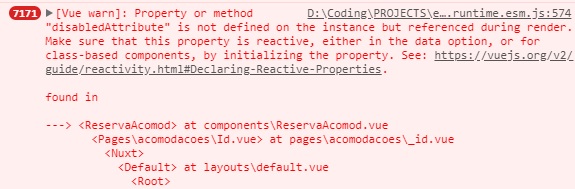
Continued the same behavior @nathanreyes, but now I can see the loop on console.
luiztsmelo
on 10 Feb 2018
luiztsmelo
on 10 Feb 2018
I'm going to stay 4 days without internet. Sorry if I can't reply until there.
luiztsmelo
on 10 Feb 2018
Ok, I think the problem is rooted in assigning the dates in the template. I think you need to create a new data variable called
availableDates(or whatever you want) and bind to the prop via<v-date-picker :availableDates='availableDates'> </v-date-picker>Vue may not like creating dates in templates. I'll investigate, but see if that works for you.
This should be documented somewhere or be put as a disclaimer. Took me quite some time to figure this out (find this issue).
The same needs to happen for mindate and maxdate, it has the same side effect.
 haringsrob
on 11 Oct 2019
haringsrob
on 11 Oct 2019
Related issues
 neel
·
3Comments
neel
·
3Comments
 bocanhcam
·
3Comments
bocanhcam
·
3Comments
 Maadtin
·
3Comments
Maadtin
·
3Comments
 redraw
·
3Comments
redraw
·
3Comments
 nik736
·
3Comments
nik736
·
3Comments
Most helpful comment
Ok, I think the problem is rooted in assigning the dates in the template. I think you need to create a new data variable called
availableDates(or whatever you want) and bind to the prop viaVue may not like creating dates in templates. I'll investigate, but see if that works for you.