V-calendar: Clear date-picker styles on focus
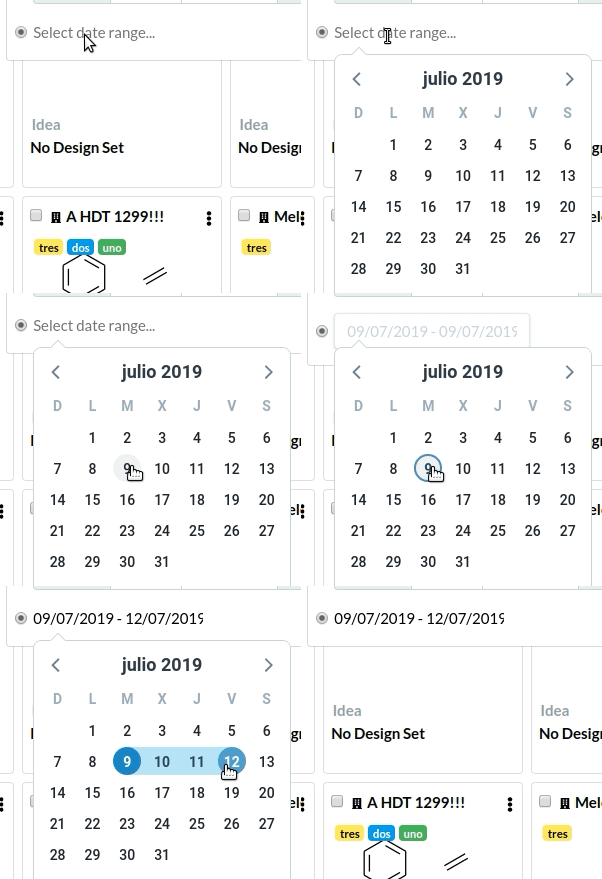
I've tried to clear Tailwind styles and worked by changing the class prop, but they get reapplied on focus event. Is there any way simple to clear them? I guess I could read how to make a custom input otherwise
<v-date-picker
  v-model="dates"
  mode="range"
  :input-props="{
    class: 'input',
    placeholder: 'Select date range'
  }"
 />
 redraw
All 3 comments
Had the same issue. From a possible duplicate issue #451 I solved this by explicitly apply a class object to the theme prop:
<v-data-picker
  :input-props="{ class: 'input' }"
  :theme="{
    datePickerInputDrag: { light: 'input' }
  }"
/>
I'm using v-calendar@next with light theme, so only light is assigned with a new value here.
Hope it helps.
 jessuni
on 29 Oct 2019
jessuni
on 29 Oct 2019
👍1
But this got me thinking. If we specify a class to input-props, would it be reasonable not to revert it to the original classes upon drag? @nathanreyes 🤔
jessuni
on 29 Oct 2019
👍3
Would be great to inherit the classes on the original input.
 nivv
on 28 Oct 2020
nivv
on 28 Oct 2020
Was this page helpful?
0 / 5 - 0 ratings
Related issues
 felixfrtz
·
3Comments
felixfrtz
·
3Comments
 knagyorg
·
4Comments
knagyorg
·
4Comments
 bocanhcam
·
3Comments
bocanhcam
·
3Comments
 octaviangrozman
·
4Comments
octaviangrozman
·
4Comments
 rcascante
·
3Comments
rcascante
·
3Comments
Most helpful comment
But this got me thinking. If we specify a class to
input-props, would it be reasonable not to revert it to the original classes upon drag? @nathanreyes 🤔