Urbit: Digital Ocean Spaces S3 integration in the chat app doesn't work
I have created a Space on Digital Ocean (their S3 compatible service) and filled in the correct details under the settings tab on Urbit. When I try to post an image, I get the following error in the console:
Cross-Origin Request Blocked: The Same Origin Policy disallows reading the remote resource at https://fonnyx-nopmer.ams3.cdn.digitaloceanspaces.com/fonnyx-nopmer/2020.9.09..15.20.05-bee.png. (Reason: CORS header 'Access-Control-Allow-Origin' missing).
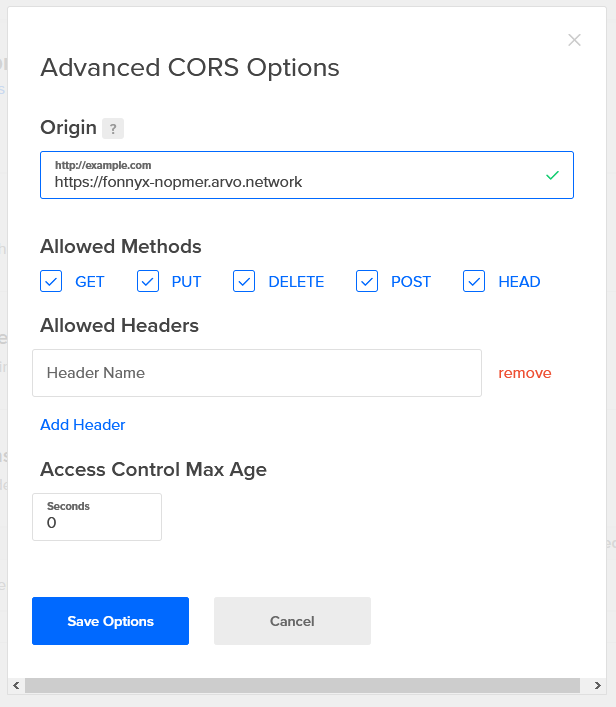
It looks to me as if I have set up things correctly on the DO side:
If I run :s3-store +dbug the output looks correct.
I am using Firefox.
I believe @custom-jonathan also has this problem.
 fonnyx
All 11 comments
Yep, I've added * in the origin & header field, and I still get the same errors.
 custom-jonathan
on 9 Sep 2020
custom-jonathan
on 9 Sep 2020
Check out the guide:
https://github.com/urbit/support/wiki/How-to-set-up-S3-integration
You need to loosen CORS further. @tacryt-socryp wrote the integration with DO so maybe he can opine.
On Sep 9, 2020, at 11:29 AM, fonnyx notifications@github.com wrote:
I have created a Space on Digital Ocean (their S3 compatible service) and filled in the correct details under the settings tab on Urbit. When I try to post an image, I get the following error in the console:Cross-Origin Request Blocked: The Same Origin Policy disallows reading the remote resource at https://fonnyx-nopmer.ams3.cdn.digitaloceanspaces.com/fonnyx-nopmer/2020.9.09..15.20.05-bee.png. (Reason: CORS header 'Access-Control-Allow-Origin' missing).
It looks to me as if I have set up things correctly on the DO side:If I run :s3-store +dbug the output looks correct.
I am using Firefox.
I believe @custom-jonathan also has this problem.
—
You are receiving this because you are subscribed to this thread.
Reply to this email directly, view it on GitHub, or unsubscribe.
 matildepark
on 9 Sep 2020
matildepark
on 9 Sep 2020
I'm afraid I don't know what to put in the "Allowed Headers" field, so I will have to wait for someone who knows how to get it working on DO.
fonnyx
on 9 Sep 2020
Allowed Headers should be *
 tacryt-socryp
on 9 Sep 2020
tacryt-socryp
on 9 Sep 2020
Having tried that, I am afraid I still get the same error in the console.
fonnyx
on 9 Sep 2020
Having tried that, I am afraid I still get the same error in the console.
I have to ask, in your screenshot, did you put * and press "Save Options" or did you put * and press "Add Header"? It's not clear how you'd add a header example.
matildepark
on 17 Sep 2020
I have the same experience. I press save. Hard refresh the DO page to make sure it really saved. Then hard refresh landscape, and it doesn't work.
custom-jonathan
on 17 Sep 2020
custom-jonathan
on 17 Sep 2020
matildepark
on 4 Oct 2020
Yep, worked like a charm.
custom-jonathan
on 4 Oct 2020
I have it working now. The problem was not having these two things match:

fonnyx
on 1 Nov 2020
Related issues
custom-jonathan
·
5Comments
 hrharder
·
14Comments
hrharder
·
14Comments
 rabsef-bicrym
·
7Comments
custom-jonathan
·
10Comments
rabsef-bicrym
·
7Comments
custom-jonathan
·
10Comments
 JohnELester
·
4Comments
JohnELester
·
4Comments
Most helpful comment
Yep, worked like a charm.