I'm trying to use the React <DragDrop /> component to allow users to upload a .csv file, then I want to grab the CSV data and process it in the browser. I'm grabbing the file from the 'file-added' event - the file has a data member containing metadata like name, id etc. I'm then calling uppy.getFile, passing it the file ID I just retrieved from the 'file-added' event - getFile returns a new object, which according to the documentation should have a data member that represents the blob of the file - but it's not, it's just the same metadata object I saw in the results of the 'file-added' event.
Is it possible to get the data of the drag-dropped file?
 mattandersonfg
All 10 comments
Could you provide a code sample that shows the problem? The argument to the file-added event is exactly this.getFile(id) so maybe something is changing the file behind your back :thinking:
 goto-bus-stop
on 4 May 2020
goto-bus-stop
on 4 May 2020
I created a sandbox that shows what I'm seeing: https://codesandbox.io/s/hardcore-kilby-yhp65
Save this data as students.csv and upload it:
Firstname,Lastname,Grade,Email
Buzzy,Lark,6,[email protected]
Benny,Lou,6,[email protected]
Benny,Lou,6,[email protected]
Barney,Layne,8,[email protected]
Billy,Lloyd,6,[email protected]
mattandersonfg
on 4 May 2020
I have the same issue/question I think:
Is it possible to access the actual file blob data in the Uppy file object (prior to upload) in either:
on('file-added')or inonBeforeUpload?
When I inspect a small text file as the uppy file object in onBeforeUpload, the files[id].data property is as per this:
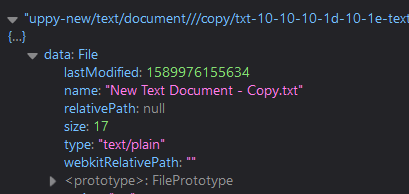
So plenty of info about the file, but none of the file's actual data/body/contents.
But perhaps this is by design?
 iamjrock
on 20 May 2020
iamjrock
on 20 May 2020
Ohh, maybe I was misunderstanding the original post here. I see a similar result in @mattandersonfg's sandbox to what you're posting, but that is actually the expected and correct behaviour.
File and Blob are builtin classes that represent files or binary data. you can only get the actual data asynchronously using the FileReader DOM API. That is by design—not Uppy's design but browser designs :)
goto-bus-stop
on 20 May 2020
Thanks @goto-bus-stop, I thought that might be the case. I just wasn't sure whether Uppy was using FileReader internally to populate an Uppy file.data property, makes sense that it doesn't.
So with a normal html file input we can do this to get to the data:
<input type="file" onchange="readFile(this)">

<script>
function readFile(input) {
  let file = input.files[0];
  let reader = new FileReader();
  reader.readAsArrayBuffer(file);
  reader.onload = function() {
    console.log(reader.result);
  };
}
</script>
Is it possible to achieve the same using Dashboard?
iamjrock
on 20 May 2020
Right. You can pass the file.data property to a readAsArrayBuffer call :)
If you are using remote providers like Dropbox or Instagram, note that it is not possible to access the underlying data for those files at all, since they are never actually downloaded to the browser. Those files are marked with file.isRemote === true.
goto-bus-stop
on 25 May 2020
@goto-bus-stop I think the docs should be changed - the part I linked to in my original post definitely gives the impression that getFile gives you the file data ("the Blob object").
mattandersonfg
on 25 May 2020
AWS S3 Upload Photo Sample Code
In above example, they're using
<input id="photoupload" type="file" accept="image/*">
Using following they are easily able to fetch the file:
var files = document.getElementById("photoupload").files;
Ultimately, they do this:
var file = files[0];
 var upload = new AWS.S3.ManagedUpload({
    params: {
      Bucket: albumBucketName,
      Key: photoKey,
      Body: file,
      ACL: "public-read"
    }
  });
I am using the React Uppy DragDrop Component. I have the file as follows:
this.uppy.on('file-added', (file) => {
I want to use file in similar manner as in AWS sample code. kindly guide me
 RohiniJindam
on 4 Jul 2020
RohiniJindam
on 4 Jul 2020
@RohiniJindam Then you'd also have to pass file.data to the Body option. But you should not use the AWS.S3.ManagedUpload with Uppy, because it isn't integrated with Uppy's progress reporting and everything. Instead, use the @uppy/aws-s3-multipart plugin. With that, you don't need access to the file object.
goto-bus-stop
on 5 Jul 2020
The docs now link to the MDN pages for Blob/File. Thanks for the report!
goto-bus-stop
on 3 Aug 2020
Related issues
 eltercero
·
4Comments
eltercero
·
4Comments
 matthewhartstonge
·
3Comments
matthewhartstonge
·
3Comments
 hikurangi
·
4Comments
hikurangi
·
4Comments
 agreene-coursera
·
4Comments
agreene-coursera
·
4Comments
 evanoberholster
·
3Comments
evanoberholster
·
3Comments