Uppy: Unable to upload file to S3 using @uppy/url
I'm using the Uppy react modal component.
import React, { Component } from 'react';

import Uppy, { UppyFile } from '@uppy/core';
import { DashboardModal } from '@uppy/react';
import Url from '@uppy/url';
import AwsS3Multipart from '@uppy/aws-s3-multipart';

export class FileUpload extends Component<Props> {
    uppy: Uppy.Uppy;

    constructor(props: Props) {
        super(props);
        this.uppy = Uppy({
            id: 'MyUppy'
                         ....
                         /* -- uppy config options -- */
                }).use(Url, {
            id: 'MyUrl',
            companionUrl: process.env.REACT_APP_FILES_HOST
        })
        .use(AwsS3Multipart, {
            id: 'AwsS3Multipart',
            companionUrl: process.env.REACT_APP_FILES_HOST
        });
        }

        componentWillUnmount() {
        this.uppy.close();
    }

    onClose = () => {
        this.uppy.reset();
        }

        render() {
        return (
            <DashboardModal
                uppy={this.uppy}
                plugins={['MyUrl']}
                inline={false}
                open={this.props.visible}
                                  ....
                                 /* -- uppy config options -- */
                         />
        );
    }

}
This is the TypeScript code I'm using. I'm basically trying to upload files to s3 using multipart plugin from url. I have correctly configured the Uppy companion instance
var express = require('express');
var cors = require('cors');
var bodyParser = require('body-parser');
var session = require('express-session');
var companion = require('@uppy/companion');

var app = express();

var corsOptions = {
  origin: '*',
  methods: "GET,HEAD,PUT,PATCH,POST,DELETE,OPTIONS",
  optionsSuccessStatus: 200 // some legacy browsers (IE11, various SmartTVs) choke on 204
}

app.use(cors(corsOptions));
app.use(bodyParser.json());
app.use(session({
  secret: 'UPPY_SECRET'
}));

var options = {
  server: {
    host: 'AWS_HOST.compute-1.amazonaws.com:8080',
    protocol: 'http',
  },
  filePath: './uploads',
  providerOptions: {
    s3: {
      getKey: (req, filename) => {
        var date = (new Date()).getTime();
  return date + '-' + filename;
      },
      key: 'AWS_KEY',
      secret: 'ASW_SECRET',
      bucket: 'ASW_BUCKET',
      region: 'AWS_REGION'
    }
  }
};

try {
  var server = app.listen(8080);
  companion.socket(server, options);
  app.options('*', cors(corsOptions));
  app.use(companion.app(options));
} catch (error) {
  console.log(error);
}
Am I missing something here? When I try to upload using URL, I see an OPTIONS call to /url/meta followed by a POST call to /url/meta which returns an object like
{"type":"image/png","size":13504}
After this nothing happens. I don't see any other network activity after this. What am I missing here?
 sagar7993
All 10 comments
I'm running this on the following system configuration
MacOS 10.15
Chrome version 77
NodeJS version 10.15.3
"@uppy/aws-s3-multipart": "1.3.3",
"@uppy/core": "1.5.1",
"@uppy/dashboard": "1.4.1",
"@uppy/react": "1.3.2",
"@uppy/url": "1.3.2",
"react": "16.10.2"
@sagar7993 what version of companion are you using?
 ifedapoolarewaju
on 23 Oct 2019
ifedapoolarewaju
on 23 Oct 2019
@ifedapoolarewaju I'm using the latest version of companion, i.e 1.5.0
sagar7993
on 23 Oct 2019
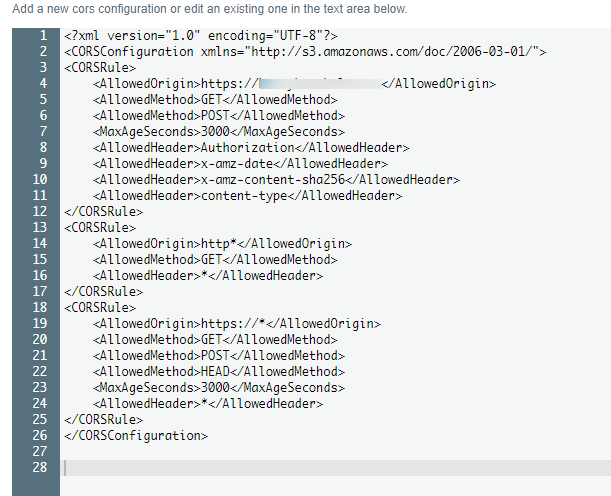
@sagar7993 you should try the debug flag for companion and uppy, as well as check your buckets permissions.
something like this worked for me
 cybersholt
on 23 Oct 2019
cybersholt
on 23 Oct 2019
Hi @sagar7993, sorry for the delay. Were you able to resolve the issue?
 arturi
on 17 Dec 2019
arturi
on 17 Dec 2019
I'm still experiencing this issue.
On Tue, Dec 17, 2019, 10:21 PM Artur Paikin notifications@github.com
wrote:
Hi @sagar7993 https://github.com/sagar7993, sorry for the delay. Was
the issue resolved?—
You are receiving this because you were mentioned.
Reply to this email directly, view it on GitHub
https://github.com/transloadit/uppy/issues/1907?email_source=notifications&email_token=ABZB5BQKHVP3LANORVDRQ4LQZD7SFA5CNFSM4JDLQV2KYY3PNVWWK3TUL52HS4DFVREXG43VMVBW63LNMVXHJKTDN5WW2ZLOORPWSZGOEHDGIFY#issuecomment-566649879,
or unsubscribe
https://github.com/notifications/unsubscribe-auth/ABZB5BSDOBBL3XLTEE2QZ33QZD7SFANCNFSM4JDLQV2A
.
sagar7993
on 19 Dec 2019
Does this issue fix? I'm also experiencing trouble when uploading to AWS s3 using URL provider.
 hashandev-test
on 29 Apr 2020
hashandev-test
on 29 Apr 2020
Have had a dig around in the URL controller, but unsure whether this a Companion issue (which seems to be providing the metadata as needed) or an Uppy/core fault.
We have a newly-installed Companion server in production if anyone needs some examples.
 schmoove
on 21 Jun 2020
schmoove
on 21 Jun 2020
Does anyone have this working?
 martinstreicher
on 23 Jul 2020
martinstreicher
on 23 Jul 2020
I'm facing the same issue.
any updates here
 christinewaol
on 25 Aug 2020
christinewaol
on 25 Aug 2020
Related issues
 hikurangi
·
4Comments
hikurangi
·
4Comments
 ameft
·
4Comments
ameft
·
4Comments
 eltercero
·
4Comments
eltercero
·
4Comments
 NihadOb
·
3Comments
NihadOb
·
3Comments
 ogtfaber
·
4Comments
ogtfaber
·
4Comments
Most helpful comment
I'm still experiencing this issue.
On Tue, Dec 17, 2019, 10:21 PM Artur Paikin notifications@github.com
wrote: