Uppy: Basic documented React examples are very problematic to run
I tried to work with Uppy and React, to no avail.
I started from the examples, assuming that the react examples might be working ones. I wasn't able to make them work.
Let me clarify that I am not a React expert, absolutely, so I hope what I am reporting is nothing but a false positive. However at first I tried to load uppy on a complex theme I am using, but then I tried a blank create-react-app and found more or less the same problems.
First, you will find attached a basic react example with a "FileUploader" I intend to use as a component. Obviously it is very basic and based on the example from the official docs. In addition to the basic modules, I executed:
yarn add @uppy/core
yarn add @uppy/react
yarn add @uppy/tus
I tried many other ways to make this working. Just want to highlight the fact that I am opening an issue after 4-5 hours trying to understand
- documentation
- why documentation says some things that I found difficult to understand
For example:
why using this block of code from the docs
import DragDrop from '@uppy/react/lib/DragDrop';
import { DragDrop } from '@uppy/react';
I get a "duplicate" import error when I try to do this?
Most of other errors were related to something that goes wrong during the import phase.
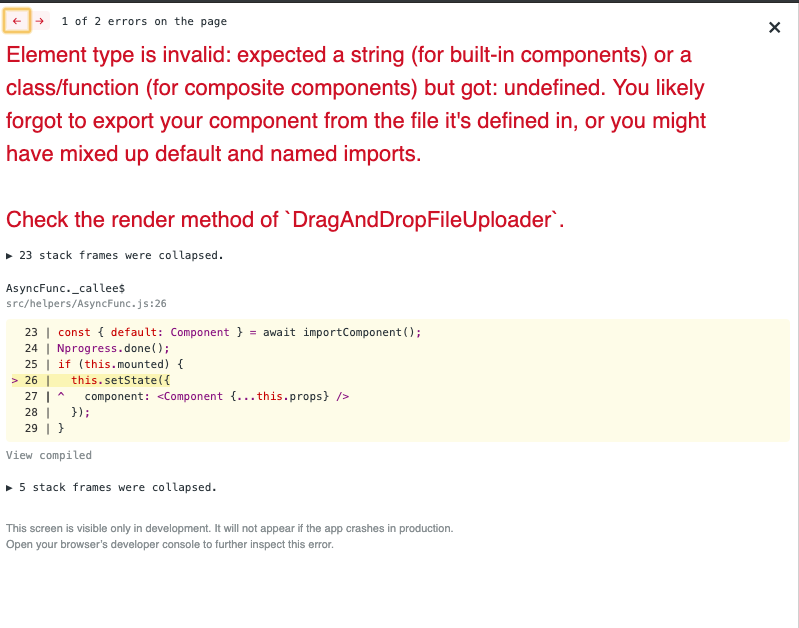

One of the import/constructor setup of the "theme" integration was this:
import '@uppy/core/dist/style.css'
import '@uppy/drag-drop/dist/style.css'
const React = require('react')
const { Dashboard, DashboardModal, DragDrop, ProgressBar } = require('@uppy/react')
const Tus = require('@uppy/tus')


const Uppy = require('@uppy/core')


export default class DragAndDropFileUploader extends React.Component {

  constructor (props) {
    super(props)

    this.state = {
      showInlineDashboard: false,
      open: false
    }

    this.uppy = Uppy({ id: 'uppy1', autoProceed: true, debug: true })
    .use(DragDrop, { })
      //.use(GoogleDrive, { companionUrl: 'https://companion.uppy.io' })


   this.handleModalClick = this.handleModalClick.bind(this)
  }

  componentWillUnmount () {
    this.uppy.close()
  }

  handleModalClick () {
    this.setState({
      open: !this.state.open
    })
  }

  render () {
    const { showInlineDashboard } = this.state

    return (

        <div>
        <h1>React Examples</h1>

        <h2>Inline Dashboard</h2>
        <label>
          <input
            type="checkbox"
            checked={showInlineDashboard}
            onChange={(event) => {
              this.setState({
                showInlineDashboard: event.target.checked
              })
            }}
          />
          Show Dashboard
        </label>
        {showInlineDashboard && (
          <Dashboard
            uppy={this.uppy}
            plugins={['GoogleDrive']}
            metaFields={[
              { id: 'name', name: 'Name', placeholder: 'File name' }
            ]}
          />
        )}

        <h2>Modal Dashboard</h2>
        <div>
          <button onClick={this.handleModalClick}>
            {this.state.open ? 'Close dashboard' : 'Open dashboard'}
          </button>
          <DashboardModal
            uppy={this.uppy2}
            open={this.state.open}
            target={document.body}
            onRequestClose={() => this.setState({ open: false })}
          />
        </div>

        <h2>Drag Drop Area</h2>
        <DragDrop
          uppy={this.uppy}
          locale={{
            strings: {
              chooseFile: 'Boop a file',
              orDragDrop: 'or yoink it here'
            }
          }}
        />

        <h2>Progress Bar</h2>
        <ProgressBar
          uppy={this.uppy}
          hideAfterFinish={false}
        />
      </div>

    )
  }
}
which led to this different error:
TypeError: Expected a plugin class, but got undefined. Please verify that the plugin was imported and spelled correctly. (for the benefit of google searches 🗡 )

Obviously there is something huge that I am missing, but the reason I am reporting this issue is that I would like to help perfectioning the documentation so that it would be more easy to understand for another user in the future.
the example attached brought me to the
Error: Your plugin must have an id error.
I also tried to run the react-example from the repo, but the npm start command gave css import error. Tried building the entire repository with npm run build.. I wasn't able to load the examples.
Thank for every clarification! I hope my reporting is useful and not based on some misunderstanding I could have avoided.
 superandrew
All 13 comments
Hello @superandrew
There were few minor mistakes. I have edited your code with a working example. Also, you were initializing DashboardModal with __this.uppy2__ instead of this.uppy
I hope Uppy team will use this as an example in Uppy React docs.
import React, { Component } from 'react';
import Uppy from '@uppy/core'
import Tus from '@uppy/tus'
import Webcam from '@uppy/webcam'
import DashboardModal from '@uppy/react/lib/DashboardModal'
import '@uppy/core/dist/style.css'
import '@uppy/dashboard/dist/style.css'

export default class DragAndDropFileUploader extends Component {
  constructor (props) {
    super(props)

    this.state = {
      open: false
    }
    this.handleModalClick = this.handleModalClick.bind(this);

    this.uppy = Uppy({ id: 'uppy1', autoProceed: true, debug: true })
    .use(Webcam)
    .use(Tus)
      //.use(GoogleDrive, { companionUrl: 'https://companion.uppy.io' })
  }

  componentWillUnmount () {
    this.uppy.close();
  }

  handleModalClick () {
    this.setState({
      open: !this.state.open
    });
  }

  render () {
    const { open } = this.state;

    return (
        <div>
        <h1>React Examples</h1>

       <h2>Modal Dashboard</h2>
        <div>
          <button id='dashboardmodal' onClick={this.handleModalClick}>
            {open ? 'Close dashboard' : 'Open dashboard'}
          </button>
          <DashboardModal
            uppy={this.uppy}
            open={open}
            target={document.body}
            onRequestClose={() => this.setState({ open: false })}
            plugins={['Webcam']}
            trigger='#dashboardmodal'
          />
        </div>
      </div>
    )
  }
}
 jazkh
on 30 Apr 2019
jazkh
on 30 Apr 2019
hello @jazkh, and thank for your help, which is very appreciated.
I tried to run it, however I am facing an error on CameraScreen.js on this line:
if (typeof superClass !== "function" && superClass !== null) {
    throw new TypeError("Super expression must either be null or a function, not " + _typeof(superClass));
  }
In this case superClass is undefined.
Out of curiosity, if I remove webcam from the example, I get the same error on ActionBrowserTagline.js, same line:
function _inherits(subClass, superClass) {
  if (typeof superClass !== "function" && superClass !== null) {
    throw new TypeError("Super expression must either be null or a function, not " + _typeof(superClass));
  }
superClass being undefined this time as well, so I suspect this could have something to do with my environment. Does this error ring a bell for you? It could be totally unrelated to Uppy, though.
Besides this, I don't understand why
import DashboardModal from '@uppy/react/lib/DashboardModal' instead of const { Dashboard, DashboardModal, DragDrop, ProgressBar } = require('@uppy/react') works, and sometimes I notice that npm breaks yarn and viceversa, so it's not entirely clean if - for uppy at least - adding via yarn or installing via npm is equivalent.
superandrew
on 30 Apr 2019
For what is worth, I can tell that this error is in the
```import Webcam from '@uppy/webcam'
import DashboardModal from '@uppy/react/lib/DashboardModal'
import Dashboard from '@uppy/react/lib/Dashboard'
lines. Leaving those lines with nothing on render different than a simple div triggers the error, while commenting those lines doesn't. It happens only on my project and not a clean environment.

Here's my package.json, in case it could help:

```{
  "name": "<project_name>",
  "version": "2.9.5",
  "private": true,
  "proxy": "http://localhost:8000/",
  "dependencies": {
    "@uppy/core": "^1.0.0",
    "@uppy/drag-drop": "^1.0.0",
    "@uppy/react": "^1.0.0",
    "@uppy/tus": "^1.0.0",
    "@uppy/webcam": "^1.0.0",
    "antd": "^3.10.0",
    "antd-local-icon": "^0.1.3",
    "axios": "^0.18.0",
    "classnames": "^2.2.5",
    "clone": "^2.1.1",
    "history": "^4.9.0",
    "jwt-decode": "^2.2.0",
    "node-sass": "^4.9.3",
    "nprogress": "^0.2.0",
    "postcss-inline-rtl": "^0.9.8",
    "react": "^16.8.6",
    "react-dom": "^16.8.1",
    "react-intl": "^2.3.0",
    "react-motion-drawer": "^3.1.0",
    "react-placeholder": "^2.0.0",
    "react-redux": "^5.0.4",
    "react-router": "^4.1.1",
    "react-router-dom": "^4.1.0",
    "react-router-redux": "^5.0.0-alpha.5",
    "react-scripts": "2.0.3",
    "react-sidebar": "^2.3.2",
    "react-smooth-scrollbar": "^8.0.6",
    "react-throttle": "^0.3.0",
    "react-window-size-listener": "^1.0.10",
    "redux": "^3.6.0",
    "redux-devtools": "^3.3.2",
    "redux-devtools-dock-monitor": "^1.1.1",
    "redux-devtools-log-monitor": "^1.2.0",
    "redux-saga": "^0.16.0",
    "redux-thunk": "^2.2.0",
    "smooth-scrollbar": "^8.2.5",
    "styled-components": "^2.2.1",
    "styled-theme": "^0.3.3"
  },
  "scripts": {
    "start": "react-scripts start",
    "build": "react-scripts build",
    "test": "react-scripts test --env=jsdom",
    "eject": "react-scripts eject"
  },
  "browserslist": [
    ">0.2%",
    "not dead",
    "not ie <= 11",
    "not op_mini all"
  ],
  "devDependencies": {
    "redux-devtools-extension": "^2.13.8"
  }
}
I don't see @uppy/dashboard installed in your package list.
yarn install @uppy/dashboard
Then,
import Dashboard from @uppy/dashboard
If possible, would you like to paste your code again? Because my previous working example was minimal and I was only using DashboardModal.
I just want to be sure that the problem is not related to Uppy but your project setup.
I would also not recommend to use npm and yarn together. I am using npm.
jazkh
on 1 May 2019
Thanks @jazkh . The reason why I am using Yarn is because it seems the Isomorphic theme I am using works better with yarn. Anyway I tried both.
I can tell that this is a theme/setup problem. The theme itself is working with Uppy 0.18. (see https://isomorphic.redq.io/?v=2.9)
Anyway: here's my code, and my package.json, in case it helps.
import React, { Component } from 'react';
import Uppy from '@uppy/core'
import Tus from '@uppy/tus'
import Webcam from '@uppy/webcam'
import DashboardModal from '@uppy/react/lib/DashboardModal'
import Dashboard from '@uppy/react/lib/Dashboard'
import '@uppy/core/dist/style.css'
import '@uppy/dashboard/dist/style.css'

export default class DragAndDropFileUploader extends React.Component {
  constructor (props) {
    super(props)

    this.state = {
      open: false
    }
    this.handleModalClick = this.handleModalClick.bind(this);

    this.uppy = Uppy({ id: 'uppy1', autoProceed: true, debug: true })
    .use(Webcam)
    .use(Tus)
      //.use(GoogleDrive, { companionUrl: 'https://companion.uppy.io' })
  }

  componentWillUnmount () {
    this.uppy.close();
  }

  handleModalClick () {
    this.setState({
      open: !this.state.open
    });
  }

  render () {
    const { open } = this.state;

    return (
        <div>
        <h1>Uppy Examples</h1>

       <h2>Dashboard Modale</h2>
        <div>
          <button id='dashboardmodal' onClick={this.handleModalClick}>
            {open ? 'Close dashboard' : 'Open dashboard'}
          </button>
          <DashboardModal
            uppy={this.uppy}
            open={open}
            target={document.body}
            onRequestClose={() => this.setState({ open: false })}
            //plugins={['Webcam']}
            trigger='#dashboardmodal'
          />
        </div>
       <h2>Dashboard Fissa</h2>
        <div>

          <Dashboard
            uppy={this.uppy}

            target={document.body}

            //plugins={['Webcam']}
            trigger='#dashboard'
          />
        </div>
      </div>
    )
  }
}
package.json
{
  "name": "<Projectname>",
  "version": "2.9.5",
  "private": true,
  "proxy": "http://localhost:8000/",
  "dependencies": {
    "@uppy/core": "^1.0.0",
    "@uppy/dashboard": "^1.0.0",
    "@uppy/drag-drop": "^1.0.0",
    "@uppy/react": "^1.0.0",
    "@uppy/tus": "^1.0.0",
    "@uppy/webcam": "^1.0.0",
    "antd": "^3.10.0",
    "antd-local-icon": "^0.1.3",
    "axios": "^0.18.0",
    "classnames": "^2.2.5",
    "clone": "^2.1.1",
    "history": "^4.9.0",
    "jwt-decode": "^2.2.0",
    "node-sass": "^4.9.3",
    "nprogress": "^0.2.0",
    "postcss-inline-rtl": "^0.9.8",
    "react": "^16.8.6",
    "react-dom": "^16.8.1",
    "react-intl": "^2.3.0",
    "react-motion-drawer": "^3.1.0",
    "react-placeholder": "^2.0.0",
    "react-redux": "^5.0.4",
    "react-router": "^4.1.1",
    "react-router-dom": "^4.1.0",
    "react-router-redux": "^5.0.0-alpha.5",
    "react-scripts": "2.0.3",
    "react-sidebar": "^2.3.2",
    "react-smooth-scrollbar": "^8.0.6",
    "react-throttle": "^0.3.0",
    "react-window-size-listener": "^1.0.10",
    "redux": "^3.6.0",
    "redux-devtools": "^3.3.2",
    "redux-devtools-dock-monitor": "^1.1.1",
    "redux-devtools-log-monitor": "^1.2.0",
    "redux-saga": "^0.16.0",
    "redux-thunk": "^2.2.0",
    "smooth-scrollbar": "^8.2.5",
    "styled-components": "^2.2.1",
    "styled-theme": "^0.3.3"
  },
  "scripts": {
    "start": "react-scripts start",
    "build": "react-scripts build",
    "test": "react-scripts test --env=jsdom",
    "eject": "react-scripts eject"
  },
  "browserslist": [
    ">0.2%",
    "not dead",
    "not ie <= 11",
    "not op_mini all"
  ],
  "devDependencies": {
    "redux-devtools-extension": "^2.13.8"
  }
}
Try:
import Dashboard from @uppy/dashboard
You have trigger set for Dashboard but why you do not have button with that id?
Do you still get errors if you remove Dashboard (from render as well) and only use DashboardModal?
jazkh
on 1 May 2019
Also if you go to uppy react docs, you will see that uppy team recommends using npm only and I don't know why.
jazkh
on 1 May 2019
Thanks for the detailed posts (and thanks @jazkh for lending a hand :D )!
We only list npm because Yarn users (or pnpm or … users) likely know how to use both.
To clarify, when using the React components, you do _not_ need to manually install eg. @uppy/dashboard. The @uppy/dashboard, @uppy/drag-drop, @uppy/status-bar modules are all dependencies of @uppy/react and are automatically installed.
The error about "Super expression must either be null or a function" is a bug introduced by a preact version. (Not really a preact bug but combined with our use of preact it becomes a bug!) We were kinda hoping it would silently go away again but that hasn't happened, so I'll submit a PR to fix it today … if you'd like to try in the mean time, you can do yarn add [email protected] to pin preact to a working version. yarn should deduplicate everything so uppy will use the version you specified. With a pinned preact version, your code sample Works For Me(™)
Sorry for the trouble!
 goto-bus-stop
on 1 May 2019
goto-bus-stop
on 1 May 2019
@goto-bus-stop no, thank you for helping! about your clarification than you! I read and followed the examples, so imported just @uppy/react and @uppy/core at first, but I thought that there were some missing parts.
About preact.. am I using it? because I thought I was using react, and as I understand preact is a lightweight/optimized version of react? Anyway, I followed your instructions, see my updated package.json.
{
  "name": "Tutelart",
  "version": "2.9.5",
  "private": true,
  "proxy": "http://localhost.charlesproxy.com:8000/",
  "dependencies": {
    "@uppy/core": "^1.0.0",
    "@uppy/react": "^1.0.0",
    "@uppy/tus": "^1.0.0",
    "@uppy/webcam": "^1.0.0",
    "antd": "^3.10.0",
    "antd-local-icon": "^0.1.3",
    "axios": "^0.18.0",
    "classnames": "^2.2.5",
    "clone": "^2.1.1",
    "history": "^4.9.0",
    "jwt-decode": "^2.2.0",
    "node-sass": "^4.9.3",
    "nprogress": "^0.2.0",
    "postcss-inline-rtl": "^0.9.8",
    "preact": "8.2.9",
    "react": "^16.8.6",
    "react-dom": "^16.8.1",
    "react-intl": "^2.3.0",
    "react-motion-drawer": "^3.1.0",
    "react-placeholder": "^2.0.0",
    "react-redux": "^5.0.4",
    "react-router": "^4.1.1",
    "react-router-dom": "^4.1.0",
    "react-router-redux": "^5.0.0-alpha.5",
    "react-scripts": "2.0.3",
    "react-sidebar": "^2.3.2",
    "react-smooth-scrollbar": "^8.0.6",
    "react-throttle": "^0.3.0",
    "react-window-size-listener": "^1.0.10",
    "redux": "^3.6.0",
    "redux-devtools": "^3.3.2",
    "redux-devtools-dock-monitor": "^1.1.1",
    "redux-devtools-log-monitor": "^1.2.0",
    "redux-saga": "^0.16.0",
    "redux-thunk": "^2.2.0",
    "smooth-scrollbar": "^8.2.5",
    "styled-components": "^2.2.1",
    "styled-theme": "^0.3.3"
  },
  "scripts": {
    "start": "react-scripts start",
    "build": "react-scripts build",
    "test": "react-scripts test --env=jsdom",
    "eject": "react-scripts eject"
  },
  "browserslist": [
    ">0.2%",
    "not dead",
    "not ie <= 11",
    "not op_mini all"
  ],
  "devDependencies": {
    "redux-devtools-extension": "^2.13.8"
  }
}
However in the yarn lock I see that the preact version required by @uppy/dashboard and @uppy/core is ^8.2.9. which gets resolved as 8.4.2
[email protected]:
  version "8.2.9"
  resolved "https://registry.yarnpkg.com/preact/-/preact-8.2.9.tgz#813ba9dd45e5d97c5ea0d6c86d375b3be711cc40"

preact@^8.2.9:
  version "8.4.2"
  resolved "https://registry.yarnpkg.com/preact/-/preact-8.4.2.tgz#1263b974a17d1ea80b66590e41ef786ced5d6a23"
Probably I didn't understand what you mean by "you should deduplicate everything so that uppy..". I googled it anyway so I got the sense of it. In fact, changing the resolution of the second line to
preact@^8.2.9:
  version "8.2.9"
  resolved "https://registry.yarnpkg.com/preact/-/preact-8.2.9.tgz#813ba9dd45e5d97c5ea0d6c86d375b3be711cc40"
Fixes it. Thanks! So, in your opinionm, should I wait for a new release of uppy or should I force the resolution of preact to 8.2.9 for other members of my team to make it work?
superandrew
on 1 May 2019
sorry, been busy with apartment move :(
I'm aiming to cut a release today, but hopefully you've been forcing resolution to 8.2.9 in the mean time :sweat_smile:
goto-bus-stop
on 8 May 2019
Closing, as the Preact issue has been resolved in https://github.com/transloadit/uppy/pull/1513 and 1.0.1 release.
 arturi
on 21 May 2019
arturi
on 21 May 2019
agree - the docs need to be improved.
 Laksh1997
on 18 Nov 2020
Laksh1997
on 18 Nov 2020
Related issues
 ghost
·
3Comments
ghost
·
3Comments
 mokutsu-coursera
·
3Comments
mokutsu-coursera
·
3Comments
 quetzyg
·
3Comments
ghost
·
4Comments
quetzyg
·
3Comments
ghost
·
4Comments
 matthewhartstonge
·
3Comments
matthewhartstonge
·
3Comments
Most helpful comment
Hello @superandrew
There were few minor mistakes. I have edited your code with a working example. Also, you were initializing DashboardModal with __this.uppy2__ instead of this.uppy
I hope Uppy team will use this as an example in Uppy React docs.