Uppy: Append uppy Dashboard files on existing form data
This may be the silliest question ever but I'm struggling for hours now and thought to give it a shot:
I'm using Rails and have a simple form with the following input fields:
- Name
- Attachments
My question is this: Is it possible to attach uppy (with its cool-looking Dashboard) in my existing form and submit all data at once using the parent form's submit button?
I think I currently can't do this; If I use XHRUpload and let a user submit attachments asynchronously I'd have to do lots of "housekeeping" since I won't have a user model id on the server to attach the files to.
Using a regular form field instead, I do get all the files on form submission but I don't get to use the awesome Dashboard. Is there a middle ground?
Is there a way to use uppy and let users select and remove files through its Dashboard but only upload on my form's submit?
 kstratis
All 7 comments
Hi! What you can do:
- In
Dashboardoptionally setinline: trueto show Dashboard inline with your form, and thenhideUploadButton: trueto hide the upload button, so you can use your own from the form. See https://uppy.io/docs/dashboard/ for details. - Use
Formplugin https://uppy.io/docs/form/ to attach
Or intercept your form’s submit event and call uppy.upload() so that Uppy will send the files along with metadata to your server. You could also get files that user selected from Uppy by iterating over uppy.state.files object. There’s currently no way to just use the Dashboard as file picker that will add actual files to your form’s input, but there is a way to upload those files first, and then append results (urls) to your form.
I am not sure which of those would help the most, but I think this is a valid use case which we were hoping to cover with Form plugin, and I’d be happy to add more options to it.
 arturi
on 14 Mar 2018
arturi
on 14 Mar 2018
@tim-kos could you take a look too, please?
arturi
on 14 Mar 2018
Hi @arturi !
Thanks for the prompt response. Here's the full disclosure:
I am basically trying to use the brand new ActiveStorage solution included in Rails 5.2 RC1.
ActiveStorage handles everything for you on the backend and to top it off it also provides an activestorage.js file which can be used to automatically intercept any given form submissions and store all files along with their associated model in one fell swoop.
The problem is that activestorage.js is based on form file fields in order to retrieve the files.
After reading your post and with some help from the Rails team I decided to go with the scenario of using uppy only as the file provider through its uppy.state.files just like you suggested (only Dashboard enabled - no uploaders at all) and let activestorage.js handle the actual uploading.
activestorage.js uses some clever tricks to sign urls etc and plays well with the backend so it was the most straightforward thing to tap into its uploader. However now I have a new kind of problem: How do I programmatically update uppy's progress?
In other words, I'm now using activestorage.js as a kind of middleware to upload files taken from uppy dashboard and need to feed the upload progress back to uppy. Is there a method for that?
Maybe something like this?
Thanks again.
kstratis
on 15 Mar 2018
There’s a progress event upload-progress (which we might convert into a method like uppy.setProgress()) that you can use to emit progress, and then upload-success and complete events that are fired when upload or all uploads are complete. You can also manually update progress in state, yes.
I’m not sure what updating progress will give you though, do you want the StatusBar to show progress, is that the end goal?
arturi
on 15 Mar 2018
I've hidden the StatusBar so ideally I'd like to just show the "progress overlay" on top of each thumbnail just like in normal Dashboard operation (never mind about the network speed).

The end goal is to "emulate" an uppy Dashboard upload by using data from an external uploader (in this case activestorage.js). I already have the progress available; I just need to pass it somehow over to uppy. This is my attempt:
addEventListener("direct-upload:progress", event => {
    const {id, file, progress} = event.detail;
    /* This is how I used to update the UI */
    // const progressElement = document.getElementById(`direct-upload-progress-${id}`);
    // progressElement.style.width = `${progress}%`
    /* and this is what I tried but failed */
    window.uppy_uploader.setState({
      totalProgress: progress
    });
});
However the above fails in that the thumbnails don't update properly and the StatusBar suggests that I added an extra file (seems like a glitch). Which would be the proper way to go about it?
Thanks.
kstratis
on 15 Mar 2018
UPDATE:
I placed a listener just like you suggested:
 uppy.on('upload-progress', (file, progress) => {
    console.log('I got a progress update event ');
});
which works as expected. It is being triggered using this:
addEventListener("direct-upload:progress", event => {
    const {id, file, progress} = event.detail;
    let file = uppy.getState().files['uppy-cards2png-image/png-194575-1516364748479'];
    uppy.emit('upload-progress', file, {
      uploader: 'custom',
      bytesUploaded: 200000,
      bytesTotal: 600000
    })
});
However the file item progress indicator still doesn't update...
UPDATE 2:
Just to be certain I've also checked the store state:
uppy.getState() and it seems to be correctly calculated:
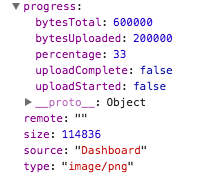
I could definitely use some help at this point @arturi
UPDATE 3:
I made some progress today: It seems that there were two problems:
- I never emitted an
upload-startedevent :
uppy.emit('upload-started', file, {
    uploader: 'custom',
    bytesUploaded: 0,
    bytesTotal: 269938
})
- For some reason
uploadStartedwas overwritten tofalseand that's the reason thumbnail progress was never shown. Now this works:
uppy.emit('upload-progress', file, {
    uploader: 'custom',
    bytesUploaded: 100000,
    bytesTotal: 269938,
    uploadStarted: 1521189374063,
    uploadCompleted: false
})
In short it turned out that I just needed to emit these events to Uppy from within activestorage's direct-upload events so that Uppy can behave the way I want it to. Effectively I think this is called a "bridge". However if there's a better way to do this, I'm all ears. Thanks again.
kstratis
on 15 Mar 2018
please how did you resolve this issue, I am challenged with the same problem
 andrew-oko-odion
on 28 Oct 2018
andrew-oko-odion
on 28 Oct 2018
Related issues
 risonsimon
·
4Comments
risonsimon
·
4Comments
 ogtfaber
·
4Comments
ogtfaber
·
4Comments
 aleccool213
·
3Comments
aleccool213
·
3Comments
 oyeanuj
·
3Comments
oyeanuj
·
3Comments
 yaegor
·
3Comments
yaegor
·
3Comments
Most helpful comment
Hi! What you can do:
Dashboardoptionally setinline: trueto show Dashboard inline with your form, and thenhideUploadButton: trueto hide the upload button, so you can use your own from the form. See https://uppy.io/docs/dashboard/ for details.Formplugin https://uppy.io/docs/form/ to attachOr intercept your form’s submit event and call
uppy.upload()so that Uppy will send the files along with metadata to your server. You could also get files that user selected from Uppy by iterating overuppy.state.filesobject. There’s currently no way to just use the Dashboard as file picker that will add actual files to your form’s input, but there is a way to upload those files first, and then append results (urls) to your form.I am not sure which of those would help the most, but I think this is a valid use case which we were hoping to cover with
Formplugin, and I’d be happy to add more options to it.