Umbraco-cms: [8.6RC] Uploaded images by the RTE Media Picker appear only after publishing content
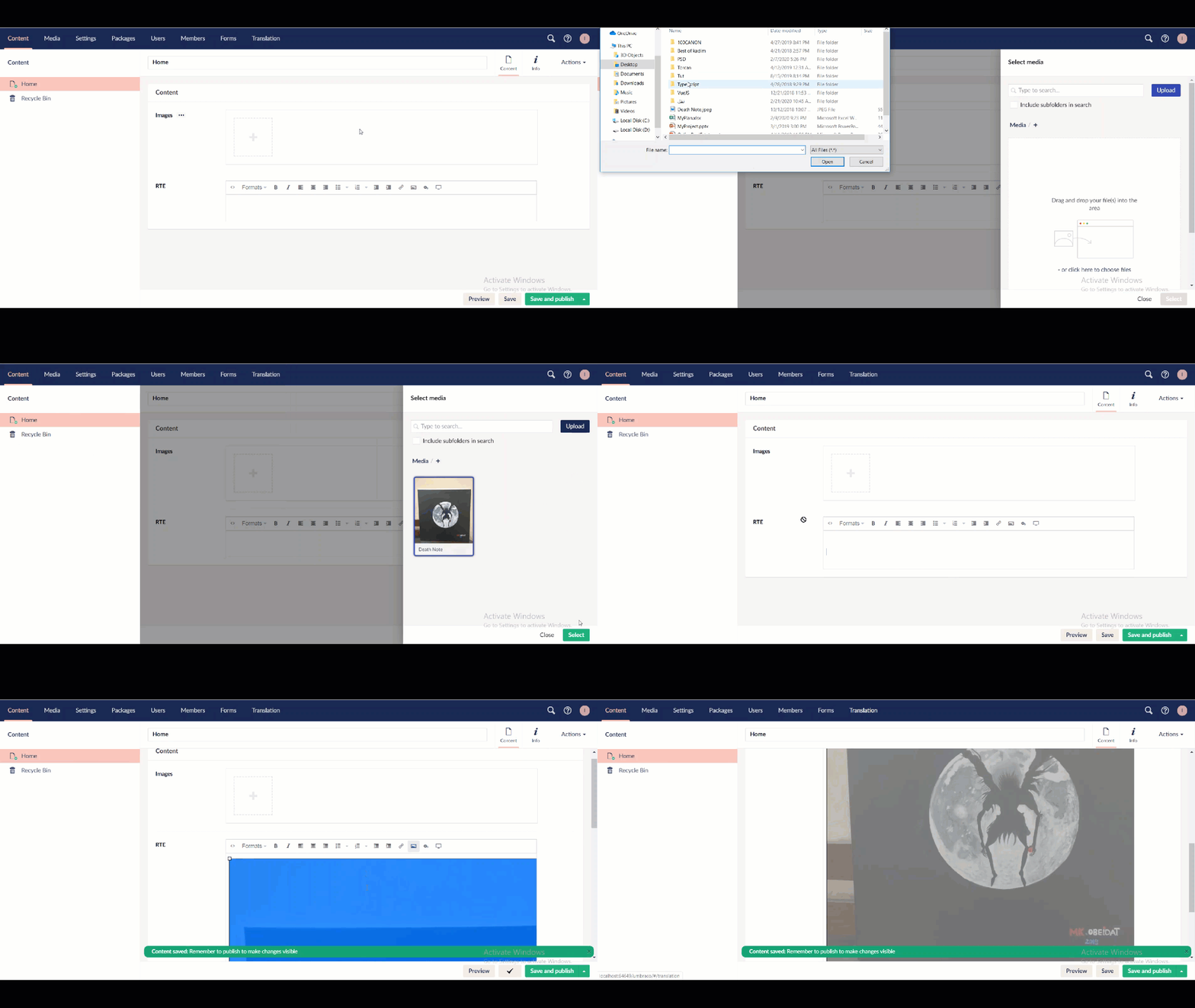
If you try to upload images from your PC directly by media picker in the RTE, they wouldn't appear in the RTE box until you save or publish the node.
Note that if you pick images from your current gallery, they would appear.
Umbraco version
I am seeing this issue on Umbraco version: 8.6RC
Specifics
Fresh Umbraco 8.6 RC installation
Steps to reproduce
1- Create RTE property in any existing node
2- Upload images directly form your PC
3- Click Save or Save & Publish to be able to see the uploaded images in the RTE box
Expected result
I expect to see the uploaded images in the RTE box
Actual result
Uploaded images didn't appear
_This item has been added to our backlog AB#5516_
 saifobeidat
All 10 comments
@saifobeidat hmmm I recall having fixed something along those lines at some point 🤔 and I don't see this bug in the latest v8/contrib.
The media picker should display a new dialog subsequent to picking the uploaded image, but in your GIF it does not - it just closes. Are there any JS errors in the console?
 kjac
on 1 Mar 2020
kjac
on 1 Mar 2020
I can reproduce, will have a look at the history of v8/contrib - the image is selected after upload, but it doesn't "actually" seem selected.
 nul800sebastiaan
on 2 Mar 2020
nul800sebastiaan
on 2 Mar 2020
Looks like this would've fixed it, but it's not working any more: https://github.com/umbraco/Umbraco-CMS/pull/6995
nul800sebastiaan
on 2 Mar 2020
@nul800sebastiaan I believe it wasn't working even before, as it was stated in Musab's comment
saifobeidat
on 2 Mar 2020
For the life of me I still can't reproduce this in v8/contrib. Is anyone seeing any console errors?
kjac
on 2 Mar 2020
@kjac yes there is an error appears on the console :
http://localhost:64649/nothing.jpg 404 (Not Found)
it appears when I click "select" button, and appears again when I publish the node
saifobeidat
on 2 Mar 2020
Hmmmmm well I still can't reproduce on vLatest, but now at least I can see an error in the console:
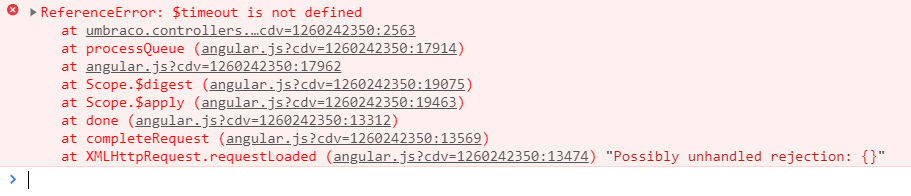
Looks like a bad merge has removed a dependency in the media picker controller. When I re-introduce that dependency I can reproduce the bug y'all are seeing.
I've got a PR incoming 👍
kjac
on 2 Mar 2020
PR in #7745
kjac
on 2 Mar 2020
@kjac this the version that I downloaded and has the issue: https://our.umbraco.com/download/releases/860 I don't know if it's the same as latest v8/contrib
saifobeidat
on 3 Mar 2020
@saifobeidat That's not the same. This issue has now been fixed for the upcoming final release of 8.6.0 (due out next week).
nul800sebastiaan
on 4 Mar 2020
Related issues
 lcichanowicz
·
28Comments
lcichanowicz
·
28Comments
 DotpeopleApS
·
31Comments
DotpeopleApS
·
31Comments
 JoseMarcenaro
·
26Comments
JoseMarcenaro
·
26Comments
 benjaminc
·
35Comments
benjaminc
·
35Comments
 FransdeJong
·
33Comments
FransdeJong
·
33Comments