Umbraco-cms: Unhandled exception in AppDomain (terminating) when multiple domains on shared hosting environment
Since launch of v8 we (among others) have experienced a lot of random Examine/Lucene index errors and application crashes when running a Umbraco setup with two (or more) root nodes with different domains or subdomains added to the root nodes. After running a short while, the log explodes multiple lucene errors. We have experienced this on shared hosting.
Umbraco version
I am seeing this issue on Umbraco version: 8.0 ->
Reproduction
Install a new Umbraco CMS with 2 or more root nodes with added domain name to each node.
We have prepared a reproduction site here:
https://www.play-box.dk (root node 1)
https://www.examinetest.dk (root node 2)
Umbraco login:
Email: [email protected]
Password: examinetester
Bug summary
We have experienced a lot of random Examine/Lucene index errors and application crashes when running a Umbraco setup with two (or more) root nodes with different domains or subdomains added to the root nodes. After running a short while, the log explodes with errors saying:
Unhandled exception in AppDomain (terminating). (The worst one!)
Cannot index queue items, the index is currently locked
Error indexing queue items
Concurrent merge failed for index: ExternalIndex if this error is persistent then index rebuilding is necessary
An error occurred during the index commit operation, if this error is persistent then index rebuilding is necessary
When opening the Examine Management tab, it fails and says:
Failed to retrieve indexer details
System.ApplicationException: Could not create an index searcher with the supplied lucene directory
Specifics
Steps to reproduce
Expected result
We expect it to be as stable as the 7 version
Actual result
Multiple lucene errors that can be seen in the log file in the previous mentioned solution:
 DotpeopleApS
All 31 comments
Thanks for the detailed reports and playgrounds, that's helpful! I've sent this off for the team to look at. Just a question, I notice the reproduction site is running 8.6.4, I am assuming this still happens on that version?
 nul800sebastiaan
on 27 Aug 2020
nul800sebastiaan
on 27 Aug 2020
Hi Sebastiaan
That is correct...
- Jonas
DotpeopleApS
on 27 Aug 2020
@DotpeopleApS , have you configured the umbracoApplicationUrl in UmbracoSettings.config to have a specific domain? I'm wondering if not having an entry there is causing Umbraco to re-detect the application url after a period of a time, in turn causing the app domain to shutdown/restart and that isn't completing fully. (https://github.com/umbraco/Umbraco-CMS/issues/8612)
 NikRimington
on 3 Sep 2020
NikRimington
on 3 Sep 2020
@DotpeopleApS , have you configured the
umbracoApplicationUrlin UmbracoSettings.config to have a specific domain? I'm wondering if not having an entry there is causing Umbraco to re-detect the application url after a period of a time, in turn causing the app domain to shutdown/restart and that isn't completing fully. (#8612)
I am experiencing the exact same problems with my two Umbraco 8 websites, and the umbracoApplicationUrl in my UmbracoSettings.config is just an empty string.
 wvdweerd
on 3 Sep 2020
wvdweerd
on 3 Sep 2020
@DotpeopleApS
I have seen this behavior when people had 2 IIS websites configured pointing to the same directory ? Is this your case ? Or do you have only one website with both domains configured ?
Dave
 dawoe
on 14 Sep 2020
dawoe
on 14 Sep 2020
@DotpeopleApS To come back to this, I just had another look in the backoffice and I see this:

Is there any way we can get a copy of this solution, including the publish code etc so we can see what is happening?
And could you let us know if you have a umbracoApplicationUrl configured or not?
nul800sebastiaan
on 14 Sep 2020
Hi Sebastiaan
Absolutely... please refer to:
Here you will find a dropbox link to the solution.
We have NOT configured umbracoApplicationUrl
Thank you.
DotpeopleApS
on 14 Sep 2020
Alright, I unfortunately don't have SQL 2019 installed so I couldn't test with your exact website.
However, it seems like the code was the most important part so I've set everything up in the same way on a test site:
- RootNode 1 - domain1.com
- RootNode 2 - domain2.com
umbracoApplicationUrl is empty.
Updated my homepage template like you did with, the following code:
    var cs = Services.ContentService;
    var content = cs.GetById(Model.Id);

    content.SetValue("metaTitle", "You have just saved and published this field by visiting this page. Log in to Umbraco and check the log, to see how it has affected the Examine index.");
    cs.SaveAndPublish(content);
The only difference is that I didn't hardcode the content ids, but that shouldn't make a difference. I've reloaded the home page multiple times on different browsers and logged into the backoffices on both URLs and published the home nodes from there as well. All of this seems to work for me, so maybe I'm missing some important step in the setup?
nul800sebastiaan
on 14 Sep 2020
We have no problems running it locally, we are only experiencing problems on our shared hosting environment @ Simply.dk so i guess thats the difference for starters. As of now , we have to separate multi domain website in separate installations...
Is it possible to bug test our testing environment or do you need further access to files etc?
DotpeopleApS
on 15 Sep 2020
@DotpeopleApS
Did you see my previous comment.
Dave
dawoe
on 15 Sep 2020
@DotpeopleApS
I have seen this behavior when people had 2 IIS websites configured pointing to the same directory ? Is this your case ? Or do you have only one website with both domains configured ?
Dave
Sorry Dave...
we have one website with one main domain and another domain as attached that points to the root of the website. From here we separate them with culture and hostnames
DotpeopleApS
on 15 Sep 2020
we are only experiencing problems on our shared hosting environment
This is what I expected which means there's a need to determine how to configure Lucene for this hosting environment. Like Azure, there's probably some weird things going on like hosting over a network share, but there could be all sorts of other unknown things going on. These errors are almost always related to multiple processes accessing the same Lucene files at the same time which isn't possible. Perhaps the hosting environment is using network shares, perhaps they have configured IIS to have overlapping app domains, maybe they've configured an IIS farm where the same site might be running on more than one IIS instance internally accessing the same network share and their load balancer determines how to route. There's a huge amount of variables that can affect file access. Lucene will absolutely not work with multiple processes accessing the files at the same time and has problems when running over a network share.
Other notes in that Our post mentions using things like IgnoreLocalDb to reduce errors - this also means that there is file access issues in this hosting environment. That setting disables Umbraco's local cache files which like Lucene can only be accessed by one process at a time. If this setting removes those errors then this pretty much shows that the hosting environment is not a traditional setup. There's no need to manually unlock indexes - if you need to do that because of file lock errors than it's a red flag that some configuration is amiss.
I would recommend trying the Azure configuration settings (and also understanding what they do) https://our.umbraco.com/documentation/Getting-Started/Setup/Server-Setup/azure-web-apps - however, those might not work perfectly for this hosting environment since it's probably not identical to Azure. Perhaps it's worth asking them how they configure IIS and it's file systems and if they have overlapping appdomains turned on and anything else that might not be a typical IIS setup.
 Shazwazza
on 16 Sep 2020
Shazwazza
on 16 Sep 2020
we are only experiencing problems on our shared hosting environment
This is what I expected which means there's a need to determine how to configure Lucene for this hosting environment. Like Azure, there's probably some weird things going on like hosting over a network share, but there could be all sorts of other unknown things going on. These errors are almost always related to multiple processes accessing the same Lucene files at the same time which isn't possible. Perhaps the hosting environment is using network shares, perhaps they have configured IIS to have overlapping app domains, maybe they've configured an IIS farm where the same site might be running on more than one IIS instance internally accessing the same network share and their load balancer determines how to route. There's a huge amount of variables that can affect file access. Lucene will absolutely not work with multiple processes accessing the files at the same time and has problems when running over a network share.
Other notes in that Our post mentions using things like
IgnoreLocalDbto reduce errors - this also means that there is file access issues in this hosting environment. That setting disables Umbraco's local cache files which like Lucene can only be accessed by one process at a time. If this setting removes those errors then this pretty much shows that the hosting environment is not a traditional setup. There's no need to manually unlock indexes - if you need to do that because of file lock errors than it's a red flag that some configuration is amiss.I would recommend trying the Azure configuration settings (and also understanding what they do) https://our.umbraco.com/documentation/Getting-Started/Setup/Server-Setup/azure-web-apps - however, those might not work perfectly for this hosting environment since it's probably not identical to Azure. Perhaps it's worth asking them how they configure IIS and it's file systems and if they have overlapping appdomains turned on and anything else that might not be a typical IIS setup.
Thank you for you comment.
I have adressed the following questions to Simply... them being one of the largest hosting providers in Denmark I have left out "red flag that some configuration is amiss." :-)
1) Is the hosting environment is using network shares
2) Have you configured IIS to have overlapping app domains,
3) Have you configured an IIS farm where the same site might be running on more than one IIS instance internally accessing the same network share and their load balancer determines how to route.
I will post it as soon i get an answer.
DotpeopleApS
on 16 Sep 2020
The answers to your questions are as follows:
1) No
2) Yes
3) No
Does that help in any way? If it is any help in solving the problem, we had no problems in Umbraco 7x.
DotpeopleApS
on 16 Sep 2020
Overlapping appdomains may pose an issue but shouldn't in theory and that is exactly why our 'MainDom' object exists. On Azure the default MainDom doesn't work because it uses systemwide semaphore locks which don't work there. Potentially this host may not support that either somehow. You can try to use the SqlMainDom setting:
<add
    key="Umbraco.Core.MainDom.Lock"
    value="SqlMainDomLock" />
v7 does actually have issues with this too but they are hidden ;) meaning the errors don't bubble up as YSODs but there will be logged errors sometimes or 'weird' things happening. v7 doesn't lock the xml cache file but v8 does which is part of why the problem is seen more in v8 but because v7 doesn't have exclusive file access if overlapping app domains try to write to the file at the same time you will end up with missing content or corrupt xml files.
Shazwazza
on 17 Sep 2020
Hi Shannon
We have implementet the SqlMainDom setting in the examine testing environment mentioned above. We have also upgraded this project to the lates Umbraco release... This is the current status:
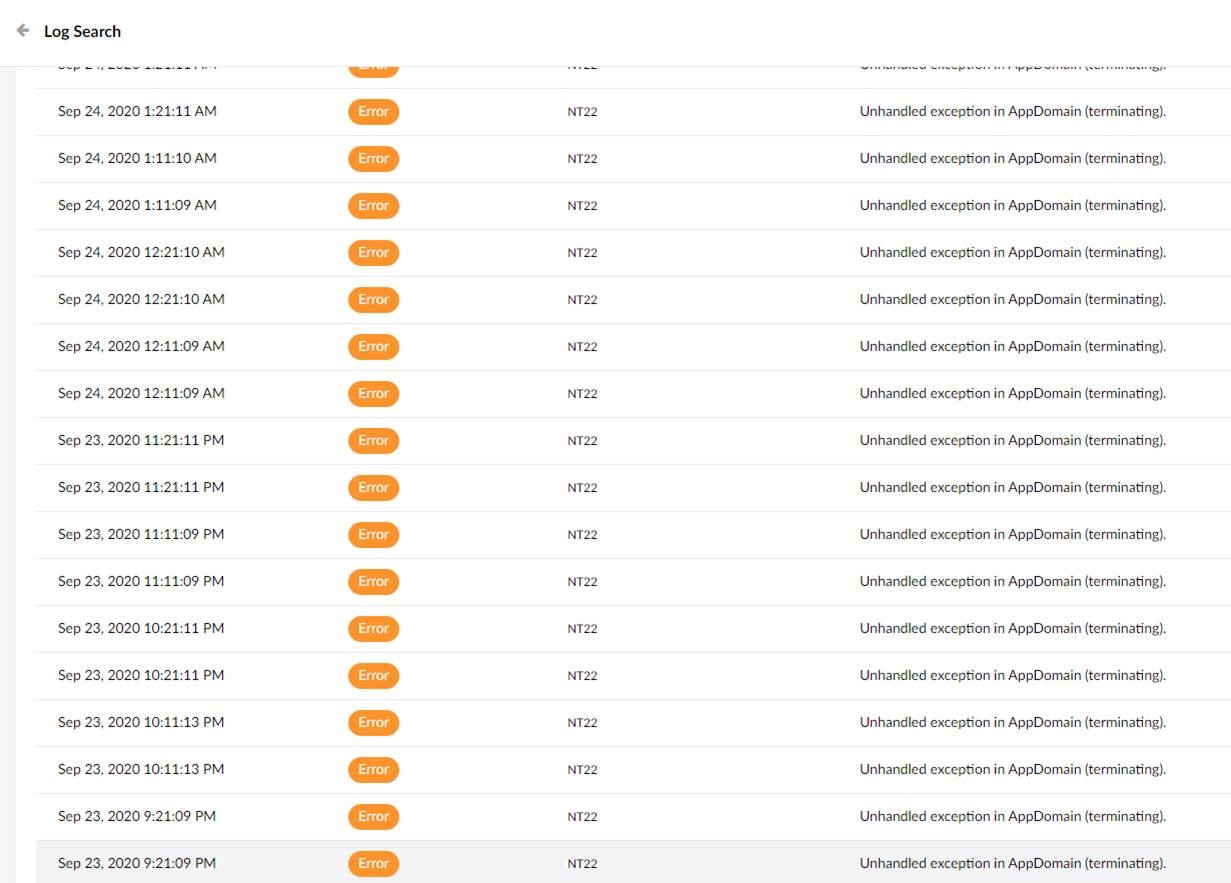
We have previous implemented a lot of different solutions but, at most, we get different lucene related errors.
DotpeopleApS
on 24 Sep 2020
I dont know if its the right place, but we need to get things running smoothly again as soon as possible.
What hosting providers do Umbraco recommend @nul800sebastiaan?
We are currently using Simply which is a part of Zitcom that owns Wannafind, Simply, Curanet, Surftown, so i guess these are out of the question.
DotpeopleApS
on 24 Sep 2020
@DotpeopleApS We recommend Umbraco Cloud. 😄
Sorry, we don't have any specific recommendations, that's not our specialty.
We're getting ready to release 8.6.5 soon which could help with stability, so maybe try that one out first when it gets released (tentatively next week).
nul800sebastiaan
on 24 Sep 2020
@DotpeopleApS We recommend Umbraco Cloud. 😄
Sorry, we don't have any specific recommendations, that's not our specialty.
We're getting ready to release 8.6.5 soon which could help with stability, so maybe try that one out first when it gets released (tentatively next week).
Ohh thats why its not working 😄 (Nudging at its best)
Wow... i will repeatedly hit refresh starting monday morning 😄 GREAT news
DotpeopleApS
on 24 Sep 2020
Ha! Well do it on Tuesday 😉, we just announced the release date - https://umbraco.com/blog/product-update-september-24th-2020/
I really don't know if it's going to help for you but we'll keep fingers crossed!
nul800sebastiaan
on 24 Sep 2020
@DotpeopleApS maybe more questions for this hosting company:
- Do they run anti-virus? If so could it affect files on disk?
- Do they run active backup? If so could it affect files on disk?
I've had a quick look at your error logs on the https://www.play-box.dk/, I have no idea what it's current configuration is but all of the "Unhandled exception in AppDomain (terminating)." errors are due to lucene files not being found. I don't know how that would be possible and I've never seen that before.
Your logs for today show the site starting up and within the first minute of starting it says it tries to publish a document: "Document "Examinetest.dk" (id=1073) has been published." and immediately after that you get the "Unhandled exception in AppDomain (terminating)." occurring on both the internal and external index. But is that because you have previous issues with these indexes that do not get resolved? I can see you cannot access the Examine mgmt panel so you can't rebuild the indexes. Have you force deleted them so they rebuild? If you're indexes are just totally corrupted but they are not being detected as empty and not being rebuilt on startup then they'll just forever be corrupted.
You have this CustomizedExamineComponent which shouldn't exist. There is no reason for that. You don't want to disable the local db with IgnoreLocalDb, that's not ideal. You don't need to unlock indexes on startup, Umbraco will ensure that's all done if necessary. You don' t need to change the lock factory, it's should remain as the default. In fact you are just setting it to be what it already is. IMO both CustomizedExamineComponent and should be removed IgnoreLocalDbComposer.
Shazwazza
on 24 Sep 2020
@Shazwazza I will get back to you on the questions.
Furthermore we have done the following to our bug testing environment:
- IgnoreLocalDb (now removed from release)
- CustomizedExamineComponent (now removed from release)
- Custom unlock of indexes on startup (now removed from release)

(now removed from web.config)
Configuration is now standard:
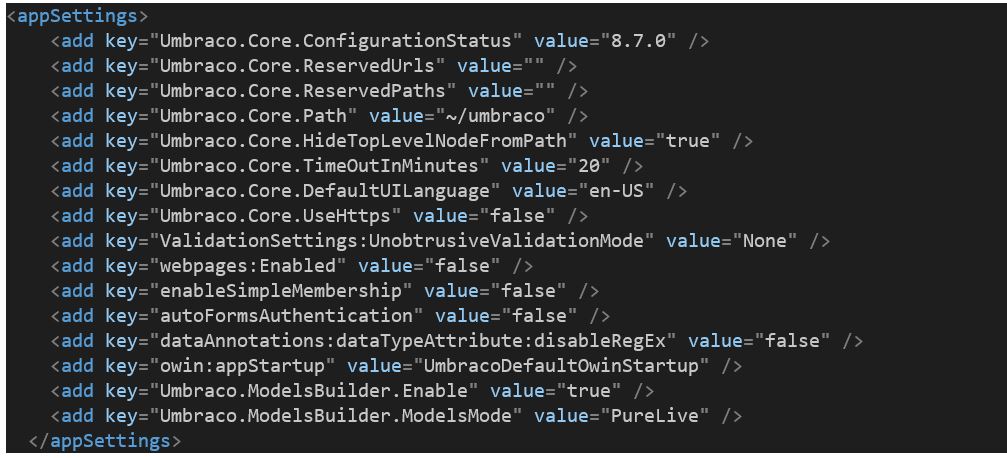
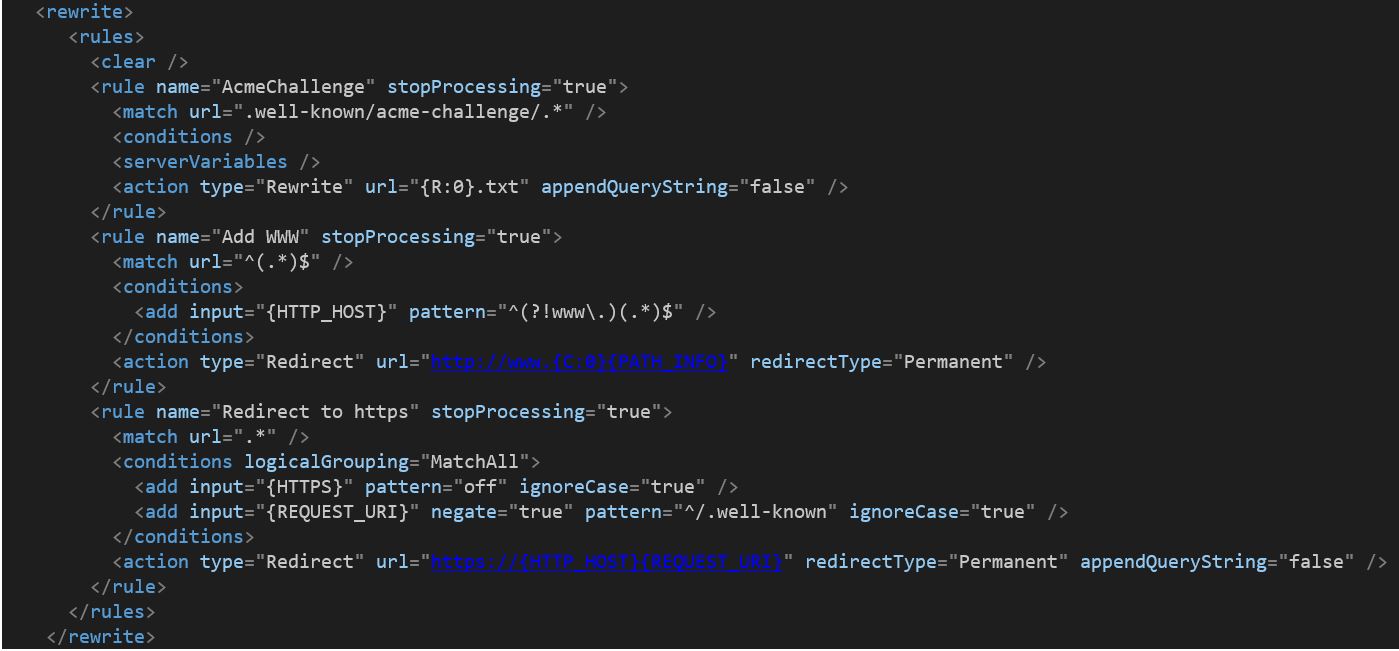
Except from some rewrite rules for https further down in web.cofig:
DotpeopleApS
on 25 Sep 2020
@Shazwazza Just a note:
“You don't want to disable the local db with IgnoreLocalDb, that's not ideal.”
But disabling this custom functionality always causes one of the two domains to crash.
That applies to all of our v8 installations with two domains a described. Please have a look at the live test site now:
https://www.play-box.dk/ (running fine)
https://www.examinetest.dk/ (crashes because of NuCache.Content.db being used by another process)
DotpeopleApS
on 25 Sep 2020
But disabling this custom functionality always causes one of the two domains to crash.
That applies to all of our v8 installations with two domains a described. Please have a look at the live test site now:
(crashes because of NuCache.Content.db being used by another process)
Yes then this also confirms that there's an issue going on with hosting and/or configuration, just like the Lucene errors. There is clearly multiple processes trying to access these files at the same time. Are these setup as 2 different IIS sites pointing at the same file system/database??
Shazwazza
on 28 Sep 2020
I got these answers from the hosting company:
Yes, there is antivirus and backup but neither should impact the files on the sever...
This is our current setup:
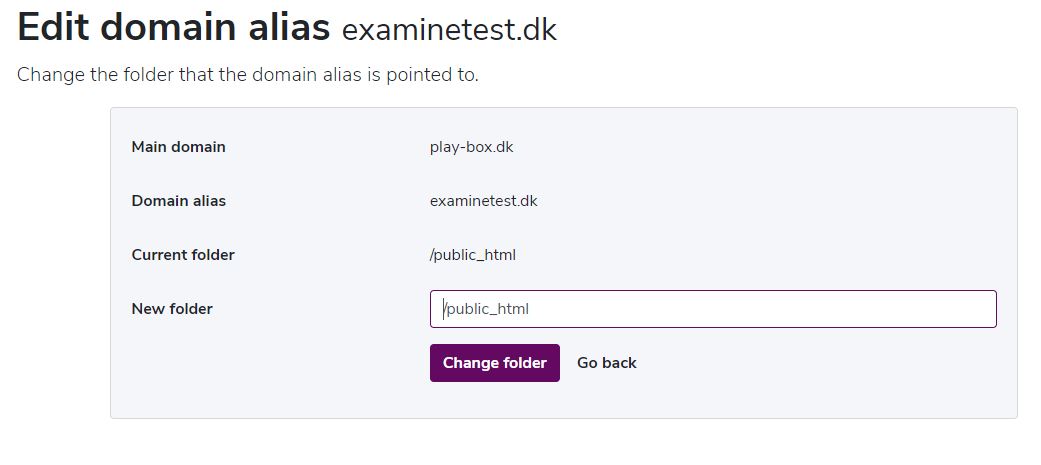
We have domain A as the primary domain that points directly to the server.
Then we get, what the hosting company calls an domain alias, domain B. This domain points to the root of the server as well. Then we configure the rest in culture and hostnames.
This is what it looks like in our test enviroment:
DotpeopleApS
on 28 Sep 2020
Then we get, what the hosting company calls an domain alias, domain B. This domain points to the root of the server as well
Considering the issues you are having - this sounds like what they call a 'domain alias' is actually another IIS instance pointed at the same file system but I have no idea, it's really up to how they are configuring these things. Your symptoms are pretty much identical to having multiple IIS websites pointing at a single shared file system. Umbraco cannot have multiple IIS site instances pointed at the same file system.
Shazwazza
on 28 Sep 2020
What would the ideal solution be if you have company.dk and company.com.
company.dk pointing to one node in root
company.com pointing to another root in root
Like a language divided website
DotpeopleApS
on 28 Sep 2020
@DotpeopleApS Without knowing exactly how you've set up things, it does sound like you are not using the web hosting product in a way that is compatible with Umbraco (or many other CMS platforms for that matter).
as @Shazwazza mentions it sure sounds like what you have is not actually a domain alias, but a completely separate IIS website/instance simply set up to run in the same directory as the first one. This will not work as it will cause two separate IIS instances to be trying to obtain file locks on the same Examine index files at the same time.
What you want is to have a real domain alias on your single website. This will ensure that all requests for either alias will go to the same single IIS instance running in that directory on the file system - no longer fighting with another IIS instance for file locks. This single instance will then be able to handle requests coming to both domain-a and domain-b _within_ that same instance, as long as both the hosting environment (simply.com) and your Umbraco site running in there, is set up accept requests on both aliases.
From the looks of it, you are most likely using the _Possibility for more domains_ option of their product (https://www.simply.com/en/products/). This option allows you to set up multiple websites (in separate IIS instances) under the same shared resources on the server. When doing this, you are not supposed to be pointing these websites to the same location on the file system. It is supposed to be used for completely separated websites, running in separated locations on the file system - simply just sharing the total amount of resources available (cpu, memory, storage).
What you want to use is most likely their _Domain alias_ option which is listed completely at the bottom of the product page under _Additional choices_. I believe this should allow you to add extra domain aliases to an existing website, routing all requests to the same single IIS instance. You may want to confirm this with them though as I am not too familiar with how simply.com do their things.
If you're having problems with this I would suggest that you contact your hosting provider, as this is not an Umbraco bug - it is simply a matter of misconfiguration of the hosting environment used to host your Umbraco site. When you have it set up correctly on your hosting provider, all that is left is to configure Umbraco itself to use the mapped domains. There's a few hints here on how to set it up: https://skrift.io/issues/using-one-umbraco-instance-to-host-multiple-sites/ (although it may look a bit different now) and if you're still having trouble I would suggest you reach out on https://our.umbraco.com/forum/ as there's a lot of good help to get there from the community.
 clausjensen
on 29 Sep 2020
clausjensen
on 29 Sep 2020
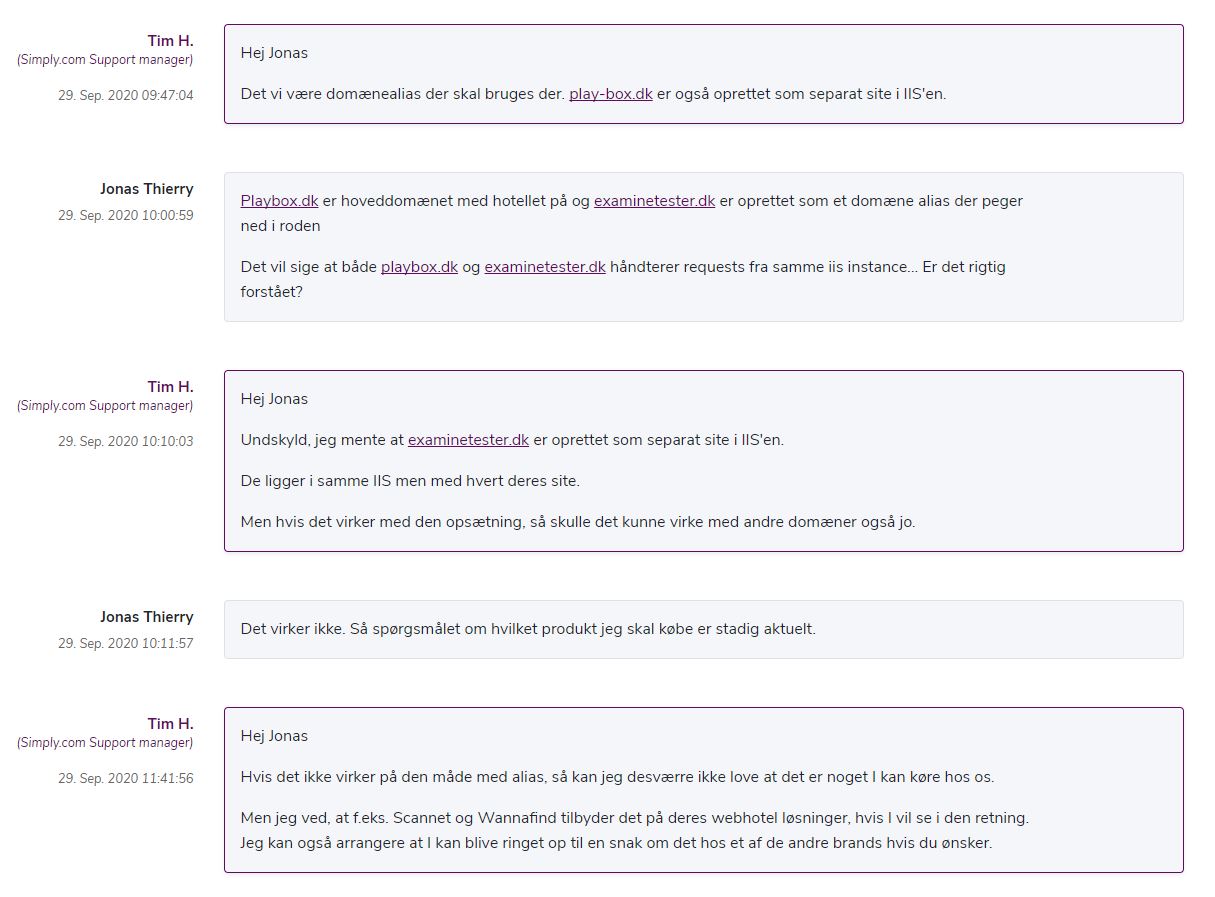
During our extensive investigation in this matter we have, off course, tried what you suggests. @clausjensen
We are left with the fact that Umbraco 8 can not be hosted @ Simply with multiple domains, despite the fact that this is possible in Umbraco 7.
Please refer to Simplys answer for documentation. (in danish)
DotpeopleApS
on 29 Sep 2020
@DotpeopleApS Wow. I don't even know how to respond to this. I'm completely amazed that someone can actually run a serious hosting business and not support this.
While it won't be of much help to you, I can tell you that the reason why this is "working" in v7 is most likely because you just don't see the errors bubbling up in the same way on a v7 site as it does on a v8 site. We now do a whole lot more of error checking and reporting. Rest assured - any Umbraco site (v7/v8) where you try to run multiple instances of the site within the same file store on disk - will have issues due to locks. They are just very well hidden in v7 and usually show up as "strange behavior" that you may or may not see and can't really pinpoint the exact cause of.
So... while this is "possible" in v7 - knowing what we know, we would never recommend doing it and I would definitely not consider this a viable solution for a production site.
Disappointing as it is - I can only encourage you to look for a different hosting provider if that is their answer.
clausjensen
on 29 Sep 2020
Thank you Claus... we are doing just that.
DotpeopleApS
on 29 Sep 2020
Related issues
 Matthew-Wise
·
4Comments
Matthew-Wise
·
4Comments
 jesperordrup
·
3Comments
jesperordrup
·
3Comments
 0Neji
·
3Comments
0Neji
·
3Comments
 aochmann
·
3Comments
aochmann
·
3Comments
 sofietoft
·
3Comments
sofietoft
·
3Comments