Umbraco-cms: Variant Children of non-variant node are not listed
Testing and PR notes: https://github.com/umbraco/Umbraco-CMS/issues/5886#issuecomment-513100527
Release 8.1.0 includes some breaking changes regarding IPublishedContent.Children() - gone - and its replacement properties .Children and .ChildrenForAllCultures (see this discussion).
But it looks like the implementation does not work as expected:
If you have a non-variant parent with a mix of culture-variant and non-variant children:
- Only the non-variant children are listed in the
Childrenproperty. - The culture-variant children are not listed, even if they have a published version in the current language.
- The related methods
.FirstChild(),.FirstChild<T>(), etc. also fail to retrieve any culture-variant children.
The only way to access the culture-variant children is the ChildrenForAllCultures property. I don't think this is by design, is it?
_This item has been added to our backlog AB#1721_
 JoseMarcenaro
All 26 comments
Whoa. That sounds like an oversight ☹️
 kjac
on 15 Jul 2019
kjac
on 15 Jul 2019
Not by design. Bug.
 zpqrtbnk
on 15 Jul 2019
zpqrtbnk
on 15 Jul 2019
That is an interesting one and potentially depends on where these invariant children exist.
The Children property should return children that are contextual to the current request. In this case the Children that are variant which exist underneath an invariant document should correspond to the culture in the IVariationContextAccessor.
I'd have to look to see what is going on but would have thought this was already the case.
@JoseMarcenaro To confirm with your setup though, do you have cultures assigned to the tree where you have non-variant nodes?
 Shazwazza
on 15 Jul 2019
Shazwazza
on 15 Jul 2019
@Shazwazza - I'm not sure I understand your question, but I can confirm this behavior happens down the tree, below the node where the "Culture and Hostnames" are set, i.e.
Website
|- Home // variant, hostname bindings are set here
| |- Panels // invariant
| | |- Child1 // variant
When rendering 'Home', children of the 'Panels' folder are not retrieved by the .Children property.
JoseMarcenaro
on 15 Jul 2019
@Shazwazza - in case you don't experience the same behavior, let me know and I'll post a "Steps to reproduce" sequence starting from a blank Umbraco 8.1.0 site.
JoseMarcenaro
on 15 Jul 2019
Steps to reproduce
Install a brand new Umbraco 8.1.0 website
Create the following document types:
- InvariantSection (doctype without template) - add no properties, keep all defaults
- VariantSection (doctype without template) - add no properties, enable "Allow varying by culture"
- HomePage (doctype) - add no properties, enable "Allow as root" and "Allow varying by culture", add InvariantSection and VariantSection as allowed children
In the content tree:
- Create the root HomePage, publish with the default language (en-US)
- Create an InvariantSection child under the home (Section1) and publish
- Create a VariantSection child under the home (Section2) and publish
Edit the Homepage template:
@inherits Umbraco.Web.Mvc.UmbracoViewPage<ContentModels.HomePage>
@using ContentModels = Umbraco.Web.PublishedModels;
@{
Layout = null;
}
<ul>
@foreach (var child in Model.Children)
{
<li>@child.Name</li>
}
</ul>
Add a "Culture and Hostnames..." entry to the home page, using the single language available (en-US)
Run the site: this is what you'll get:
- Section1
- Section2
So far, so good.
Now change the HomePage document type as invariant and republish the content item.
Run the site, and this is what you get:
- Section1
Whoa! Note that this is not related to the fact that the invariant node is the home page (where the binding is set). If you keep the home page as culture-variant and add a "Sections" (invariant) folder between the home page and the two sections, you'll get the same behavior.
JoseMarcenaro
on 15 Jul 2019
I still think there should be a clear seperation between content and structure, as only content can be variant by culture, as I commented earlier: https://github.com/umbraco/Umbraco-CMS/issues/5170#issuecomment-499278717. But as we now have ChildrenForAllCultures on IPublishedContent, this will just be the way it is...
Regarding this issue: it looks like the culture can be null, an empty string or * (when getting/filtering the children). The Children property invokes this.Children() (using culture = null), which is then changed to an empty string and thus filters all children using IsInvariantOrHasCulture():
This checks whether the child content type has a ContentVariation.Culture flag set (true for Section1) or a culture that equals an empty string (false for Section2)! So the culture set via domains/cultures on the parent node isn't taken into account.
@JoseMarcenaro Using Model.Children(Model.GetCultureFromDomains()) will probably give you the expected results, can you validate this?
 ronaldbarendse
on 16 Jul 2019
ronaldbarendse
on 16 Jul 2019
@ronaldbarendse
No. Using Model.Children(Model.GetCultureFromDomains()) only lists Section1 (the invariant one). Only Model.ChildrenForAllCultures returns both sections.
Anyway, that's not the point. We need the full set of properties and methods to work correctly:
ChildrenChildren<T>FirstChild()FirstChild<T>- ... and so on
In a multilingual site, it makes senses to make some "structural" nodes as invariant, and that should not break the entire set of navigational properties / methods.
JoseMarcenaro
on 16 Jul 2019
In your final example, HomePage is invariant and has it's culture set to en-US via the 'Culture and Hostnames' (so Model.GetCultureFromDomains() should return this culture, as this is saved as a wildcard domain behind the scenes).
So Model.Children(Model.GetCultureFromDomains()) should return all invariant children and variants with en-US published/available. Is this the case for Section2?
ronaldbarendse
on 16 Jul 2019
@ronaldbarendse no, it is not the case. That is what should happen, but it does not.
Section2 is ignored.
JoseMarcenaro
on 16 Jul 2019
I ran into this issue as well, and if I've debugged/understand correctly it does look like the issue is with
https://github.com/umbraco/Umbraco-CMS/blob/3bfd9b71e290354744d677440983ecd06c5c0788/src/Umbraco.Core/PublishedContentExtensions.cs#L102-L127
and is relatively simple.
If the content is invariant and culture is not * (basically the same as just calling ChildrenForAllCultures), culture will always be set to empty string and context culture will not be used as culture is no longer null.
This means if using a specific culture, it'll be overwritten by empty string because the content is invariant.
So using the culture overload will do nothing if the content you're getting children for is invariant?
Children will be attempted filtered for culture empty string in IsInvariantOrHasCulture but if they have a cultures other than empty string they'll not be returned.
I would think a possible fix could be to change the IsInvariantOrHasCulture or create one specifically for children which takes context culture into consideration if the child content is not invariant, but the parent is?
(Or has I misunderstood the code?)
 ashansen
on 17 Jul 2019
ashansen
on 17 Jul 2019
@ashansen It's probably more complicated, as invariant content still has a culture: either set via 'Culture and Hostnames', inherited from parent nodes or as fallback the default culture...
So if the invariant content has a culture of 'en-US', I would expect all children to be invariant or the same culture (and not just all children).
ronaldbarendse
on 17 Jul 2019
@ronaldbarendse There might be some culture fallback issues and I've not dug into how Umbraco handles those (fallback) culture aspects (yet), however I would doubt (hope) that it mean they're saving culture specific content on other cultures or invent a specific 'invariant culture or similar but simply load content with the fall back cultures.
And that's why I think that when looking up children, you should not rely on the parents culture if the parent is invariant (and thus have no culture), but the context culture and if the child is invariant.
Something similar to:
return (content.ContentType.VariesByCulture() && content.Cultures.ContainsKey(culture))
|| !content.ContentType.VariesByCulture();
Now I know that's not a universal fix and just snipped into the codebase and all that because of complexities - however, the extension method for Children and the IsInvariantOrHasCulture does look to be relatively isolated.
ashansen
on 17 Jul 2019
Just working through all this but have found another related bug which is in the ContentCache.FollowRoute method which calls into content.Children(culture) which fails when you have a tree like:
variant -> non-variant -> variant
The last variant node will have a message saying that it is published but the item is not routable, this is because the FollowRoute fails due to the Children not returning the correct thing so this bug isn't just limited to the front-end.
There's a bunch of unit tests under NuCacheChildrenTests which all pass but means that it's not testing these scenarios, i will add to these tests and then can get a fix in place.
Shazwazza
on 19 Jul 2019
Here's a PR https://github.com/umbraco/Umbraco-CMS/pull/5946
The problem was the odd logic in PublishedContentExtensions.Children where it did this:
            // invariant has invariant value (whatever the requested culture)
            if (!content.ContentType.VariesByCulture() && culture != "*")
                culture = "";
I'm actually unsure why this logic exists and it may actually be a copy/paste problem. This similar logic exists in the Name and UrlSegment methods but in those methods it makes sense since they are returning single values. Perhaps @zpqrtbnk has some thoughts on that.
You can see in the PR that I've removed this logic which fixes these issues. I've added unit tests to prove this (these were failing before adding the fix). Please also have a look at the code comments/notes I've added.
For testing:
- Follow these steps https://github.com/umbraco/Umbraco-CMS/issues/5886#issuecomment-511585905
- Create a tree structure in the back office with variant -> invariant -> variant and navigate to the deepest variant and ensure that it's URLs are generated and it can be routed to
Shazwazza
on 19 Jul 2019
Generally it looks good to me and is similar to an extension method I made in my current project to circumvent the issues while waiting for an official fix :)
One question though - will empty string in method call have a different meaning in the context than null? Considering the check for culture is against null?.
ashansen
on 19 Jul 2019
Thinking that @Shazwazza is right, and the code he's removing is indeed a copy/paste error - it should not be there.
As for "empty string", it means "invariant culture" and has indeed a different meaning than null, which means "use the default/current culture".
zpqrtbnk
on 19 Jul 2019
Closed due to this PR merged in for 8.1.1
https://github.com/umbraco/Umbraco-CMS/pull/5946
 warrenbuckley
on 22 Jul 2019
warrenbuckley
on 22 Jul 2019
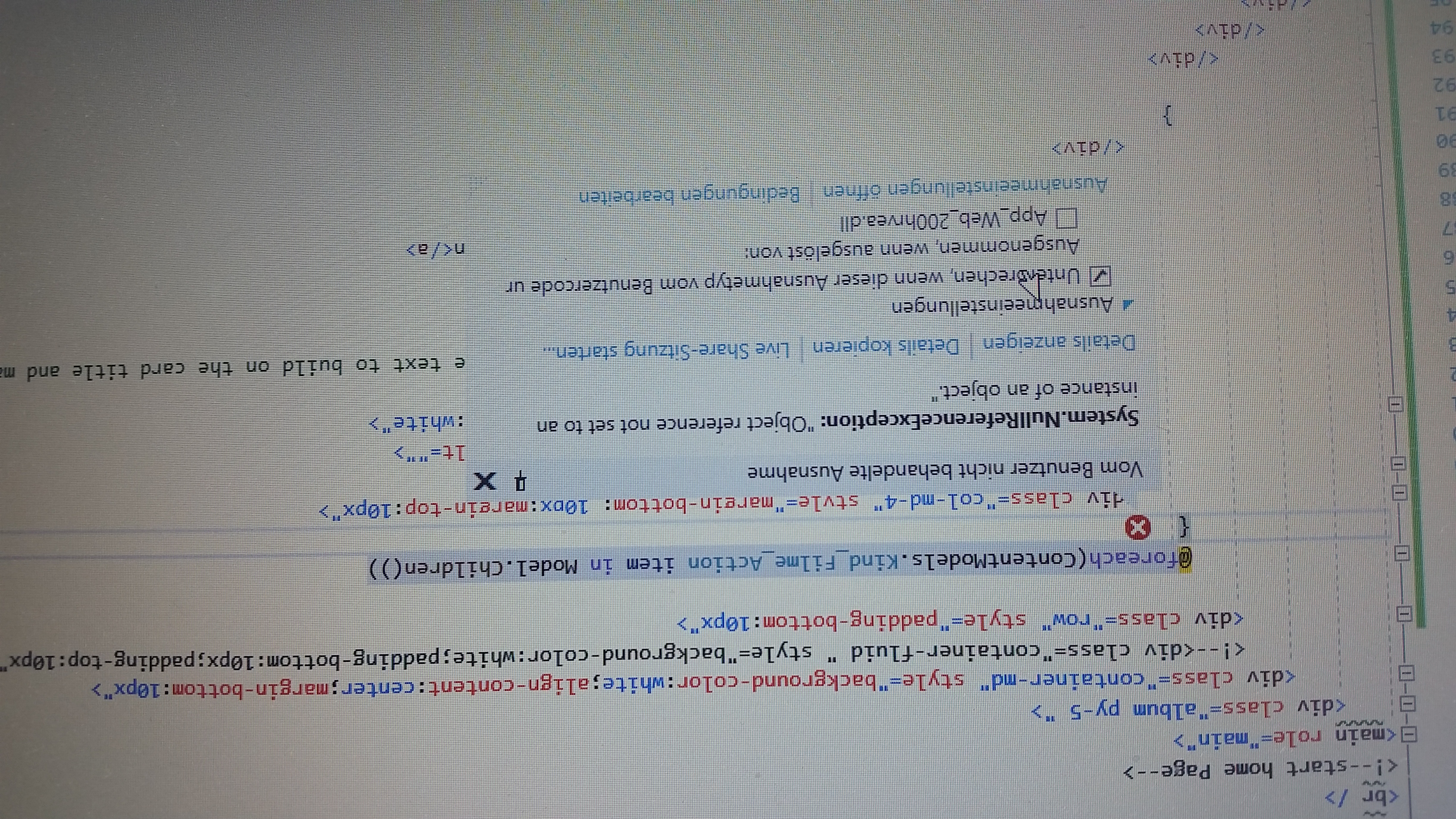
please,who can solve this problem
 brahim19
on 24 Sep 2020
brahim19
on 24 Sep 2020
Hi brahim19 - this does not look to be related to the reported issue - which was fixed, by the way.
If the Children() method was returning an empty collection, that would not be a null reference exception.
Are you sure Model is not null ?
JoseMarcenaro
on 24 Sep 2020
Yes,I'm sure
brahim19
on 24 Sep 2020
Can you please put a breakpoint at the foreach and test (in the Inmediate or Watch windows) the values of
Model
Model.Children()
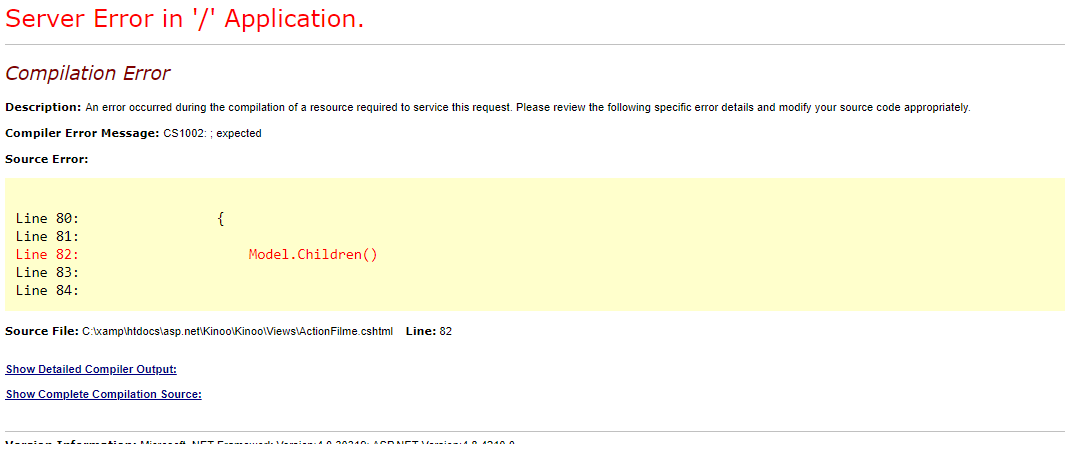
first, I thank you for the answer.I did it.but I got this error
brahim19
on 24 Sep 2020
Brahim, do not modify the razor view (by the way, the trailing ";" is missing).
Can you attach a debugger and stop the execution in the @foreach statement?
JoseMarcenaro
on 24 Sep 2020
if I stop @foreach statement, it will run quite normally.
brahim19
on 24 Sep 2020
@brahim19 - please open a thread in https://our.umbraco.com/forum/ to get help on this issue with your code, as it is not an Umbraco issue. Thx
JoseMarcenaro
on 24 Sep 2020
Related issues
 deMD
·
55Comments
deMD
·
55Comments
 nathanwoulfe
·
34Comments
nathanwoulfe
·
34Comments
 philipdanielhayton
·
29Comments
philipdanielhayton
·
29Comments
 FransdeJong
·
33Comments
FransdeJong
·
33Comments
 NikRimington
·
61Comments
NikRimington
·
61Comments
Most helpful comment
Here's a PR https://github.com/umbraco/Umbraco-CMS/pull/5946
The problem was the odd logic in PublishedContentExtensions.Children where it did this:
I'm actually unsure why this logic exists and it may actually be a copy/paste problem. This similar logic exists in the Name and UrlSegment methods but in those methods it makes sense since they are returning single values. Perhaps @zpqrtbnk has some thoughts on that.
You can see in the PR that I've removed this logic which fixes these issues. I've added unit tests to prove this (these were failing before adding the fix). Please also have a look at the code comments/notes I've added.
For testing: