Udemy-dl: Windows Error: UnicodeDecodeError: 'utf-8' codec can't decode byte 0x92 in position 0: invalid start byte
Good afternoon,
Receiving the following exception on Windows Python 3.7
Traceback (most recent call last):
  File "c:\Program Files (x86)\Python37-32\lib\runpy.py", line 193, in _run_module_as_main
    "__main__", mod_spec)
  File "c:\Program Files (x86)\Python37-32\lib\runpy.py", line 85, in _run_code
    exec(code, run_globals)
  File "c:\dl\udemy\udemy-dl.py", line 1445, in <module>
    main()
  File "c:\dl\udemy\udemy-dl.py", line 1441, in main
    udemy.course_download(path=options.output, quality=options.quality, unsafe=options.unsafe)
  File "c:\dl\udemy\udemy-dl.py", line 515, in course_download
    self.download_lectures_and_captions(lecture_best=lecture_best, lecture_title=lecture_title, inner_index=inner_index, lectures_count=lectures_count, lecture_subtitles=lecture_subtitles, lecture_assets=lecture_assets, filepath=filepath, unsafe=unsafe)
  File "c:\dl\udemy\udemy-dl.py", line 431, in download_lectures_and_captions
    self.download_subtitles(lecture_subtitles=lecture_subtitles, filepath=filepath, unsafe=unsafe)
  File "c:\dl\udemy\udemy-dl.py", line 385, in download_subtitles
    self.convert(filename=filename)
  File "c:\dl\udemy\udemy\_vtt2srt.py", line 87, in convert
    content = self._vttcontents(fname=filename)
  File "c:\dl\udemy\udemy\_vtt2srt.py", line 45, in _vttcontents
    content = [line for line in (l.strip() for l in f)]
  File "c:\dl\udemy\udemy\_vtt2srt.py", line 45, in <listcomp>
    content = [line for line in (l.strip() for l in f)]
  File "c:\dl\udemy\udemy\_vtt2srt.py", line 45, in <genexpr>
    content = [line for line in (l.strip() for l in f)]
  File "c:\Program Files (x86)\Python37-32\lib\codecs.py", line 714, in __next__
    return next(self.reader)
  File "c:\Program Files (x86)\Python37-32\lib\codecs.py", line 645, in __next__
    line = self.readline()
  File "c:\Program Files (x86)\Python37-32\lib\codecs.py", line 558, in readline
    data = self.read(readsize, firstline=True)
  File "c:\Program Files (x86)\Python37-32\lib\codecs.py", line 504, in read
    newchars, decodedbytes = self.decode(data, self.errors)
UnicodeDecodeError: 'utf-8' codec can't decode byte 0x92 in position 0: invalid start byte
Sorry I don't know python, but if I put the line in around 369 it bypasses the error, unsure if that is indeed a terrible fix or not:
filename = bytes(filename, 'utf-8').decode('utf-8', 'ignore')
EDIT: Sorry the error still occurs after this change.
 monstermorphic
All 4 comments
@monstermorphic can you please follow the issue reporting guideline i cannot reproduce.
 r0oth3x49
on 26 Aug 2018
r0oth3x49
on 26 Aug 2018
@monstermorphic 'm closing this issue as there is no update from your side.
r0oth3x49
on 31 Aug 2018
Hello Hello @r0oth3x49 ,
Thank you for your beautiful app.
I'm receiving this error too. The workaround is to disable subtitles with '--skip-sub'.
An example course url would be: https://www.udemy.com/the-python-mega-course --chapter-start 6 --unsafe
I believe the root cause is when there's a "Translated by Google" option in the lecture's subtitles.
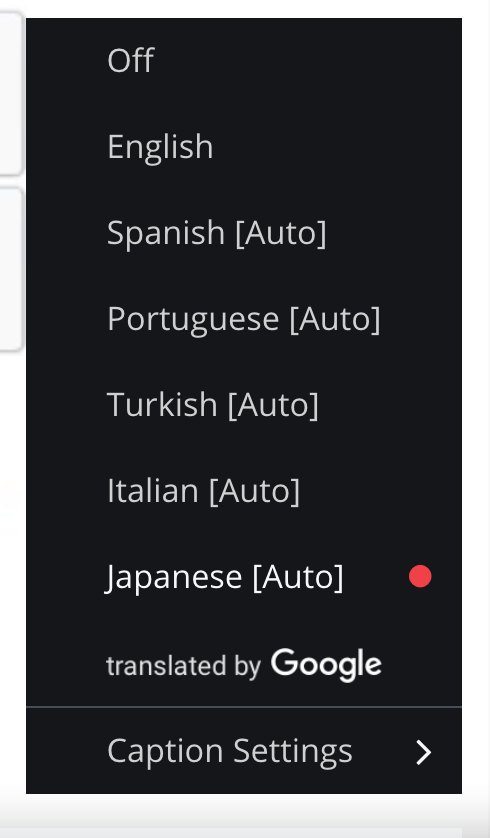
Another workaround to download that specific course and lecture number (maybe that link is retrieved first before the other subtitles?)
If I may trouble you with a feature request, it would be the option to download English only. I believe that would bypass this bug.
Thanks again for your continuous support!
 nokillkenny
on 8 Sep 2018
nokillkenny
on 8 Sep 2018
@nokillkenny Thank you for sharing your workaround. This was the solution to my issue.
 jessburnett
on 10 Jan 2019
jessburnett
on 10 Jan 2019
Related issues
 mattwelke
·
11Comments
mattwelke
·
11Comments
 vivekpanchal
·
8Comments
vivekpanchal
·
8Comments
 vipksmosar
·
6Comments
vipksmosar
·
6Comments
 TechieGenie
·
10Comments
TechieGenie
·
10Comments
 thedtech
·
7Comments
thedtech
·
7Comments
Most helpful comment
Hello Hello @r0oth3x49 ,
Thank you for your beautiful app.
I'm receiving this error too. The workaround is to disable subtitles with '--skip-sub'.
An example course url would be: https://www.udemy.com/the-python-mega-course --chapter-start 6 --unsafe
I believe the root cause is when there's a "Translated by Google" option in the lecture's subtitles.

Another workaround to download that specific course and lecture number (maybe that link is retrieved first before the other subtitles?)
If I may trouble you with a feature request, it would be the option to download English only. I believe that would bypass this bug.
Thanks again for your continuous support!