Udemy-dl: Unable to extract course idation and login-form form
Hey there,
While downloading a course these two errors are coming, (which I think are recent) :
1. Unable to extract course idation
[+] : Logged in successfully.
[-] Unable to extract course idation ..
2. Unable to extract login-form form
[*] : Trying to login as ([email protected])...
[-] Unable to extract login-form form
Please see through them.
Thank You.
 thedtech
All 7 comments
@thedtech check #184 its already discussed so i 'm closing the issue and please do follow issue reporting guieline
 r0oth3x49
on 24 May 2018
r0oth3x49
on 24 May 2018
@r0oth3x49 Sorry bro, but I did every thing which you mentioned to fix this issue in any thread like Updating the [ pip, requests, colorama, unidecode, six, requests[security], pyOpenSSL ] etc.
I have updated every module which is required. I also have updated the script to latest version
[ Version : 0.5 ].
My Operating System Is: Windows 10 Enterprise X64 and Internet Connection is also fine @100 Mbps.
I have used VPN also, but when I use VPN this error converts to the other error:
Unable to extract login-form form
I think this issue is now permanent. I am unable to fix it, Did everything mentioned in every post of yours previously, but unable to fix this error.
Thank you for your efforts.
thedtech
on 24 May 2018
@thedtech after certain interval didn't that worked for you, you have to wait atleast 3 to 4 minutes to retry downloading, as we have discussed in #184 that waiting for few minutes and resuming the download works for almost every one out there even for me i face the above error so many times but then i wait for atleast 5 to 10 minute to resume downloading and it works fine. currently there is no permanent solution to this.
r0oth3x49
on 24 May 2018
@r0oth3x49 Actually that is the real problem bro, this error came for me yesterday and till then I am waiting. Waited for 5 minutes even for 1 hour but nothing is happening.I will try again today, hope it will work.
thedtech
on 25 May 2018
@r0oth3x49 Hey Bro, I tried everything on my current environment (Windows 10 X64 April 2018) but nothing working. Now I am trying to do the same on (Ubuntu 18.04 LTS Desktop) installed on vmware (Virtual Environment), but I am getting the error Command Not Found while executing the script.I have Python 3.6.5 installed and PIP/Modules are also installed.
Can you please instruct me If I am missing anything. Please!
Thank You!!!
thedtech
on 25 May 2018
@thedtech sorry for the late response. can you please verify that you are using this utility instead the one at Python's Repository. remember this cannot be installed via pip so you have to clone udemy-dl from here. one more suggestion is to use cookie based authentication mechanism. steps to use cookie based authentication are below.
- login to your udemy account via browser
- Once you are logged in goto the course you want to download and right click on page look for option Inspect Element & click on that option.
Click on Network Tab Menu in Inspect Element and then click on XHR option.
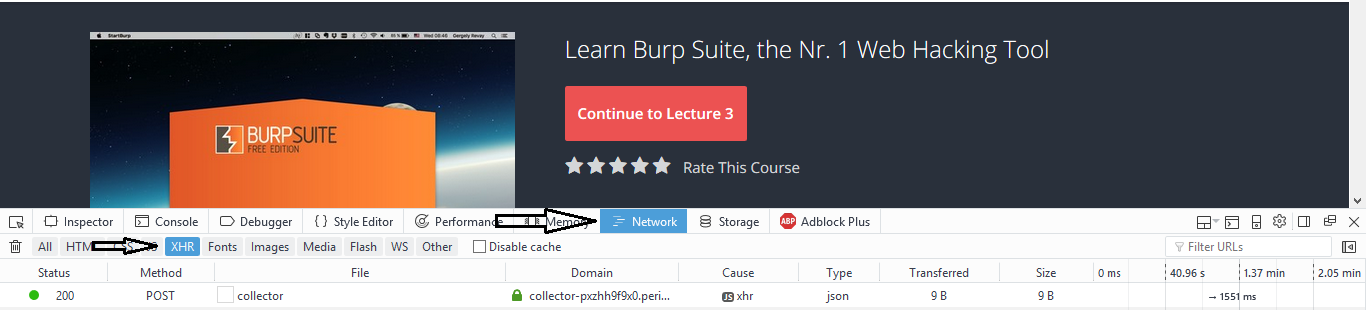
Refresh the page you will see some requests in Network tab right click on any one of them and goto Copy & then Copy Request Headers.
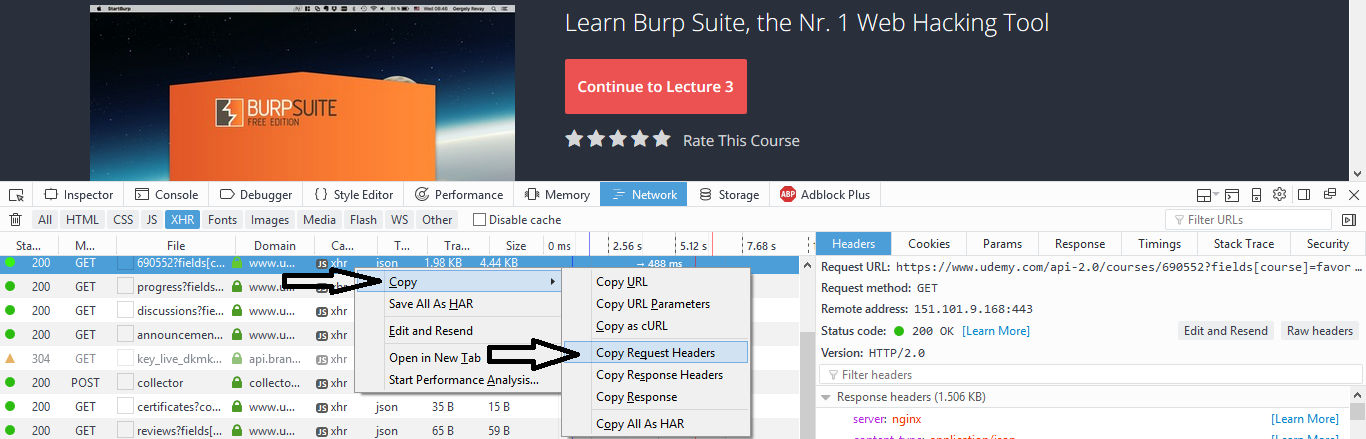
Save the Copied Request Headers to text file (let say cookies.txt) under the root directory of udemy-dl where udemy-dl.py is.
- Now run the below command.
python COURSE_URL -k file_name_where_you_save_request_headers.txt - Done this will download the course for you.
- this guide is created using Firefox browser for other i hope will be the same process.
r0oth3x49
on 26 May 2018
This solved the issue of not being able to find the id. Thanks @r0oth3x49 !
 TheAlexPorter
on 13 Jun 2018
TheAlexPorter
on 13 Jun 2018
Related issues
 Carlosx7
·
9Comments
Carlosx7
·
9Comments
 mumi
·
10Comments
mumi
·
10Comments
 badjano
·
6Comments
badjano
·
6Comments
 SwapnilSoni1999
·
7Comments
SwapnilSoni1999
·
7Comments
 sagarsamrat3956
·
7Comments
sagarsamrat3956
·
7Comments
Most helpful comment
@thedtech sorry for the late response. can you please verify that you are using this utility instead the one at Python's Repository. remember this cannot be installed via
pipso you have to clone udemy-dl from here. one more suggestion is to use cookie based authentication mechanism. steps to use cookie based authentication are below.Click on Network Tab Menu in Inspect Element and then click on XHR option.

Refresh the page you will see some requests in Network tab right click on any one of them and goto Copy & then Copy Request Headers.

Save the Copied Request Headers to text file (let say cookies.txt) under the root directory of udemy-dl where udemy-dl.py is.
python COURSE_URL -k file_name_where_you_save_request_headers.txt