Udemy-dl: [Errno 2] No such file or directory when downloading course
I'm getting the following error message when I try to download a course:
Traceback (most recent call last):
File "/opt/udemy-dl/udemy-dl.py", line 858, in
main()
File "/opt/udemy-dl/udemy-dl.py", line 774, in main
udemy.ExtractAndDownload(path=outto)
File "/opt/udemy-dl/udemy-dl.py", line 387, in ExtractAndDownload
out = self.Downloader(_url, lecture_name, chapter_path)
File "/opt/udemy-dl/udemy-dl.py", line 88, in Downloader
out = course_dl.download(url, title, filepath=path, quiet=True, callback=self.Download)
File "/opt/udemy-dl/udemy/_downloader.py", line 90, in download
outfh = open(temp_filepath, fmode)
FileNotFoundError: [Errno 2] No such file or directory: 'illustrator/v4/01 Getting Started.part'
I have udemy-dl installed to my /opt directory, with execute permissions. No matter if I try to run it from inside that directory in /opt or elsewhere, like my home folder, I keep getting this error.
 mattwelke
All 11 comments
@welkie thanks for the report. can you please explain a bit more?according to the error OS might not allowing udemy-dl to create directory and subdirectory with chapter name. you should provide permission to all files and folders inside udemy-dl including udemy-dl.
are you using the default command to download?
Example:. with this option udemy-dl creates dir in same dir where udemy-dl is.
python udemy-dl.py -u USER -p PASSSWD URL
Course url must be like: https://www.udemy.com/course_name/ it should not contain /learn/v4 etc..
Example:
https://www.udemy.com/java-the-complete-java-developer-course/
if you provide screens shots that will be great.
are you using Linux or Mac i will try to reproduce this error and fix it as soon as possible.
Thanks.
 r0oth3x49
on 20 Nov 2017
r0oth3x49
on 20 Nov 2017
@r0oth3x49
I was running the command with the following format:
python /opt/udemy-dl/udemy-dl.py -u USER -p PASSWD URL -o SAVEDIR
In my command, SAVEDIR was a relative pathname, relative to where the script I had this in was running from. Also, I was using the full URL my browser gave me when I right clicked on the course and clicked Copy Link Location. I did not remove the /learn/v4 from the end of it.
Here I'm about to log some troubleshooting steps as I do them.
When I try again while removing the end of the URL so that it's in the format you specified above, it still fails with the same error.
The next thing I tried was not using the -o option and manually creating the directory I wanted to output to, cd into it, and run the script from there. This works. It's now downloading the videos.
I notice as well that unlike with another recent udemy-dl program I tried to use, this one does not download the videos into the current directory. Instead, like the old udemy-dl, it creates a directory with the course's URL name to save the videos there, so I don't need to use the -o option at all, and my automated, scripted solution still works. This is working really well!
Just out of curiosity, I tried running it again without the -o option, but with the old URL format I was using, which includes /learn/v4 on the end, and this still downloaded, but the folder name then was always v4. I see that in order to save the videos in the right place, you need to take that part off the URL.
mattwelke
on 21 Nov 2017
@welkie thanks for the details. about the full URL i will add fix for that which will check the for /learn/v4 and if it is there it will remove. currently this script is simply splits the URL by / and extract the name of from last index. in the following example last index is v4 which the script selects for the course name that's why it saves course in v4 in your case.
Example:
https://www.udemy.com/java-the-complete-java-developer-course/learn/v4
that's why solution to this was not to use /learn/v4 in URL so that script can save course with proper name extracted from URL.
I will try to reproduce and fix that issue of relative path which u have faced with -o option.
Once again thanks for using this utility. soon will add a fix for this.
r0oth3x49
on 21 Nov 2017
No problem, thanks for making it available. It really helps with having good offline access to my courses.
mattwelke
on 21 Nov 2017
@welkie most welcome 👍 have fun and if you have any suggestion to improve it more do suggest.
Update
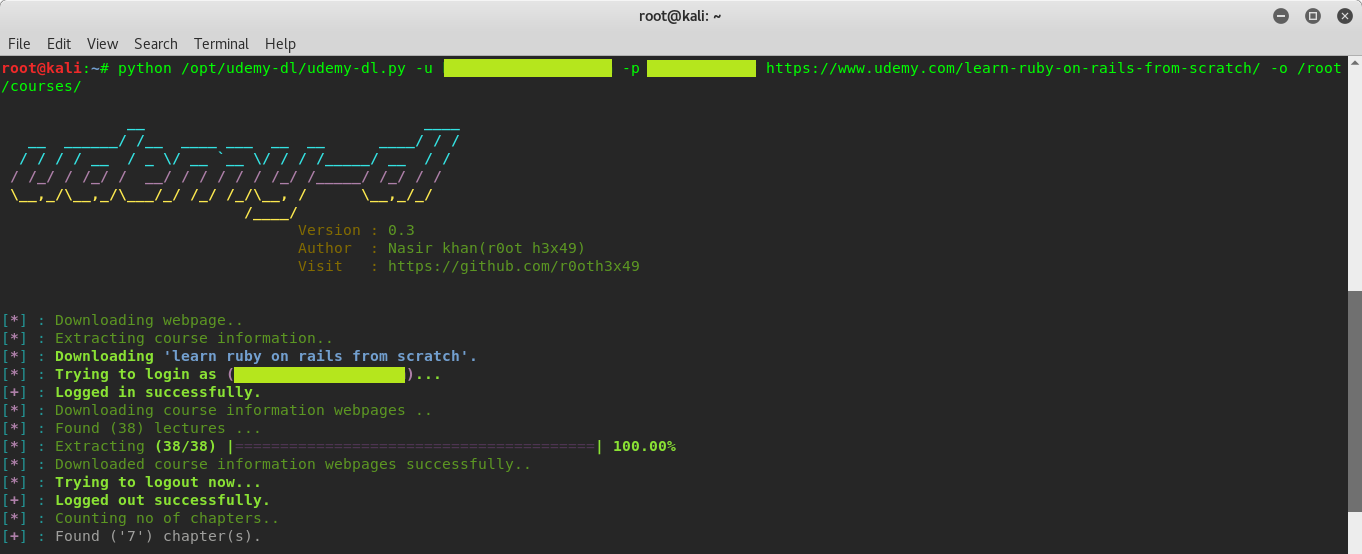
@welkie i have added a fix for the error you were facing. and also tried the same way you tried it worked for me perfectly fine. so i am closing the issue now.
python /opt/udemy-dl/udemy-dl.py -u USER -p PASSWD URL -o SAVEDIR
POC 01.

POC 02.
r0oth3x49
on 23 Nov 2017
Thanks for the fix. :)
mattwelke
on 25 Nov 2017
could some please guide me on how to try the same procedure on windows 10 ????
 bala93kumar
on 18 Jan 2018
bala93kumar
on 18 Jan 2018
Ich bekomme immer das... version 0.3
[-] Unable to extract login-form form
Traceback (most recent call last):
File "C:\Users\Jeffr\Desktop\udemy-dl-master\udemy-dl.py", line 936, in
main()
File "C:\Users\Jeffr\Desktop\udemy-dl-master\udemy-dl.py", line 852, in main
udemy.ExtractAndDownload(path=outto)
File "C:\Users\Jeffr\Desktop\udemy-dl-master\udemy-dl.py", line 303, in ExtractAndDownload
self.login()
File "C:\Users\Jeffr\Desktop\udemy-dl-master\udemy-dl.py", line 40, in login
extract_info.login(self.username, self.password)
File "C:\Users\Jeffr\Desktop\udemy-dl-master\udemy_extractor.py", line 147, in login
login_form = self._fill_login_form(login_popup, username, password)
File "C:\Users\Jeffr\Desktop\udemy-dl-master\udemy_extractor.py", line 98, in _fill_login_form
login_form = self._form_hidden_inputs('login-form', webpage)
File "C:\Users\Jeffr\Desktop\udemy-dl-master\udemy_extractor.py", line 88, in _form_hidden_inputs
return _hidden_inputs(form)
File "C:\Users\Jeffr\Desktop\udemy-dl-master\udemy_utils.py", line 80, in _hidden_inputs
html = re.sub(r'', '', html)
File "C:\Python27\lib\re.py", line 155, in sub
return _compile(pattern, flags).sub(repl, string, count)
TypeError: expected string or buffer
 Jeffreyveggie
on 13 Feb 2018
Jeffreyveggie
on 13 Feb 2018
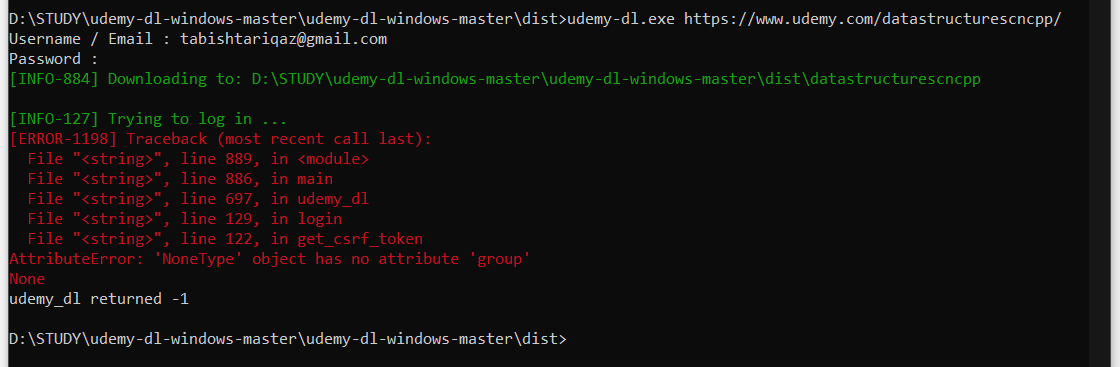
I'm getting this error after entering my password. Can someone please help me with this.
 TabTQ
on 28 Jul 2019
TabTQ
on 28 Jul 2019
Hi, i have this error, what can be, i`m using this comand: python udemy-dl.py -k cookies.txt https://www.udemy.com/after-effects-35-expresiones-imprescindibles
And i have this result: Traceback (most recent call last):
File "udemy-dl.py", line 1432, in
main()
File "udemy-dl.py", line 941, in main
f_in = open(options.cookies)
FileNotFoundError: [Errno 2] No such file or directory: 'cookies.txt'
Is like udemy-dl is not see the cookies.txt, the cookies.txt is in the same folder of udemy-dl project, please help
 ghost
on 29 Jul 2019
ghost
on 29 Jul 2019
Du nimms das Falsche Programm, Viel Spass
You take the wrong program, have fun
https://github.com/FaisalUmair/udemy-downloader-gui/releases
Jeffreyveggie
on 29 Jul 2019
Related issues
 SwapnilSoni1999
·
7Comments
SwapnilSoni1999
·
7Comments
 thedtech
·
7Comments
thedtech
·
7Comments
 sagarsamrat3956
·
7Comments
sagarsamrat3956
·
7Comments
 badjano
·
6Comments
badjano
·
6Comments
 abr4xas
·
7Comments
abr4xas
·
7Comments