Trenchbroom: Copy and pasting textures no longer works.
Copy and pasting textures from a face to another no longer works in the latest version, worked fine on previous versions.
System Information
TrenchBroom 2020.2 Build v2020.2 Release Win64 on win10
Steps to Reproduce
Select a face with a texture, ctrl-c, select another face with a different texture, ctrl-v, nothing happens!
 bstordeur
All 5 comments
Argh.. so the bug is that parseNodes doesn't throw an exception here:
 PasteType MapDocument::paste(const std::string& str) {
            try {
                const std::vector<Model::Node*> nodes = m_game->parseNodes(str, *m_world, m_worldBounds, logger());
                if (!nodes.empty() && pasteNodes(nodes))
                    return PasteType::Node;
            } catch (const ParserException& e) {
when given a single line of text that's a brush face, like ( -80 32 16 ) ( -80 32 17 ) ( -79 32 16 ) pizzeria/metal_normal 0 0 0 1 1, so we don't try to handle it as a texture paste.
Edit, was broken by e34206bbe0c4d8951230f6a6c7f4aac62c8563e8 - I guess the exception handling changes there did not preserve the prior behaviour exactly.
 ericwa
on 11 Oct 2020
ericwa
on 11 Oct 2020
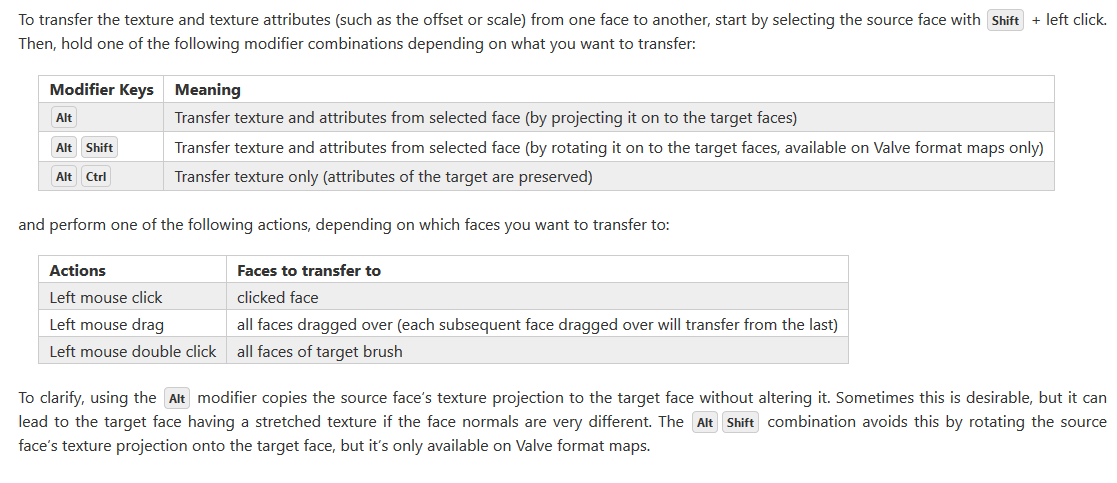
Looks like we have to manually transfer texture co-ordinates and scale units to another face :( Whats the solution?
 serious-coder20
on 11 Oct 2020
serious-coder20
on 11 Oct 2020
@serious-coder20 There are various Alt+left click modifiers for transferring texturing:
ericwa
on 11 Oct 2020
Hello.. thanks for the reply. Was wondering if you could give any inputs regarding the following :
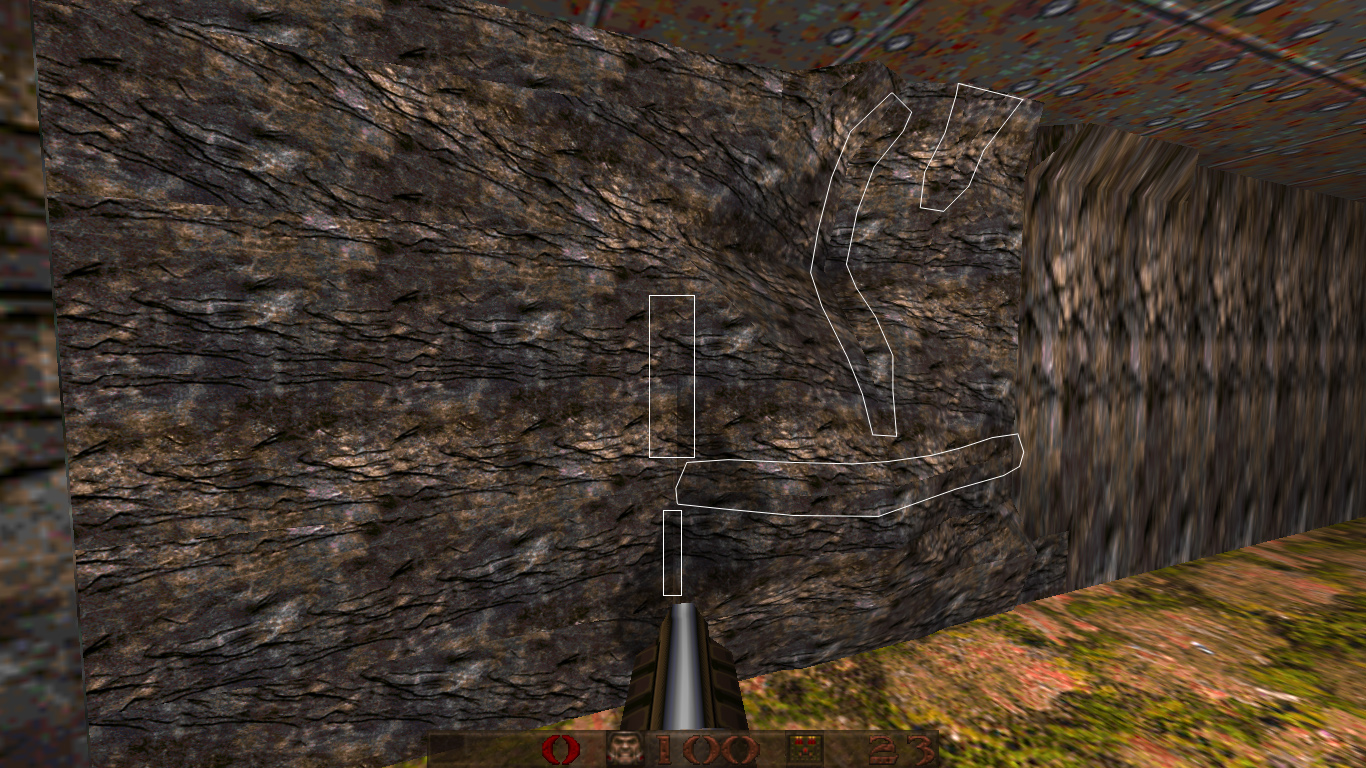
I am trying to experiment on modelling / texturing rocky surfaces in TrenchBroom. To make uneven surfaces, I clip the brush many times and then push/pull vertices. But the problem comes when even after doing through texture alignment (both vertically / horizontally) by pressing Shft + Alt + Right Click, the model ends up with 3-4 seams. See the attached image (seams are marked in white).
Is it possible to get a completely seamless texture in such a model with uneven surface in TrenchBroom? Is there any tool / script to help project a texture on complex surfaces? (Just like planar mapping in 3d max)?
Thanks.
Thanks.
serious-coder20
on 12 Oct 2020
@serious-coder20 it doesn't look like your questions are related to this bug. If you have questions such as this, it's better to drop by on discord. Thanks!
 kduske
on 12 Oct 2020
kduske
on 12 Oct 2020
Related issues
 JackViney96
·
5Comments
bstordeur
·
4Comments
bstordeur
·
3Comments
JackViney96
·
5Comments
bstordeur
·
4Comments
bstordeur
·
3Comments
 Silentdarkness12
·
5Comments
bstordeur
·
3Comments
Silentdarkness12
·
5Comments
bstordeur
·
3Comments