Trenchbroom: Scaling textures in UV editor getting harder when scale less then 1
System Information
TrenchBroom V2019.6 on Windows 10
Expected Behavior
Scaling textures in UV editor using gray texture grid lines should be an identically simple procedure for both big texture scale (2) and for small scale (0.1)
Actual Behavior
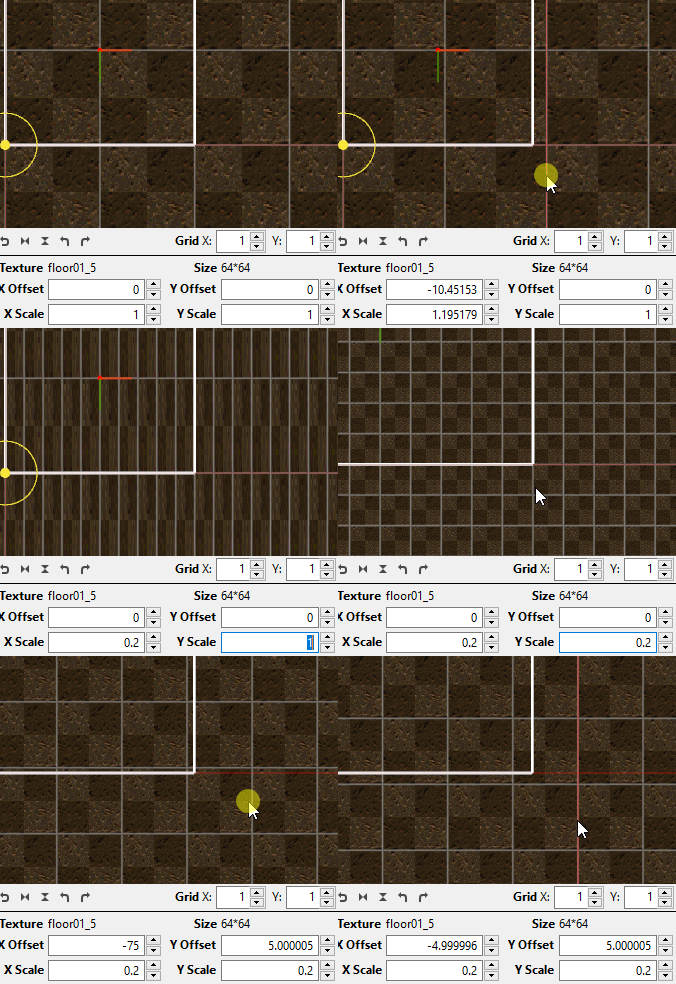
For small scale (0.4 and less) texture scaling with grid lines becomes harder, and instead of scaling, texture just moving around (like with simple dragging texture with left mouse button outside of grid lines).
Steps to Reproduce
- Create a brush with a texture
- Select face of the brush to use UV editor
- Try scaling texture with gray grid lines (it will work fine)
- Manually change texture scale to 0.3 / 0.3 or less
- Try scaling again in UV editor using gray grid lines
Additional info
I found out that the real issue is - when scaling texture with big initial scale factor (1 and more) - when you moving mouse cursor towards gray grid line and it becomes active (red) - you can immediately drag it and it works fine. But with scale less then 1 it becomes gradually more difficult, because you should be very precise, to the point when scaling with scaling factor 0.3 and less becomes almost impossible.
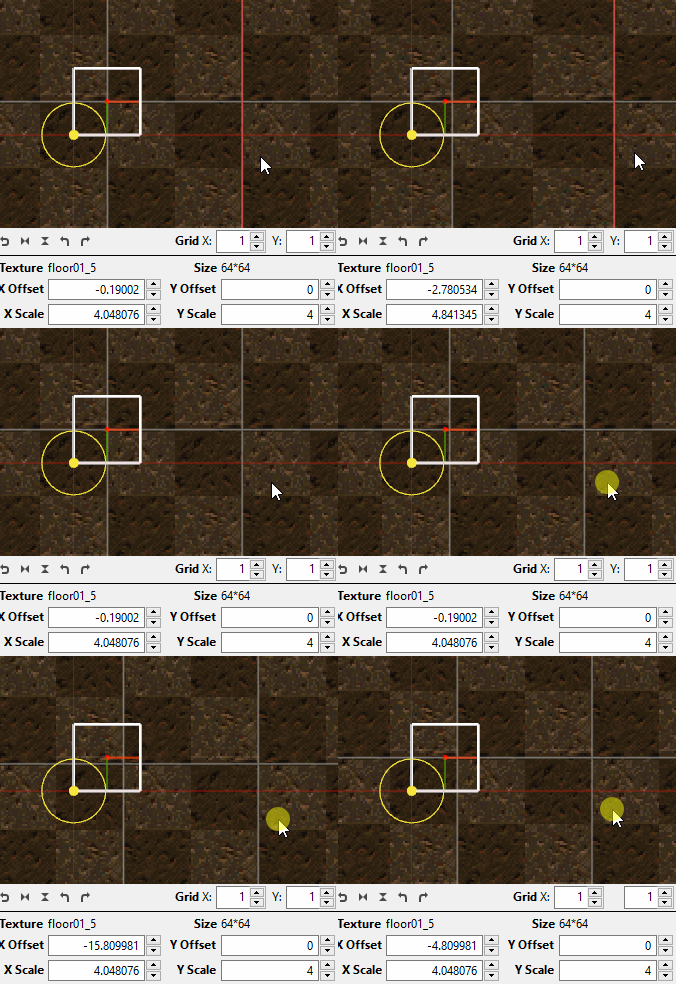
Take notice, then with big scale factor (4 for example) - "active" space around grid line becomes really big (even more then necessary). And with scale 0.5 - you should be very precise, and even when grid line getting active (red) - it doesn't mean it is really active unless your cursor is right on the grid line.
Sorry for long explanation - gif will probably be more descriptive.
- Small scale (0.2):
Big scale (4):
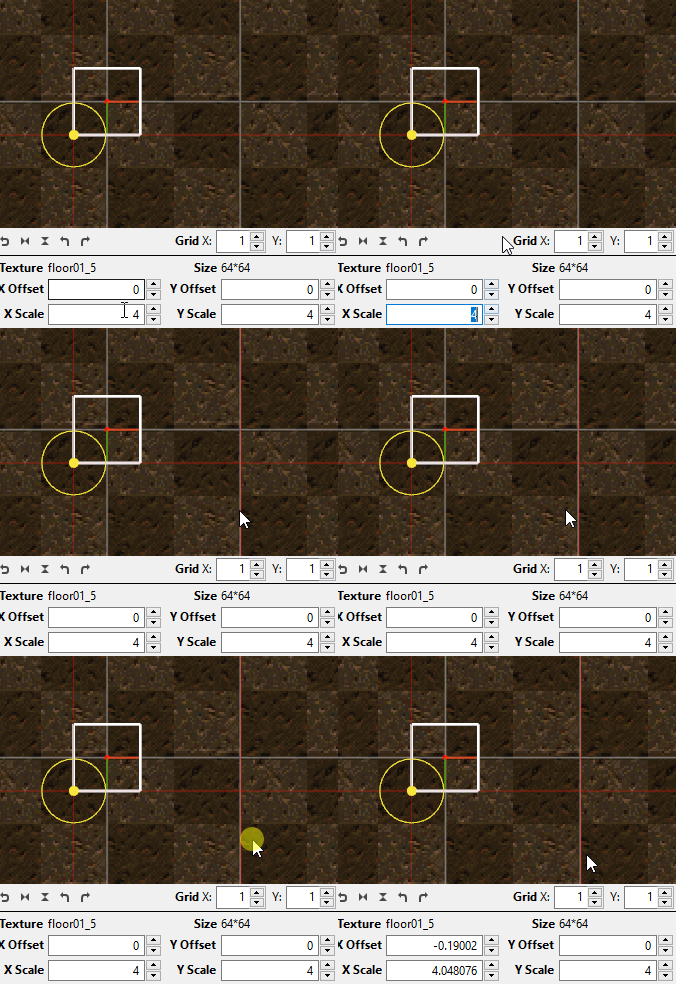
Notice that for big scale - if you start dragging from the "edge" of "active" zone (when grid gets red) - it's won't really be "active" (so "red" - doesn't always mean "active")
 Maxxiii
All 6 comments
I ran into this today. It becomes more relevant when you make the jump to big (2K, 4K, etc) textures, since you'll be operating at very small scale levels (0.05 and below for 2K) a lot of the time.
 Shfty
on 4 Dec 2019
Shfty
on 4 Dec 2019
Upgraded priority because it can almost make scaling in UV view unusable.
 kduske
on 5 Dec 2019
kduske
on 5 Dec 2019
I can have a look
 ericwa
on 6 Dec 2019
ericwa
on 6 Dec 2019
Fix in progress, I tracked it down to two interacting problems:
UVViewHelper::pickTextureGrid seems to be wrong. This is the "allowed mouse distance from a grid line" to grab it. With texture scale 5 and max zoom, you have a threshold of about 32 pixels, but with scale 0.2 and max zoom you have about 1 pixel max error to get the grid line turns red. This one should be easy to fix.
More of a design problem: we don't generate DragStart's until the mouse has moved 2px (InputEvent.cpp), but picking is being constantly updated, so the picking that the DragStart event sees may not hit the same handle that was under the mouse when it was clicked.
I'm trying a hack in ToolBoxConnector::processDragStart that moves the mouse back to where it was when clicked, which fixes the problem, though there are other ways we could tackle it I guess.
ericwa
on 7 Dec 2019
Re 2., there already is code to compensate for the drag start having the wrong mouse position, see `InputEvent::recordEvent' line 164 (probably), where it records a drag start event:
m_queue.enqueueEvent(std::make_unique<MouseEvent>(MouseEvent::Type::DragStart, button, wheelAxis, m_lastClickX, m_lastClickY, scrollDistance));
See that it uses the last click position to set the X/Y coordinates, so ToolBoxConnector::processDragStart will have the correct coordinates to work with. It doesn't update the pick result there, which looks like the culprit to me. I think you should just call updatePickResult() before forwarding the event to the tool chain, that should fix it.
kduske
on 7 Dec 2019
looks like I broke picking the scale gridlines when the texture is rotated, will investigate
ericwa
on 8 Dec 2019
Related issues
 dumptruckDS
·
5Comments
dumptruckDS
·
5Comments
 totalnewbie
·
3Comments
kduske
·
4Comments
totalnewbie
·
3Comments
kduske
·
4Comments
 AlpacaNox
·
5Comments
ericwa
·
4Comments
AlpacaNox
·
5Comments
ericwa
·
4Comments
Most helpful comment
Upgraded priority because it can almost make scaling in UV view unusable.