- [x] Make the current layer easier to recognize in the layer list
- [ ] Make it easier to recognize the state of a layer (hidden / locked), e.g. by using colors
- [x] Increase the size of the hide / lock buttons (should be easier to click)
- [x] Add context menu to move selection to different layer
- [x] Keep duplicated objects in the same layer as the original
- [ ] All other newly created objects go into default layer
 kduske
All 20 comments
Might one be able to right-click on a selected brush/entity/group, "move to layer" --> and have a menu of of layers display?
 undeaddemon
on 19 Oct 2018
undeaddemon
on 19 Oct 2018
yeah, that could be useful to avoid switching inspector tabs
kduske
on 19 Oct 2018
Would it also be possible to have _Lock All_ and _Hide All_ buttons for layers? Also, perhaps the _Hide_ and _Lock_ buttons could be in their own columns.
 hemebond
on 25 Aug 2019
hemebond
on 25 Aug 2019
We should have a way to show what layer the current selection is in (in the status bar?). It currently just shows the current layer.
Keep duplicated objects in the same layer as the original
All other newly created objects go into default layer
If we do these, this implies dropping the concept of "current layer", doesn't it? (what other function would "current layer" have?)
 ericwa
on 26 Aug 2019
ericwa
on 26 Aug 2019
I feel there shouldn't be a "current layer", it's a hassle to always be switching around to the layer you want when working.
In addition to a "move to layer > layer list" in the rlight click menu in the viewport, I feel there should also be :
- Hide selected layers (hide all the layers that currently selected objects are part of).
- Isolate selected layers (hide all layers that currently selected objects are not part of).
For giving the user feedback on layers, coloring the edges (in both 2d and 3d views) could be a solution, and is what's done in Maya, letting the user chose the color. This might be a bit confusing to see, so maybe have it as a display option.
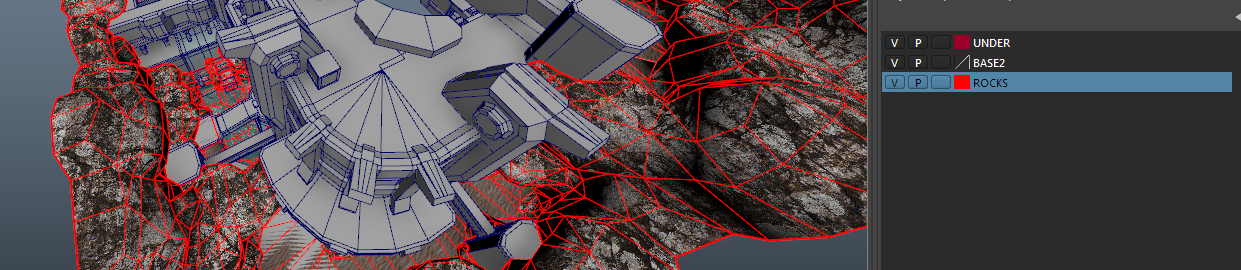
 bstordeur
on 26 Aug 2019
bstordeur
on 26 Aug 2019
I agree that the „current layer“ is cumbersome. My question is, where do newly created objects go? It says „default layer“ in the issue description, but at this point I‘m not sure if that‘s an error. Note I‘m not referring to duplicated objects, these always go into the same layer as the original, or objects created in an open group, as these will always go into the same layer as the group itself.
If newly created objects go into the default layer, users will constantly have to move those into a different layer, and I think that might be annoying as it interrupts their workflow.
Instead of having the notion of „current layer“, we could just place newly created objects into the currently selected layer, or the default layer if no layer is currently selected.
Coloring layers is certainly useful and should be added at some point. I think it requires some changes to the renderer, but it shouldn‘t be too hard.
kduske
on 26 Aug 2019
Oh and optionally, we could have the layer selection follow the object selection, that is, when you select some object, it’s layer becomes selected in the layer list.
kduske
on 26 Aug 2019
I don't really see the difference between the "current layer" system and "we could just place newly created objects into the currently selected layer, or the default layer if no layer is currently selected." you're basically just describing the same thing presented in a slightly different manner no? :)
I'm a bit biased after working for 15 years in Maya, so pinch of salt etc. but my take is :
I work pretty organically on maps, iterating a lot and moving from area to area quite often.
I'd rather new objects (not duplicated) always go to a fixed "default layer", otherwise they will end up in whatever random layer I had active. That means I can regularly display only the default layer and reassign new stuff to appropriate layers, otherwise I get to a situation where I have a mess of new stuff spread across lots of other layers they shouldn't be in.
And yeah to clarify the "default layer" is a hard-coded layer that is always present and not renameable. In Maya it's not even shown in the layer editor, it's basically "whatever isn't in any other user layer".
bstordeur
on 26 Aug 2019
Yes, that is true, with a simpler way of changing what the default layer is, and without the limitations of the current default layer (cannot be hidden or locked).
Ok, so one vote for "new objects to default layer".
kduske
on 26 Aug 2019
without the limitations of the current default layer (cannot be hidden or locked).
Assuming you mean "current active layer", it can be hidden and locked via the context menu but not the buttons.
Ok, so one vote for "new objects to default layer".
If you mean "active layer" then :+1:
hemebond
on 26 Aug 2019
Had a chat with hemebond on discord, as he's happy with the current method (just has UI complaints). It made me reconsider and reevaluate my requests, so that they stay closer to the existing design, and thus don't penalize people who are happy with it.
Basically the main issue currently is that when you duplicate a selection it moves it to the Active Layer instead of staying in the sources Layer.
To recap here is what I'd suggest (some of these points are already how TB acts today) :
- [x] Keep existing Default Layer, make the hide button usable.
- [x] Alow users to change the Active Layer (make which Layer is the Active Layer more visible in the list).
- [x] When creating a new object from scratch (click drag, brush tool), put it in the Active Layer.
- [x] When creating a new object from an existing one (ctrl-drag, extrude, clip, etc.), put it in the Layer of the source object.
- [x] When using ctrl-c and ctrl-v, put it in the Active Layer.
- [x] Alow renaming Layers (except for the Default Layer)
- [x] Alow reordering Layers.
- [x] Add a way to hide/reveal all layers.
- [x] Add a way to lock/unlock all layers.
- [ ] Alow ctrl-click and shift-click in the Layers panel to select multiple Layers
- [ ] Alow setting colors to layers, that would display on the edges in the 2D and 3D views (option to disable colors?)
- [x] Some new options when right clicking in the viewports (while obviously keep the relevant stuff in the Layers Panel of course) :
- Add selection to > Layer list.
- Make current selection's Layer the Active Layer (list if there are multiple Layers?)
- Hide selected layers (hide all the layers that currently selected objects are part of).
- Isolate selected layers (hide all layers that currently selected objects are not part of).
bstordeur
on 26 Aug 2019
Should the active / current layer just follow the selection in the layer list or should it. E changed by double click as it is now?
kduske
on 26 Aug 2019
I personally think double-clicking is fine, sometimes you'll click on a layer to select it without actually wanting it to become the active layer? (Like say you select a few layers to hide them, or just accidentally select one before right clicking on it to to do some other function like renaming or reordering or whatever else).
bstordeur
on 26 Aug 2019
I'm happy with Bal's list: https://github.com/kduske/TrenchBroom/issues/2365#issuecomment-524904016
I would just add something like:
- [x] Status bar: print the active layer separately from the layer(s) that the current selection belongs to.
About layer colors: I'd suggest the color can either be unset, which means you get the default colors TB uses (blue for groups, entities might have a color specified in the .fgd), or the layer can have a color set, which draws everything with that color.
I'd also vote for keeping "double-click to change active layer" rather than just following the list selection. I guess it's not a big difference either way.
ericwa
on 27 Aug 2019
Ok, that settles it then... let's hope we get around to this soon ;-)
kduske
on 27 Aug 2019
Reminder to deal with undo/redo for switching active layer, closing any open groups when you switch active layers: https://github.com/kduske/TrenchBroom/issues/3186
ericwa
on 5 May 2020
Some discussion in Discord with Bal:
- [x] Layers having hidden/shown state separate from objects is good
- [x] unclear whether we lock Default Layer at the top of the list or allow reordering. Locking it at the top of the list might remind users that it's special (why you can't delete it.) Maya doesn't show the default layer, it's just everything that's not in a layer
- current plan is to lock it at the top of the layer list
- [x] Don't allow renaming Default Layer
- [ ] allow changing Default Layer's color, hide/show/select it's contents
- [ ] Allow click drag across layers to hide/show them rather than click, click, click?
- [x] Don't store hidden/shown state in map. Could be confusing / create unsaved changes when you don't intend to.
- [x] Allowing hiding/locking the active layer makes some things easier: e.g. you can "Lock all layers"/"Hide all layers" and then create a new one, rather than being forced to do it in the backwards order. The concern is what happens if the user creates a brush when the active layer is hidden/locked. Sleepwalkr suggests we could override the visibility of that brush even though it would normally be hidden/locked by the layer. Another option is undoing the lock/hide state of the layer when the first brush is created in it.
- [x] Isolate layer
- [ ] Bal: in photoshop you can alt-click a layer and it'll hide all of them but that one
and if you alt click it again it comes back to previous setup (so if a layer was hidden it stays hidden)
this only works if you don't change the display state of the other layers in between of course
if you do you lose the "initial state"
ericwa
on 7 May 2020
some implementation notes here: https://github.com/kduske/TrenchBroom/pull/2914
ericwa
on 7 May 2020
Discussion with sleepwalkr:
- [x] Pin default layer at top of list
- [x] go with keeping newly created objects visible / unlocked when the active layer is hidden / locked
- [ ] alt+click to hide / lock all but the clicked on layer is useful, but requires a bit of additional state management (postpone for later?)
- [ ] allow assigning color to default layer (stick in worldspawn)
- [x] Assign/sanitize layer sort indices at map load time
- [ ] Rendering layer colors: override brush edges and the entity bounding boxes (probably?):
- e.g. maybe you want monsters to be green/yellow/red based on skill levels, with 1 layer per skill level
- [x] keep ChangeEntityAttributesCommand 's behaviour of acting on the selection. Have subclasses/alternate constructors for a version that acts on a specified list of AttributableNodes.
ericwa
on 8 May 2020
The bulk of this was fixed in commits 6629440803128539df809a8b0306a74c771a1927 and 9e1fde3a8fb5d7d1b9f84e098be6daed0b2c88ed
Code review is in https://github.com/kduske/TrenchBroom/pull/3267
ericwa
on 2 Jun 2020
Related issues
 antopilo
·
4Comments
ericwa
·
4Comments
antopilo
·
4Comments
ericwa
·
4Comments
 HeadClot
·
4Comments
HeadClot
·
4Comments
 jmickle66666666
·
3Comments
jmickle66666666
·
3Comments
 Silentdarkness12
·
5Comments
Silentdarkness12
·
5Comments
Most helpful comment
Ok, that settles it then... let's hope we get around to this soon ;-)