Treestyletab: Restarting Firefox unexpands all tabs
When I restart Firefox, all my tree drop-downs restore in unexpanded mode, so I have to manually expand them again (e.g. by clicking the triangle).
It would be great if the tree could restore with the same expansion status as it was closed with when FF is restarted.
Environment
- Platform (OS): Ubuntu 16.04
- Version of Firefox: 61 Nightly
- Version (or revision) of Tree Style Tab: 2.4.17
 nh2
nh2
All 9 comments
Another question, slightly unrelated to the issue: Can I disable the "collapsing" feature completely? I would always like my tree to be expanded.
nh2
on 21 Mar 2018
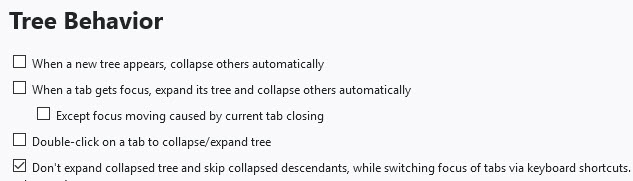
This help?
 zekeblue
on 21 Mar 2018
zekeblue
on 21 Mar 2018
@zekeblue You are right, enabling that last setting, Don't expand collapsed tree and skip collapsed descendants, while switching focus of the tabs via keyboard shortcuts, seems to ensure that the foldings restore as before when restarting.
But I don't understand why -- that description doesn't sound relevant at all. Even more so because it says don't expand, while I _want_ it to expand.
nh2
on 22 Mar 2018
Well, I can't explain, but glad it helps. BTW, I didn't mean to suggest checking boxes as I displayed, only that there are those settings that affect tree operations.
I have settings to minimize automatic tree expanding and collapsing, so it makes sense that it could work for you also.
zekeblue
on 22 Mar 2018
I seem to have developed the issue. Restart and all trees are expanded. Can't find settings that will allow keeping the state of the previous tree.
zekeblue
on 27 Mar 2018
I also see this problem sometimes, but I still couldn't find out what is the trigger...
 piroor
on 13 May 2018
piroor
on 13 May 2018
@piroor have you had any more luck andor ideas on this issue?
I am seeing this fairly consistently and while having all of my trees collapsed after a reset isn't the end of the world, I have noticed that if I search for a tab in the URL bar (Example: % yahoo.com) and select the open tab I want to switch to, the tab comes into focus on the main tab bar, the tab loads, but the TST tree that contains the tab is not "auto-expanded" and it isn't even always clear which tree the tab is in. If I expand the tree manually (to expose the tab), collapse the tree, and repeat the same search, it auto-expands after that.
In addition, if the root of the tree is one of TST's false tabs (Ex: moz-extension://a4a9b8f6-c10c-4493-a148-e61836960a97/resources/group-tab.html?title=Main&temporary=false#) if the tree is collapsed on restart, I load the false tab, then click one one of the links of the tabs under that root, the tab loads, the regular tab bar moves to that tab, but TST does not "auto-expand" to reveal the tab. Again, if I expand the tree manually, collapse it again, then repeat the process it auto-expands as expected and everything works.
In my case, it seems that the tree needs to be manually exercised first for it to be auto-expanded the next time. This could also be a separate issue andor a conflict somehow with another add-on.
I would be willing to try to isolate this further in a clean profile with no add-ons if you haven't made any progress or have any ideas. I can reproduce this consistently in my large profile with many add-ons (not useful I know), but would any of the logs be useful?
 irvinm
on 25 Jul 2018
irvinm
on 25 Jul 2018
The latest development build contains some fixes around this problem. If you use Aurora or Nightly you can try that: https://github.com/piroor/treestyletab/blob/master/README.md#development-builds
piroor
on 28 Jul 2018
I close this because outdated.
piroor
on 1 May 2019
Related issues
 cebas
·
29Comments
cebas
·
29Comments
 clampittsti
·
44Comments
clampittsti
·
44Comments
 Dimas-sc
·
32Comments
Dimas-sc
·
32Comments
 SXZ1
·
26Comments
SXZ1
·
26Comments
 skarmoutsosv
·
30Comments
skarmoutsosv
·
30Comments
Most helpful comment
The latest development build contains some fixes around this problem. If you use Aurora or Nightly you can try that: https://github.com/piroor/treestyletab/blob/master/README.md#development-builds