Impossible to order the tabs in a tree. I create a tree, restart the browser (or press F1 twice to close and open TST) and I lose the changes. Well, not only I lose it but the order of the tabs doesn't make sense.
I recorded it in a short video: https://youtu.be/FJXQ9IIneHM
I'm using TST since a while now (FF 57 or so), it worked good at first but since some time ago that happens.
- Platform (OS): W10
- Version of Firefox: 61b but happened the same with previous versions
- Version (or revision) of Tree Style Tab: 2.4.23
 Dimas-sc
All 32 comments
Hmm, this doesn't happen on my environment.
Do you use any other addon which can break relation of tabs? Is it possible to reproduce the problem with a clean profile?
 piroor
on 2 Jun 2018
piroor
on 2 Jun 2018
I tried now to disable all addons except of TST and the same happens. I don't know, but I've the feeling that it happens after having many tabs on it (~70) or when the scrollbar appears.
Is it possible that the file where the tabs structure is stored are corrupted?
Dimas-sc
on 3 Jun 2018
Tried bookmarking and closing many tabs but the same continues to happen, it's frustrating :-(
Is there a way to clean / edit / fix the file where the tree structure is stored?
Dimas-sc
on 3 Jun 2018
Is it possible that the file where the tabs structure is stored are corrupted?
TST's tree structure information is stored in the sessionstore.jsonlz4. Sadly there is no way to cleanup them, except deletion of the file itself...
piroor
on 4 Jun 2018
This file is recreated every time Firefox starts so I suppose this won't be the problem.
Maybe related to settings? At work (other environment, same config) sometimes the addon fails ordering tabs.
Can you try to reproduce it with these settings?
1: https://i.imgur.com/ortFhlf.png
2: https://i.imgur.com/RisswS0.png
Dimas-sc
on 5 Jun 2018
Different computer, different PC, Same TST config, more issues: https://youtu.be/5kfTEIxvbtA
Dimas-sc
on 6 Jun 2018
@Dimas-sc Your last issue looks like something I can reproduce by closing a parent tab, and then restoring it with Ctrl+Shift+T. Moving the children afterwards doesn't move them to the correct row, and only updates their indent.
I have it set up to "Promote the first child as the new parent", but I think it happens with other settings too.
A workaround I found to "fix" it again is to kill firefox, and then restore the previous session.
 ferreum
on 7 Jun 2018
ferreum
on 7 Jun 2018
I still cannot reproduce the problem with same settings. But I think something slow environment (less RAM, less CPU power) can cause this problem easily. TST 2.x is built on asynchronous APIs of WebExtensions, so many internal operations are processed asynchronously. TST is designed based on an important expectation: multiple asynchronous operations are processed in the expected order. But their order can be scrumbled if your PC is slow down.
I think that the only one solution is: introducing various mechanism for robustness of asynchronous operations. However I'm afraid of becoming more slow, by robust codes like that...
piroor
on 8 Jun 2018
I'm seeing similar behavior. Tabs are getting tossed around all over the place on restarts, with new tabs opening up in random places. It's essentially made things unusable for me. :frowning:
I have plenty of compute power: an i5-7300U (2 core, 4 thread 2.6 GHz) with 16 GB RAM and a 960 Evo NVMe SSD. Available speed + memory is not an issue. Relying on async processes to remain synced though...that seems like an obvious recipe for failure. Why are you expecting that to work? (sorry to hear how much of a pain WebExtensions have made things for you)
I'm on FF 60.0.01 on Ubuntu 17.10 with TST 2.4.24
 lostnihilist
on 8 Jun 2018
lostnihilist
on 8 Jun 2018
It looks similar to my #1888 bug.
I would prefer a working TST version instead a fast one as it costs me more time to fix trees and find tabs then to wait a second when TST is working.
Perhaps an option to enable the safety feature if it doesn't work with normal asynchronous operations.
 Tragen
on 8 Jun 2018
Tragen
on 8 Jun 2018
Regarding the async expectations vs processing power: my Firefox does use up a lot of CPU, which frequently seems to be unaccounted for in the about:performance page.
One issue I've noticed is that some page might cause Firefox to redraw a lot even if visually it stays the same, and Firefox itself seems to not notice this in about:performance, but still causes macOS to spend a lot of CPU on it; this can be diagnosed with Quartz Debug.app. I already filled in some Firefox feedback, but maybe I should go for a bug report. I didn't think of looking into a correlation between this and broken tab trees, though.
 hmijail
on 9 Jun 2018
hmijail
on 9 Jun 2018
Actually, it's even worse and maybe even more related to this problem: what I am seeing is that even navigating to a new page in an existing tab causes a lot of superfluous redrawing, even when the sidebar is closed. This causes a CPU usage peak that lasts for as long as the page is loading. I would guess that to TST/Firefox this feels like the CPU is slow.
In summary, what I'm saying is that Firefox's occasionally redundant redrawing when loading new pages causes CPU usage issues (at least in macOS), which might cause the broken TST behavior - given Pyro's suspicion of a slow CPU.
I will try checking whether these redrawing issues also happen even without add-ons.
hmijail
on 9 Jun 2018
Tried restarting with a new profile and no add-ons, opened a bunch of empty tabs, and then repeated only with Tree Style Tabs. All in macOS 10.13.5, Firefox 61.0b12 (64-bit). TST 2.4.24.
The redrawing behavior in this case seems to be the same (judging in a coarse way, just keeping an eye on the frames-per-second counter and CPU counters).
However, even in this case TST is breaking the tree in a repeatable way. Press (and keep pressing) Cmd+T to open new tabs; instead of plain "root" new tabs, from time to time a new level is created and a burst of tabs is created inside that level. Eventually new tabs will go back to the root level, and again another level will be created.
Just by keeping Cmd+T pressed for 10 seconds I reliably get a couple of "trees" with 30-40 tabs inside.
So, I guess the redrawing subject is unrelated to TST's problems.
hmijail
on 9 Jun 2018
In my case I've a new CPU Ryzen 7 @3.6ghz 16gb ram and SSD M.2, I don't
think it depends on PC performance.
El ds., 9 de juny 2018, 12:40, Horacio Mijail Antón Quiles <
[email protected]> va escriure:
Tried restarting with a new profile and no add-ons, opened a bunch of
empty tabs, and then repeated only with Tree Style Tabs. All in macOS
10.13.5, Firefox 61.0b12 (64-bit). TST 2.4.24.The redrawing behavior in this case seems to be the same (judging in a
coarse way, just keeping an eye on the frames-per-second counter and CPU
counters).However, even in this case TST is breaking the tree in a repeatable way.
Press (and keep pressing) Cmd+T to open new tabs; instead of plain "root"
new tabs, from time to time a new level is created and a burst of tabs is
created inside that level. Eventually new tabs will go back to the root
level, and again another level will be created.Just by keeping Cmd+T pressed for 10 seconds I reliably get a couple of
"trees" with 30-40 tabs inside.—
You are receiving this because you were mentioned.
Reply to this email directly, view it on GitHub
https://github.com/piroor/treestyletab/issues/1918#issuecomment-395959005,
or mute the thread
https://github.com/notifications/unsubscribe-auth/ACTcP2zH0qlBuD5HxAg-mN13O0nwP_lJks5t66YjgaJpZM4UXQO9
.
Dimas-sc
on 9 Jun 2018
I've introduced some changes around session restoration. It possibly affect to this problem. Could you try the latest development build?: https://piro.sakura.ne.jp/xul/xpi/nightly/treestyletab-we.xpi
piroor
on 9 Jun 2018
One note for all: if there are only few number of tabs in one window but there are multiple windows with more tabs, TST can be slow. For example, if you have 10 windows and there are 200 tabs on each window, TST's master process detects 10 * 200 = 2000 tabs and it takes more time to do everything for a tab from them (ex. finding a tab by its id from all tabs.) This restriction is due to my poor development skill, sorry.
Could you try again with new blank profile of Firefox itself? If you successfully reproduce this problem from scratch without such too much tabs, the complete steps to reproduce will help me to fix this problem.
piroor
on 10 Jun 2018
I currently have 3 windows open with 5000, 2000 and 1800 tabs. Fortunately, I haven't run into any bugs for a long time. I think there are two reasons why:
- TST is very well written and optimized extension
- I tweaked TST settings in order to make sure TST doesn't interfere with anything related to tab opening/closing because WebExtensions APIs available right now are simply not good enough for that.
 SXZ1
on 10 Jun 2018
SXZ1
on 10 Jun 2018
I just tested Firefox Nightly 62.0a1 (2018-06-10) with that version of TST in a blank profile, and again by just pressing for 10 seconds the "create new tab" shortcut, I get broken trees.
EDIT: looks like this behavior was as expected because of the autogrouping preference.
hmijail
on 10 Jun 2018
@piroor if I would have 10% of your experience in writing Firefox addons, I would try to help you. I'm very glad you are doing this great extension.
Tragen
on 10 Jun 2018
Now 9861ea4 and 363bc94 should make things around new tab creation robust. On the other hand, this change can make things more slower, for example session restoration with large number of tabs. I need further testing with the latest development build: https://piro.sakura.ne.jp/xul/xpi/nightly/treestyletab-we.xpi
piroor
on 10 Jun 2018
@piroor
Now 9861ea4 and 363bc94 should make things around new tab creation robust.
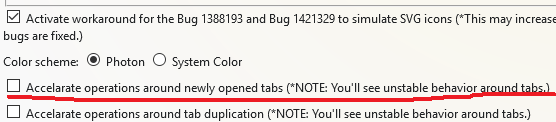
I assume it is enough to enable this pref in latest dev build in order to disable these commits?
SXZ1
on 10 Jun 2018
@SXZ1 The old behavior was "accelerated" and new default behavior is "robust but slow (not accelerated"). In other words, checked=old and unchecked=new.
piroor
on 10 Jun 2018
Experimentally I've added new another config acceleratedTabOperations (it is changeable via Debug mode.) true is the present behavior, false is the new robust-and-slow behavior. And I set it to true by default. Uncheckining the config (turning to false) activates newly introduced mechanism to do everything sequentially. In the robust-and-slow mode, tabs.onCreated, tabs onUpdated, tabs.onActivated, tabs.onRemoved, and more other tab-related WebExtensions events are operated sequentially.
I've confirmed that there are some corrupted behaviors with the robust-and-slow mode. I think that deferred handling of events can fail to call WebExtensions APIs for tabs like tabs.get(id) because the tab can be closed before it is operated.
piroor
on 10 Jun 2018
Since using 2.5.x I didn't had problems again, maybe this issue can be closed. Thx!!
Dimas-sc
on 29 Aug 2018
Since using 2.5.x I didn't had problems again, maybe this issue can be closed. Thx!!
Nah, the problem persist :-(
Dimas-sc
on 18 Sep 2018
Yes it still happens a lot. It's annoying as hell.
It seems to happen in random situations sometimes, I can't really tell why. But an easy way to break everything consistently is:
- Collapse a tree (doesn't need to be large)
- Click the X on the parent to close it and all its children. A dialog pops up asking if you want to close them or restore them.
- As far as I can tell, both options cause terrible things to happen to the tree.
The effects are tabs moving around seemingly at random, reparenting themselves to random tabs or to the root for no reason, children collapsing with parents that are nowhere near the actual collapsed parent.
Trying to get it back to normal is painful. Closing all affected tabs or moving them seems to work at first, but some other tabs start being affected. Reopening the treestyletab pane or restarting firefox doesn't help either.
The only way I found to consistently fix it is to KILL FIREFOX WITH SIGKILL, which I guess causes it to reload the tree correctly on startup.
Update 2018-11-28: FWIW, I haven't had any such issues for a couple weeks now, though I tried being careful not to cause them.
ferreum
on 14 Oct 2018
Recent changes possibly affect to this problem. Basically, such a problem may be caused by failing of synchronizing between TST's tabs' order and Firefox's native tabs' order. If you don't use any userChrome.css hack, you'll be able to confirm differently-ordered tabs in the native tab bar. Such a status causes problems like:
- Ctrl-Tab/Ctrl-Shift-Tab are handled by Firefox itself and the order of focusing is decided based on the order of native tabs. The "random order" problem is actually a problem of wrongly ordered tab elements in TST's sidebar.
- TST calculates the insertion position for a newly opened tab (or drag-and-dropped tab) based on both orders of native tabs and TST's tabs. When they are unsynchronized, such calculation fails and the tab appears in odd location in TST's sidebar.
By recent commits, TST now tries to synchronize orders of native tabs and TST's tabs more certainly. I expect these improvements should solve such an unsynchronized status.
piroor
on 29 Nov 2018
By recent commits, TST now tries to synchronize orders of native tabs and TST's tabs more certainly. I expect these improvements should solve such an unsynchronized status.
Thx, I will wait for the new release to test it 🎉
Dimas-sc
on 30 Nov 2018
Sounds good, but would the order issue explain the spontaneous appearance of new tabs when subtrees of tabs are closed?
hmijail
on 30 Nov 2018
Still happens on version 2.6.8. It started after accidently closing a parent tab and restoring it with Ctrl-Shift-T.
- Close an expanded parent tab. With my options, its first child becomes the new parent.
- Restore the parent tab with Ctrl-Shift-T. This looks fine for now.
- Restart firefox. After this, the tabs are parented differently and behave like described in my previous post.
Also, how does a hidden tabbar affect this? I've had the native tabbar hidden with userChrome.css this whole time.
ferreum
on 9 Dec 2018
@ferreum Thank you for another scenario, but it didn't reproduce the problem on my environment: Windows 10 + Firefox 63 + TST 2.6.8.
I still cannot reproduce this problem on my environment. Sorry but I need more help to narrow down conditions to reproduce. Please describe a complete scenario to reproduce the problem always on your environment from scratch, like:
- Prepare an Windows 10 PC.
- Install Firefox 64. (It is the latest release now)
- Start Firefox with clean profile.
- Install TST 2.6.8.
- Go to https://mozilla.org/
- Open the "Firefox" link in new child tab three times.
- ...
I mainly use Windows 10 and Ubuntu 16.04TS, but if required I'll do testing on macOS also.
piroor
on 11 Dec 2018
I close this because outdated.
piroor
on 1 May 2019
Related issues
 array
·
4Comments
array
·
4Comments
 Andrade
·
3Comments
Andrade
·
3Comments
 emceekain
·
3Comments
emceekain
·
3Comments
 mikeaustin
·
3Comments
mikeaustin
·
3Comments
 Evotron
·
3Comments
Evotron
·
3Comments