Transgui: Add torrent > "Templates"?
Could someone explain what the "Template" option is for in the Add Torrent dialogue? I can't seem to find anything about it here or looking at Transmission.

 Dustie
All 11 comments

 leonsoft-kras
on 24 Jan 2018
leonsoft-kras
on 24 Jan 2018
This is the way to automatically select the folder in which to download the torrent.
leonsoft-kras
on 24 Jan 2018
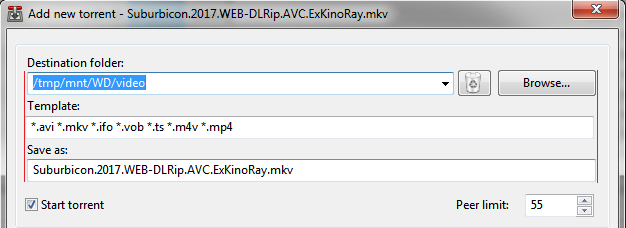
It's kinda unrelated to this question but could you please fix the text box position for the next release? It looks a bit ugly now.
 rld243
on 24 Jan 2018
rld243
on 24 Jan 2018
what's wrong?
leonsoft-kras
on 24 Jan 2018
The "Template" text box should be moved a few pixels to the right to match both "Destination folder:" and "Save as:" text boxes. It's just displaced a little.
rld243
on 24 Jan 2018
Well, now it makes perfect sense.
Dustie
on 24 Jan 2018
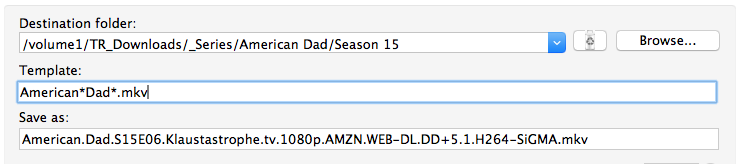
I'm having troubles to make it work with TV series titles. I have template like this
Then I:
1) Click OK for this download
2) Add another torrent with different name (it's mkv, but it shouldn't match template from the screenshot) and destination
3) Add another episode of American dad (filename is almost same se the screenshot case)
-> The American Dad folder is not preselected, there is still the last used folder from step 2
Tested with 5.15.2
Should I change something in my template syntax?
 AlmightyCZ
on 25 Mar 2018
AlmightyCZ
on 25 Mar 2018
Оnly the file extension is checked.
There are plans to expand the possibilities.
leonsoft-kras
on 26 Mar 2018
I see, thanks for info. I was following the ToolTip example, so maybe it'd be a good thing to temporarily remove the tom*jerry example?

AlmightyCZ
on 26 Mar 2018
ok thanks
note: this line is in the translation files.
leonsoft-kras
on 26 Mar 2018
I think we're out of the topic here ... let's close it.
 PeterDaveHello
on 31 Mar 2018
PeterDaveHello
on 31 Mar 2018
Related issues
 kissglay
·
11Comments
PeterDaveHello
·
12Comments
PeterDaveHello
·
4Comments
kissglay
·
11Comments
PeterDaveHello
·
12Comments
PeterDaveHello
·
4Comments
 designelf
·
5Comments
designelf
·
5Comments
 Pusha1d
·
7Comments
Pusha1d
·
7Comments