Todo-tree: Regex highlight setting "todo-tree.regex.regex" now matching all following lines until the end of the whole file
I have this setting in my settings.json
"todo-tree.regex.regex": "(todozzz)",
✔️ Expected behavior (working on v0.0.199 and prior)
Up until yesterday, this would highlight the word todozzz plus everything that comes after it on the rest of that line (following lines would be unaffected):
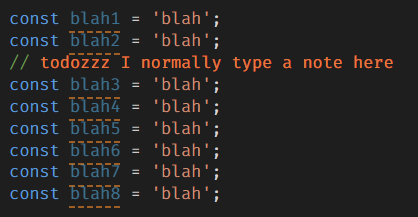
❌ Issue occurring (v0.0.200 & v0.0.201)
However a change in the last 24 hours seems to be causing the regex to no longer do that (I also haven't touched this setting for a long time). Instead, it now just matches all of lines that come afterwards, until the end of the whole file (but not the actual line itself)...

Is this a new unexpected bug, or do I need to change my regex to be more specific now? I've tried a few things like:
"todo-tree.regex.regex": "(todozzz).*$",
"todo-tree.regex.regex": "todozzz.*",
"todo-tree.regex.regex": "todozzz.*$",
...but it doesn't help.
I've also confirmed the problem goes away when I comment out my todo-tree.regex.regex setting line entirely (in that case there is no highlighting at all).
 hi2u
hi2u
All 11 comments
Looks like a bug. I'll look into it.
Can you post all your todo tree setting please - it will help me work out whats wrong.
 Gruntfuggly
on 5 Mar 2021
Gruntfuggly
on 5 Mar 2021
I've reduced my settings down to the bare minimum, while still seeing the issue occur. Including removing the orange foreground setting in the original screenshots in my initial post above.
So these screenshots below, instead display highlighting with a white background (which I guess is the default if I don't define colors myself):
Here's side-by-side screenshots of 3x different "type" config settings, which all produce similar results (shown on the right):
"type": "text"

"type": "line"

"type": "whole-line"

hi2u
on 5 Mar 2021
I also just noticed that with "type": "tag" - highlighting no longer works at all on v0.0.200 & v0.0.201:
"type": "tag"
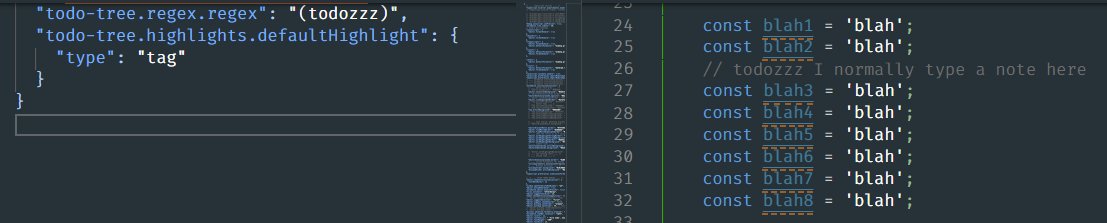
...
Same version numbers apply:
- Not working: v0.0.200 & v0.0.201
- Working: v0.0.199
hi2u
on 5 Mar 2021
I think this is because of a change I made to handle the case where $TAGS isn't used in the regex.
If you use
    "todo-tree.general.tags": [
        "todozzz"
    ],
    "todo-tree.regex.regex": "($TAGS)",
it should work.
I'll investigate why the change broke it.
Gruntfuggly
on 5 Mar 2021
Also for me, its highlighting tags irresepective of id its a comment or not.

 deekshithanand
on 6 Mar 2021
deekshithanand
on 6 Mar 2021
@deekshithanand Can you post your settings please?
Gruntfuggly
on 6 Mar 2021
@deekshithanand Can you post your settings please?
{
"window.zoomLevel": 1,
"editor.suggestSelection": "first",
"vsintellicode.modify.editor.suggestSelection": "automaticallyOverrodeDefaultValue",
"java.project.importOnFirstTimeStartup": "automatic",
"files.exclude": {
"/.classpath": true,
"/.project": true,
"/.settings": true,
"/.factorypath": true
},
"workbench.iconTheme": "material-icon-theme",
"java.eclipse.downloadSources": true,
"java.maven.downloadSources": true,
"maven.executable.preferMavenWrapper": false,
"terminal.integrated.fontFamily": "Source Code Pro Medium",
"java.server.launchMode": "Standard",
"todo-tree.filtering.excludeGlobs": [
"/node_modules",
"/.data",
"*/mvnw"
],
"todo-tree.general.statusBar": "tags",
"workbench.colorTheme": "Community Material Theme Ocean High Contrast",
"editor.matchBrackets": "never",
"bracket-pair-colorizer-2.highlightActiveScope": true,
"bracket-pair-colorizer-2.activeScopeCSS": [
    "borderStyle : solid",
    "borderWidth : 1px",
    "borderColor : {color}",
    "opacity: 0.5"
],
"todo-tree.highlights.useColourScheme": true
}
Here is the modified settings json. The rest is all untoched. I have made a fresh installation of vscode and all the extensions....
deekshithanand
on 6 Mar 2021
Thanks - I think it's a different issue. I'm going to create a new one to track it (#454).
Gruntfuggly
on 6 Mar 2021
@deekshithanand OK - that is normal behaviour - please see the comment in #454.
Gruntfuggly
on 6 Mar 2021
Please try the latest version (0.0.202) with your original config settings. I think it should now work as expected.
Gruntfuggly
on 8 Mar 2021
Awesome, thanks @Gruntfuggly !
I'm on v0.0.203 now, and can confirm that all of: text/line/whole-line/tag are working as expected.
And thanks so much for this plugin in general! It's awesome!
hi2u
on 11 Mar 2021
Related issues
 jabacchetta
·
8Comments
jabacchetta
·
8Comments
 onetrev
·
5Comments
onetrev
·
5Comments
 fheinicke
·
6Comments
fheinicke
·
6Comments
 ghost
·
7Comments
ghost
·
7Comments
 beebase
·
6Comments
beebase
·
6Comments