Todo-tree: Version 0.0.168 seems to be working, but not 0.0.169 (currently latest).
I'm a newbie using VS Code 1.43.0 on OS X. The current latest version (0.0.169) is not working at all, but downgrading to 0.0.168 seem to be on track.
I hope that the info can help improve this handy little extension.
Best,
joafii
 joafii
All 15 comments
Please can you check the console (Help -> Toggle Developer Tools) and see if there are any errors?
Is "TODOs" listed in the View->Open View... menu?
 Gruntfuggly
on 10 Mar 2020
Gruntfuggly
on 10 Mar 2020
What's odd is that 0.0.169 only turns off file watching by default. If anything I would expect 168 to fail (if you have a large workspace) but 169 to work :confused:
Gruntfuggly
on 10 Mar 2020
It doesn't seem to be the file watching that's issue here?
I got these with 0.0.169.
:)
On 10 Mar 2020, at 15.58, Nigel Scott notifications@github.com wrote:
What's odd is that 0.0.169 only turns off file watching by default. If anything I would expect 168 to fail (if you have a large workspace) but 169 to work 😕
—
You are receiving this because you authored the thread.
Reply to this email directly, view it on GitHub https://github.com/Gruntfuggly/todo-tree/issues/284?email_source=notifications&email_token=ALRUGKDSJ6FVAQB5OWTYMBLRGZIRJA5CNFSM4LFANMI2YY3PNVWWK3TUL52HS4DFVREXG43VMVBW63LNMVXHJKTDN5WW2ZLOORPWSZGOEOLYKKI#issuecomment-597132585, or unsubscribe https://github.com/notifications/unsubscribe-auth/ALRUGKGXTIJTXHGDH6BR5L3RGZIRJANCNFSM4LFANMIQ.
joafii
on 11 Mar 2020
Did you find any errors in the console window? If you turn debug on, is the Todo Tree view available in the Output window?
Gruntfuggly
on 11 Mar 2020
Ah, I didn't realise that the email reply was ending up here — without the attached images showing.

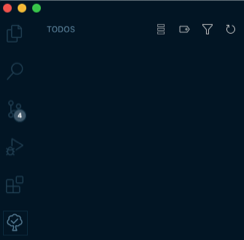
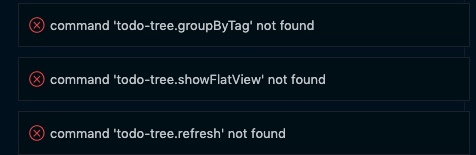
joafii
on 12 Mar 2020
It looks like the extension hasn't installed properly. Not sure why? Can you try installing 169 again and if the same error happens, go into the extension folder .vscode/extensions/Gruntfuggly.todo-tree-0.0.169 and do npm install.
Gruntfuggly
on 16 Mar 2020
Any luck getting this to work?
Gruntfuggly
on 22 Mar 2020
I meet the same problem.
I'm using VS Code in windows 10. The version 0.0.168 is OK, but later versions (0.0.169 - 0.0.171) not work.
It looks like the extension hasn't installed properly. Not sure why? Can you try installing 169 again and if the same error happens, go into the extension folder
.vscode/extensions/Gruntfuggly.todo-tree-0.0.169and donpm install.
I've tried and still not working.
 lymims
on 30 Mar 2020
lymims
on 30 Mar 2020
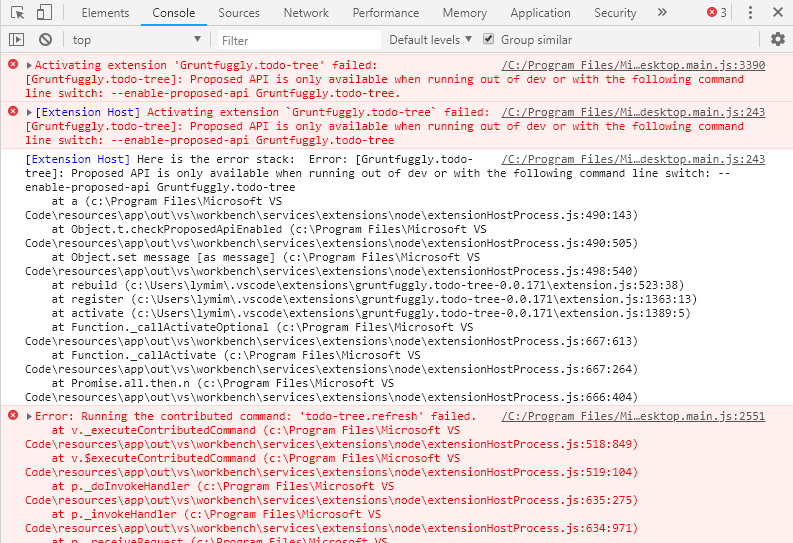
Here is the console info in Developer Tools:
lymims
on 30 Mar 2020
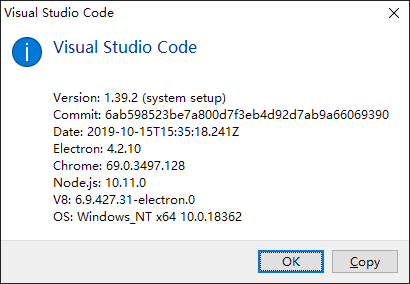
What version of vscode are you running? The warning suggests that an API is not available, which sounds like you might be running an older version.
Gruntfuggly
on 30 Mar 2020
What doesn't make any sense is that version 169 was literally just a change to a default setting - to turn a feature off!?
Gruntfuggly
on 30 Mar 2020
lymims
on 30 Mar 2020
That explains it - the current version is 1.43.2. Is there a reason you need to be running an older version?
Gruntfuggly
on 30 Mar 2020
You are right, I don't know when and why I set the update mode of VS Code to none.
After updating to the latest version, the plugin works perfectly.
Thanks a lot!
lymims
on 30 Mar 2020
You should have a whole bunch of new and cool vscode features as a bonus! 😀
Gruntfuggly
on 30 Mar 2020
Related issues
 rickstaa
·
5Comments
rickstaa
·
5Comments
 Cloud7050
·
9Comments
Cloud7050
·
9Comments
 ghost
·
7Comments
ghost
·
7Comments
 Therzok
·
5Comments
Therzok
·
5Comments
 onetrev
·
5Comments
onetrev
·
5Comments
Most helpful comment
You should have a whole bunch of new and cool vscode features as a bonus! 😀