Todo-tree: Tags are not highlighted in VSCode 1.32.1
Here's the info not working on
Version: 1.32.1 (user setup)
Commit: 05f146c7a8f7f78e80261aa3b2a2e642586f9eb3
Date: 2019-03-08T00:51:49.278Z
Electron: 3.1.3
Chrome: 66.0.3359.181
Node.js: 10.2.0
V8: 6.6.346.32
OS: Windows_NT x64 10.0.17134
When I downgraded VSC to v1.30.2, tag highlighting worked as expected
 wenfangdu
All 12 comments
Is there anything in the developer console?
 Gruntfuggly
on 9 Mar 2019
Gruntfuggly
on 9 Mar 2019
I also noticed that my tags stopped working with 1.32.1. After playing around with it a little bit, I found that the tag highlighting / coloration only works when the tag is followed by whitespace.
In previous versions of VSCode I loved being able to add numbers to my tags.
i.e. for TASK_01 to work with the following in my settings.json.
"TASK_": {
"type": "text",
"foreground": "#01E5D6",
"background": "#B559BD",
"opacity": "20"
}
I can still use it as is by separating out the tag from the number, but that means I have a bunch of files that are no longer showing up in the extension's sidebar panel.
Let me know if there is anything I can do to help! I looked at the Dev Console but didn't see anything about this extension. Though tbh I'm not sure exactly what I'd be looking for.
Cheers!
 tobias-fyi
on 10 Mar 2019
tobias-fyi
on 10 Mar 2019
@Gruntfuggly Is this what you are looking for?

@tobias-fyi Thx, mine doesn't work even when tag is followed by white spaces.
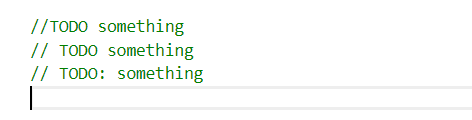
wenfangdu
on 10 Mar 2019
I was hoping there might be some errors shown in the console, but if that is all you are seeing then it's probably working OK, but not matching for some other reason.
Can you try installing an earlier version of the extension using the context menu of the extensions view (I suggest 0.0.121) and see if that fixes it?
Or, if you are using the default regex, try removing the \\b...
Gruntfuggly
on 11 Mar 2019
I've uploaded a new version which reverts the change for the word boundary (b).
Please let me know if you're still having issues.
Gruntfuggly
on 11 Mar 2019
@Gruntfuggly Hi, thanks for fix, but it didn't work for me, tried installing 0.0.121, still not highlighting. Also, didn't notice errors related to todo-tree in the console. Only downgrading VSC worked.
wenfangdu
on 12 Mar 2019
That's odd. Can you post your configuration and an example that it should highlight so I can try it out?
Gruntfuggly
on 12 Mar 2019
I don't have any manual configs for todo-tree, all are defaults. The TODO is not highlighted in the editor panel, but could be found in the extension panel tho.

wenfangdu
on 12 Mar 2019
I'm confused - if you haven't set any configuration, then there won't be any highlights. Is it possible that they were being highlighted by a different extension?
Can you try setting
    "todo-tree.defaultHighlight": {
        "background":"green"
    }
and see if that works?
Gruntfuggly
on 12 Mar 2019
Seems to be working great for me.
Thank you @Gruntfuggly !
Best of luck.
tobias-fyi
on 12 Mar 2019
@Gruntfuggly Thank you, that worked, so the tags are not supposed to be highlighted by default:sweat_smile:? I only have todo-tree for tag highlighting tho, don't know why the tags were highlighted when downgrading VSC, sorry for the hassle.
Here's my config now:
  "todo-tree.defaultHighlight": {
    "background": "#ffab00",
    "foreground": "#fff",
    "icon": "alert",
    "iconColour": "#ffab00",
    "opacity": "0.5",
    "rulerColour": "#ffab00",
    "rulerLane": "full",
    "type": "tag"
  },
Works great with VSC default light theme, kudos for the great extension!
wenfangdu
on 13 Mar 2019
Glad you've got it sorted. I must admit I don't understand how you were seeing the highlights with the downgrade either!
Highlighting was only added as a secondary option a long time ago because there were better extensions for highlighting available. However, lots of users asked for options and improvements and now it works pretty well, so maybe I should add some default highlighting.
Gruntfuggly
on 13 Mar 2019
Related issues
 luqiudi
·
9Comments
luqiudi
·
9Comments
 Therzok
·
5Comments
Therzok
·
5Comments
 emanuelenardi
·
3Comments
emanuelenardi
·
3Comments
 alexwall
·
6Comments
alexwall
·
6Comments
 Cloud7050
·
9Comments
Cloud7050
·
9Comments
Most helpful comment
Glad you've got it sorted. I must admit I don't understand how you were seeing the highlights with the downgrade either!
Highlighting was only added as a secondary option a long time ago because there were better extensions for highlighting available. However, lots of users asked for options and improvements and now it works pretty well, so maybe I should add some default highlighting.