Todo-tree: See your TODO count in the status bar..
I would love it if you could see a TODO count in your status bar.
Cause we want those TODO and Fixme to go to 0 :)
Being able to see a count in the status bar is a good reminder to reduce the number.
There could be a setting to show a merged count or show separate counts for each tag.
 Yzrsah
All 14 comments
That could be useful - I'll add it as an option.
 Gruntfuggly
on 4 Dec 2018
Gruntfuggly
on 4 Dec 2018
I came to ask the same, but for maybe
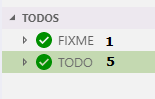
or even
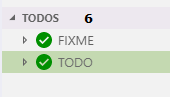
I don't mind which..
 WORMSS
on 10 Dec 2018
WORMSS
on 10 Dec 2018
Hi - the status bar is almost ready. Unfortunately adding to the tree view can only be done by adding something to the item labels, so it can't be shown exactly like you have it.
So it could show something like:
TODO (5)
but it won't look as nice.
Gruntfuggly
on 10 Dec 2018
To be honest, it's actually what I thought myself, but I can only do so much with mspaint at short notice. Lol
WORMSS
on 10 Dec 2018
Latest version has counts in the status bar - you can chose total or per tag from the settings, or click the status bar to toggle.
Gruntfuggly
on 12 Dec 2018
If I add counters to the tree itself, would you expect them on all nodes with children, or just the grouped tag nodes (as in your top picture)?
Gruntfuggly
on 12 Dec 2018
I would have thought the grouped tags, because in other ways it's mostly going to be filename.ext (1) seeing hundreds of them seems a little unneeded. But I am sure someone out there that will disagree with me.
WORMSS
on 12 Dec 2018
@Gruntfuggly Thanks for adding this feature in the latest release 👍
// What to show in the status bar - nothing, total count, or counts per tag
  "todo-tree.statusBar": "none"
Would it make sense to add an array as an option to filter the counts in the statusbar?
"todo-tree.statusBar":['TODO', 'BUG",...]
(i have like 15 tags filling up the entire statusbar when using 'counts per tag'
 beebase
on 13 Dec 2018
beebase
on 13 Dec 2018
I would prefer not to have another list of the tags in the settings - I'm not particularly happy with how it is at the moment with a list of tags and then the custom highlights needing to reference each tag again, as it opens up possible configuration errors.
How about another option: "top three", showing the three tags with the highest number of counts? The full list could still be shown in the tooltip?
Gruntfuggly
on 13 Dec 2018
@WORMSS Looks like the latest vscode release supports a new description property - I'll have a look, but this might make putting the counters on the nodes look nice.
Gruntfuggly
on 13 Dec 2018
How about another option: "top three", showing the three tags with the highest number of counts? The full list could still be shown in the tooltip?
That would work fine.
I see what you mean with 'possible configuration errors'
Maybe "todo-tree.customHighlight" should be merged into "todo-tree.tags' like:
todo-tree.tags : {
  'TODO' : {
    "iconColour": "grey",
    "background": "grey",
    "showInStatusBar" : true,
    ...
    ...
But then again, I have no clue how much that would break existing code. 😉
beebase
on 14 Dec 2018
@beebase I've just uploaded a version which has another option "top three".
@WORMSS The latest version also now has an option todo-tree.showCountsInTree which displays the number of tags within each node of the tree.
Gruntfuggly
on 22 Dec 2018
Thank you very much @gruntfuggly
I have finished work until the new year, but I will set a reminder to turn the setting on.
WORMSS
on 22 Dec 2018
@Gruntfuggly I can confirm it works and looks lovely.
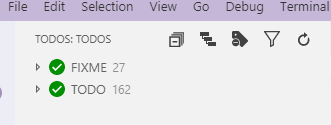
WORMSS
on 3 Jan 2019
Related issues
WORMSS
·
6Comments
 bitjson
·
8Comments
bitjson
·
8Comments
 fheinicke
·
6Comments
fheinicke
·
6Comments
 alexwall
·
6Comments
bitjson
·
7Comments
alexwall
·
6Comments
bitjson
·
7Comments
Most helpful comment
That could be useful - I'll add it as an option.