Todo-tree: Can't use flat view (?)
Some time ago I had in the tree the possibility, to sort the list by tags and also with one click go to that line where the tag is.
For example if my tag is "TODO" and I write in the code: "//TODO Do something here" it would show me "TODO Do something here" in the tree / explorer. With a click I get to that line.
Then when I for example add "//TODO Do something more here 2" in another line, the second, "TODO Do something here 2" would be under the first in the list (alphabetically sorted).
But now - I don't know why - I get the following (when I click "Group by tag").
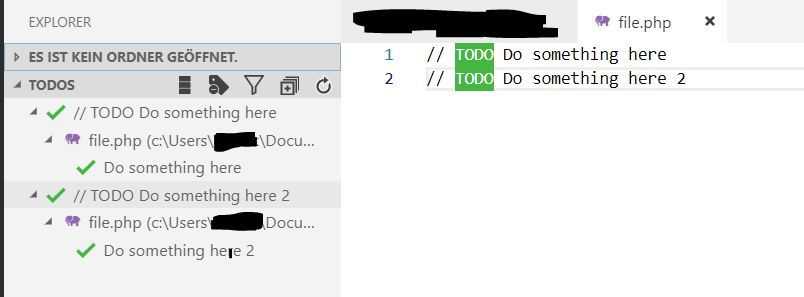
It starts with the problem, that the whole line is now in the tree. In my above example the whole "//TODO Do something here" is in the tree (instead of just "TODO Do something here"). But the bigger problem is, that it now shows the file name, then again the tag and only there I can click to go to the line.
For example:
"//TODO Do something here"
I click on it (dropdown opens)
"file.php (c:\user[...])"
I click on it (dropdown opens again...)
"Do something here"
I click on it and only then get to the line
(some clicks needed. I can "expand all" but that's a hella long list then)
In the above example all tags are sorted by tags. All TODO are together, all IMPORTANT are together etc.
If I have multiple TODO tags, they're under each other. But I always have to click multiple times to get to the line I want.
In the next I have all under each other (when I click "Ungroup by tag")
"TODO Do something here 1"
"TODO Do something here 2"
"TODO Do something here 3"
But they're sorted by line and no longer by name/tag.
For example if I have "TODO Do something here 1" in line 30 and "TODO Do something here 2" in line 40 and add "IMPORTANT Fix this" in line 33 the list looks like this
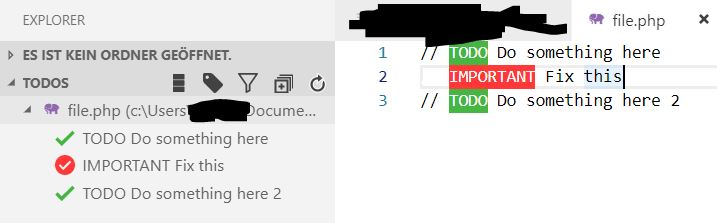
"TODO Do something here 1"
"IMPORTANT Fix this"
"TODO Do something here 2"
"TODO Do something here 3"
How can I get back to where I have the list like in the second but sorted by tag?
When I click "Show Flat view" / "Show tree view" nothing happens.
I had that some days ago, it worked well. I don't know what happened in the meantime.
 decpr
decpr
All 13 comments
This seems linked to #95. I'm looking into it.
 Gruntfuggly
on 22 Nov 2018
Gruntfuggly
on 22 Nov 2018
OK, I think I found the problem - I did a really stupid change to find the tag when grouping by tag. This would have been caught by unit tests - which I am in the process of adding. This has highlighted how important they are, so I need to get them integrated now. 😞
I've just uploaded a new version - let me know if it works properly again.
Sorry for the mess!
Gruntfuggly
on 22 Nov 2018
Thanks for the answer! The first one seems fixed now. But the second is still sorted by line, not by tag.
So what I would like to have is the first one (with the dropdown:) but with the ability to not show the filename, instead, only the todos. I mostly work with one file only so I would not need it.
/edit: Btw. it could be added via button, if possible. Because there might be users who have multiple files with multiple todos. I don't want to interrupt something here.
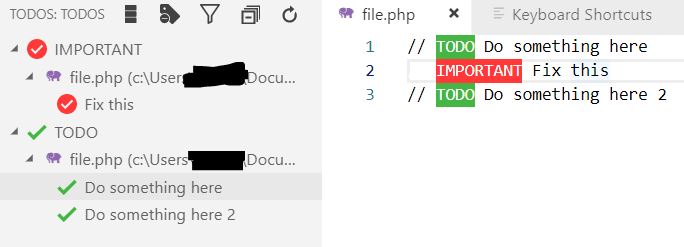
Here it is fixed (now longer much dropdowns):
But here still sorted by line, not by tag:
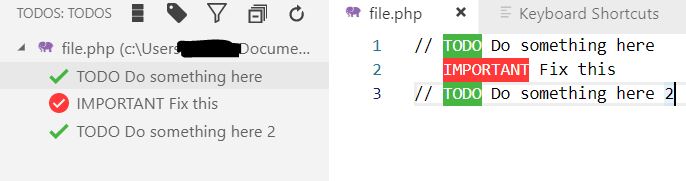
If that would be possible, it would be awesome! I have made a little edit to show what I mean.
All tags in a expandable dropdown under each other and once I click a specific tag, I get to that line. Here how I mean it:
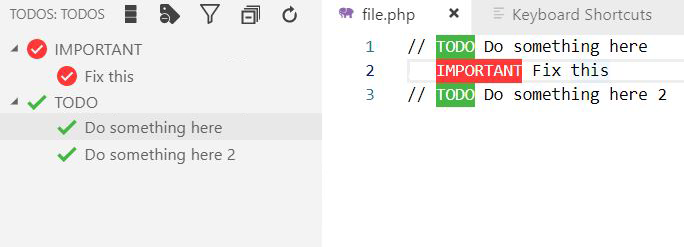
I am not sure if that's already what the "Flat view" is, because when I click it, nothing happens.
Thanks and have a good day
decpr
on 23 Nov 2018
If your files are all in the same folder (i.e. no subfolders) then you won't see any difference between the tree view and the flat view.
So, are you looking for a minimal, flat, grouped view, without filenames?
Gruntfuggly
on 23 Nov 2018
Exactly, that would be awesome. Like I posted in my image (the last one).
decpr
on 23 Nov 2018
OK, I'll see what I can do. 😄
Gruntfuggly
on 23 Nov 2018
Thanks, that would be cool! Have a great day
decpr
on 23 Nov 2018
I've just uploaded a new version which supports a tags only view. Without grouping it will just list all tags (no tree). If you switch on grouping, they will be grouped by the tag.
To enable it, the button now goes tree -> flat -> tags only -> tree
Let me know what you think. 😁
Gruntfuggly
on 28 Nov 2018
Oh lol! Just saw that I didn't send my answer here yet 😄, sorry!! Thanks for the great work, it looks awesome!
Just one (hopefully last 😆) little suggestion if it's possible to add:
Would be great if tags would be sorted or sortable by name in each group.
Groups are already sorted by name, but not their content.
For example if I have the group "TODOS" and there I have "TODO I am a todo" and "TODO I am one more todo" that the first would be first in list also, despite it being in the code some lines under the second.
Currently it's sorted by line. Sorting by name would be awesome!
decpr
on 5 Dec 2018
I'll add it as an option - I kept it by line because if you don't use groups it seems to make more sense, but I can see that it might be preferable with groups.
Gruntfuggly
on 5 Dec 2018
Yes that's right, I think it's also depending on your workflow. Like sometimes you just might want to go trough the list from top to bottom. But when for example searching a specific thing and having a big list (I don't use TODO tree as TODO only, because it's also helpful if you have several functions "marked" and have a list of all of them :P), it might be helpful to sort by name. Maybe keeping both options and adding a "Sort by name / Sort by line"-option would be great! There's space for one lust button 🤣
decpr
on 5 Dec 2018
Latest version now has a sort alphabetically option in the setting - I didn't add a button because it only affects the tags only view.
Gruntfuggly
on 9 Dec 2018
Thanks very much! Have a great day!
decpr
on 10 Dec 2018
Related issues
 ghost
·
7Comments
ghost
·
7Comments
 JonathanTroyer
·
5Comments
JonathanTroyer
·
5Comments
 jabacchetta
·
8Comments
jabacchetta
·
8Comments
 bitjson
·
7Comments
bitjson
·
7Comments
 rickstaa
·
5Comments
rickstaa
·
5Comments
Most helpful comment
I've just uploaded a new version which supports a tags only view. Without grouping it will just list all tags (no tree). If you switch on grouping, they will be grouped by the tag.
To enable it, the button now goes tree -> flat -> tags only -> tree
Let me know what you think. 😁