Todo-tree: Icon colour not working/customizable
With the following setup:
"todo-tree.customHighlight": {
        "TODO": {
            "background": "green"
        },
        "FIXME": {
            "icon": "issue-opened",
            "background": "red"
        },
        "CONTENT": {
            "icon": "three-bars",
            "background": "#1f7e38"
        },
        "FORMATTING": {
            "icon": "zap",
            "background": "#9c308b"
        }
    },
"todo-tree.tags": [
        "TODO",
        "FIXME",
        "CONTENT",
        "FORMATTING"
    ],
I get green icons for all tags, light green text foreground on the green "CONTENT" tag, and gray text foreground on the purple "FORMATTING" tag.
 Gliptal
All 27 comments
Found the issue, this setting was added at the end of my config file:
    "todo-tree.defaultHighlight": {
        "foreground": "green",
        "type": "text"
    },
Removing it fixed the issue. I usually put my settings in alphabetical order, this looks like something the extensions added?
Gliptal
on 7 Sep 2018
The extension will have added defaultHighlight the first time it was run after the update to the new configuration settings. It was an attempt to help migrate from the old settings.
Now you have removed it, does everything behave as expected? The intention is that the defaultHighlight should now specify standard highlight settings, with customHighlight then extending that as required.
It seems like in your case that the default "foreground" probably wasn't required - I'll see if would make sense to take it out.
 Gruntfuggly
on 7 Sep 2018
Gruntfuggly
on 7 Sep 2018
BTW - it would be nice if the settings were automatically ordered - I do the same thing as you. Maybe another extension to automatically order the settings would be useful... :smile:
Gruntfuggly
on 7 Sep 2018
Heads up: I just downloaded 0.0.85, and it added that "problematic" setting again. I think ideally you'd want to have icon, icon colour, text foreground, and text background all independently configurable. It's a bit confusing right now with icon colour sharing the foreground setting.
I agree on the ordering, even more of a problem now with the new GUI.
Gliptal
on 7 Sep 2018
Yes, it will recreate it each time which is not good. Instead of deleting it, set it to:
todo-tree.defaultHighlight: {}
which should then leave it as it is.
I think you're right about the icon colours - at the moment it uses the foreground colour first, then the background colour if the foreground is not defined and if neither foreground or background is defined it uses the colour from the iconColours setting. Maybe it would be clearer if it used the iconColours setting first.
Gruntfuggly
on 7 Sep 2018
Any chance you could add it in customHighlight instead, and forego the deprecated iconColours?
Gliptal
on 7 Sep 2018
As the icon itself is in the defaultHighlight and customHighlight your're probably right. I'll add iconColour to them both and use the iconColours as the fallback.
Gruntfuggly
on 7 Sep 2018
So, reloading VSCode adds that problematic setting every time, even if I specify its object empty in the user settings.
EDIT: Nevermind it seems something is now messed up on my install.
Gliptal
on 7 Sep 2018
Actually, it does keep happening.
Gliptal
on 7 Sep 2018
OK, for now, here's another way to stop it updating:
todo-tree.defaultHighlight: { "done":true }
Haveing something in it should stop it. I'll try to think if a better way to migrate the old settings.
Gruntfuggly
on 7 Sep 2018
I've added iconColour to defaultHighlight and customHighlight. It will try custom first, then default, then foreground, then background and lastly the old settings.
Gruntfuggly
on 10 Sep 2018
Nice!
Gliptal
on 10 Sep 2018
ahm... i'm not sure if this issue is also including the point that todo-tree.iconColors isn't working anymore...?
I have the following setting:
    "todo-tree.globs": [
        "*.*",
    ],
    "todo-tree.regex": "(^/[a-zA-Z0-9_.\\-«»/(/)]{1,}|TODO|FIXME)",
    "todo-tree.showTagsFromOpenFilesOnly": true,
    "todo-tree.autoRefresh": true,
    "todo-tree.iconColours":
    {
        "ErrorMSG" : "red",
        "GetBo.Normal" : "red",
        "Param.InitFiles" : "magenta",
        "GetParams" : "magenta",
        "CheckPath" : "magenta",
    },
This did set the colors of the tree items to the defined color before?
 Raydir
on 21 Sep 2018
Raydir
on 21 Sep 2018
Can you attach an example of the code that it matches? Your regex is quite different to the default! 8-)
The way it should have work before was that the 'iconColours' setting should have matched the 'tags' array. Have you got that defined too?
Gruntfuggly
on 21 Sep 2018
@Gruntfuggly the regex just seeks "functions" this did work fine until one of the latest updates
The "sourcefile" contains something linke this:
/headerreport
ipsum lorum
«/CheckPath.Function»
«/GetBo.Normal»
/

/ErrorMSG.Return
/

/CheckPath.Function
ipsum lorum
/

/GetBo.Normal
ipsum lorum
/
by the way - your extension is awsome :)
Raydir
on 21 Sep 2018
Thanks! :smile:
The way it's working with your regex (because you aren't using the tags setting) the highlight configuration will need to be based on the whole match, so you could use something like this:
"todo-tree.regex": "(^/[a-zA-Z0-9_.\\\\-«»/(/)]{1,})",
"todo-tree.customHighlight": {
    "/ErrorMSG.Return": {
        "iconColour": "red"
    },
    "/GetBo.Normal": {
        "iconColour": "red"
    },
    "/Param.InitFiles": {
        "iconColour": "magneta"
    },
    "/GetParams": {
        "iconColour": "magenta"
    },
    "/CheckPath.Function": {
        "iconColour": "magenta"
    }
}
I don't think you need the TODO or FIXME?
If you need more flexibility to match 'anything' after the dot, then you'll need a more complex regex.
Gruntfuggly
on 21 Sep 2018
hm... strange since this did work when i only wrote the "beginning" of a match.
The TODO and FIXME was just "additive" ignore them ;D
Raydir
on 21 Sep 2018
i almost get it right if i set it to this. Only problem is that this seems to be case sensitive hmpf
    "todo-tree.regex": "(^/([a-zA-Z0-9_.\\\\-«»/(/)]{1,}|/$TAGS))",
    "todo-tree.tags": [
        "/ERROR",
        "/get"
        ],
    "todo-tree.customHighlight": {
        "/ERROR": {
            "iconColour": "red"
        },
        "/get": {
            "iconColour": "red"
        },
     },
most efficient way:
    "todo-tree.regex": "(^/([a-zA-Z0-9_.\\\\-«»/(/)]{1,}|/$TAGS))",
    "todo-tree.tags": [
        "/ERROR",
        "/Get",
        ],

    "todo-tree.showTagsFromOpenFilesOnly": true,
    "todo-tree.autoRefresh": true,
    "todo-tree.iconColours": {
        "/ERROR" : "yellow",
        "/Get" : "yellow"
    }
only the "todo-tree.filterCaseSensitive": false" seems to be ignored.
Raydir
on 21 Sep 2018
The todo-tree.filterCaseSensitive setting applies to filtering the view itself (when you click the funnel button). You can make the regex insensitive for searching files (with ripgrep) by adding '-i' to the todo-tree.ripgrepArgs. I don't think the highlight search will work insensitively though - I could add a setting to allow it...
Gruntfuggly
on 21 Sep 2018
Hm... i'm still wondering why this did work some versions ago.
Well it would be a blast to have such a setting!
Thanx for your work @Gruntfuggly 👍
Raydir
on 21 Sep 2018
I've just uploaded a new version which adds a new setting todo-tree.regexCaseSensitive. By default it is set to true, but if you set it to false the tags will be matched regardless of case - including the custom highlighting.
Let me know if it works OK.
Gruntfuggly
on 2 Oct 2018
@Gruntfuggly i'll try asap (as soon our firewall isn't blocking marketplace anymore -.-)
Raydir
on 2 Oct 2018
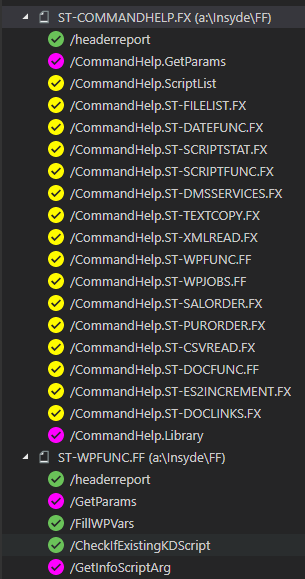
@Gruntfuggly just tried it and it works like a bomb:
My settings are now just this one:
   "todo-tree.regexCaseSensitive" : false,
    "todo-tree.regex": "(^/([a-zA-Z0-9_.\\\\-«»/(/)]{1,}|/$TAGS))",
    "todo-tree.showTagsFromOpenFilesOnly": true,
    "todo-tree.autoRefresh": true,
    "todo-tree.defaultHighlight": {
        "foreground": "green",
        "type": "none"
    },
    "todo-tree.customHighlight": {
        "commandhelp": {
            "foreground": "yellow"
        },
        "get": {
            "foreground": "magenta"
        },
        "lib": {
            "foreground": "magenta"
        }
    },
Raydir
on 3 Oct 2018
I always hoped it would be flexible enough using the regex. :smile:
Do you have todo-tree.tags defined? If not, you probably don't need the $TAGS at the end?
Gruntfuggly
on 3 Oct 2018
i don't have tags and you are right - i dont need the $TAGS option.
Regex ist now:
"todo-tree.regex": "^/[a-zA-Z0-9_.\\\\-«»/(/)]{1,}",
works like a bomb 👍
Raydir
on 3 Oct 2018
Related issues
 emanuelenardi
·
3Comments
emanuelenardi
·
3Comments
 rickstaa
·
5Comments
rickstaa
·
5Comments
 bitjson
·
8Comments
bitjson
·
8Comments
 nickPietrass
·
9Comments
nickPietrass
·
9Comments
 diminutivesloop
·
5Comments
diminutivesloop
·
5Comments