Hi there,
Just want to check if there is a working active example of using alignment in tiptap?
Thanks
 MrMoonbag
All 20 comments
Hey there,
within our project I used and modified the old alignment example from the version before 1.0
First step is to create a custom extension in a file named paragraph.js:
import { toggleBlockType } from 'tiptap-commands';
import { Node } from 'tiptap';

export default class Paragraph extends Node {
    get name() {
        return 'paragraph';
    }

    get schema() {
        return {
            attrs: {
                textAlign: {
                    default: 'left'
                }
            },
            content: 'inline*',
            group: 'block',
            draggable: false,
            parseDOM: [
                {
                    tag: 'p',
                    getAttrs: (node) => ({
                        textAlign: node.style.textAlign || 'left'
                    })
                }
            ],
            toDOM: (node) => [ 'p', { style: `text-align: ${node.attrs.textAlign}` }, 0 ]
        };
    }

    commands({ type, schema }) {
        return (attrs) => toggleBlockType(type, schema.nodes.paragraph, attrs);
    }
}
In my component I firstly import that paragraph extension
import Paragraph from './paragraph.js';
and added it to the extensions of the Editor class
this.editor = new Editor({
                extensions: [
                    new Bold(),
                    new Italic(),
                    new Strike(),
                    new Underline(),
                    new Paragraph(),
                    new ListItem(),
                    new BulletList(),
                    new OrderedList()
                ]
            });
And last but not least in my HTML code it can look like the following (don't get confused with the v-toolbar, v-btn,... tags - i used vuetify, should be easily adjustable for other use cases):
<editor-menu-bar :editor="editor">
      <div class="menubar" :style="menubarStyle" slot-scope="{ commands, isActive }">
        <v-toolbar>
          <v-btn icon
            :class="{ 'v-btn--active': isActive.paragraph({ textAlign: 'left' }) }"
            @click="commands.paragraph({ textAlign: 'left' })">
            <v-icon color="primary">format_align_left</v-icon>
          </v-btn>
          <v-btn icon
            :class="{ 'v-btn--active': isActive.paragraph({ textAlign: 'center' }) }"
            @click="commands.paragraph({ textAlign: 'center' })">
            <v-icon color="primary">format_align_center</v-icon>
          </v-btn>
          <v-btn icon
            :class="{ 'v-btn--active': isActive.paragraph({ textAlign: 'right' }) }"
            @click="commands.paragraph({ textAlign: 'right' })">
            <v-icon color="primary">format_align_right</v-icon>
          </v-btn>
        </v-toolbar>
      </div>
    </editor-menu-bar>
Hope this helps. Also thinking about adding this example in a pull request but had not found the time yet.
 RyamBaCo
on 11 Jan 2019
RyamBaCo
on 11 Jan 2019
@RyamBaCo Thank you very much will give it a try
MrMoonbag
on 13 Jan 2019
I don't want to support that and a example is given so I'll close that.
 philippkuehn
on 19 Jan 2019
philippkuehn
on 19 Jan 2019
@RyamBaCo Thanks for the example. It seems to function, but if you select multiple nodes (for example, a header as well) or even just another node that isn't a paragraph, it converts it to a paragraph. I'm not sure the best way to prevent this. I suppose by checking the node type first?
 mattkoch614
on 23 Jan 2019
mattkoch614
on 23 Jan 2019
Hi,
The issue where the header gets converted to paragraph can be resolved by using a Mark instead of Node.
Here is my example:
import {toggleMark} from 'tiptap-commands'
import {Mark}       from 'tiptap'

export default class Alignment extends Mark {

    get name() {
        return 'alignment'
    }

    get defaultOptions() {
        return {
            textAlign: ['left', 'center', 'right'],
        }
    }

    get schema() {
        return {
            attrs    : {
                textAlign: {
                    default: 'left',
                },
            },
            content  : 'inline*',
            group    : 'block',
            defining : true,
            draggable: false,
            parseDOM : this.options.textAlign.map(align => ({
                tag  : 'div[style="text-align:'+align+'"]',
                attrs: { textAlign: align },
            })),
            toDOM    :
                node => {
                    return ['div', {
                        style       : `text-align:${node.attrs.textAlign}`
                    }, 0]
                }
        }
    }

    commands({ type }) {
        return (attrs) => toggleMark(type, attrs)
    }
}
And the buttons for changing alignment:
<button class="menubar__button"
                        :class="{ 'is-active': isActive.alignment({ textAlign: 'left' }) }"
                        @click="commands.alignment({ textAlign: 'left' })">
                    <icon name="align-left" />
                </button>

                <button class="menubar__button"
                        :class="{ 'is-active': isActive.alignment({ textAlign: 'center' }) }"
                        @click="commands.alignment({ textAlign: 'center' })">
                    <icon name="align-center" />
                </button>

                <button class="menubar__button"
                        :class="{ 'is-active': isActive.alignment({ textAlign: 'center' }) }"
                        @click="commands.alignment({ textAlign: 'right' })">
                    <icon name="align-right" />
                </button>
However, I have an issue here where the isActive class gets added to all three buttons when one alignment is used. And I can't figure out how to make it work properly. So if anybody has a suggestion, that would be great :)
 papa-zulu
on 26 Mar 2019
papa-zulu
on 26 Mar 2019
Hi @papa-zulu
I had the same issue and tried to use your example. It seems to work very well expected the active state of the button, that you already mentioned (I'm fine with that, it's not critical for me) and two other issues I noticed:
1.) If I change the default alignment left to center, it works instantly and well. If I take the centered part and hit the right button I have to click two times on the right button to get my expected alignment. On my first click, the centered part first goes back the left alignment and on the second click it becomes right. So summed up: When you align a left aligned part to center/right, it works on the first click. When you try to align a centered part to right or a right to centered, you have to click two times (first goes back to left and then becomes center/right on the second click). Don't know why. Did you noticed the same issue?
2.) When I center a paragraph within a table cell, it looks fine. After saving, it addes me a paragraph before and after my centered paragraph. So I get two empty paragraphs with an <br> tag in it and my cell is higher than expected. The table looks ugly. Any ideas why this happens? Maybe something wrong in the schema?
Thanks!
 MrBuggy
on 27 May 2019
MrBuggy
on 27 May 2019
Hi @papa-zulu
Me again: I solved the second issue with the two additional paragraphs: If I use a span in case of a div, than the paragraphs would not be added after saving. Before I tried the span I changed the content to text* in case of inline* - didn't help. Than I tried out the span and the content: 'inline*' and it worked. I also had to add a display: block; to the span to get the correct alignment.
So my schema looks like this:
  get schema() {
    return {
      attrs: {
        textAlign: {
          default: 'left',
        },
      },
      content: 'inline*',
      defining: true,
      draggable: false,
      parseDOM: this.options.textAlign.map((align) => ({
        tag: `span[style="text-align:${align}; display:block;"]`,
        attrs: { textAlign: align },
      })),
      toDOM: (node) => ['span', { style: `text-align:${node.attrs.textAlign}; display:block;` }, 0],
    };
  }
I still didn't figure out a solution for the other issue I mentioned in my first comment above...Maybe you'll have more luck. Thanks.
MrBuggy
on 27 May 2019
Hi guys,
I'm new to tiptap and prosemirror. I spent some time on this issue and debugged a little bit. I think there is a small bug in tiptap. The attributes are not checked to verify if the button is active or not. Here is my temporary fix in markIsActive.js:
function compareDeep(a, b) {
  if (a === b) return true
  if (!(a && typeof a == "object") ||
      !(b && typeof b == "object")) return false
  let array = Array.isArray(a)
  if (Array.isArray(b) != array) return false
  if (array) {
    if (a.length != b.length) return false
    for (let i = 0; i < a.length; i++) if (!compareDeep(a[i], b[i])) return false
  } else {
    for (let p in a) if (!(p in b) || !compareDeep(a[p], b[p])) return false
    for (let p in b) if (!(p in a)) return false
  }
  return true
}

export default function (state, type, attrs) {
  const {
    from,
    $from,
    to,
    empty,
  } = state.selection

  let result = false

  if (empty) {
    result =!!type.isInSet(state.storedMarks || $from.marks())
  }else{
    result = !!state.doc.rangeHasMark(from, to, type)
  }

  if(attrs && attrs != {} && result){
    result = $from.marks().find(x=>compareDeep(x.attrs,attrs))
  }

  return result
}
And the my alignment mark is very simple (align.js):
import { Mark } from '../../utils'
import { updateMark, markInputRule } from '../../commands'

export default class Align extends Mark {
  get name () {
    return 'align'
  }

  get schema () {
    return {
      attrs: {
        textAlign: 'left'
      },
      parseDOM: [
        {
          style: 'text-alig',
          getAttrs: value => value
        }
      ],
      toDOM: mark => ['span', {
        style: `text-align: ${mark.attrs.textAlign};display: block`
      }, 0],
    };
  }

  commands ({ type }) {
    return (attrs) => updateMark(type, attrs)
  }

  inputRules({ type }) {
        return [
            markInputRule(/(?:\*\*|__)([^*_]+)(?:\*\*|__)$/, type),
        ]
    }
}
 hicham-elmansouri
on 8 Jul 2019
hicham-elmansouri
on 8 Jul 2019
Hi guys,
I'm new to tiptap and prosemirror. I spent some time on this issue and debugged a little bit. I think there is a small bug in tiptap. The attributes are not checked to verify if the button is active or not. Here is my temporary fix in markIsActive.js:function compareDeep(a, b) { if (a === b) return true if (!(a && typeof a == "object") || !(b && typeof b == "object")) return false let array = Array.isArray(a) if (Array.isArray(b) != array) return false if (array) { if (a.length != b.length) return false for (let i = 0; i < a.length; i++) if (!compareDeep(a[i], b[i])) return false } else { for (let p in a) if (!(p in b) || !compareDeep(a[p], b[p])) return false for (let p in b) if (!(p in a)) return false } return true } export default function (state, type, attrs) { const { from, $from, to, empty, } = state.selection let result = false if (empty) { result =!!type.isInSet(state.storedMarks || $from.marks()) }else{ result = !!state.doc.rangeHasMark(from, to, type) } if(attrs && attrs != {} && result){ result = $from.marks().find(x=>compareDeep(x.attrs,attrs)) } return result }And the my alignment mark is very simple (align.js):
import { Mark } from '../../utils'
import { updateMark, markInputRule } from '../../commands'

export default class Align extends Mark {
  get name () {
    return 'align'
  }

  get schema () {
    return {
      attrs: {
        textAlign: 'left'
      },
      parseDOM: [
        {
          style: 'text-alig',
          getAttrs: value => value
        }
      ],
      toDOM: mark => ['span', {
        style: `text-align: ${mark.attrs.textAlign};display: block`
      }, 0],
    };
  }

  commands ({ type }) {
    return (attrs) => updateMark(type, attrs)
  }

  inputRules({ type }) {
      return [
          markInputRule(/(?:\*\*|__)([^*_]+)(?:\*\*|__)$/, type),
      ]
  }
}
Could you post a full example of this?
 anishtr4
on 10 Jul 2019
anishtr4
on 10 Jul 2019
Hi guys,
I'm new to tiptap and prosemirror. I spent some time on this issue and debugged a little bit. I think there is a small bug in tiptap. The attributes are not checked to verify if the button is active or not. Here is my temporary fix in markIsActive.js:function compareDeep(a, b) { if (a === b) return true if (!(a && typeof a == "object") || !(b && typeof b == "object")) return false let array = Array.isArray(a) if (Array.isArray(b) != array) return false if (array) { if (a.length != b.length) return false for (let i = 0; i < a.length; i++) if (!compareDeep(a[i], b[i])) return false } else { for (let p in a) if (!(p in b) || !compareDeep(a[p], b[p])) return false for (let p in b) if (!(p in a)) return false } return true } export default function (state, type, attrs) { const { from, $from, to, empty, } = state.selection let result = false if (empty) { result =!!type.isInSet(state.storedMarks || $from.marks()) }else{ result = !!state.doc.rangeHasMark(from, to, type) } if(attrs && attrs != {} && result){ result = $from.marks().find(x=>compareDeep(x.attrs,attrs)) } return result }And the my alignment mark is very simple (align.js):
import { Mark } from '../../utils'
import { updateMark, markInputRule } from '../../commands'

export default class Align extends Mark {
  get name () {
    return 'align'
  }

  get schema () {
    return {
      attrs: {
        textAlign: 'left'
      },
      parseDOM: [
        {
          style: 'text-alig',
          getAttrs: value => value
        }
      ],
      toDOM: mark => ['span', {
        style: `text-align: ${mark.attrs.textAlign};display: block`
      }, 0],
    };
  }

  commands ({ type }) {
    return (attrs) => updateMark(type, attrs)
  }

  inputRules({ type }) {
      return [
          markInputRule(/(?:\*\*|__)([^*_]+)(?:\*\*|__)$/, type),
      ]
  }
}
i think its better to create a pull request.
 khanzadimahdi
on 31 Jul 2019
khanzadimahdi
on 31 Jul 2019
Just to weigh in here, since it seems that isActive is bugged and toggles active state for all three of them regardless of which one is actually active, I did a workaround and am currently checking for getMarkAttrs('align').textAlign === 'right' (don't forget to add getMarkAttrs to v-slot in <div class="menubar">).
So my menububble looks like this now:
<div
  slot-scope="{ commands, isActive, getMarkAttrs, menu }"
  class="menububble"
  :class="{ 'is-active': menu.isActive }"
  :style="`left: ${menu.left}px; bottom: ${menu.bottom}px;`"
>
  <button
    class="menububble__button"
    :class="{ 'is-active': getMarkAttrs('align').textAlign === 'left' }"
    @click="commands.align({ textAlign: 'left' })"
  >
    <icon name="align-left" />
  </button>

  <button
    class="menububble__button"
    :class="{ 'is-active': getMarkAttrs('align').textAlign === 'center' }"
    @click="commands.align({ textAlign: 'center' })"
  >
    <icon name="align-center" />
  </button>

  <button
    class="menububble__button"
    :class="{ 'is-active': getMarkAttrs('align').textAlign === 'right' }"
    @click="commands.align({ textAlign: 'right' })"
  >
    <icon name="align-right" />
  </button>
</div>
The rest is mostly @papa-zulu's answer, so thanks for that!
 mariojankovic
on 19 Aug 2019
mariojankovic
on 19 Aug 2019
@mariojankovic I keep getting errors when using getMarkAttrs('align').textAlign
[Vue warn]: Error in render: "TypeError: getMarkAttrs(...) is undefined"

found in

---> <EditorMenuBar>
My code:
        <editor-menu-bar :editor="editor" v-slot="{ commands, isActive, getMarkAttrs }">
            <div
                :class="{'sticky top-0': sticky}"
                class="menubar p-2 mb-0 bg-white z-10 shadow flex flex-wrap text-gray-800"
            >
                <button
                    :class="{ 'is-active': getMarkAttrs('align').textAlign === 'center' }"
                    @click="commands.align({ textAlign: 'center' })"
                    class="menububble__button"
                >
                    <icon name="align-center" />
                </button>
 nivv
on 27 Sep 2019
nivv
on 27 Sep 2019
@nivv try using slot-scope="{ commands, isActive, getMarkAttrs }" instead of v-slot.
mariojankovic
on 27 Sep 2019
@mariojankovic Just wanted to ask how would you allow the menububble to stay on top of the text. Using this method for text-align creates a span with display: block in the element causing the menububble to count the empty space in the span when you highlight the first or last word of the text. I was just wondering if you knew how this could be avoided so the menububble would only count text not empty space hence staying on top of the highlighted text with no left or right offset.
 ItakeLs
on 16 Oct 2019
ItakeLs
on 16 Oct 2019
@ItakeLs do you have a screenshot (ideally with your dev tools open and the items selected) or a video? Even better, a codepen with what you got would be really nice.
mariojankovic
on 17 Oct 2019
@mariojankovic
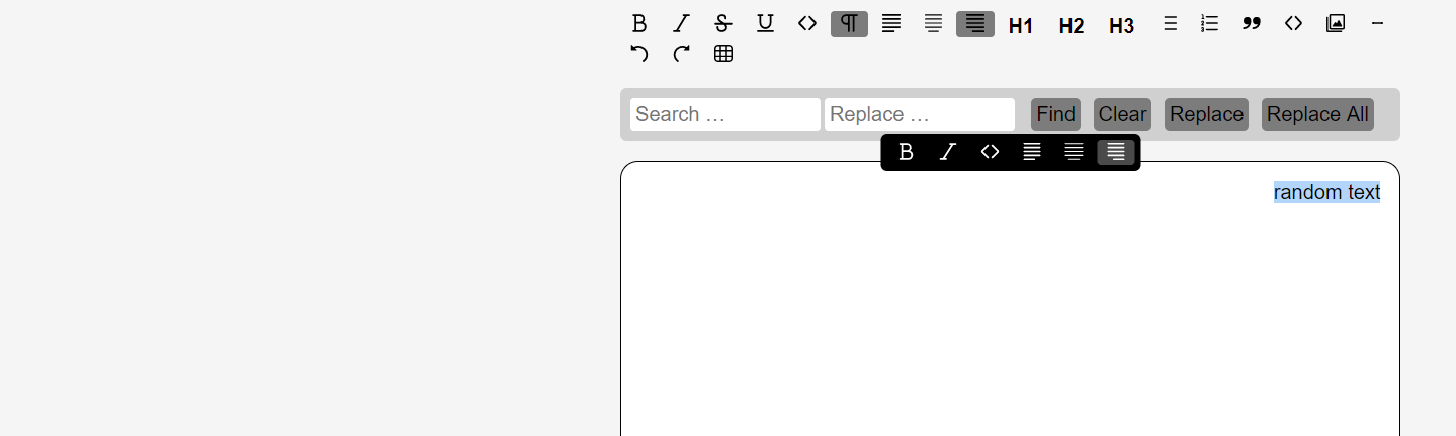
as you can see the text random words is selected but the menu bubble appears in the middle isntead of ontop of the text.
This is a pic of the dev tools
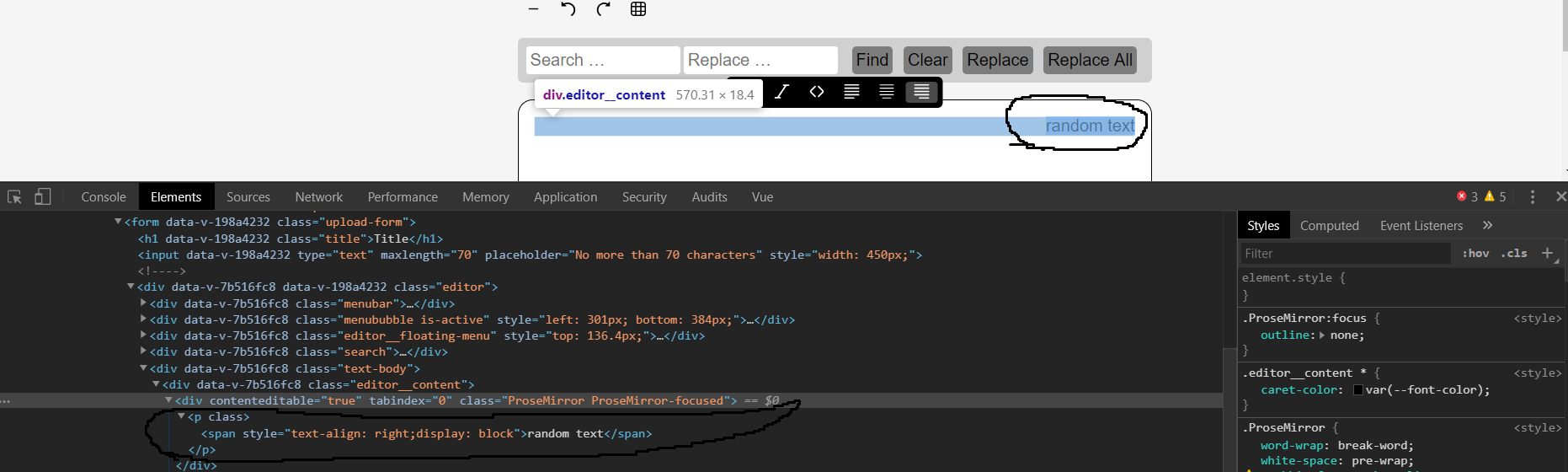
This is the code in a file called align.js using what @hicham-elmansouri posted earlier.
import { Mark } from 'tiptap'
import { updateMark, markInputRule } from 'tiptap-commands'

export default class Align extends Mark {
  get name () {
    return 'align'
  }

  get schema () {
    return {
      attrs: {
        textAlign: 'left'
      },
      parseDOM: [
        {
          style: 'text-alig',
          getAttrs: value => value
        }
      ],
      toDOM: mark => ['span', {
        style: `text-align: ${mark.attrs.textAlign};display: block`
      }, 0],
    };
  }

  commands ({ type }) {
    return (attrs) => updateMark(type, attrs)
  }

  inputRules({ type }) {
        return [
            markInputRule(/(?:\*\*|__)([^*_]+)(?:\*\*|__)$/, type),
        ]
    }
}
Also, I was wondering where I can modify the editor.setContent function and editor.getHtml so I can export and import with alignment added.
ItakeLs
on 23 Oct 2019
@ItakeLs This isn't really possible without getting the menuBubble to either be part of the span itself or playing with the bubble's style attribute in terms of have the box be right: 0 as soon as you align the text right.
The issue is that aligning text requires a display: block item (in this case a paragraph or the selected span to which the bubble is placed relatively). Other than that there's no real way of telling how wide an item is apart from placing the bubble inside a display: inline/inline-block span element which has position: relative as previously mentioned.
mariojankovic
on 23 Oct 2019
```import { Mark } from 'tiptap';
import { updateMark, markInputRule } from 'tiptap-commands';
export default class Align extends Mark {
// eslint-disable-next-line class-methods-use-this
get name() {
return 'align';
}
// eslint-disable-next-line class-methods-use-this
get schema() {
    return {
        attrs: {
            textAlign: {
                default: 'left',
            },
        },
        parseDOM: [
            {
                style: 'text-align',
                getAttrs: value => ({ textAlign: value }),
            },
        ],
        toDOM: mark => ['span', { style: `text-align: ${mark.attrs.textAlign};display: block` }, 0],
    };
}

// eslint-disable-next-line class-methods-use-this
commands({ type }) {
    return attrs => updateMark(type, attrs);
}

// eslint-disable-next-line class-methods-use-this
inputRules({ type }) {
    return [
        markInputRule(/(?:\*\*|__)([^*_]+)(?:\*\*|__)$/, type),
    ];
}
}
```
This is what works for me, i update a bit the code from @hicham-elmansouri
 fazlurr
on 20 Dec 2019
fazlurr
on 20 Dec 2019
For anyone looking to drop into a TailwindCSS project (or any project that uses classes instead of styles):
Note: I am using BoxIcons for the icons which you can replace.
This also includes the fixes for active class as mentioned further up 🎉
1. Add to Editor Bar
<editor-menu-bar :editor="editor" v-slot="{ commands, isActive, getMarkAttrs }">
      <div class="menubar">
        <button
          type="button"
          class="menubar__button"
          :class="{ 'is-active': getMarkAttrs('alignment').align === 'left' }"
          @click="commands.alignment({ align: 'left' })"
        >
          <box-icon name="align-left"></box-icon>
        </button>

        <button
          type="button"
          class="menubar__button"
          :class="{ 'is-active': getMarkAttrs('alignment').align === 'center' }"
          @click="commands.alignment({ align: 'center' })"
        >
          <box-icon name="align-middle"></box-icon>
        </button>

        <button
          type="button"
          class="menubar__button"
          :class="{ 'is-active': getMarkAttrs('alignment').align === 'right' }"
          @click="commands.alignment({ align: 'right' })"
        >
          <box-icon name="align-right"></box-icon>
        </button>

        <button
          type="button"
          class="menubar__button"
          :class="{ 'is-active': getMarkAttrs('alignment').align === 'justify' }"
          @click="commands.alignment({ align: 'justify' })"
        >
          <box-icon name="align-justify"></box-icon>
        </button>
      </div>
</editor-menu-bar>
2. Create a new Alignment.js file and import:
import Alignment from './Alignment';
3. Add to your data:
data() {
    return {
      editor: new Editor({
        extensions: [
           new Alignment()
        ]
     )}
   }
}
4. Alignment.js
import {
    Mark
} from 'tiptap'
import {
    updateMark,
    markInputRule
} from 'tiptap-commands';

export default class Alignment extends Mark {

    get name() {
        return 'alignment';
    }

    get defaultOptions() {
        return {
            levels: ["left", "center", "right", "justify"]
        };
    }

    get schema() {
        return {
            attrs: {
                align: {
                    default: 'left',
                },
            },
            parseDOM: [{
                style: 'text-align',
                getAttrs: value => ({
                    align: value
                }),
            }, ],
            toDOM: mark => {
                return ["span", {
                    class: `block text-${mark.attrs.align}`
                }, 0];
            }
        };
    }

    commands({
        type
    }) {
        return attrs => updateMark(type, attrs);
    }

    inputRules({
        type
    }) {
        return [
            markInputRule(/(?:\*\*|__)([^*_]+)(?:\*\*|__)$/, type),
        ];
    }
}
 enkota
on 20 Jun 2020
enkota
on 20 Jun 2020
Related issues
 santicros
·
3Comments
santicros
·
3Comments
 ageeye-cn
·
3Comments
ageeye-cn
·
3Comments
 Auxxxxlx
·
3Comments
Auxxxxlx
·
3Comments
 jameswragg
·
3Comments
jameswragg
·
3Comments
 unikitty37
·
3Comments
unikitty37
·
3Comments
Most helpful comment
Hey there,
within our project I used and modified the old alignment example from the version before 1.0
First step is to create a custom extension in a file named paragraph.js:
In my component I firstly import that paragraph extension
import Paragraph from './paragraph.js';and added it to the extensions of the Editor class
And last but not least in my HTML code it can look like the following (don't get confused with the v-toolbar, v-btn,... tags - i used vuetify, should be easily adjustable for other use cases):
Hope this helps. Also thinking about adding this example in a pull request but had not found the time yet.