Tiptap: Hard break cannot be inserted from a menubar button: commands.hard_break is not a function
Describe the bug
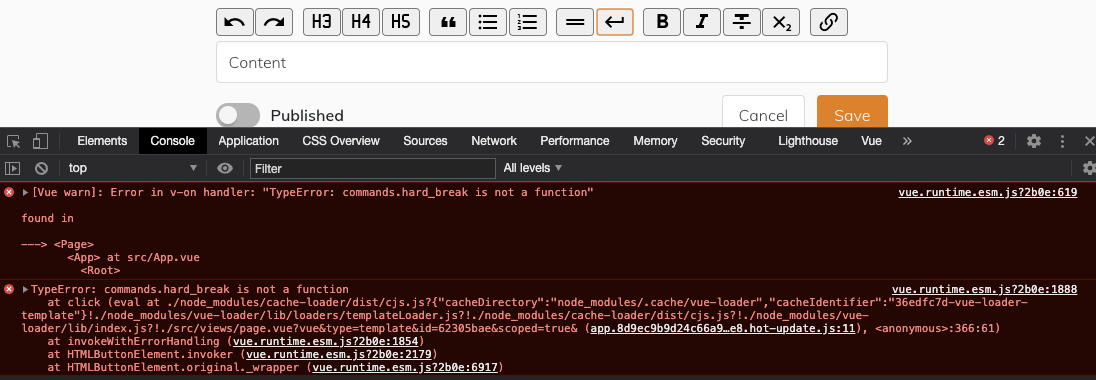
Despite the command being defined as hard_break in packages/tiptap-extensions/src/nodes/HardBreak.js, setting a menu bar button to call commands.hard_break produces TypeError: commands.hard_break is not a function. The break can be inserted as normal by pressing Shift-Return or Command-Return.
This is particularly annoying as I guarantee some of my users will not be able to remember the shortcut, and will use paragraph breaks instead if they cannot have a toolbar button…
Steps to Reproduce / Codesandbox Example
Steps to reproduce the behaviour:
- Import
HardBreakfromtiptap-extensionsand add it to the editor's extensions. - In the menu bar, add a button for hard-break:
<button @click.prevent="commands.hard_break">
  BREAK
</button>
- Load the page
- Confirm hard breaks can be added using the keyboard shortcuts.
- Place the cursor in some text and click the
BREAKbutton.
https://codesandbox.io/s/vue-issue-template-forked-2xtmb?file=/src/App.vue
Expected behaviour
A hard break is inserted, and there is no console error.
Screenshots
Environment
- OS: macOS 10.14.6 (18G6020)
- Browser: Vivaldi
- Version: 3.3.2022.45
- Mobile / Desktop: Desktop
Additional context
For some reason, the console error is not output in the Codesandbox example, but I'm not familiar enough with that site to know if that's down to something they've done. Regardless, the hard break is still not inserted when the button is clicked.
Incidentally, the .prevent on the @click seems to be necessary when using Buefy in order to stop it reloading the page — I'm leaving this here as a note just in case it helps anybody else using Buefy :)
 unikitty37
All 3 comments
Oh, you’re right. Would you mind to update to the latest version of tiptap-extensions (1.33.1) and try again?
 hanspagel
on 30 Sep 2020
hanspagel
on 30 Sep 2020
That's fixed it — thanks 😁
unikitty37
on 30 Sep 2020
Thanks for checking! ✌️
hanspagel
on 30 Sep 2020
Related issues
 chrisjbrown
·
3Comments
chrisjbrown
·
3Comments
 santicros
·
3Comments
santicros
·
3Comments
 Auxxxxlx
·
3Comments
Auxxxxlx
·
3Comments
 bernhardh
·
3Comments
bernhardh
·
3Comments
 leandromatos
·
4Comments
leandromatos
·
4Comments
Most helpful comment
That's fixed it — thanks 😁