Tiptap: Editor commands always steal focus
Describe the bug
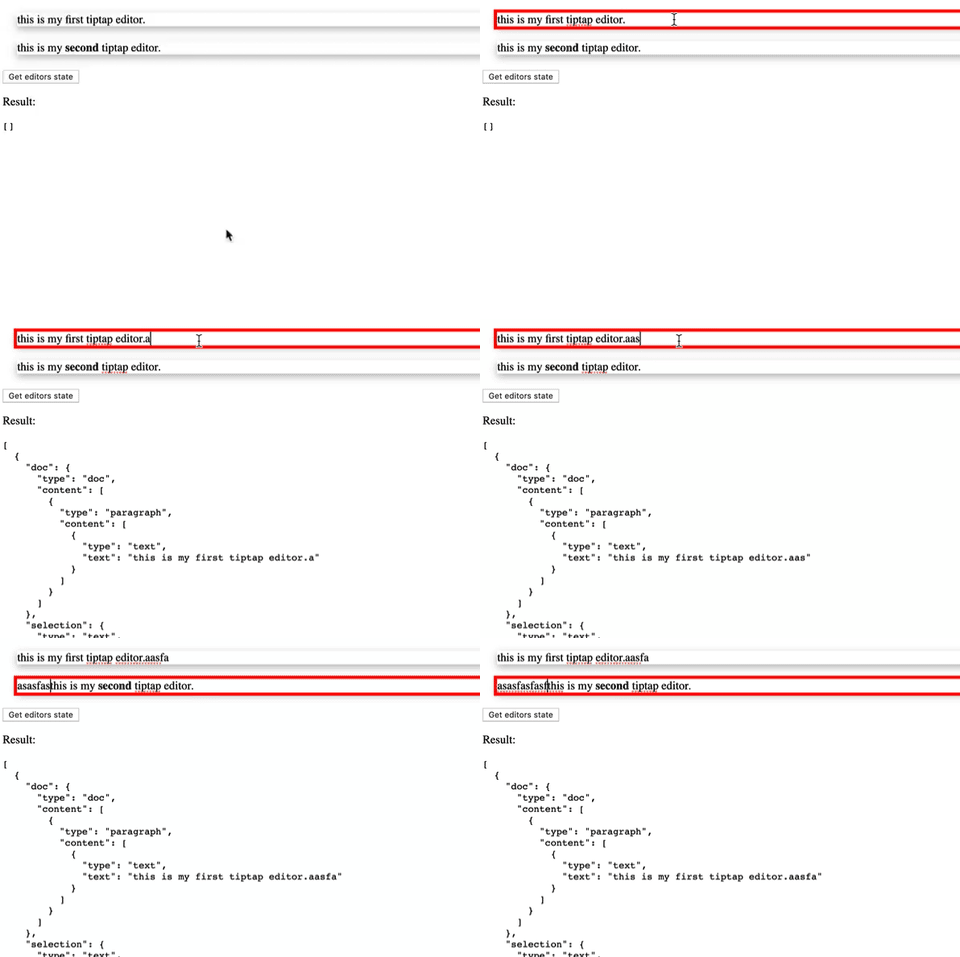
Running an editor command via a tiptap Extension steals the editor focus. It's creating a bug in my app where I have 2 tiptap editors on one screen, both have my ProseMirror plugin that sets up some commands so I can expose data to the wrapping Vue app. Running any of these commands pulls focus away from the editor I'm working in.
Steps to Reproduce / Codesandbox Example
Here's a drastically reduced example:
- Go to https://codesandbox.io/s/vue-issue-template-nrowx
- Try typing in the first editor
- Notice the focus is always stolen by the second editor
Expected behavior
I would expect focus to not be affected when running commands on an editor instance.
Screenshots
Environment
- OS: macOS 10.14.6 (18G95)
- Browser Chrome
- Version 76.0.3809.132
- Mobile / Desktop: Desktop
Additional context
Offending line here: https://github.com/scrumpy/tiptap/blob/master/packages/tiptap/src/Utils/ExtensionManager.js#L155
 jameswragg
All 3 comments
Moved to using a method defined in defaultOptions.
e.g. Instead of calling my command:
return this.titleEditor.commands.getContentBlocks();
I call:
return this.titleEditor.extensions.options.myExtension.getContentBlocks();
And define this in my Extension class:
export default class myExtension extends Extension {
  get defaultOptions() {
    return {
      getContentBlocks: () => {
        const { state, view, schema } = this.editor;
        return this.doMyThing(state);
      }
    }
  }
}
I found this almost by accident, and wonder if I'm mis-interpreting what commands are for? Anyway, hopefully this is useful to others.
jameswragg
on 1 Oct 2019
Thx, it works.
 yousetme
on 11 Mar 2020
yousetme
on 11 Mar 2020
I've run into a similar issue with the History extension: https://codesandbox.io/s/vue-issue-template-forked-7gfmf?file=/src/App.vue
Just doing :disabled="commands.undoDepth() === 0" makes it so focus never leaves the editor (on Chrome).
The workaround I've found is to directly use the prosemirror command:
import { undoDepth } from 'prosemirror-history'
methods: {
    canUndo(editor) => {
        const view = editor.view
        return undoDepth(view.state, view.dispatch, view)
    }
}
 andres-ml
on 22 Oct 2020
andres-ml
on 22 Oct 2020
Related issues
 git-mischa
·
3Comments
git-mischa
·
3Comments
 glavdir
·
3Comments
glavdir
·
3Comments
 klaasgeldof
·
3Comments
klaasgeldof
·
3Comments
 panayotisk
·
4Comments
panayotisk
·
4Comments
 bernhardh
·
3Comments
bernhardh
·
3Comments
Most helpful comment
Thx, it works.